<?xml version="1.0" encoding="UTF-8"?>
  <feed xmlns="http://www.w3.org/2005/Atom">
  <title>Blair&#39;s Homepage - all items</title>
  <link href="https://blairconrad.com/feeds/everything.xml" rel="self" type="application/atom+xml" />
  <link href="https://blairconrad.com/" rel="alternate" type="text/html"/>
  <author>
    <name>Blair Conrad</name>
  </author>
<updated>2023-03-02T00:00:00Z</updated>
  <id>https://blairconrad.com/</id>
  <entry>
    <title>Faking HttpClient Using FakeItEasy</title>
    <category term="fakeiteasy" />
    <link href="https://blairconrad.com/blog/2023/03/02/faking-httpclient-using-fakeiteasy/"/>
    <updated>2023-03-02T00:00:00Z</updated>
    <id>https://blairconrad.com/blog/2023/03/02/faking-httpclient-using-fakeiteasy/</id>
    <content type="html"><![CDATA[
        <p>Recently in the <a href="https://app.gitter.im/#/room/#FakeItEasy_FakeItEasy:gitter.im">FakeItEasy gitter channel</a>,
someone asked how to fake
<a href="https://learn.microsoft.com/en-us/dotnet/api/system.net.http.httpclient?view=net-7.0"><code>System.Net.Http.HttpClient</code></a>.</p>
<p>This is a question that comes up from time to time, and each time I have to fumble for an answer and search
old StackOverflow answers (usually for an older version of HttpClient) and the like. Today I'm writing
an answer down so it's easier to find.</p>
<details class="info"><summary>A note on versions</summary><p>
Everything below has been tested using FakeItEasy 7.3.1 and .NET 7.0. As always, things may be different
in the future. (Or past!)
</p></details>
<p>Let's assume that you want to create a fake <code>HttpClient</code> so you can dictate the behaviour of the
<a href="https://learn.microsoft.com/en-us/dotnet/api/system.net.http.httpclient.getasync?view=net-7.0#system-net-http-httpclient-getasync(system-string)">GetAsync(String)</a>
method. Other methods work similarly. This seems like it would be a straightforward task,
but it's complicated by the design of <code>HttpClient</code>, which is not faking-friendly.</p>
<h2>A working Fake</h2>
<p>First off, let's look at the declaration of <code>GetAsync</code>:</p>
<pre class="language-csharp"><code class="language-csharp"><span class="token keyword">public</span> <span class="token return-type class-name">Task<span class="token punctuation">&lt;</span>HttpResponseMessage<span class="token punctuation">></span></span> <span class="token function">GetAsync</span><span class="token punctuation">(</span><span class="token class-name"><span class="token keyword">string</span><span class="token punctuation">?</span></span> requestUri<span class="token punctuation">)</span></code></pre>
<p>This method is neither virtual nor abstract, and so
<a href="https://fakeiteasy.github.io/docs/stable/what-can-be-faked/#what-members-can-be-overridden">can't be overridden by FakeItEasy</a>.</p>
<p>This could be the end of the story, but we can look at the
<a href="https://github.com/dotnet/runtime/blob/ab5e28c1cab305450897749daa7393bef30d7505/src/libraries/System.Net.Http/src/System/Net/Http/HttpClient.cs#L363-L364">definition of GetAsync</a>
and see that we eventually end up calling
<a href="https://learn.microsoft.com/en-us/dotnet/api/system.net.http.httpmessagehandler.sendasync?view=net-7.0#system-net-http-httpmessagehandler-sendasync(system-net-http-httprequestmessage-system-threading-cancellationtoken)"><code>HttpMessageHandler.SendAsync(HttpRequestMessage, CancellationToken)</code></a>
on an <code>HttpMessageHandler</code> that can be supplied via the <code>HttpClient</code> constructor.</p>
<p>The downside is that <code>HttpMessageHandler.SendAsync</code> is protected, which makes it less convenient to
override than a public method. We need to specify the call by name, and to give FakeItEasy a hint about the return type,
as described in <a href="https://fakeiteasy.github.io/docs/stable/specifying-a-call-to-configure/#specifying-a-call-to-any-method-or-property">Specifying a call to any method or property</a>.</p>
<p>Now we can write the following passing test:</p>
<pre class="language-csharp"><code class="language-csharp"><span class="token keyword">public</span> <span class="token keyword">async</span> <span class="token return-type class-name">Task</span> <span class="token function">Test</span><span class="token punctuation">(</span><span class="token punctuation">)</span>
<span class="token punctuation">{</span>
    <span class="token class-name"><span class="token keyword">var</span></span> response <span class="token operator">=</span> <span class="token keyword">new</span> <span class="token constructor-invocation class-name">HttpResponseMessage</span> <span class="token punctuation">{</span> Content <span class="token operator">=</span> <span class="token keyword">new</span> <span class="token constructor-invocation class-name">StringContent</span><span class="token punctuation">(</span><span class="token string">"FakeItEasy is fun"</span><span class="token punctuation">)</span> <span class="token punctuation">}</span><span class="token punctuation">;</span>

    <span class="token class-name"><span class="token keyword">var</span></span> handler <span class="token operator">=</span> A<span class="token punctuation">.</span><span class="token generic-method"><span class="token function">Fake</span><span class="token generic class-name"><span class="token punctuation">&lt;</span>HttpMessageHandler<span class="token punctuation">></span></span></span><span class="token punctuation">(</span><span class="token punctuation">)</span><span class="token punctuation">;</span>
    A<span class="token punctuation">.</span><span class="token function">CallTo</span><span class="token punctuation">(</span>handler<span class="token punctuation">)</span>
        <span class="token punctuation">.</span><span class="token generic-method"><span class="token function">WithReturnType</span><span class="token generic class-name"><span class="token punctuation">&lt;</span>Task<span class="token punctuation">&lt;</span>HttpResponseMessage<span class="token punctuation">></span><span class="token punctuation">></span></span></span><span class="token punctuation">(</span><span class="token punctuation">)</span>
        <span class="token punctuation">.</span><span class="token function">Where</span><span class="token punctuation">(</span>call <span class="token operator">=></span> call<span class="token punctuation">.</span>Method<span class="token punctuation">.</span>Name <span class="token operator">==</span> <span class="token string">"SendAsync"</span><span class="token punctuation">)</span>
        <span class="token punctuation">.</span><span class="token function">Returns</span><span class="token punctuation">(</span>response<span class="token punctuation">)</span><span class="token punctuation">;</span>

    <span class="token class-name"><span class="token keyword">var</span></span> client <span class="token operator">=</span> <span class="token keyword">new</span> <span class="token constructor-invocation class-name">HttpClient</span><span class="token punctuation">(</span>handler<span class="token punctuation">)</span><span class="token punctuation">;</span>

    <span class="token class-name"><span class="token keyword">var</span></span> result <span class="token operator">=</span> <span class="token keyword">await</span> client<span class="token punctuation">.</span><span class="token function">GetAsync</span><span class="token punctuation">(</span><span class="token string">"https://fakeiteasy.github.io/docs/"</span><span class="token punctuation">)</span><span class="token punctuation">;</span>
    <span class="token class-name"><span class="token keyword">var</span></span> content <span class="token operator">=</span> <span class="token keyword">await</span> result<span class="token punctuation">.</span>Content<span class="token punctuation">.</span><span class="token function">ReadAsStringAsync</span><span class="token punctuation">(</span><span class="token punctuation">)</span><span class="token punctuation">;</span>
    content<span class="token punctuation">.</span><span class="token function">Should</span><span class="token punctuation">(</span><span class="token punctuation">)</span><span class="token punctuation">.</span><span class="token function">Be</span><span class="token punctuation">(</span><span class="token string">"FakeItEasy is fun"</span><span class="token punctuation">)</span><span class="token punctuation">;</span>
<span class="token punctuation">}</span></code></pre>
<details class="warning"><summary>This is a simplified example</summary><p>
In the interest of brevity, I'm creating a Fake, exercising it directly, and checking its behaviour.
A more realistic example would create the Fake as a collaborator of some production class (the "system
under test") and the Fake would not be called directly from the test code.
</p></details>
<h2>Easier and safer call configuration</h2>
<p>The above code works, but specifying the method name and return type is a little awkward.
A <code>FakeableHttpMessageHandler</code> class can be used to clean things up and to also supply a
little compile-time safety by ensuring we're configuring the expected method.
(Note: this class is a near-verbatim copy of the one written by FakeItEasy
co-owner <a href="https://thomaslevesque.com/">Thomas Levesque</a> while we were answering the user's question.)</p>
<pre class="language-csharp"><code class="language-csharp"><span class="highlight-line"><span class="token keyword">public</span> <span class="token keyword">abstract</span> <span class="token keyword">class</span> <span class="token class-name">FakeableHttpMessageHandler</span> <span class="token punctuation">:</span> <span class="token type-list"><span class="token class-name">HttpMessageHandler</span></span></span>
<span class="highlight-line"><span class="token punctuation">{</span></span>
<span class="highlight-line">    <span class="token comment">// sealed so when FakeItEasy creates a Fake, it won't intercept calls</span></span>
<span class="highlight-line">    <span class="token keyword">protected</span> <span class="token keyword">sealed</span> <span class="token keyword">override</span> <span class="token return-type class-name">Task<span class="token punctuation">&lt;</span>HttpResponseMessage<span class="token punctuation">></span></span> <span class="token function">SendAsync</span><span class="token punctuation">(</span></span>
<span class="highlight-line">            <span class="token class-name">HttpRequestMessage</span> request<span class="token punctuation">,</span> <span class="token class-name">CancellationToken</span> cancellationToken</span>
<span class="highlight-line">        <span class="token punctuation">)</span> <span class="token operator">=></span> <span class="token function">FakeSendAsync</span><span class="token punctuation">(</span>request<span class="token punctuation">,</span> cancellationToken<span class="token punctuation">)</span><span class="token punctuation">;</span></span>
<span class="highlight-line"></span>
<span class="highlight-line">    <span class="token keyword">public</span> <span class="token keyword">abstract</span> <span class="token return-type class-name">Task<span class="token punctuation">&lt;</span>HttpResponseMessage<span class="token punctuation">></span></span> <span class="token function">FakeSendAsync</span><span class="token punctuation">(</span></span>
<span class="highlight-line">        <span class="token class-name">HttpRequestMessage</span> request<span class="token punctuation">,</span> <span class="token class-name">CancellationToken</span> cancellationToken<span class="token punctuation">)</span><span class="token punctuation">;</span></span>
<span class="highlight-line"><span class="token punctuation">}</span></span>
<span class="highlight-line"></span>
<span class="highlight-line"><span class="token keyword">public</span> <span class="token keyword">async</span> <span class="token return-type class-name">Task</span> <span class="token function">Test</span><span class="token punctuation">(</span><span class="token punctuation">)</span></span>
<span class="highlight-line"><span class="token punctuation">{</span></span>
<span class="highlight-line">    <span class="token class-name"><span class="token keyword">var</span></span> response <span class="token operator">=</span> <span class="token keyword">new</span> <span class="token constructor-invocation class-name">HttpResponseMessage</span> <span class="token punctuation">{</span> Content <span class="token operator">=</span> <span class="token keyword">new</span> <span class="token constructor-invocation class-name">StringContent</span><span class="token punctuation">(</span><span class="token string">"FakeItEasy is fun"</span><span class="token punctuation">)</span> <span class="token punctuation">}</span><span class="token punctuation">;</span></span>
<span class="highlight-line"></span>
<mark class="highlight-line highlight-line-active">    <span class="token class-name"><span class="token keyword">var</span></span> handler <span class="token operator">=</span> A<span class="token punctuation">.</span><span class="token generic-method"><span class="token function">Fake</span><span class="token generic class-name"><span class="token punctuation">&lt;</span>FakeableHttpMessageHandler<span class="token punctuation">></span></span></span><span class="token punctuation">(</span><span class="token punctuation">)</span><span class="token punctuation">;</span></mark>
<mark class="highlight-line highlight-line-active">    A<span class="token punctuation">.</span><span class="token function">CallTo</span><span class="token punctuation">(</span><span class="token punctuation">(</span><span class="token punctuation">)</span> <span class="token operator">=></span> handler<span class="token punctuation">.</span><span class="token function">FakeSendAsync</span><span class="token punctuation">(</span>A<span class="token operator">&lt;</span>HttpRequestMessage<span class="token operator">></span><span class="token punctuation">.</span>_<span class="token punctuation">,</span> A<span class="token operator">&lt;</span>CancellationToken<span class="token operator">></span><span class="token punctuation">.</span>_<span class="token punctuation">)</span><span class="token punctuation">)</span></mark>
<mark class="highlight-line highlight-line-active">        <span class="token punctuation">.</span><span class="token function">Returns</span><span class="token punctuation">(</span>response<span class="token punctuation">)</span><span class="token punctuation">;</span></mark>
<span class="highlight-line"></span>
<span class="highlight-line">    <span class="token class-name"><span class="token keyword">var</span></span> client <span class="token operator">=</span> <span class="token keyword">new</span> <span class="token constructor-invocation class-name">HttpClient</span><span class="token punctuation">(</span>handler<span class="token punctuation">)</span><span class="token punctuation">;</span></span>
<span class="highlight-line"></span>
<span class="highlight-line">    <span class="token class-name"><span class="token keyword">var</span></span> result <span class="token operator">=</span> <span class="token keyword">await</span> client<span class="token punctuation">.</span><span class="token function">GetAsync</span><span class="token punctuation">(</span><span class="token string">"https://fakeiteasy.github.io/docs/"</span><span class="token punctuation">)</span><span class="token punctuation">;</span></span>
<span class="highlight-line">    <span class="token class-name"><span class="token keyword">var</span></span> content <span class="token operator">=</span> <span class="token keyword">await</span> result<span class="token punctuation">.</span>Content<span class="token punctuation">.</span><span class="token function">ReadAsStringAsync</span><span class="token punctuation">(</span><span class="token punctuation">)</span><span class="token punctuation">;</span></span>
<span class="highlight-line">    content<span class="token punctuation">.</span><span class="token function">Should</span><span class="token punctuation">(</span><span class="token punctuation">)</span><span class="token punctuation">.</span><span class="token function">Be</span><span class="token punctuation">(</span><span class="token string">"FakeItEasy is fun"</span><span class="token punctuation">)</span><span class="token punctuation">;</span></span>
<span class="highlight-line"><span class="token punctuation">}</span></span></code></pre>
<h2>Alternative: wrap HttpClient</h2>
<p>The above approach will work, but is a little cumbersome, and relies on the internal
implementation of <code>HttpClient</code> remaining the same. Assuming the interfaces of the
production code can be changed, one way to reduce uncertainty and
future-proof the code is to introduce a layer of abstraction on top of <code>HttpClient</code>.
Since the wrapper could only be tested by faking <code>HttpClient</code>, which is what got us
into this mess, or by actually making web requests, we keep the implementation as
simple as possible and either lightly test the wrapper or leave it untested.</p>
<pre class="language-csharp"><code class="language-csharp"><span class="token keyword">public</span> <span class="token keyword">interface</span> <span class="token class-name">IWebStringGetter</span>
<span class="token punctuation">{</span>
    <span class="token return-type class-name">Task<span class="token punctuation">&lt;</span><span class="token keyword">string</span><span class="token punctuation">></span></span> <span class="token function">GetAsync</span><span class="token punctuation">(</span><span class="token class-name">String</span> requestUri<span class="token punctuation">)</span><span class="token punctuation">;</span>
<span class="token punctuation">}</span>

<span class="token keyword">public</span> <span class="token keyword">class</span> <span class="token class-name">WebStringGetter</span> <span class="token punctuation">:</span> <span class="token type-list"><span class="token class-name">IWebStringGetter</span></span>
<span class="token punctuation">{</span>
    <span class="token keyword">private</span> <span class="token keyword">readonly</span> <span class="token class-name">HttpClient</span> client<span class="token punctuation">;</span>

    <span class="token keyword">public</span> <span class="token function">WebStringGetter</span><span class="token punctuation">(</span><span class="token class-name">HttpClient</span> client<span class="token punctuation">)</span> <span class="token operator">=></span> <span class="token keyword">this</span><span class="token punctuation">.</span>client <span class="token operator">=</span> client<span class="token punctuation">;</span>

    <span class="token keyword">public</span> <span class="token keyword">async</span> <span class="token return-type class-name">Task<span class="token punctuation">&lt;</span><span class="token keyword">string</span><span class="token punctuation">></span></span> <span class="token function">GetAsync</span><span class="token punctuation">(</span><span class="token class-name"><span class="token keyword">string</span></span> requestUri<span class="token punctuation">)</span> <span class="token operator">=></span>
        <span class="token keyword">await</span> client<span class="token punctuation">.</span><span class="token function">GetAsync</span><span class="token punctuation">(</span>requestUri<span class="token punctuation">)</span><span class="token punctuation">.</span>Result<span class="token punctuation">.</span>Content<span class="token punctuation">.</span><span class="token function">ReadAsStringAsync</span><span class="token punctuation">(</span><span class="token punctuation">)</span><span class="token punctuation">;</span>
<span class="token punctuation">}</span>

<span class="token keyword">public</span> <span class="token keyword">async</span> <span class="token return-type class-name">Task</span> <span class="token function">Test</span><span class="token punctuation">(</span><span class="token punctuation">)</span>
<span class="token punctuation">{</span>
    <span class="token class-name"><span class="token keyword">var</span></span> getter <span class="token operator">=</span> A<span class="token punctuation">.</span><span class="token generic-method"><span class="token function">Fake</span><span class="token generic class-name"><span class="token punctuation">&lt;</span>IWebStringGetter<span class="token punctuation">></span></span></span><span class="token punctuation">(</span><span class="token punctuation">)</span><span class="token punctuation">;</span>
    A<span class="token punctuation">.</span><span class="token function">CallTo</span><span class="token punctuation">(</span><span class="token punctuation">(</span><span class="token punctuation">)</span> <span class="token operator">=></span> getter<span class="token punctuation">.</span><span class="token function">GetAsync</span><span class="token punctuation">(</span><span class="token string">"https://fakeiteasy.github.io/docs/"</span><span class="token punctuation">)</span><span class="token punctuation">)</span>
        <span class="token punctuation">.</span><span class="token function">Returns</span><span class="token punctuation">(</span><span class="token string">"FakeItEasy is fun"</span><span class="token punctuation">)</span><span class="token punctuation">;</span>

    <span class="token class-name"><span class="token keyword">var</span></span> text <span class="token operator">=</span> <span class="token keyword">await</span> getter<span class="token punctuation">.</span><span class="token function">GetAsync</span><span class="token punctuation">(</span><span class="token string">"https://fakeiteasy.github.io/docs/"</span><span class="token punctuation">)</span><span class="token punctuation">;</span>
    text<span class="token punctuation">.</span><span class="token function">Should</span><span class="token punctuation">(</span><span class="token punctuation">)</span><span class="token punctuation">.</span><span class="token function">Be</span><span class="token punctuation">(</span><span class="token string">"FakeItEasy is fun"</span><span class="token punctuation">)</span><span class="token punctuation">;</span>
<span class="token punctuation">}</span></code></pre>
<p>This results in a much simpler test, and so long as the <code>HttpClient</code> doesn't change its interface,
it will continue to work. Moreover, this technique is applicable to all kinds of difficult-to-fake
collaborators.</p>

    ]]></content>
  </entry>
  <entry>
    <title>MakeItEasy: Making SUTs with Minimal Fuss</title>
    <category term="fakeiteasy" />
    <category term="makeiteasy" />
    <category term="testing" />
    <link href="https://blairconrad.com/blog/2021/03/12/makeiteasy-making-suts-with-minimal-fuss/"/>
    <updated>2021-03-12T00:00:00Z</updated>
    <id>https://blairconrad.com/blog/2021/03/12/makeiteasy-making-suts-with-minimal-fuss/</id>
    <content type="html"><![CDATA[
        <!--
:cover: {static}/images/makeiteasy-social-preview.png
:summary:
-->
<p>Recently a <a href="https://fakeiteasy.github.io/">FakeItEasy</a> user came to our Gitter
channel asking about easier ways to create their
<a href="http://xunitpatterns.com/SUT.html">systems under test</a> and the Fakes that
those systems depend on. They referenced the old <code>UnderTest</code> and <code>Fake</code>
attributes that FakeItEasy
<a href="https://thomaslevesque.com/2016/01/17/automatically-inject-fakes-in-test-fixture-with-fakeiteasy/">used to provide</a>
for this purpose, but which had been removed when FakeItEasy 5.0.0 was released.</p>
<p>There are some existing libraries that provide this functionality, or something
like it, such as</p>
<ul>
<li><a href="https://github.com/AutoFixture/AutoFixture">AutoFixture.AutoFakeItEasy</a>,</li>
<li><a href="https://autofaccn.readthedocs.io/en/latest/integration/fakeiteasy.html">Autofac.Extras.FakeItEasy</a>, and</li>
<li><a href="https://jamiehumphries.github.io/FakeItEasy.Auto/">FakeItEasy.Auto</a></li>
</ul>
<p>but I thought there was room for improvement. The first two pull along
additional libraries with them, either for complete test data generation or for
generalized dependency injection. This isn't a problem (and may be a feature) if
you're already using those libraries, but could be overwhelming if you're not.
FakeItEasy.Auto has a nice light interface, but appears to be abandoned and only
supports .NET Framework 4.5.</p>
<p>So my FakeItEasy co-conspirator <a href="https://thomaslevesque.com/">Thomas Levesque</a>
and I chatted about how to design a simple interface to create the system under
test. We (or if I'm being honest, mostly he) arrived at an API that</p>
<ol>
<li>doesn't require the user to specify any arguments that they don't care about</li>
<li>doesn't require fields or properties on the test fixture, or use of any attributes</li>
<li>allows users to provide any values to the SUT's constructor</li>
<li>makes it easy to retrieve (and later configure) Faked collaborators</li>
</ol>
<p><img src="https://blairconrad.com/images/blog/2021/makeiteasy-logo.png" alt="MakeItEasy logo" /></p>
<h2>Creating a System Under Test using MakeItEasy</h2>
<p><a href="https://github.com/blairconrad/MakeItEasy">MakeItEasy</a> is an attempt to
fulfill the requirements laid out above. The <code>Make</code> class is its single entry
point and allows you to create your system under test:</p>
<pre class="language-csharp"><code class="language-csharp"><span class="token comment">// The simplest way to create your system under test</span>
<span class="token class-name">import</span> MakeItEasy<span class="token punctuation">;</span>

<span class="token comment">// ...</span>

<span class="token class-name"><span class="token keyword">var</span></span> systemUnderTest <span class="token operator">=</span> Make<span class="token punctuation">.</span><span class="token generic-method"><span class="token function">A</span><span class="token generic class-name"><span class="token punctuation">&lt;</span>VeryNeedySystem<span class="token punctuation">></span></span></span><span class="token punctuation">(</span><span class="token punctuation">)</span><span class="token punctuation">.</span><span class="token function">FromDefaults</span><span class="token punctuation">(</span><span class="token punctuation">)</span><span class="token punctuation">;</span></code></pre>
<p>That's it. If <code>VeryNeedySystem</code> has a public constructor whose arguments can
be made from FakeItEasy Dummies, MakeItEasy will make it for you.
It doesn't matter if the constructor has 1 parameter or 14.</p>
<h2>Making and Using Fake collaborators</h2>
<p>The example above looks great, but more often you'll want to access the Fake
object(s) that the SUT will be using. Then you can configure them, or maybe
interrogate them after the system under test has been exercised. This is also
very easy:</p>
<pre class="language-csharp"><code class="language-csharp"><span class="token class-name"><span class="token keyword">var</span></span> systemUnderTest <span class="token operator">=</span> Make<span class="token punctuation">.</span><span class="token generic-method"><span class="token function">A</span><span class="token generic class-name"><span class="token punctuation">&lt;</span>VeryNeedySystem<span class="token punctuation">></span></span></span><span class="token punctuation">(</span><span class="token punctuation">)</span><span class="token punctuation">.</span><span class="token function">From</span><span class="token punctuation">(</span>
    <span class="token keyword">out</span> <span class="token class-name">ICollaborator</span> fakeCollaborator<span class="token punctuation">)</span><span class="token punctuation">;</span>

<span class="token comment">// A.CallTo(() => fakeCollaborator.SomeMethod()).Returns(1);</span>
<span class="token comment">// exercise systemUnderTest</span>
<span class="token comment">// A.CallTo(() => fakeCollaborator.SomeMethod()).MustHaveHappened();</span></code></pre>
<p>Currently MakeItEasy supports up to 8 <code>out</code> parameters, which will be
populated with Fakes and passed as constructor arguments to the system under
test.</p>
<p>You can even call <code>Make</code> from a setup method and initialize fields, if you
prefer not to use local variables for the collaborators.</p>
<h2>Supplying Arbitrary Constructor arguments</h2>
<p>Maybe the system under test's constructor requires some non-Fake additional
parameters. MakeItEasy will usually populate these with Dummies, but if you have
a particular value you want to supply, you can do that:</p>
<!-- code-figure:: Create a system under test using supplied arguments -->
<pre class="language-csharp"><code class="language-csharp"><span class="token class-name"><span class="token keyword">var</span></span> systemUnderTest <span class="token operator">=</span> Make<span class="token punctuation">.</span><span class="token generic-method"><span class="token function">A</span><span class="token generic class-name"><span class="token punctuation">&lt;</span>VeryNeedySystem<span class="token punctuation">></span></span></span><span class="token punctuation">(</span><span class="token punctuation">)</span><span class="token punctuation">.</span><span class="token function">From</span><span class="token punctuation">(</span>
    DateTime<span class="token punctuation">.</span>Now<span class="token punctuation">)</span><span class="token punctuation">;</span></code></pre>
<p>You can supply up to 8 constructor arguments.</p>
<h2>&quot;Advanced&quot; Usage</h2>
<p>You can request Fake collaborators and supply arguments at the same time, of course.</p>
<pre class="language-csharp"><code class="language-csharp"><span class="token class-name"><span class="token keyword">var</span></span> systemUnderTest <span class="token operator">=</span> Make<span class="token punctuation">.</span><span class="token generic-method"><span class="token function">A</span><span class="token generic class-name"><span class="token punctuation">&lt;</span>VeryNeedySystem<span class="token punctuation">></span></span></span><span class="token punctuation">(</span><span class="token punctuation">)</span><span class="token punctuation">.</span><span class="token function">From</span><span class="token punctuation">(</span>
    DateTime<span class="token punctuation">.</span>Now<span class="token punctuation">,</span>
    <span class="token keyword">out</span> <span class="token class-name">ICollaborator</span> fakeCollaborator<span class="token punctuation">)</span><span class="token punctuation">;</span></code></pre>
<p>As before, you can supply up to 8 arguments and request up to 8 collaborators back.</p>
<p>MakeItEasy doesn't provide a way to customize the Fake before it's passed to the
constructor of the system under test. If you need this behaviour, you can always
create the Fake &quot;by hand&quot;, configure it, and then pass it in. Or maybe you want
to share a Fake between systems under test. All this is supported, even in
combination.</p>
<pre class="language-csharp"><code class="language-csharp"><span class="token class-name"><span class="token keyword">var</span></span> oneSystemUnderTest <span class="token operator">=</span> Make<span class="token punctuation">.</span><span class="token generic-method"><span class="token function">A</span><span class="token generic class-name"><span class="token punctuation">&lt;</span>VeryNeedySystem<span class="token punctuation">></span></span></span><span class="token punctuation">(</span><span class="token punctuation">)</span><span class="token punctuation">.</span><span class="token function">From</span><span class="token punctuation">(</span>
    <span class="token keyword">out</span> <span class="token class-name">ICollaborator</span> fakeCollaborator<span class="token punctuation">)</span><span class="token punctuation">;</span>

<span class="token comment">// configure the fakeCollaborator somehow</span>

<span class="token class-name"><span class="token keyword">var</span></span> anotherSystemUnderTest <span class="token operator">=</span> Make<span class="token punctuation">.</span><span class="token generic-method"><span class="token function">An</span><span class="token generic class-name"><span class="token punctuation">&lt;</span>OtherKindOfSystem<span class="token punctuation">></span></span></span><span class="token punctuation">(</span><span class="token punctuation">)</span><span class="token punctuation">.</span><span class="token function">From</span><span class="token punctuation">(</span>
    fakeCollaborator<span class="token punctuation">)</span><span class="token punctuation">;</span></code></pre>
<h2>What Next?</h2>
<p>If you're interested in trying MakeItEasy, get <a href="https://www.nuget.org/packages/MakeItEasy/">the latest release from NuGet</a>. Tell me what you think. What
works for you? What doesn't? Chat here or
<a href="https://github.com/blairconrad/MakeItEasy/issues">raise an issue</a>.</p>

    ]]></content>
  </entry>
  <entry>
    <title>How Untested Changes Block Merges to Master: a Guide for Non-Developers</title>
    <category term="git" />
    <link href="https://blairconrad.com/blog/2020/11/23/how-untested-changes-block-merges-to-master-a-guide-for-non-developers/"/>
    <updated>2020-11-23T00:00:00Z</updated>
    <id>https://blairconrad.com/blog/2020/11/23/how-untested-changes-block-merges-to-master-a-guide-for-non-developers/</id>
    <content type="html"><![CDATA[
        <p>At the Day Job, I work on a product that over two dozen development teams
contribute to. To provide some level of stability on the branch that we release
from (called &quot;master&quot;), each team has their own development branch and we merge
from the team branches to the master branch only after</p>
<ol>
<li>a suite of automated feature and regression tests pass, and</li>
<li>new features are manually tested</li>
</ol>
<p>Ideally, the new features (or bugfixes) would be tested quickly and in the order
that they were added to the team branch, but this doesn't always happen. Some
issues take a very long time to test and the developers race ahead, and
sometimes issues fail. In these situations, some changes that have met the above
conditions must wait to be merged to the master branch.</p>
<p>Often non-developer teammates and servant leaders ask me <em>why</em> a tested issue is
blocked by an untested (or failed!) issue. This is my attempt to explain why.
Hopefully it's accessible to those without previous git knowledge.</p>
<h2>Git: a Collection of Changes</h2>
<p>Git, like any version control system, exists to track the evolution of a body
information (often a codebase). It does so by keeping track of changes that
happen over time. Each change (or &quot;commit&quot; as they are called in git) can
include one or more file additions, deletions, or modifications. Once commits
are added to the master or team branch, they cannot be removed or changed;
they're permanent.</p>
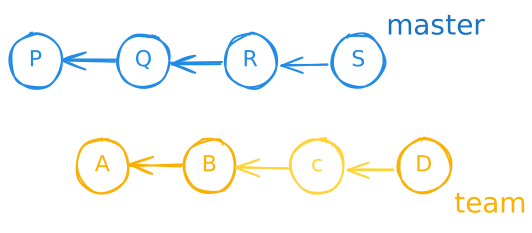
<p>Here's a very simple representation of a collection of git commits. Letters
represent individual commits, and the arrows indicate pointers from commits to
the preceding commit (or &quot;parent&quot;):</p>
<p><img src="https://blairconrad.com/images/blog/2020/one-branch.svg" alt="one branch" /></p>
<p>In this diagram, time moves to the right, so A was the first change, B next (and
it knows about its parent A), and so on, to the most recent commit, D.</p>
<h2>Merging between branches</h2>
<p>Let's add a second branch and label them, to model the system I deal with at
work</p>
<p><img src="https://blairconrad.com/images/blog/2020/master-and-team-branch.svg" alt="master and team branches" /></p>
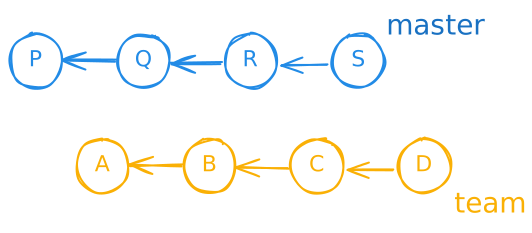
<p>Here we see the master branch with commits P, Q, R, and S (the latest) and the
team branch with A, B, C, and D. Each of the commits I mentioned exist only in
their own branch. In particular, this means that the commits in the team branch
will not be built into our product and make it to our customers, since we build
and ship from the master branch.</p>
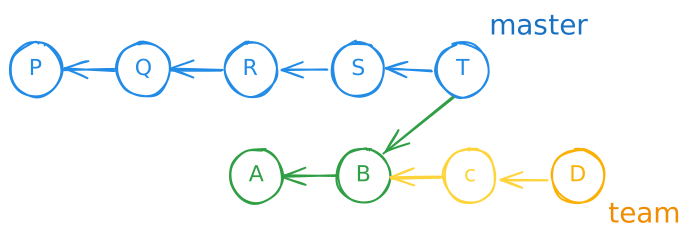
<p>We incorporate the team-level changes in the team branch via a git &quot;merge&quot;,
which sounds very fancy, but it's just another commit. A merge commit melds
divergent histories by having two parents. Once the merge commit is added to a
branch any commits that are reachable by following the links from that commit
back to the left are &quot;part of&quot; the branch:</p>
<p><img src="https://blairconrad.com/images/blog/2020/merged-team-into-master.svg" alt="team branch merged into master" /></p>
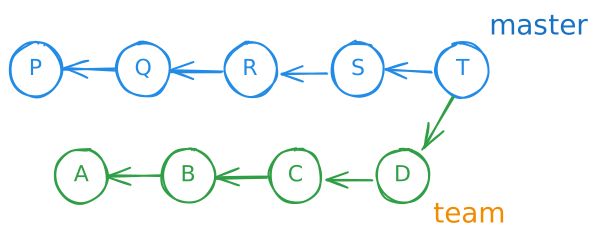
<p>Here we've merged the team branch into the master branch by creating a new merge
commit called T on the master branch. Now all of the work we've done on the
master branch and on the team branch has been consolidated into the master
branch, so the next time we build the product, we'll get all the benefits.</p>
<p>You don't always have to merge the last commit of a branch into another branch.
Suppose we had some bonus commits on the team branch that we just didn't want to
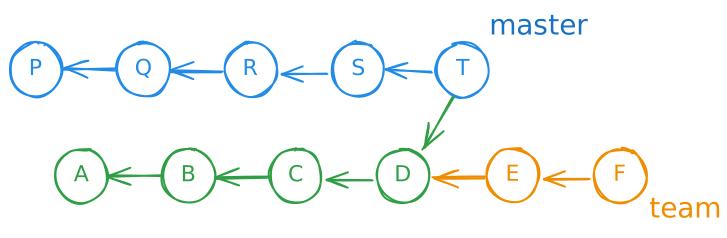
merge into the master branch yet for whatever reason. We could do this:</p>
<p><img src="https://blairconrad.com/images/blog/2020/bonus-team-commits.svg" alt="bonus-team-commits" /></p>
<p>Then</p>
<ul>
<li>A, B, C, D, P, Q, R, S, and T are all part of the master branch, and</li>
<li>A, B, C, D, E, and F are part of the team branch, but</li>
<li>E and F are not (yet) part of the master branch.</li>
</ul>
<p>Even though we can pick essentially any commit to merge into the master branch,
what we can't do is omit that commit's ancestors. If we merge a commit D as
above, we always take C, B, and A, because we can reach those commits by
following the parent links to the left from D.</p>
<h2>Blocking commits</h2>
<p>Up till now we've not really been looking at the worthiness of particular
commits when deciding what to merge. Suppose</p>
<ol>
<li>we have 4 commits in master and 4 in the team branch</li>
<li>the team branch passed all automated tests,</li>
<li>the issues addressed by the first, second, and fourth team commits have been manually tested</li>
<li>but the issue addressed by the third team commit has not yet been tested.</li>
</ol>
<p>We'll represent the commits that has not yet been manually tested with a
lowercase letter to show that it's not &quot;done&quot;:</p>
<p><img src="https://blairconrad.com/images/blog/2020/untested-team-commit.svg" alt="untested team commit" /></p>
<p>Under our rules, A, B, and D are considered complete and worthy of merging, but
c is not. Maybe it's fine, but we don't know yet, and we promised not to merge c
into the master branch until it's known to be good.</p>
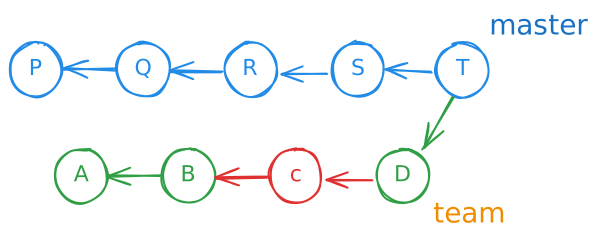
<p>There's no way to merge D into the master branch given our rules. We could merge
A and B like so:</p>
<p><img src="https://blairconrad.com/images/blog/2020/merge-up-to-untested.svg" alt="merge up to untested" /></p>
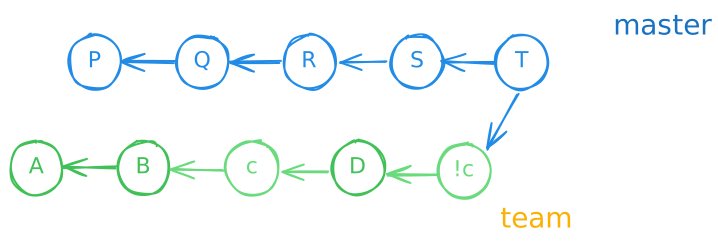
<p>(or similarly just A). But if we want to merge D in, we'd end up getting c, B,
and A as well. It would look like this:</p>
<p><img src="https://blairconrad.com/images/blog/2020/invalid-merge.svg" alt="invalid merge" /></p>
<p>And that violates our rules: c has not yet met all its merging conditions, but
it's been merged into the master branch. We can start at the latest commit in
the master branch (T) and follow the lower parent link to the left (and down) to
D, and then follow its link to c. We've risked polluting the master branch with
an unproven change.</p>
<h2>How to Unblock the Branch</h2>
<p>Ultimately we want to merge all of our proven work from the team branch into the
master branch. How do we do that?</p>
<h3>Focus on the blocking commit and wait</h3>
<p>This is the approach we take most often. The commit called c hasn't been tested
above, but it will be sometime. When we notice that we have blocked commits, as
a team we can concentrate on completing the testing for the blocking commits.
Once they are found to be good, they're no longer blockers and we can merge them
or any other subsequent commits, so long as all of those have been found worthy.
This is the strategy we take most often.</p>
<h3>Revert the offending commit</h3>
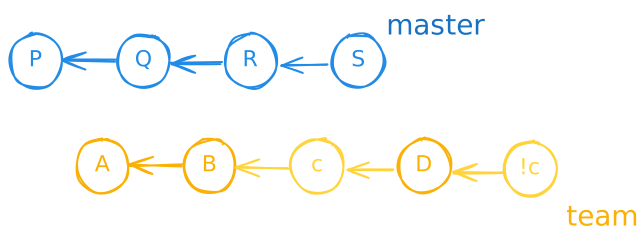
<p>If the blocking commit is expected to take a very long time to test, we can
&quot;revert&quot; it. This is different from removing the commit (remember, once a commit
is added to a branch, you can't remove it). Reverting involves adding <em>another</em>
commit to the branch. The new commit undoes the original change. Here's what that
looks like:</p>
<p><img src="https://blairconrad.com/images/blog/2020/revert-offending-commit.svg" alt="revert offending commit.svg" /></p>
<p>Here &quot;!c&quot; represents a sort of anti-c that has the opposite of the changes
contained in c.</p>
<p>Once this is done, it's as if the team branch has only A, B, and D in it. But
there are some caveats:</p>
<ul>
<li>
<p>crafting and adding !c takes some development time, and time to run the
automated tests to ensure that the team branch is still in good shape</p>
</li>
<li>
<p>sometimes the commits between c and !c will build upon work in c. This means
that</p>
<ul>
<li>
<p>!c is harder to make, and</p>
</li>
<li>
<p>making !c runs the risk of compromising the work done in D (or other
intervening commits—there could be more than one). Depending on the
entanglement, it may even be necessary to manually retest the issue
addressed by D</p>
</li>
<li>
<p>eventually we'll need to redo the work for c and test it then, perhaps
running into the same problem we had this time</p>
</li>
</ul>
</li>
</ul>
<p>If we decide that reverting and merging are still worth it given all those
caveats, eventually we'll end up with</p>
<p><img src="https://blairconrad.com/images/blog/2020/merge-reverted-offending-commit.svg" alt="merge reverted offending commit.svg" /></p>
<p>While this approach is possible, it has significant downsides, and so we are
loath to use it when &quot;focus and wait&quot; is a viable option.</p>
<h2>How to Avoid the Problem</h2>
<p>The problem of blocking commits is generally caused by a mismatch in the time it
takes for us to develop a change and that taken to test it. Our product's build
times and even automated testing times are quite long, so we'll naturally have
some mismatch, even if someone is available to perform manual testing
immediately after the change is in a team branch build. But there are ways to
reduce this gap or mitigate its effects. The ideas presented below are neither
comprehensive nor independent. In the coming months we could pursue more than
one of them, or think of something else.</p>
<h3>More (reliable) automated testing</h3>
<p>Our ratio of automated to manual testing isn't great. Some portions of the
product have good automated tests and we have high confidence in them, but more
areas have lower coverage and therefore confidence. If developers and testers
were better at working together to establish what kinds of automated tests
should be written in conjunction with a bugfix or new feature, and if those
tests reliably produced consistent results, this might</p>
<ol>
<li>slow down development</li>
<li>considerably shorten the manual testing phase</li>
<li>increase the likelihood that any manual testing phase will pass</li>
<li>provide lasting value in the form of automatically-run regression tests</li>
</ol>
<h3>Better planning and coordination</h3>
<p>Sometimes developers and testers fail to talk before an issue is developed, so
the change is added to the team branch when no testers are ready to test it, and
it languishes. Maybe certain issues require special hardware or complex
configuration, so the tester prefers to test B and D consecutively, deferring c
for a while, but the developer was unaware (or just didn't consider it).</p>
<p>If there were more and better intra-team planning, a change could be developed
just in time for it to be manually tested, reducing the time it sits in the team
branch, waiting for other issues to be cleared.</p>
<h3>Manual testing before the team branch</h3>
<p>I didn't discuss topic branches above, but they are a third type of branch where
developers do their low-level work. They feed into the team branches. In theory,
we could build packages from those branches and do the manual testing on them.
Then once the issue has passed, the topic branch's contents could be added to
the team branch. We'd only be waiting for the automated tests to run to clear
the branch, and this is generally quicker than manual testing (and can be done
overnight).</p>
<p>The downside to this approach is that it requires heavier weight automated
processes to be run on the topic branches (of which there are more than team
branches) and we're already resource-constrained. In addition, it means staging
more clusters for the manual testers to work on, again requiring more hardware
and time.</p>

    ]]></content>
  </entry>
  <entry>
    <title>LibraryHippo 2020 - Unit Tests</title>
    <category term="libraryhippo" />
    <category term="testing" />
    <link href="https://blairconrad.com/blog/2020/06/25/libraryhippo-2020-unit-tests/"/>
    <updated>2020-06-25T00:00:00Z</updated>
    <id>https://blairconrad.com/blog/2020/06/25/libraryhippo-2020-unit-tests/</id>
    <content type="html"><![CDATA[
        <p>Now that I've completed all my
<a href="http://www.extremeprogramming.org/rules/spike.html">spikes</a> and decided to
move forward, I'd like to add a little more rigour to the project. Original
LibraryHippo had a comprehensive suite of unit tests and I'll port them over
(and perhaps augment them with integration tests). Today I'll add the first unit
test to the project, then port over a bunch more when you're not looking!</p>
<h2>Prerequisites</h2>
<p>The first thing we need is a test-running package. My favourite is
<a href="https://docs.pytest.org/en/latest/">pytest</a>.</p>
<pre class="language-powershell"><code class="language-powershell">❯ pip install pytest
❯ inv freeze</code></pre>
<p>Now I need a place to put the tests. I'll broadly be following the structure
from Patrick Kennedy's
<a href="https://www.patricksoftwareblog.com/testing-a-flask-application-using-pytest/">Testing a Flask Application using pytest</a>,
although most of it won't be needed today, so I'll just make the <code>tests\unit</code>
structure, including empty <code>__init__.py</code> files so my imports work.</p>
<pre class="language-powershell"><code class="language-powershell">❯ <span class="token string">'tests'</span><span class="token punctuation">,</span> <span class="token string">'tests\unit'</span> <span class="token punctuation">|</span> <span class="token function">ForEach-Object</span> <span class="token punctuation">{</span>
    <span class="token function">New-Item</span> <span class="token operator">-</span><span class="token function">Type</span> File <span class="token variable">$_</span>\__init__<span class="token punctuation">.</span>py <span class="token operator">-</span>Force
<span class="token punctuation">}</span></code></pre>
<h2>First test</h2>
<p>Next, I write a simple unit test for the <code>WPL</code> class, to make sure it correctly reads the items I have on hold.</p>
<pre class="language-python"><code class="language-python"><span class="token comment"># tests/unit/test_wpl.py</span>
<span class="token keyword">from</span> app<span class="token punctuation">.</span>libraries<span class="token punctuation">.</span>wpl <span class="token keyword">import</span> WPL
<span class="token keyword">from</span> app<span class="token punctuation">.</span>models <span class="token keyword">import</span> Card


<span class="token keyword">def</span> <span class="token function">test_check_card_finds_holds</span><span class="token punctuation">(</span><span class="token punctuation">)</span><span class="token punctuation">:</span>
    card <span class="token operator">=</span> make_card<span class="token punctuation">(</span><span class="token punctuation">)</span>

    target <span class="token operator">=</span> WPL<span class="token punctuation">(</span><span class="token punctuation">)</span>
    check_result <span class="token operator">=</span> target<span class="token punctuation">.</span>check_card<span class="token punctuation">(</span>card<span class="token punctuation">)</span>

    <span class="token keyword">assert</span> check_result <span class="token keyword">is</span> <span class="token keyword">not</span> <span class="token boolean">None</span>
    <span class="token keyword">assert</span> check_result<span class="token punctuation">[</span><span class="token string">"holds"</span><span class="token punctuation">]</span>


<span class="token keyword">def</span> <span class="token function">make_card</span><span class="token punctuation">(</span><span class="token punctuation">)</span><span class="token punctuation">:</span>
    card <span class="token operator">=</span> Card<span class="token punctuation">(</span><span class="token punctuation">)</span>
    card<span class="token punctuation">.</span>patron_name <span class="token operator">=</span> <span class="token string">"Blair Conrad"</span>
    card<span class="token punctuation">.</span>number <span class="token operator">=</span> <span class="token string">"123456789"</span>
    card<span class="token punctuation">.</span>pin <span class="token operator">=</span> <span class="token string">"9876"</span>
    <span class="token keyword">return</span> card</code></pre>
<p>Run it using <code>pytest</code>, and success!</p>
<pre class="console language-powershell">============================= test session starts =============================
platform win32 -- Python 3.8.1, pytest-5.4.2, py-1.8.1, pluggy-0.13.1
rootdir: D:\Sandbox\LibraryHippo
collected 1 item

tests\unit\test_wpl.py <span style="color: var(--console-color-green)">.                                                 [100%]

============================== <b>1 passed</b> in 2.20s ==============================
</span></pre>
<h2>Isolate tests from the library website</h2>
<p>That test shows that the code is doing something, but it's dependent on
responses from the Waterloo Public Library website. If I don't have any holds,
or the site is down, my test will fail. I'll use
<a href="https://requests-mock.readthedocs.io/en/latest/">requests-mock</a> to fake out
interactions with the library system.</p>
<pre class="language-powershell"><code class="language-powershell">❯ pip install requests-mock
❯ inv freeze</code></pre>
<p>I'd never used requests-mock before, and it was incredibly easy. It provides a
pytest fixture on which I can set expectations for the requests module. Within
minutes, I'd used the <code>mock_requests</code> fixture to configure fake results for</p>
<ol>
<li>getting the login page</li>
<li>posting the login page</li>
<li>getting the holds page</li>
<li>getting the checkouts page</li>
</ol>
<pre class="language-python"><code class="language-python"><span class="token comment"># tests/unit/test_wpl.ca</span>
<span class="token keyword">def</span> <span class="token function">test_check_card_finds_holds</span><span class="token punctuation">(</span>requests_mock<span class="token punctuation">)</span><span class="token punctuation">:</span>
    login_url <span class="token operator">=</span> <span class="token punctuation">(</span>
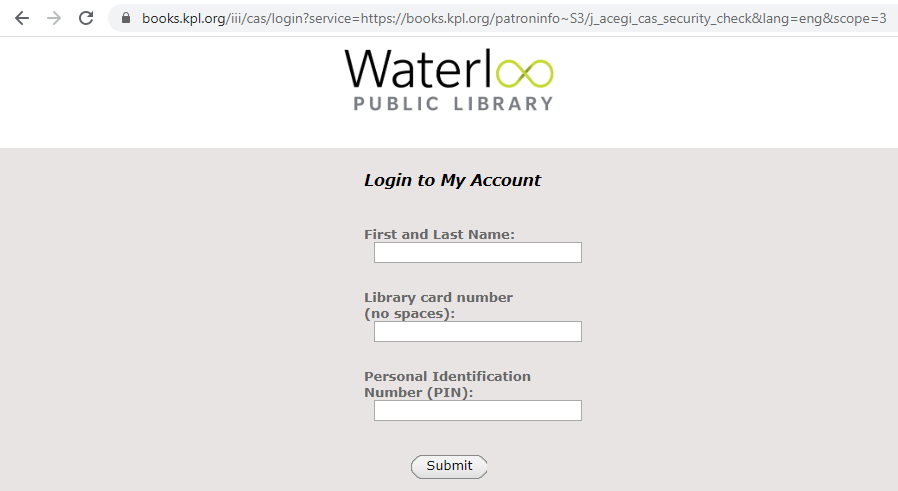
        <span class="token string">"https://books.kpl.org/iii/cas/login?service="</span>
        <span class="token operator">+</span> <span class="token string">"https://books.kpl.org/patroninfo~S3/"</span>
        <span class="token operator">+</span> <span class="token string">"j_acegi_cas_security_check&amp;lang=eng&amp;scope=3"</span>
    <span class="token punctuation">)</span>

    requests_mock<span class="token punctuation">.</span>get<span class="token punctuation">(</span>login_url<span class="token punctuation">,</span> text<span class="token operator">=</span><span class="token string">""</span><span class="token punctuation">)</span>
    requests_mock<span class="token punctuation">.</span>post<span class="token punctuation">(</span>login_url<span class="token punctuation">,</span> text<span class="token operator">=</span><span class="token string">"&lt;a href='/holds'>holds&lt;/a>"</span><span class="token punctuation">)</span>

    requests_mock<span class="token punctuation">.</span>get<span class="token punctuation">(</span>
        <span class="token string">"/holds"</span><span class="token punctuation">,</span>
        text<span class="token operator">=</span><span class="token triple-quoted-string string">"""
            &lt;table class="patFunc">
            &lt;tr class="patFuncHeaders">&lt;th> TITLE &lt;/th>&lt;th>STATUS&lt;/th>&lt;/tr>
            &lt;tr class="patFuncEntry">
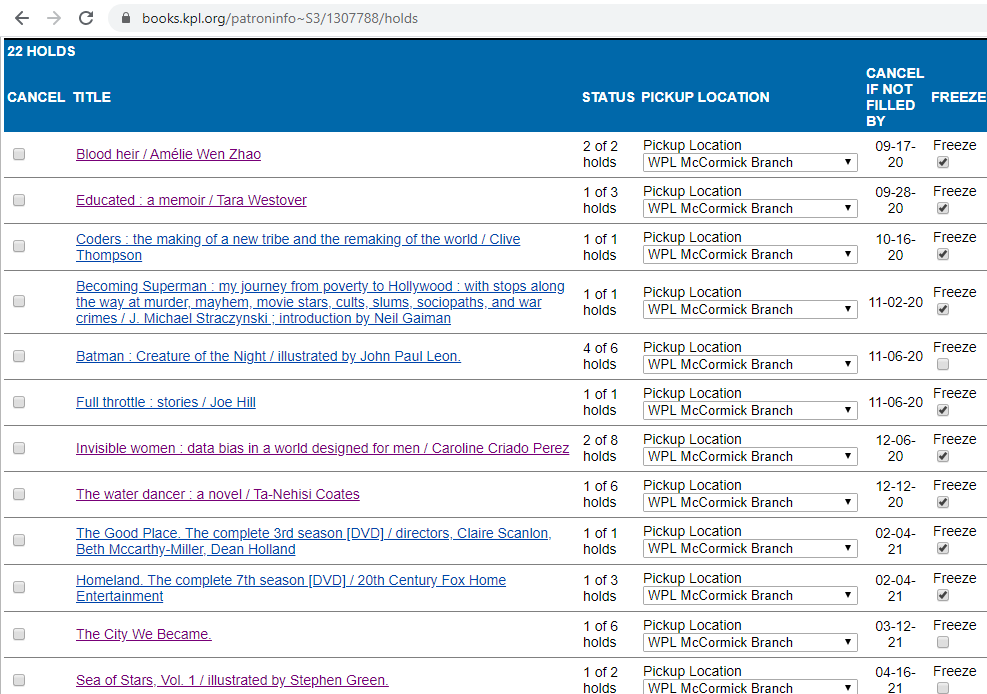
                &lt;td class="patFuncTitle">Blood heir / Amélie Wen Zhao&lt;/td>
                &lt;td class="patFuncStatus"> 9 of 83 holds &lt;/td>
            &lt;/tr>
            &lt;/table>
            """</span><span class="token punctuation">,</span>
    <span class="token punctuation">)</span>

    card <span class="token operator">=</span> make_card<span class="token punctuation">(</span><span class="token punctuation">)</span>

    target <span class="token operator">=</span> WPL<span class="token punctuation">(</span><span class="token punctuation">)</span>
    check_result <span class="token operator">=</span> target<span class="token punctuation">.</span>check_card<span class="token punctuation">(</span>card<span class="token punctuation">)</span>

    <span class="token keyword">assert</span> check_result
    <span class="token keyword">assert</span> check_result<span class="token punctuation">[</span><span class="token string">"holds"</span><span class="token punctuation">]</span>
    <span class="token keyword">assert</span> check_result<span class="token punctuation">[</span><span class="token string">"holds"</span><span class="token punctuation">]</span><span class="token punctuation">[</span><span class="token number">0</span><span class="token punctuation">]</span> <span class="token operator">==</span> <span class="token punctuation">{</span>
        <span class="token string">"Status"</span><span class="token punctuation">:</span> <span class="token string">" 9 of 83 holds "</span><span class="token punctuation">,</span>
        <span class="token string">"Title"</span><span class="token punctuation">:</span> <span class="token string">"Blood heir / Amélie Wen Zhao"</span><span class="token punctuation">,</span>
    <span class="token punctuation">}</span></code></pre>
<p>This passes just as in its previous iteration, even after I made the test more
specific. Since I control the &quot;response from the library&quot;, I can expect a
particular held item to be present. In the future, this will allow me to easily
verify that holds with different statuses, such as &quot;in transit&quot; or &quot;missing&quot; are
reported properly.</p>
<h2>A note on mocking styles</h2>
<p>As a maintainer of the
<a href="https://fakeiteasy.github.io/">third most popular and first best .NET mocking framework</a>
I have opinions on mocking practices. For one, I generally advise against
<a href="https://www.geeksforgeeks.org/monkey-patching-in-python-dynamic-behavior/">monkey patching</a>
or anything else that seems like magic. I've worked in environments where these
effects were abused, and tests became very difficult to debug.</p>
<p>The new test relies on a magically-provided <code>requests_mock</code> object, and
actions on that object affect the functioning of the <code>requests</code> module. This
gave me pause. Ultimately, I decided to go with it, for two reasons. First, the
<a href="https://docs.pytest.org/en/latest/fixture.html">pytest fixtures</a> have
well-known behaviour and should undo the <code>requests_mock</code>'s changes after every
test function. Second, the actual monkey patching is too convenient to not try.
I toyed with the idea of adding a fixture that created a new session, had
requests-mock intercept only that, and then pass both those objects to each
test, and it just seemed like too much work for the benefit. Hopefully, as sole
maintainer on LibraryHippo, I'll be able to keep a handle on the magic mocking.
If not, I can always fall back to a more explicit style.</p>

    ]]></content>
  </entry>
  <entry>
    <title>Why I Teach Git Using Only the Command Line</title>
    <category term="git" />
    <link href="https://blairconrad.com/blog/2020/06/04/why-i-teach-git-using-only-the-command-line/"/>
    <updated>2020-06-04T00:00:00Z</updated>
    <id>https://blairconrad.com/blog/2020/06/04/why-i-teach-git-using-only-the-command-line/</id>
    <content type="html"><![CDATA[
        <p>At the Day Job, we're about to transition something like 150 Subversion repos to
a single git monorepo. Part of my contribution will be training several tens of
git-unaware developers in my office on the basics of working with git.</p>
<p>I was chatting about training approaches with my counterpart in another office
(which already has a higher level of git experience) and he mentioned that his
local colleagues are committed (sorry) to using Tortoise SVN and similar tools,
and he wondered how I was going to handle GUI vs. CLI training.</p>
<p>I figured I'd have to address that question a few times in the coming weeks, so
I decided to write it down here.</p>
<h2>All Command Line</h2>
<p>As the title of this article hints, the answer to my colleague's question is
that I plan on handling GUI training by not doing any at all. I anticipate this
will be less than popular with my trainees, many of whom I know love their File
Explorer extensions for interfacing with Subversion. However, I have three
reasons for potentially disappointing them.</p>
<h3>Too many GUIs to choose from</h3>
<p>First, if I did use a GUI tool to train the users, which one? Off the top of my
head, I can think of <a href="https://tortoisegit.org/">TortoiseGit</a>, <a href="https://www.sourcetreeapp.com/">SourceTree</a>, <a href="https://www.gitkraken.com/">GitKraken</a>, <a href="https://git-fork.com/">fork</a>, and
systems embedded into the three popular editors in the office: Visual Studio
Code, Eclipse, and IntelliJ. The time required to develop and execute a plan for
even half of these is prohibitive, and picking just one isn't going to
appease near everyone.</p>
<h3>Lack of tool knowledge</h3>
<p>Even if I did choose one or two GUI tools to focus on, hoping that I'd cover an
overlapping subset that would make most people happy, I'd have to learn how to
use the tools. It's been quite a while since I used a GUI tool (I enjoyed
GitKraken for a while, mostly because it's so pretty), and I'd need at least a
refresher, and potentially to completely retrain myself. I've never touched the
source control integration in Visual Studio Code, for example, despite using
that editor <em>right now</em>, with an intent to add this file to git.</p>
<h3>GUIs lack transparency</h3>
<p>Finally, I've seen people use GUI git tools when they get started working with
git. I watched me do it. I don't think it helps. Having a pretty graphical view
of the commits is enjoyable, and being able to pick a few popular actions from a
menu helps the novice accomplish simple tasks, but after that the GUI becomes a
barrier to learning.</p>
<p>A number of the GUI tools handle housekeeping tasks, such as fetching from
remotes, for users. Or they perform so many background operations per explicit
action that the user takes, that they introduce confusion. I've several times
been called to my (smaller, informally introduced to git) team members' desks
and been asked what happened to their commit graph. Poring over the
incomprehensible snarl, I ask &quot;what did you do?&quot;. They either point at some
confusingly-named action in a menu or say they picked some option from the menu,
they don't remember which.</p>
<p>By having developers actually type commands to fetch updates, switch branches,
commit, and rebase (and to constantly <code>git log --graph --decorate --all</code> after
each repository-modifying command), I'm hoping it will force them to think about
their actions and to develop a sense of how the git graphs change. Ideally they
will know what commands to execute to perform a particular task, or be able to
determine compensating actions to repair mistakes.</p>
<p>Or if things go horribly wrong, at least I'll be able to have them scroll up
through their command history to answer &quot;what did you <em>do</em>?&quot;.</p>

    ]]></content>
  </entry>
  <entry>
    <title>LibraryHippo 2020 - Recap and decision</title>
    <category term="flask" />
    <category term="libraryhippo" />
    <link href="https://blairconrad.com/blog/2020/05/21/libraryhippo-2020-recap-and-decision/"/>
    <updated>2020-05-21T00:00:00Z</updated>
    <id>https://blairconrad.com/blog/2020/05/21/libraryhippo-2020-recap-and-decision/</id>
    <content type="html"><![CDATA[
        <p>In each of last six articles I've satisfied one of the high-risk requirements I
had for moving LibraryHippo to the Flask framework, with the goal of hosting it
on Heroku. This leaves three &quot;softer&quot; requirements open, which I'll address
here.</p>
<p>(Aside: It feels a little weird working on this conversion while my local
libraries (and many others across the world) are closed due to the 2019–2020
coronavirus pandemic. I'm unable to take books out or put them on hold for
testing purposes, and it's not clear when the libraries will reopen. And maybe
I'll be reluctant to borrow library materials for a while after they do open.
Still, I'm hopeful that the libraries will return to normal, and in the meantime
this is a fun project, so I might as well continue the series.)</p>
<h2>Remaining requirements</h2>
<h3>Custom domains</h3>
<p>All levels of Heroku plans support custom domain names. They don't offer free
SSL , but LibraryHippo's been getting along well enough without SSL to this
point, so I might as well continue. And it looks like
<a href="https://www.cloudflare.com/en-ca/ssl/">Cloudflare</a> offers SSL for free, so
that may be an option in the future.</p>
<h3>Job queues</h3>
<p>I'd used job queues on Google App Engine because each job's execution time was
capped at 30 seconds or so. It wasn't always possible to check even all the
cards for a single family in that time, so each card check was queued
separately. I've simulated a long-running job on Heroku with no problem, so the
job queue probably isn't necessary.</p>
<h3>Cheap hosting</h3>
<p>I don't intend to make any money with LibraryHippo, and while I enjoy it, I
don't want to pour hundreds (or even several tens) of dollars into it every
year. Everything I've tried so far has been done on a Heroku free dyno, and it
looks like it'll continue to meet my needs.</p>
<h2>Next steps</h2>
<p>I feel good about meeting my requirements, so I'm going to continue converting the
application. Part of this will be fleshing out the skeleton that's there now;
for example, the library site scraping is nowhere near as robust as the current
LibraryHippo, and the site looks <em>terrible</em>. The remaining work will be adding
the features and underpinnings that are missing, such as:</p>
<ul>
<li>family management</li>
<li>card management</li>
<li>automated tests on the backend</li>
<li>migrating users from the old application</li>
</ul>
<p>Some of these steps may warrant a blog post, and some might not. We'll see how
it goes.</p>

    ]]></content>
  </entry>
  <entry>
    <title>LibraryHippo 2020 - Social Login</title>
    <category term="authomatic" />
    <category term="flask" />
    <category term="libraryhippo" />
    <category term="login" />
    <link href="https://blairconrad.com/blog/2020/05/07/libraryhippo-2020-social-login/"/>
    <updated>2020-05-07T00:00:00Z</updated>
    <id>https://blairconrad.com/blog/2020/05/07/libraryhippo-2020-social-login/</id>
    <content type="html"><![CDATA[
        <p>I now have a functioning skeleton of a shadow LibraryHippo site. The last gaping
hole is that it treats every visitor the same. We need to be able to distinguish
one user from the next and to retain information about them between visits, such
as which family they belong to.</p>
<p>Rather than have users create new login identities and passwords (and worry
about securely storing those passwords), I'm going to use social logins. The old
LibraryHippo application supported login via a Google account, and I'll do the
same here, while leaving the door open to add other vectors in the future.</p>
<h2>New Requirements</h2>
<p>We'll need new software to perform the authentication and user management. The
<a href="https://flask-login.readthedocs.io/en/latest/">Flask-Login</a> package adds
support for storing user objects and managing their sessions, and
<a href="https://authomatic.github.io/authomatic/">Authomatic</a> simplifies
authentication via OAuth2 providers such as Google (and many more). Install them
both:</p>
<pre class="language-powershell"><code class="language-powershell">pip install Flask-Login
pip install Authomatic
inv freeze</code></pre>
<h2>Register with Google</h2>
<p>Google requires applications using it as an OAuth provider to register and
obtain credentials which must be presented when authenticating users. I visit
the
[APIs &amp; Services Dashboard]https://console.developers.google.com/apis/dashboard),
create a new project, and add a new Web application OAuth Client ID. I added 3
Authorised redirect URIs, which are the URIs that lead to the Flask route that
will handle login. Authomatic sends its current URI to Google when
authenticating, and Google redirects back to the URI (with an additional token)
after authenticating the user. As a security measure, Google will only redirect
back to known URIs.</p>
<p>I added</p>
<ul>
<li>http://localhost:5000/login/google/ (for testing locally)</li>
<li>https://libraryhippo.herokuapp.com/login/google/ (for when I deploy to Heroku), and</li>
<li>http://libraryhippo.com/login/google/ (for when I eventually point the domain name to Heroku)</li>
</ul>
<p>and was rewarded with a <em>Client ID</em> and a <em>Client secret</em>, which are needed by Authomatic.</p>
<p>I also configured the OAuth consent screen, which controls what users see when
they are redirected to Google. I added an application name and Application logo.
Since we only need to identify a user, I left the scopes limited to the minimum:</p>
<ul>
<li>email</li>
<li>profile, and</li>
<li>openid</li>
</ul>
<p>I don't have an Application Privacy Policy link, so left it blank. This seems to
prevent me from &quot;verifying&quot; the application. So far it hasn't been an issue for
testing, but I'll keep an eye on it.</p>
<h2>New Configuration</h2>
<p>Authomatic knows a lot about its underlying providers, but still needs to be
told about the Client ID and Client secret obtained above. I'll add those to the
<code>secrets</code> file.</p>
<pre class="language-python"><code class="language-python"><span class="token comment"># secrets</span>
…
OAUTH_GOOGLE_CLIENT_ID<span class="token operator">=</span><span class="token operator">**</span><span class="token operator">**</span><span class="token operator">**</span><span class="token operator">**</span><span class="token punctuation">.</span>apps<span class="token punctuation">.</span>googleusercontent<span class="token punctuation">.</span>com
OAUTH_GOOGLE_CLIENT_SECRET<span class="token operator">=</span><span class="token operator">**</span><span class="token operator">**</span><span class="token operator">**</span><span class="token operator">**</span></code></pre>
<p>Of course these need to be provided to the application through the <code>Config</code> class:</p>
<pre class="language-python"><code class="language-python"><span class="token comment"># config.py</span>
<span class="token keyword">from</span> authomatic<span class="token punctuation">.</span>providers <span class="token keyword">import</span> oauth2
…

OAUTH <span class="token operator">=</span> <span class="token punctuation">{</span>
    <span class="token string">"google"</span><span class="token punctuation">:</span> <span class="token punctuation">{</span>
        <span class="token string">"class_"</span><span class="token punctuation">:</span> oauth2<span class="token punctuation">.</span>Google<span class="token punctuation">,</span>
        <span class="token string">"consumer_key"</span><span class="token punctuation">:</span> os<span class="token punctuation">.</span>environ<span class="token punctuation">.</span>get<span class="token punctuation">(</span><span class="token string">"OAUTH_GOOGLE_CLIENT_ID"</span><span class="token punctuation">)</span><span class="token punctuation">,</span>
        <span class="token string">"consumer_secret"</span><span class="token punctuation">:</span> os<span class="token punctuation">.</span>environ<span class="token punctuation">.</span>get<span class="token punctuation">(</span><span class="token string">"OAUTH_GOOGLE_CLIENT_SECRET"</span><span class="token punctuation">)</span><span class="token punctuation">,</span>
        <span class="token string">"scope"</span><span class="token punctuation">:</span> <span class="token punctuation">[</span><span class="token string">"profile"</span><span class="token punctuation">,</span> <span class="token string">"email"</span><span class="token punctuation">]</span><span class="token punctuation">,</span>
    <span class="token punctuation">}</span>
<span class="token punctuation">}</span>

SECRET_KEY <span class="token operator">=</span> os<span class="token punctuation">.</span>environ<span class="token punctuation">.</span>get<span class="token punctuation">(</span><span class="token string">"SECRET_KEY"</span><span class="token punctuation">)</span> <span class="token keyword">or</span> <span class="token string">"MeF+3?N',Nmsn39v]"</span></code></pre>
<p>This will tell Authomatic that there's a provider named &quot;google&quot; that is a
Google provider, and what the consumer ID and secret are. The &quot;scope&quot; entry in
the dictionary controls what Authomatic asks for from Google. If I don't specify
this, it won't load the user's email.</p>
<p>The other new entry, <code>SECRET_KEY</code>, is a
<a href="https://flask.palletsprojects.com/en/1.1.x/config/#SECRET_KEY">Flask concept</a>
that's used to sign its session cookie. It should be treated as a secret; the
default value is just supplied to make local testing easier.</p>
<h2>The User Model</h2>
<p>Flask-Login will persist to any backing store, but the database makes the most
sense for LibraryHippo. The new <code>User</code> model will store the details of the
users that have been registered (by logging in):</p>
<pre class="language-python"><code class="language-python"><span class="token comment"># __init__.py</span>
<span class="token keyword">from</span> flask_login <span class="token keyword">import</span> LoginManager
…

login_manager <span class="token operator">=</span> LoginManager<span class="token punctuation">(</span>app<span class="token punctuation">)</span></code></pre>
<pre class="language-python"><code class="language-python"><span class="token comment"># app/models.py</span>
<span class="token keyword">from</span> app <span class="token keyword">import</span> login_manager
<span class="token keyword">from</span> flask_login <span class="token keyword">import</span> UserMixin
…

<span class="token keyword">class</span> <span class="token class-name">User</span><span class="token punctuation">(</span>UserMixin<span class="token punctuation">,</span> db<span class="token punctuation">.</span>Model<span class="token punctuation">)</span><span class="token punctuation">:</span>
    <span class="token builtin">id</span> <span class="token operator">=</span> db<span class="token punctuation">.</span>Column<span class="token punctuation">(</span>db<span class="token punctuation">.</span>Integer<span class="token punctuation">,</span> primary_key<span class="token operator">=</span><span class="token boolean">True</span><span class="token punctuation">)</span>
    social_id <span class="token operator">=</span> db<span class="token punctuation">.</span>Column<span class="token punctuation">(</span>db<span class="token punctuation">.</span>String<span class="token punctuation">(</span><span class="token number">64</span><span class="token punctuation">)</span><span class="token punctuation">,</span> nullable<span class="token operator">=</span><span class="token boolean">False</span><span class="token punctuation">,</span> unique<span class="token operator">=</span><span class="token boolean">True</span><span class="token punctuation">)</span>
    nickname <span class="token operator">=</span> db<span class="token punctuation">.</span>Column<span class="token punctuation">(</span>db<span class="token punctuation">.</span>String<span class="token punctuation">(</span><span class="token number">64</span><span class="token punctuation">)</span><span class="token punctuation">,</span> nullable<span class="token operator">=</span><span class="token boolean">False</span><span class="token punctuation">)</span>
    email <span class="token operator">=</span> db<span class="token punctuation">.</span>Column<span class="token punctuation">(</span>db<span class="token punctuation">.</span>String<span class="token punctuation">(</span><span class="token number">64</span><span class="token punctuation">)</span><span class="token punctuation">,</span> nullable<span class="token operator">=</span><span class="token boolean">False</span><span class="token punctuation">)</span>


<span class="token decorator annotation punctuation">@login_manager<span class="token punctuation">.</span>user_loader</span>
<span class="token keyword">def</span> <span class="token function">load_user</span><span class="token punctuation">(</span><span class="token builtin">id</span><span class="token punctuation">)</span><span class="token punctuation">:</span>
    <span class="token keyword">return</span> User<span class="token punctuation">.</span>query<span class="token punctuation">.</span>get<span class="token punctuation">(</span><span class="token builtin">int</span><span class="token punctuation">(</span><span class="token builtin">id</span><span class="token punctuation">)</span><span class="token punctuation">)</span></code></pre>
<p>The <code>load_user</code> function is registered as the Flask-Login &quot;user_loader&quot;.
Flask-Login will ensure that there's information in the session that can
identify the active user and will use the function to load the rest of the user
information from the database.</p>
<p>Of course the new model has to be added via SQLAlchemy:</p>
<pre class="language-powershell"><code class="language-powershell">flask db migrate <span class="token operator">-</span>m <span class="token string">"Add User model"</span>
flask db upgrade</code></pre>
<h2>The main event - log a user in</h2>
<p>The above has been preparatory work to allow LibraryHippo to authenticate a user
via Google, log them into Flask, and save a user record to the database.</p>
<p>First, I add an <code>Authomatic</code> instance to <code>app</code>, initializing it with the OAuth
configuration and secret key I set up earlier:</p>
<pre class="language-python"><code class="language-python"><span class="token comment"># app/__init__.py</span>
<span class="token keyword">from</span> logging<span class="token punctuation">.</span>config <span class="token keyword">import</span> dictConfig
…

authomatic <span class="token operator">=</span> Authomatic<span class="token punctuation">(</span>config<span class="token operator">=</span>Config<span class="token punctuation">.</span>OAUTH<span class="token punctuation">,</span> secret<span class="token operator">=</span>Config<span class="token punctuation">.</span>SECRET_KEY<span class="token punctuation">)</span></code></pre>
<p>Now add the login route, which will contain a segment for the Google provider:</p>
<pre class="language-python"><code class="language-python"><span class="token comment"># app/routes.py</span>
<span class="token keyword">from</span> flask <span class="token keyword">import</span> flash<span class="token punctuation">,</span> make_response<span class="token punctuation">,</span> redirect<span class="token punctuation">,</span> request<span class="token punctuation">,</span> session<span class="token punctuation">,</span> url_for
<span class="token keyword">from</span> flask_login <span class="token keyword">import</span> current_user<span class="token punctuation">,</span> login_user
<span class="token keyword">from</span> authomatic<span class="token punctuation">.</span>adapters <span class="token keyword">import</span> WerkzeugAdapter

<span class="token keyword">from</span> app <span class="token keyword">import</span> authomatic
<span class="token keyword">from</span> app<span class="token punctuation">.</span>models User

…

<span class="token decorator annotation punctuation">@app<span class="token punctuation">.</span>route</span><span class="token punctuation">(</span><span class="token string">"/login/&lt;provider>/"</span><span class="token punctuation">,</span> methods<span class="token operator">=</span><span class="token punctuation">[</span><span class="token string">"GET"</span><span class="token punctuation">,</span> <span class="token string">"POST"</span><span class="token punctuation">]</span><span class="token punctuation">)</span>
<span class="token keyword">def</span> <span class="token function">login</span><span class="token punctuation">(</span>provider<span class="token punctuation">)</span><span class="token punctuation">:</span>
    <span class="token keyword">if</span> <span class="token keyword">not</span> current_user<span class="token punctuation">.</span>is_anonymous<span class="token punctuation">:</span>
        <span class="token keyword">return</span> redirect<span class="token punctuation">(</span>url_for<span class="token punctuation">(</span><span class="token string">"index"</span><span class="token punctuation">)</span><span class="token punctuation">)</span>

    response <span class="token operator">=</span> make_response<span class="token punctuation">(</span><span class="token punctuation">)</span>
    result <span class="token operator">=</span> authomatic<span class="token punctuation">.</span>login<span class="token punctuation">(</span>
        WerkzeugAdapter<span class="token punctuation">(</span>request<span class="token punctuation">,</span> response<span class="token punctuation">)</span><span class="token punctuation">,</span>
        provider_name<span class="token operator">=</span>provider<span class="token punctuation">,</span>
        session<span class="token operator">=</span>session<span class="token punctuation">,</span>
        session_saver<span class="token operator">=</span><span class="token keyword">lambda</span><span class="token punctuation">:</span> app<span class="token punctuation">.</span>save_session<span class="token punctuation">(</span>session<span class="token punctuation">,</span> response<span class="token punctuation">)</span><span class="token punctuation">,</span>
    <span class="token punctuation">)</span>

    <span class="token keyword">if</span> <span class="token keyword">not</span> result<span class="token punctuation">:</span>
        <span class="token keyword">return</span> response

    <span class="token keyword">if</span> result<span class="token punctuation">.</span>user<span class="token punctuation">:</span>
        result<span class="token punctuation">.</span>user<span class="token punctuation">.</span>update<span class="token punctuation">(</span><span class="token punctuation">)</span>
        <span class="token keyword">if</span> result<span class="token punctuation">.</span>user<span class="token punctuation">.</span><span class="token builtin">id</span> <span class="token keyword">is</span> <span class="token boolean">None</span><span class="token punctuation">:</span>
            flash<span class="token punctuation">(</span><span class="token string">"Authentication failed."</span><span class="token punctuation">)</span>
            app<span class="token punctuation">.</span>logger<span class="token punctuation">.</span>error<span class="token punctuation">(</span><span class="token string">"Authentication failed: %s"</span><span class="token punctuation">,</span> result<span class="token punctuation">.</span>error<span class="token punctuation">)</span>
            <span class="token keyword">return</span> redirect<span class="token punctuation">(</span>url_for<span class="token punctuation">(</span><span class="token string">"index"</span><span class="token punctuation">)</span><span class="token punctuation">)</span>

        social_id <span class="token operator">=</span> provider <span class="token operator">+</span> <span class="token string">":"</span> <span class="token operator">+</span> result<span class="token punctuation">.</span>user<span class="token punctuation">.</span><span class="token builtin">id</span>
        user <span class="token operator">=</span> User<span class="token punctuation">.</span>query<span class="token punctuation">.</span>filter_by<span class="token punctuation">(</span>social_id<span class="token operator">=</span>social_id<span class="token punctuation">)</span><span class="token punctuation">.</span>first<span class="token punctuation">(</span><span class="token punctuation">)</span>

    <span class="token keyword">if</span> <span class="token keyword">not</span> user<span class="token punctuation">:</span>
        user <span class="token operator">=</span> User<span class="token punctuation">(</span>
            social_id<span class="token operator">=</span>social_id<span class="token punctuation">,</span> nickname<span class="token operator">=</span>result<span class="token punctuation">.</span>user<span class="token punctuation">.</span>name<span class="token punctuation">,</span> email<span class="token operator">=</span>result<span class="token punctuation">.</span>user<span class="token punctuation">.</span>email
        <span class="token punctuation">)</span>
        db<span class="token punctuation">.</span>session<span class="token punctuation">.</span>add<span class="token punctuation">(</span>user<span class="token punctuation">)</span>
        db<span class="token punctuation">.</span>session<span class="token punctuation">.</span>commit<span class="token punctuation">(</span><span class="token punctuation">)</span>

    login_user<span class="token punctuation">(</span>user<span class="token punctuation">,</span> remember<span class="token operator">=</span><span class="token boolean">True</span><span class="token punctuation">)</span>
    <span class="token keyword">return</span> redirect<span class="token punctuation">(</span>url_for<span class="token punctuation">(</span><span class="token string">"index"</span><span class="token punctuation">)</span><span class="token punctuation">)</span></code></pre>
<p>There's a lot going on here. The gist is that if the current user is logged in,
the <code>login</code> route just redirects to the main page; there's no need to login if
someone's already logged in.</p>
<p>Otherwise, Authomatic attempts to log the user in, via the <code>WerkzeugAdapter</code>,
which lets it manipulate the HTTP request and response to direct the flow of the
application. It's given the current Flask session as well as a callback it can
use to save the session. Once that succeeds, the user is &quot;updated&quot; to fill in
extra information such as their name and e-mail address.</p>
<p>Then the method attempts to load the user from the database, looking them up by
combining the provider name and the ID assigned by the provider. If no record
exists, one is created and saved back to the database for the future. Finally,
the user is logged into Flask.</p>
<h2>Logging out</h2>
<p>Once users are logged in, they might want to log out, maybe so another user can
check their library cards. This is much easier than the login process. Again, I
add a new route:</p>
<pre class="language-python"><code class="language-python"><span class="token comment"># app/routes.py</span>
<span class="token keyword">from</span> flask_login <span class="token keyword">import</span> logout_user

…

app<span class="token punctuation">.</span>route<span class="token punctuation">(</span><span class="token string">"/logout"</span><span class="token punctuation">)</span>
    logout<span class="token punctuation">(</span><span class="token punctuation">)</span><span class="token punctuation">:</span>
    <span class="token keyword">if</span> <span class="token keyword">not</span> current_user<span class="token punctuation">.</span>is_anonymous<span class="token punctuation">:</span>
        logout_user<span class="token punctuation">(</span><span class="token punctuation">)</span>
    <span class="token keyword">return</span> redirect<span class="token punctuation">(</span>url_for<span class="token punctuation">(</span><span class="token string">"index"</span><span class="token punctuation">)</span><span class="token punctuation">)</span></code></pre>
<p>It just calls Flask's <code>logout_user</code> if the user isn't logged in. Then they're
redirected to the main page.</p>
<h2>Add login/logout links</h2>
<p>Users will need a way to initiate the login process, or to log out if they're
already logged in, and these links should be available from every page, so I'll
replace my ad hoc page generation with templates that will centralize those
functions.</p>
<pre class="language-jinja2"><code class="language-jinja2"><span class="token comment">&lt;!-- app/templates/base.jinja --></span>
<span class="token doctype"><span class="token punctuation">&lt;!</span><span class="token doctype-tag">DOCTYPE</span> <span class="token name">html</span><span class="token punctuation">></span></span>
<span class="token tag"><span class="token tag"><span class="token punctuation">&lt;</span>html</span><span class="token punctuation">></span></span>
    <span class="token tag"><span class="token tag"><span class="token punctuation">&lt;</span>head</span><span class="token punctuation">></span></span>
        <span class="token tag"><span class="token tag"><span class="token punctuation">&lt;</span>title</span><span class="token punctuation">></span></span>LibraryHippo<span class="token tag"><span class="token tag"><span class="token punctuation">&lt;/</span>title</span><span class="token punctuation">></span></span>
    <span class="token tag"><span class="token tag"><span class="token punctuation">&lt;/</span>head</span><span class="token punctuation">></span></span>
    <span class="token tag"><span class="token tag"><span class="token punctuation">&lt;</span>body</span><span class="token punctuation">></span></span>
        <span class="token tag"><span class="token tag"><span class="token punctuation">&lt;</span>nav</span><span class="token punctuation">></span></span>
        <span class="token jinja2 language-jinja2"><span class="token delimiter punctuation">{%</span> <span class="token tag keyword">if</span> <span class="token variable">current_user</span><span class="token punctuation">.</span><span class="token variable">is_anonymous</span> <span class="token delimiter punctuation">%}</span></span>
        <span class="token tag"><span class="token tag"><span class="token punctuation">&lt;</span>a</span> <span class="token attr-name">href</span><span class="token attr-value"><span class="token punctuation attr-equals">=</span><span class="token punctuation">"</span><span class="token jinja2 language-jinja2"><span class="token delimiter punctuation">{{</span> <span class="token function">url_for</span><span class="token punctuation">(</span><span class="token string">'login'</span><span class="token punctuation">,</span> <span class="token variable">provider</span><span class="token operator">=</span><span class="token string">'google'</span><span class="token punctuation">)</span> <span class="token delimiter punctuation">}}</span></span><span class="token punctuation">"</span></span><span class="token punctuation">></span></span>Login<span class="token tag"><span class="token tag"><span class="token punctuation">&lt;/</span>a</span><span class="token punctuation">></span></span>
        <span class="token jinja2 language-jinja2"><span class="token delimiter punctuation">{%</span> <span class="token tag keyword">else</span> <span class="token delimiter punctuation">%}</span></span>
        <span class="token tag"><span class="token tag"><span class="token punctuation">&lt;</span>a</span> <span class="token attr-name">href</span><span class="token attr-value"><span class="token punctuation attr-equals">=</span><span class="token punctuation">"</span><span class="token jinja2 language-jinja2"><span class="token delimiter punctuation">{{</span> <span class="token function">url_for</span><span class="token punctuation">(</span><span class="token string">'logout'</span><span class="token punctuation">)</span> <span class="token delimiter punctuation">}}</span></span><span class="token punctuation">"</span></span><span class="token punctuation">></span></span>Logout <span class="token jinja2 language-jinja2"><span class="token delimiter punctuation">{{</span> <span class="token variable">current_user</span><span class="token punctuation">.</span><span class="token variable">nickname</span> <span class="token delimiter punctuation">}}</span></span><span class="token tag"><span class="token tag"><span class="token punctuation">&lt;/</span>a</span><span class="token punctuation">></span></span>
        <span class="token jinja2 language-jinja2"><span class="token delimiter punctuation">{%</span> <span class="token tag keyword">endif</span> <span class="token delimiter punctuation">%}</span></span>
        <span class="token jinja2 language-jinja2"><span class="token delimiter punctuation">{%</span> <span class="token tag keyword">block</span> <span class="token variable">body</span> <span class="token delimiter punctuation">%}</span></span><span class="token jinja2 language-jinja2"><span class="token delimiter punctuation">{%</span> <span class="token tag keyword">endblock</span> <span class="token delimiter punctuation">%}</span></span>
    <span class="token tag"><span class="token tag"><span class="token punctuation">&lt;/</span>body</span><span class="token punctuation">></span></span>
<span class="token tag"><span class="token tag"><span class="token punctuation">&lt;/</span>html</span><span class="token punctuation">></span></span></code></pre>
<p>The <code>base.jinja</code> template sets up common elements to all the pages of the
application. Here it checks to see if the user is logged in. If not, it includes
a link to the login route, and if so, a link to the logout route. The logout
link includes the user's nickname, mostly to make it easier for me to test.
The main page has not much to add, so its template is very plain for now:</p>
<pre class="language-jinja2"><code class="language-jinja2"><span class="token comment">&lt;!-- app/templates/index.jinja --></span>
<span class="token jinja2 language-jinja2"><span class="token delimiter punctuation">{%</span> <span class="token tag keyword">extends</span> <span class="token string">"base.jinja"</span> <span class="token delimiter punctuation">%}</span></span>

<span class="token jinja2 language-jinja2"><span class="token delimiter punctuation">{%</span> <span class="token tag keyword">block</span> <span class="token variable">body</span> <span class="token delimiter punctuation">%}</span></span>
<span class="token tag"><span class="token tag"><span class="token punctuation">&lt;</span>h1</span><span class="token punctuation">></span></span>LibraryHippo 2020<span class="token tag"><span class="token tag"><span class="token punctuation">&lt;/</span>h1</span><span class="token punctuation">></span></span>
<span class="token jinja2 language-jinja2"><span class="token delimiter punctuation">{%</span> <span class="token tag keyword">endblock</span> <span class="token delimiter punctuation">%}</span></span></code></pre>
<p>Then the index route is updated to use the template:</p>
<pre class="language-python"><code class="language-python"><span class="token comment"># app/routes.py</span>
<span class="token keyword">from</span> flask <span class="token keyword">import</span> render_template

…

<span class="token decorator annotation punctuation">@app<span class="token punctuation">.</span>route</span><span class="token punctuation">(</span><span class="token string">"/"</span><span class="token punctuation">)</span>
<span class="token decorator annotation punctuation">@app<span class="token punctuation">.</span>route</span><span class="token punctuation">(</span><span class="token string">"/index"</span><span class="token punctuation">)</span>
<span class="token keyword">def</span> <span class="token function">index</span><span class="token punctuation">(</span><span class="token punctuation">)</span><span class="token punctuation">:</span>
    <span class="token keyword">return</span> render_template<span class="token punctuation">(</span><span class="token string">"index.jinja"</span><span class="token punctuation">)</span></code></pre>
<h2>How's it look?</h2>
<p>From a not-logged-in account, I visit my local LibraryHippo instance:</p>
<p><img src="https://blairconrad.com/images/blog/2020/lh-not-logged-in.png" alt="screenshot of LibraryHippo when the user is not logged in" /></p>
<p>The new &quot;Login&quot; navigation link appears. When I click it, I'm taken to a
Google-hosted page where I can select the account I want to use. This screen
will vary depending on whether I'm already logged into Google, and with how many
accounts. Note that it indicates what Google account-specific information will
be shared with LibraryHippo:</p>
<ul>
<li>name</li>
<li>email address</li>
<li>language preference (which LibraryHippo doesn't use), and</li>
<li>profile picture (which LibraryHippo doesn't use)</li>
</ul>
<p><img src="https://blairconrad.com/images/blog/2020/lh-google-choose-account.png" alt="screenshot of Google asking the user to choose an account to use for login" /></p>
<p>And finally once I'm logged in, the &quot;Login&quot; link becomes a &quot;Logout&quot; link,
including my name, which was harvested from Google.</p>
<p><img src="https://blairconrad.com/images/blog/2020/lh-logged-in.png" alt="screenshot of LibraryHippo when the user is logged in" /></p>
<h2>Deploying to Heroku</h2>
<p>There almost nothing to this. I already added the Heroku-specific URL to the
Google configuration, so I just have to generate a <code>SECRET_KEY</code> and set
it and the <code>OAUTH_GOOGLE_CLIENT_*</code> values from earlier.</p>
<pre class="language-powershell"><code class="language-powershell">heroku config:<span class="token function">set</span> SECRET_KEY=…</code></pre>
<h2>Progress</h2>
<p>Six of nine requirements have been met!</p>
<table>
<thead>
<tr>
<th style="text-align:right"></th>
<th>requirement</th>
</tr>
</thead>
<tbody>
<tr>
<td style="text-align:right">✓</td>
<td>web app hosting</td>
</tr>
<tr>
<td style="text-align:right">✓</td>
<td>scheduled jobs (run in UTC)</td>
</tr>
<tr>
<td style="text-align:right">✓</td>
<td>scraping library websites on users' behalf</td>
</tr>
<tr>
<td style="text-align:right">✓</td>
<td>small persistent datastore</td>
</tr>
<tr>
<td style="text-align:right">✓</td>
<td>social authentication</td>
</tr>
<tr>
<td style="text-align:right">✓</td>
<td>sending e-mail</td>
</tr>
<tr>
<td style="text-align:right"></td>
<td>nearly free</td>
</tr>
<tr>
<td style="text-align:right"></td>
<td>job queues</td>
</tr>
<tr>
<td style="text-align:right"></td>
<td>custom domain name</td>
</tr>
</tbody>
</table>

    ]]></content>
  </entry>
  <entry>
    <title>LibraryHippo 2020 - A Small Heroku Datastore</title>
    <category term="database" />
    <category term="flask" />
    <category term="heroku" />
    <category term="libraryhippo" />
    <link href="https://blairconrad.com/blog/2020/04/23/libraryhippo-2020-a-small-heroku-datastore/"/>
    <updated>2020-04-23T00:00:00Z</updated>
    <id>https://blairconrad.com/blog/2020/04/23/libraryhippo-2020-a-small-heroku-datastore/</id>
    <content type="html"><![CDATA[
        <p>Now the Heroku-hosted LibraryHippo can perform periodic tasks, send e-mails, and
scrape the Waterloo Public Library's website. All it needs is a datastore to tie
these concepts together into a decoupled &quot;push card status to patrons&quot; pipeline.</p>
<h2>Move rendering out of library</h2>
<p>Last time, the <code>WPL.check_card</code> method scraped a patron's holds and checkouts,
and rendered them as HTML for display to the user. It would be better to have
the library build a data structure, which can be stored for later use or
rendered by the web app.</p>
<pre class="language-python"><code class="language-python"><span class="token comment"># app/libraries/wpl.py</span>
<span class="token keyword">def</span> <span class="token function">check_card</span><span class="token punctuation">(</span>self<span class="token punctuation">,</span> patron<span class="token punctuation">,</span> number<span class="token punctuation">,</span> pin<span class="token punctuation">)</span><span class="token punctuation">:</span>
    session <span class="token operator">=</span> Session<span class="token punctuation">(</span><span class="token punctuation">)</span>
    summary_page <span class="token operator">=</span> self<span class="token punctuation">.</span>login<span class="token punctuation">(</span>session<span class="token punctuation">,</span> patron<span class="token punctuation">,</span> number<span class="token punctuation">,</span> pin<span class="token punctuation">)</span>

    holds_url <span class="token operator">=</span> urllib<span class="token punctuation">.</span>parse<span class="token punctuation">.</span>urljoin<span class="token punctuation">(</span>
        self<span class="token punctuation">.</span>login_url<span class="token punctuation">(</span><span class="token punctuation">)</span><span class="token punctuation">,</span>
        summary_page<span class="token punctuation">.</span>find<span class="token punctuation">(</span>name<span class="token operator">=</span><span class="token string">"a"</span><span class="token punctuation">,</span> href<span class="token operator">=</span>re<span class="token punctuation">.</span><span class="token builtin">compile</span><span class="token punctuation">(</span><span class="token string">"/holds$"</span><span class="token punctuation">)</span><span class="token punctuation">)</span><span class="token punctuation">[</span><span class="token string">"href"</span><span class="token punctuation">]</span><span class="token punctuation">,</span>
    <span class="token punctuation">)</span>
    checkouts_url <span class="token operator">=</span> urllib<span class="token punctuation">.</span>parse<span class="token punctuation">.</span>urljoin<span class="token punctuation">(</span>
        self<span class="token punctuation">.</span>login_url<span class="token punctuation">(</span><span class="token punctuation">)</span><span class="token punctuation">,</span>
        summary_page<span class="token punctuation">.</span>find<span class="token punctuation">(</span>name<span class="token operator">=</span><span class="token string">"a"</span><span class="token punctuation">,</span> href<span class="token operator">=</span>re<span class="token punctuation">.</span><span class="token builtin">compile</span><span class="token punctuation">(</span><span class="token string">"/items$"</span><span class="token punctuation">)</span><span class="token punctuation">)</span><span class="token punctuation">[</span><span class="token string">"href"</span><span class="token punctuation">]</span><span class="token punctuation">,</span>
    <span class="token punctuation">)</span>

    holds <span class="token operator">=</span> self<span class="token punctuation">.</span>get_holds<span class="token punctuation">(</span>session<span class="token punctuation">,</span> holds_url<span class="token punctuation">)</span>
    checkouts <span class="token operator">=</span> self<span class="token punctuation">.</span>get_checkouts<span class="token punctuation">(</span>session<span class="token punctuation">,</span> checkouts_url<span class="token punctuation">)</span>

    <span class="token keyword">return</span> <span class="token punctuation">{</span>
        <span class="token string">"holds"</span><span class="token punctuation">:</span> holds<span class="token punctuation">,</span>
        <span class="token string">"checkouts"</span><span class="token punctuation">:</span> checkouts<span class="token punctuation">,</span>
    <span class="token punctuation">}</span></code></pre>
<p>&quot;Data structure&quot; is maybe too fancy a term for &quot;dictionary with two values&quot;, but
it's a start.</p>
<pre class="language-python"><code class="language-python"><span class="token comment"># app/routes.py</span>
<span class="token decorator annotation punctuation">@app<span class="token punctuation">.</span>route</span><span class="token punctuation">(</span><span class="token string">"/check"</span><span class="token punctuation">)</span>
<span class="token keyword">def</span> <span class="token function">check</span><span class="token punctuation">(</span><span class="token punctuation">)</span><span class="token punctuation">:</span>
    card_check_result <span class="token operator">=</span> WPL<span class="token punctuation">(</span><span class="token punctuation">)</span><span class="token punctuation">.</span>check_card<span class="token punctuation">(</span>
        Config<span class="token punctuation">.</span>PATRON_NAME<span class="token punctuation">,</span> Config<span class="token punctuation">.</span>CARD_NUMBER<span class="token punctuation">,</span> Config<span class="token punctuation">.</span>PIN
    <span class="token punctuation">)</span>

    result <span class="token operator">=</span> <span class="token string">"&lt;h1>Holds&lt;/h1>"</span>
    <span class="token keyword">for</span> hold <span class="token keyword">in</span> card_check_result<span class="token punctuation">[</span><span class="token string">"holds"</span><span class="token punctuation">]</span><span class="token punctuation">:</span>
        result <span class="token operator">+=</span> <span class="token string">"&lt;dl>"</span>
        <span class="token keyword">for</span> k<span class="token punctuation">,</span> v <span class="token keyword">in</span> hold<span class="token punctuation">.</span>items<span class="token punctuation">(</span><span class="token punctuation">)</span><span class="token punctuation">:</span>
            result <span class="token operator">+=</span> <span class="token string-interpolation"><span class="token string">f"&lt;dt></span><span class="token interpolation"><span class="token punctuation">{</span>k<span class="token punctuation">}</span></span><span class="token string">&lt;/dt>&lt;dd></span><span class="token interpolation"><span class="token punctuation">{</span>v<span class="token punctuation">}</span></span><span class="token string">&lt;/dd>"</span></span>
        result <span class="token operator">+=</span> <span class="token string">"&lt;/dl>&lt;hr>"</span>

    result <span class="token operator">+=</span> <span class="token string">"&lt;h1>Checkouts&lt;/h1>"</span>
    <span class="token keyword">for</span> checkout <span class="token keyword">in</span> card_check_result<span class="token punctuation">[</span><span class="token string">"checkouts"</span><span class="token punctuation">]</span><span class="token punctuation">:</span>
        result <span class="token operator">+=</span> <span class="token string">"&lt;dl>"</span>
        <span class="token keyword">for</span> k<span class="token punctuation">,</span> v <span class="token keyword">in</span> checkout<span class="token punctuation">.</span>items<span class="token punctuation">(</span><span class="token punctuation">)</span><span class="token punctuation">:</span>
            result <span class="token operator">+=</span> <span class="token string-interpolation"><span class="token string">f"&lt;dt></span><span class="token interpolation"><span class="token punctuation">{</span>k<span class="token punctuation">}</span></span><span class="token string">&lt;/dt>&lt;dd></span><span class="token interpolation"><span class="token punctuation">{</span>v<span class="token punctuation">}</span></span><span class="token string">&lt;/dd>"</span></span>
        result <span class="token operator">+=</span> <span class="token string">"&lt;/dl>&lt;hr>"</span>

    <span class="token keyword">return</span> result</code></pre>
<h2>Create a local database</h2>
<p>Flask doesn't come with a database of its own, like some web frameworks, but
there's an extension,
<a href="https://flask-sqlalchemy.palletsprojects.com/en/2.x/">Flask-SQLAlchemy</a>, that
helps it work with the <a href="https://www.sqlalchemy.org/">SQLAlchemy</a> Object
Relational Mapper. These will let LibraryHippo interact with databases both
locally and on Heroku. It's good practice to track changes to the database
schema using <a href="https://github.com/miguelgrinberg/flask-migrate">Flask-Migrate</a>,
so I'll install that as well.</p>
<pre class="language-powershell"><code class="language-powershell">pip install Flask-SQLAlchemy
pip install Flask-Migrate
inv freeze</code></pre>
<p>Flask needs some configuration settings to access the database.
<code>SQLALCHEMY_DATABASE_URI</code> describes how the application can contact the
database. In this case, there's a reasonable default, a local SQLite instance.
The <code>SQLALCHEMY_TRACK_MODIFICATIONS</code> setting will keep the database from
signalling the application whenever the database content changes.</p>
<pre class="language-python"><code class="language-python"><span class="token comment"># config.py</span>
<span class="token keyword">class</span> <span class="token class-name">Config</span><span class="token punctuation">(</span><span class="token builtin">object</span><span class="token punctuation">)</span><span class="token punctuation">:</span>
    <span class="token comment"># …</span>
    <span class="token comment"># Remove PATRON_NAME, CARD_NUMBER, and PIN, as they'll move to the database</span>

    SQLALCHEMY_DATABASE_URI <span class="token operator">=</span> os<span class="token punctuation">.</span>environ<span class="token punctuation">.</span>get<span class="token punctuation">(</span>
        <span class="token string">"DATABASE_URL"</span>
    <span class="token punctuation">)</span> <span class="token keyword">or</span> <span class="token string">"sqlite:///"</span> <span class="token operator">+</span> os<span class="token punctuation">.</span>path<span class="token punctuation">.</span>join<span class="token punctuation">(</span>basedir<span class="token punctuation">,</span> <span class="token string">"app.db"</span><span class="token punctuation">)</span>
    SQLALCHEMY_TRACK_MODIFICATIONS <span class="token operator">=</span> <span class="token boolean">False</span></code></pre>
<p>Then the application needs to be taught about the database and migration facilities:</p>
<pre class="language-python"><code class="language-python"><span class="token comment"># app/__init__.py</span>
<span class="token comment"># …</span>
<span class="token keyword">from</span> flask_migrate <span class="token keyword">import</span> Migrate
<span class="token keyword">from</span> flask_sqlalchemy <span class="token keyword">import</span> SQLAlchemy

<span class="token comment"># …</span>
app <span class="token operator">=</span> Flask<span class="token punctuation">(</span>__name__<span class="token punctuation">)</span>
app<span class="token punctuation">.</span>config<span class="token punctuation">.</span>from_object<span class="token punctuation">(</span>Config<span class="token punctuation">)</span>

mail <span class="token operator">=</span> Mail<span class="token punctuation">(</span>app<span class="token punctuation">)</span>

db <span class="token operator">=</span> SQLAlchemy<span class="token punctuation">(</span>app<span class="token punctuation">)</span>
migrate <span class="token operator">=</span> Migrate<span class="token punctuation">(</span>app<span class="token punctuation">,</span> db<span class="token punctuation">)</span>

<span class="token keyword">from</span> app <span class="token keyword">import</span> routes<span class="token punctuation">,</span> models</code></pre>
<h1>Add a Card</h1>
<p>The application now has the ability to talk to the database, but there's no
schema defined. Let's add a model and insert a record.</p>
<pre class="language-python"><code class="language-python"><span class="token comment"># app/__init__.py</span>
<span class="token keyword">class</span> <span class="token class-name">Card</span><span class="token punctuation">(</span>db<span class="token punctuation">.</span>Model<span class="token punctuation">)</span><span class="token punctuation">:</span>
    <span class="token builtin">id</span> <span class="token operator">=</span> db<span class="token punctuation">.</span>Column<span class="token punctuation">(</span>db<span class="token punctuation">.</span>Integer<span class="token punctuation">,</span> primary_key<span class="token operator">=</span><span class="token boolean">True</span><span class="token punctuation">)</span>
    patron_name <span class="token operator">=</span> db<span class="token punctuation">.</span>Column<span class="token punctuation">(</span>db<span class="token punctuation">.</span>String<span class="token punctuation">(</span><span class="token number">64</span><span class="token punctuation">)</span><span class="token punctuation">)</span>
    number <span class="token operator">=</span> db<span class="token punctuation">.</span>Column<span class="token punctuation">(</span>db<span class="token punctuation">.</span>String<span class="token punctuation">(</span><span class="token number">32</span><span class="token punctuation">)</span><span class="token punctuation">)</span>
    pin <span class="token operator">=</span> db<span class="token punctuation">.</span>Column<span class="token punctuation">(</span>db<span class="token punctuation">.</span>String<span class="token punctuation">(</span><span class="token number">16</span><span class="token punctuation">)</span><span class="token punctuation">)</span>
    last_state <span class="token operator">=</span> db<span class="token punctuation">.</span>Column<span class="token punctuation">(</span>db<span class="token punctuation">.</span>Text<span class="token punctuation">(</span><span class="token punctuation">)</span><span class="token punctuation">)</span>

    <span class="token keyword">def</span> <span class="token function">__repr__</span><span class="token punctuation">(</span>self<span class="token punctuation">)</span><span class="token punctuation">:</span>
        <span class="token keyword">return</span> <span class="token string-interpolation"><span class="token string">f"&lt;Patron </span><span class="token interpolation"><span class="token punctuation">{</span>self<span class="token punctuation">.</span>patron_name<span class="token punctuation">}</span></span><span class="token string">>"</span></span></code></pre>
<p>Every model gets an <code>id</code>, for convenience, and the next 3 fields will be
familiar from the previous article—they identify the card and control access to
the library card state. The last field, <code>last_state</code>, will be used to record
the last-checked card state. It'll hold a JSON-formatted version of the
dictionary that appears above.</p>
<h3>Initialize the database</h3>
<p>Now initialize a schemaless database, add the first migration script for the
<code>Card</code> model, and actually upgrade the database schema:</p>
<pre class="language-powershell"><code class="language-powershell">flask db init
flask db migrate <span class="token operator">-</span>m <span class="token string">"Add Card model"</span>
flask db upgrade</code></pre>
<pre class="language-text"><code class="language-text">Creating directory D:\Sandbox\LibraryHippo\migrations ...  done
Creating directory D:\Sandbox\LibraryHippo\migrations\versions ...  done
Generating D:\Sandbox\LibraryHippo\migrations\alembic.ini ...  done
Generating D:\Sandbox\LibraryHippo\migrations\env.py ...  done
Generating D:\Sandbox\LibraryHippo\migrations\README ...  done
Generating D:\Sandbox\LibraryHippo\migrations\script.py.mako ...  done
Please edit configuration/connection/logging settings in 'D:\\Sandbox\\LibraryHippo\\migrations\\alembic.ini' before proceeding.

Generating D:\Sandbox\LibraryHippo\migrations\versions\b2fc8df2f32f_add_card_model.py ...  done</code></pre>
<h3>Insert a card into the database</h3>
<p>Normally cards would be added to the database by the users, via a fancy form. For now, the <code>flask shell</code> will do.</p>
<pre class="language-python"><code class="language-python">❯ flask shell
Python <span class="token number">3.8</span><span class="token number">.1</span> <span class="token punctuation">(</span>tags<span class="token operator">/</span>v3<span class="token punctuation">.</span><span class="token number">8.1</span><span class="token punctuation">:</span>1b293b6<span class="token punctuation">,</span> Dec <span class="token number">18</span> <span class="token number">2019</span><span class="token punctuation">,</span> <span class="token number">22</span><span class="token punctuation">:</span><span class="token number">39</span><span class="token punctuation">:</span><span class="token number">24</span><span class="token punctuation">)</span> <span class="token punctuation">[</span>MSC v<span class="token punctuation">.</span><span class="token number">1916</span> <span class="token number">32</span> bit <span class="token punctuation">(</span>Intel<span class="token punctuation">)</span><span class="token punctuation">]</span> on win32
App<span class="token punctuation">:</span> app <span class="token punctuation">[</span>production<span class="token punctuation">]</span>
Instance<span class="token punctuation">:</span> D<span class="token punctuation">:</span>\Sandbox\LibraryHippo\instance
<span class="token operator">>></span><span class="token operator">></span> <span class="token keyword">from</span> app<span class="token punctuation">.</span>models <span class="token keyword">import</span> Card<span class="token punctuation">,</span> db
<span class="token operator">>></span><span class="token operator">></span> card <span class="token operator">=</span> Card<span class="token punctuation">(</span>patron_name<span class="token operator">=</span><span class="token string">"Blair Conrad"</span><span class="token punctuation">,</span> number<span class="token operator">=</span><span class="token string">"123456789"</span><span class="token punctuation">,</span> pin<span class="token operator">=</span><span class="token string">"9876"</span><span class="token punctuation">)</span>
<span class="token operator">>></span><span class="token operator">></span> db<span class="token punctuation">.</span>session<span class="token punctuation">.</span>add<span class="token punctuation">(</span>card<span class="token punctuation">)</span>
<span class="token operator">>></span><span class="token operator">></span> db<span class="token punctuation">.</span>session<span class="token punctuation">.</span>commit<span class="token punctuation">(</span><span class="token punctuation">)</span>
<span class="token operator">>></span><span class="token operator">></span> Card<span class="token punctuation">.</span>query<span class="token punctuation">.</span><span class="token builtin">all</span><span class="token punctuation">(</span><span class="token punctuation">)</span>
<span class="token punctuation">[</span><span class="token operator">&lt;</span>Patron Blair Conrad<span class="token operator">></span><span class="token punctuation">]</span></code></pre>
<h1>Load the card from the database and store the check results</h1>
<p>The <code>Config</code> class no longer has the hard-coded patron name, card number, and
PIN values added last time, so the <code>check</code> route must load them from the
database and save the result back onto the card:</p>
<pre class="language-python"><code class="language-python"><span class="token comment"># app/routes.py</span>
<span class="token comment"># …</span>
<span class="token keyword">import</span> json
<span class="token keyword">from</span> app<span class="token punctuation">.</span>models <span class="token keyword">import</span> Card

<span class="token comment"># …</span>

<span class="token decorator annotation punctuation">@app<span class="token punctuation">.</span>route</span><span class="token punctuation">(</span><span class="token string">"/check"</span><span class="token punctuation">)</span>
<span class="token keyword">def</span> <span class="token function">check</span><span class="token punctuation">(</span><span class="token punctuation">)</span><span class="token punctuation">:</span>
    card <span class="token operator">=</span> Card<span class="token punctuation">.</span>query<span class="token punctuation">.</span>get<span class="token punctuation">(</span><span class="token number">1</span><span class="token punctuation">)</span>  <span class="token comment"># a hack - we know there's only 1 card for now</span>
    card_check_result <span class="token operator">=</span> WPL<span class="token punctuation">(</span><span class="token punctuation">)</span><span class="token punctuation">.</span>check_card<span class="token punctuation">(</span>card<span class="token punctuation">)</span>
    card<span class="token punctuation">.</span>last_state <span class="token operator">=</span> json<span class="token punctuation">.</span>dumps<span class="token punctuation">(</span>card_check_result<span class="token punctuation">)</span>
    db<span class="token punctuation">.</span>session<span class="token punctuation">.</span>commit<span class="token punctuation">(</span><span class="token punctuation">)</span>
    <span class="token comment"># rendering code…</span></code></pre>
<p>The stored result can be seen by querying the database via <code>flask shell</code>:</p>
<pre class="language-python"><code class="language-python">❯ flask shell
Python <span class="token number">3.8</span><span class="token number">.1</span> <span class="token punctuation">(</span>tags<span class="token operator">/</span>v3<span class="token punctuation">.</span><span class="token number">8.1</span><span class="token punctuation">:</span>1b293b6<span class="token punctuation">,</span> Dec <span class="token number">18</span> <span class="token number">2019</span><span class="token punctuation">,</span> <span class="token number">22</span><span class="token punctuation">:</span><span class="token number">39</span><span class="token punctuation">:</span><span class="token number">24</span><span class="token punctuation">)</span> <span class="token punctuation">[</span>MSC v<span class="token punctuation">.</span><span class="token number">1916</span> <span class="token number">32</span> bit <span class="token punctuation">(</span>Intel<span class="token punctuation">)</span><span class="token punctuation">]</span> on win32
App<span class="token punctuation">:</span> app <span class="token punctuation">[</span>production<span class="token punctuation">]</span>
Instance<span class="token punctuation">:</span> D<span class="token punctuation">:</span>\Sandbox\LibraryHippo\instance
<span class="token operator">>></span><span class="token operator">></span> <span class="token keyword">from</span> app<span class="token punctuation">.</span>models <span class="token keyword">import</span> Card
<span class="token operator">>></span><span class="token operator">></span> card <span class="token operator">=</span> Card<span class="token punctuation">.</span>query<span class="token punctuation">.</span>get<span class="token punctuation">(</span><span class="token number">1</span><span class="token punctuation">)</span>
<span class="token operator">>></span><span class="token operator">></span> card<span class="token punctuation">.</span>last_state</code></pre>
<pre class="language-python"><code class="language-python">'<span class="token punctuation">{</span><span class="token string">"holds"</span><span class="token punctuation">:</span> <span class="token punctuation">[</span><span class="token punctuation">{</span><span class="token string">"Title"</span><span class="token punctuation">:</span> <span class="token string">"\\nBlood heir / Am\\u00e9lie Wen Zhao\\n\\n"</span><span class="token punctuation">,</span> <span class="token string">"Status"</span><span class="token punctuation">:</span> <span class="token string">" 2 of 2 holds "</span><span class="token punctuation">,</span> <span class="token string">"Pickup"</span><span class="token punctuation">:</span> <span class="token string">"WPL McCormick Branch"</span><span class="token punctuation">,</span> <span class="token string">"Cancel"</span><span class="token punctuation">:</span> <span class="token string">"09-17-20"</span><span class="token punctuation">,</span> <span class="token string">"Freeze"</span><span class="token punctuation">:</span> true<span class="token punctuation">}</span><span class="token punctuation">,</span> <span class="token punctuation">{</span><span class="token string">"Title"</span><span class="token punctuation">:</span> <span class="token string">"\\nEducated : a memoir / Tara Westover\\n\\n"</span><span class="token punctuation">,</span> <span class="token string">"Status"</span><span class="token punctuation">:</span> <span class="token string">" 1 of 2 holds "</span><span class="token punctuation">,</span> <span class="token string">"Pickup"</span><span class="token punctuation">:</span> <span class="token string">"WPL McCormick Branch"</span><span class="token punctuation">,</span> <span class="token string">"Cancel"</span><span class="token punctuation">:</span> <span class="token string">"09-28-20"</span><span class="token punctuation">,</span> <span class="token string">"Freeze"</span><span class="token punctuation">:</span> true<span class="token punctuation">}</span><span class="token punctuation">,</span> <span class="token punctuation">{</span><span class="token string">"Title"</span><span class="token punctuation">:</span> <span class="token string">"\\nCoders : the making of a new tribe and the remaking of the world / Clive Thompson\\n\\n"</span><span class="token punctuation">,</span> <span class="token string">"Status"</span><span class="token punctuation">:</span> <span class="token string">" 1 of 1 holds "</span><span class="token punctuation">,</span> <span class="token string">"Pickup"</span><span class="token punctuation">:</span> <span class="token string">"WPL McCormick Branch"</span><span class="token punctuation">,</span> <span class="token string">"Cancel"</span><span class="token punctuation">:</span> <span class="token string">"10-16-20"</span><span class="token punctuation">,</span> <span class="token string">"Freeze"</span><span class="token punctuation">:</span> true<span class="token punctuation">}</span><span class="token punctuation">,</span> <span class="token punctuation">{</span><span class="token string">"Title"</span><span class="token punctuation">:</span> <span class="token string">"\\nBecoming Superman : my journey from poverty to Hollywood : with stops along the way at murder, mayhem, movie stars, cults, slums, sociopaths, and war crimes / J. Michael Straczynski ; introduction by Neil Gaiman\\n\\n"</span><span class="token punctuation">,</span> <span class="token string">"Status"</span><span class="token punctuation">:</span> <span class="token string">" 1 of 1 holds "</span><span class="token punctuation">,</span> <span class="token string">"Pickup"</span><span class="token punctuation">:</span> <span class="token string">"WPL McCormick Branch"</span><span class="token punctuation">,</span> <span class="token string">"Cancel"</span><span class="token punctuation">:</span> <span class="token string">"11-02-20"</span><span class="token punctuation">,</span> <span class="token string">"Freeze"</span><span class="token punctuation">:</span> true<span class="token punctuation">}</span><span class="token punctuation">,</span> <span class="token punctuation">{</span><span class="token string">"Title"</span><span class="token punctuation">:</span> <span class="token string">"\\nBatman : Creature of the Night / illustrated by John Paul Leon.\\n\\n"</span><span class="token punctuation">,</span> <span class="token string">"Status"</span><span class="token punctuation">:</span> <span class="token string">" 4 of 6 holds "</span><span class="token punctuation">,</span> <span class="token string">"Pickup"</span><span class="token punctuation">:</span> <span class="token string">"WPL McCormick Branch"</span><span class="token punctuation">,</span> <span class="token string">"Cancel"</span><span class="token punctuation">:</span> "<span class="token number">11</span><span class="token operator">-</span><span class="token number">06</span><span class="token operator">-</span><span class="token number">2</span></code></pre>
<h1>Use the stored card check result to send e-mail</h1>
<p>Now that the database contains the result of the last card status check, it's
relatively straightforward to include that text in the notification e-mails. All
that's required is to load the card record, deserialize the saved state using
<code>json.loads</code>, and build the HTML:</p>
<pre class="language-python"><code class="language-python"><span class="token comment"># app/cli.py</span>
<span class="token comment"># …</span>
<span class="token keyword">from</span> app <span class="token keyword">import</span> mail<span class="token punctuation">,</span> models

<span class="token comment"># …</span>

<span class="token keyword">def</span> <span class="token function">register</span><span class="token punctuation">(</span>app<span class="token punctuation">)</span><span class="token punctuation">:</span>
    <span class="token decorator annotation punctuation">@app<span class="token punctuation">.</span>cli<span class="token punctuation">.</span>command</span><span class="token punctuation">(</span><span class="token string">"notify-all"</span><span class="token punctuation">)</span>
    <span class="token keyword">def</span> <span class="token function">notify_all</span><span class="token punctuation">(</span><span class="token punctuation">)</span><span class="token punctuation">:</span>
        card <span class="token operator">=</span> models<span class="token punctuation">.</span>Card<span class="token punctuation">.</span>query<span class="token punctuation">.</span>get<span class="token punctuation">(</span><span class="token number">1</span><span class="token punctuation">)</span>  <span class="token comment"># a hack - we know there's only 1 card for now</span>
        last_card_state <span class="token operator">=</span> json<span class="token punctuation">.</span>loads<span class="token punctuation">(</span>card<span class="token punctuation">.</span>last_state<span class="token punctuation">)</span>

        html_body <span class="token operator">=</span> <span class="token string">"&lt;h1>Holds&lt;/h1>"</span>
        <span class="token keyword">for</span> hold <span class="token keyword">in</span> last_card_state<span class="token punctuation">[</span><span class="token string">"holds"</span><span class="token punctuation">]</span><span class="token punctuation">:</span>
            html_body <span class="token operator">+=</span> <span class="token string">"&lt;dl>"</span>
            <span class="token keyword">for</span> k<span class="token punctuation">,</span> v <span class="token keyword">in</span> hold<span class="token punctuation">.</span>items<span class="token punctuation">(</span><span class="token punctuation">)</span><span class="token punctuation">:</span>
                html_body <span class="token operator">+=</span> <span class="token string-interpolation"><span class="token string">f"&lt;dt></span><span class="token interpolation"><span class="token punctuation">{</span>k<span class="token punctuation">}</span></span><span class="token string">&lt;/dt>&lt;dd></span><span class="token interpolation"><span class="token punctuation">{</span>v<span class="token punctuation">}</span></span><span class="token string">&lt;/dd>"</span></span>
            html_body <span class="token operator">+=</span> <span class="token string">"&lt;/dl>&lt;hr>"</span>

        html_body <span class="token operator">+=</span> <span class="token string">"&lt;h1>Checkouts&lt;/h1>"</span>
        <span class="token keyword">for</span> checkout <span class="token keyword">in</span> last_card_state<span class="token punctuation">[</span><span class="token string">"checkouts"</span><span class="token punctuation">]</span><span class="token punctuation">:</span>
            html_body <span class="token operator">+=</span> <span class="token string">"&lt;dl>"</span>
            <span class="token keyword">for</span> k<span class="token punctuation">,</span> v <span class="token keyword">in</span> checkout<span class="token punctuation">.</span>items<span class="token punctuation">(</span><span class="token punctuation">)</span><span class="token punctuation">:</span>
                html_body <span class="token operator">+=</span> <span class="token string-interpolation"><span class="token string">f"&lt;dt></span><span class="token interpolation"><span class="token punctuation">{</span>k<span class="token punctuation">}</span></span><span class="token string">&lt;/dt>&lt;dd></span><span class="token interpolation"><span class="token punctuation">{</span>v<span class="token punctuation">}</span></span><span class="token string">&lt;/dd>"</span></span>
            html_body <span class="token operator">+=</span> <span class="token string">"&lt;/dl>&lt;hr>"</span>

        now <span class="token operator">=</span> datetime<span class="token punctuation">.</span>now<span class="token punctuation">(</span><span class="token punctuation">)</span><span class="token punctuation">.</span>isoformat<span class="token punctuation">(</span><span class="token punctuation">)</span>

        msg <span class="token operator">=</span> Message<span class="token punctuation">(</span>
            <span class="token string">"LibraryHippo starting notifications"</span><span class="token punctuation">,</span> recipients<span class="token operator">=</span><span class="token punctuation">[</span><span class="token string">"blair@blairconrad.com"</span><span class="token punctuation">]</span>
        <span class="token punctuation">)</span>
        msg<span class="token punctuation">.</span>body <span class="token operator">=</span> <span class="token string-interpolation"><span class="token string">f"starting notifications at </span><span class="token interpolation"><span class="token punctuation">{</span>now<span class="token punctuation">}</span></span><span class="token string">"</span></span>
        msg<span class="token punctuation">.</span>html <span class="token operator">=</span> html_body

        mail<span class="token punctuation">.</span>send<span class="token punctuation">(</span>msg<span class="token punctuation">)</span>

        <span class="token comment"># …</span></code></pre>
<h1>Deploy to Heroku</h1>
<p>There's nothing left to do but try this out on Heroku. It shouldn't be too much work.</p>
<h3>Add and configure a database plugin</h3>
<p>Heroku has a free hobby-tier PostgreSQL addon that you can add on right from the command line:</p>
<pre class="language-powershell"><code class="language-powershell">heroku addons:add heroku-postgresql:hobby-dev</code></pre>
<pre class="language-text"><code class="language-text">Creating heroku-postgresql:hobby-dev on ⬢ libraryhippo... free
Database has been created and is available
! This database is empty. If upgrading, you can transfer
! data from another database with pg:copy
Created ·················· as DATABASE_URL
Use heroku addons:docs heroku-postgresql to view documentation</code></pre>
<p>The addon sets the <code>DATABASE_URL</code> environment variable, which
is the one that the <code>Config.SQLALCHEMY_TRACK_MODIFICATIONS</code> attribute is
populated from.</p>
<p>SQLAlchemy needs a bonus <code>psycopg2</code> package to connect to the database, and
there's no harm in having it installed when I'm testing locally, so I'll just
add it to <code>requirements.txt</code>:</p>
<pre class="language-powershell"><code class="language-powershell">pip install psycopg2
inv freeze</code></pre>
<p>Finally, the application startup should perform the database migration, to react
to any new model changes. This requires an extra command before starting gunicorn:</p>
<pre class="language-text"><code class="language-text">web: flask db upgrade; gunicorn libraryhippo:app</code></pre>
<p>And the only thing left to do is deploy.</p>
<h3>Store a library card</h3>
<p>I'll store the library card to the PostgreSQL database just as with the local
sqlite instance. The only difference is that instead of running <code>flask shell</code>
directly, I use Heroku's facility to run a one-off command via <code>heroku run</code>:</p>
<pre class="language-python"><code class="language-python">❯ heroku run flask shell
Running flask shell on ⬢ libraryhippo<span class="token punctuation">.</span><span class="token punctuation">.</span><span class="token punctuation">.</span> up<span class="token punctuation">,</span> run<span class="token punctuation">.</span><span class="token number">4950</span> <span class="token punctuation">(</span>Free<span class="token punctuation">)</span>
Python <span class="token number">3.8</span><span class="token number">.1</span> <span class="token punctuation">(</span>default<span class="token punctuation">,</span> Dec <span class="token number">23</span> <span class="token number">2019</span><span class="token punctuation">,</span> <span class="token number">04</span><span class="token punctuation">:</span><span class="token number">19</span><span class="token punctuation">:</span><span class="token number">22</span><span class="token punctuation">)</span>
<span class="token punctuation">[</span>GCC <span class="token number">7.4</span><span class="token number">.0</span><span class="token punctuation">]</span> on linux
App<span class="token punctuation">:</span> app <span class="token punctuation">[</span>production<span class="token punctuation">]</span>
Instance<span class="token punctuation">:</span> <span class="token operator">/</span>app<span class="token operator">/</span>instance
<span class="token operator">>></span><span class="token operator">></span> <span class="token keyword">from</span> app<span class="token punctuation">.</span>models <span class="token keyword">import</span> Card<span class="token punctuation">,</span> db
<span class="token operator">>></span><span class="token operator">></span> card <span class="token operator">=</span> Card<span class="token punctuation">(</span>patron_name<span class="token operator">=</span><span class="token string">"Blair Conrad"</span><span class="token punctuation">,</span> number<span class="token operator">=</span><span class="token string">"123456789"</span><span class="token punctuation">,</span> pin<span class="token operator">=</span><span class="token string">"9876"</span><span class="token punctuation">)</span>
<span class="token operator">>></span><span class="token operator">></span> db<span class="token punctuation">.</span>session<span class="token punctuation">.</span>add<span class="token punctuation">(</span>card<span class="token punctuation">)</span>
<span class="token operator">>></span><span class="token operator">></span> db<span class="token punctuation">.</span>session<span class="token punctuation">.</span>commit<span class="token punctuation">(</span><span class="token punctuation">)</span>
<span class="token operator">>></span><span class="token operator">></span> Card<span class="token punctuation">.</span>query<span class="token punctuation">.</span><span class="token builtin">all</span><span class="token punctuation">(</span><span class="token punctuation">)</span>
<span class="token punctuation">[</span><span class="token operator">&lt;</span>Patron Blair Conrad<span class="token operator">></span><span class="token punctuation">]</span></code></pre>
<p>With that done, there was no need to keep the old environment variables that encoded my library credentials, so I removed them:</p>
<pre class="language-powershell"><code class="language-powershell">heroku config:unset PATRON_NAME CARD_NUMBER PIN</code></pre>
<h3>Wait for the e-mail</h3>
<p>And that's it. I did visit <code>/check</code> on the website to ensure there was a
cached card status, and there was nothing else to do but wait until 18:30 local
time to see everything work together. Sure enough, the task woke up, read the
stored data, and used it in the e-mail:</p>
<p><img src="https://blairconrad.com/images/blog/2020/heroku-notification-using-stored-status.png" alt="screenshot of notification e-mail sent from Heroku using stored card status" /></p>
<h2>Progress</h2>
<p>Five of nine requirements have been met!</p>
<table>
<thead>
<tr>
<th style="text-align:right"></th>
<th>requirement</th>
</tr>
</thead>
<tbody>
<tr>
<td style="text-align:right">✓</td>
<td>web app hosting</td>
</tr>
<tr>
<td style="text-align:right">✓</td>
<td>scheduled jobs (run in UTC)</td>
</tr>
<tr>
<td style="text-align:right">✓</td>
<td>scraping library websites on users' behalf</td>
</tr>
<tr>
<td style="text-align:right">✓</td>
<td>small persistent datastore</td>
</tr>
<tr>
<td style="text-align:right">next</td>
<td>social authentication</td>
</tr>
<tr>
<td style="text-align:right">✓</td>
<td>sending e-mail</td>
</tr>
<tr>
<td style="text-align:right"></td>
<td>nearly free</td>
</tr>
<tr>
<td style="text-align:right"></td>
<td>job queues</td>
</tr>
<tr>
<td style="text-align:right"></td>
<td>custom domain name</td>
</tr>
</tbody>
</table>

    ]]></content>
  </entry>
  <entry>
    <title>LibraryHippo 2020 - Scraping Library Websites</title>
    <category term="flask" />
    <category term="heroku" />
    <category term="libraryhippo" />
    <category term="requests" />
    <link href="https://blairconrad.com/blog/2020/04/09/libraryhippo-2020-scraping-library-websites/"/>
    <updated>2020-04-09T00:00:00Z</updated>
    <id>https://blairconrad.com/blog/2020/04/09/libraryhippo-2020-scraping-library-websites/</id>
    <content type="html"><![CDATA[
        <p>Now that the toy LibraryHippo on Heroku is sending periodic e-mails, it's time
to provide it with meaningful content to send, by having it scrape a library's
website. This should be relatively straightforward, but there's some risk as
it's not an operation covered in
<a href="https://blog.miguelgrinberg.com/post/the-flask-mega-tutorial-part-i-hello-world">The Flask Mega-Tutorial</a>.</p>
<p>The production application gathers information from libraries using a
combination of App Engine's custom
<a href="https://cloud.google.com/appengine/docs/standard/python/issue-requests%5D">URL Fetch service</a>,
an older version of the
<a href="https://www.crummy.com/software/BeautifulSoup/">Beautiful Soup</a> HTML parser
(which had to be copied into the application source), and some glue that I
wrote. Today I'll try to replicate that using modern, commodity components.</p>
<h2>Gathering requirements</h2>
<p>I've heard that the <a href="https://requests.readthedocs.io/en/master/%5D">Requests</a>
library is a feature-rich and popular library for sending HTTP requests. Knowing
no more than that, I'll try it. Beautiful Soup has worked very well for me in
the past, but has had a number of significant releases since the version I've
used, so I'll try the latest, 4.8.2 as I write.</p>
<pre class="language-powershell"><code class="language-powershell">pip install requests
pip install BeautifulSoup4
inv freeze</code></pre>
<h2>Library Credential Management</h2>
<p>Library websites don't allow unfettered access to their patrons' records, thank
goodness, so it'll be necessary to use at least one patron's credentials during
the &quot;scraping&quot; test. I don't want to embed my credentials in the application
source code, so they have to be stored somewhere else. Had I already integrated
a permanent datastore and implement user management, the credentials would be
tied to the LibraryHippo user's account, but for now I'll read them from
environment variables that I'll save in the <code>secrets</code> file established in
<a href="https://blairconrad.com/blog/2020/03/05/libraryhippo-2020-sending-email-from-heroku/">Sending Email from Heroku</a>.</p>
<pre class="language-python"><code class="language-python"><span class="token comment"># secrets</span>
<span class="token comment"># …</span>
PATRON_NAME<span class="token operator">=</span>Blair Conrad
CARD_NUMBER<span class="token operator">=</span><span class="token number">123456789</span>
PIN<span class="token operator">=</span><span class="token number">9876</span></code></pre>
<p>with the corresponding change to the <code>Config</code>.</p>
<h2>Implementation</h2>
<p>When a patron wants to check their library card status at the Waterloo Public
Library, they have to visit the login page and provide their credentials, after
which they are taken to a summary page that basically just show the number of
checkouts and held items, with links to complete lists of their checkouts and
holds. That's 4 pages visited, and possibly some hidden redirects, plus one if
they manually logout. I planned to have the automated components follow the same
path.</p>
<h2>Login</h2>
<p>My initial thought was that LibraryHippo could login directly, just by posting
credentials to the website, but it failed miserably. The reason: hidden fields.
The login page looks like it has 4 inputs, counting the &quot;Submit&quot; button as an
input:</p>
<p><img src="https://blairconrad.com/images/blog/2020/wpl-login-form.png" alt="screenshot of Waterloo Public Library patron login form showing 3 text
fields and a submit button" /></p>
<p>But there are actually 6. The four we see and two hidden ones, called <code>lt</code> and <code>_eventId</code>:</p>
<pre class="language-html"><code class="language-html"><span class="token tag"><span class="token tag"><span class="token punctuation">&lt;</span>input</span> <span class="token attr-name">id</span><span class="token attr-value"><span class="token punctuation attr-equals">=</span><span class="token punctuation">"</span>name<span class="token punctuation">"</span></span> <span class="token attr-name">name</span><span class="token attr-value"><span class="token punctuation attr-equals">=</span><span class="token punctuation">"</span>name<span class="token punctuation">"</span></span> <span class="token attr-name">type</span><span class="token attr-value"><span class="token punctuation attr-equals">=</span><span class="token punctuation">"</span>text<span class="token punctuation">"</span></span> <span class="token attr-name">value</span><span class="token attr-value"><span class="token punctuation attr-equals">=</span><span class="token punctuation">"</span><span class="token punctuation">"</span></span> <span class="token attr-name">size</span><span class="token attr-value"><span class="token punctuation attr-equals">=</span><span class="token punctuation">"</span>25<span class="token punctuation">"</span></span> <span class="token attr-name">maxlength</span><span class="token attr-value"><span class="token punctuation attr-equals">=</span><span class="token punctuation">"</span>50<span class="token punctuation">"</span></span> <span class="token attr-name">tabindex</span><span class="token attr-value"><span class="token punctuation attr-equals">=</span><span class="token punctuation">"</span>15<span class="token punctuation">"</span></span><span class="token punctuation">></span></span>
<span class="token tag"><span class="token tag"><span class="token punctuation">&lt;</span>input</span> <span class="token attr-name">id</span><span class="token attr-value"><span class="token punctuation attr-equals">=</span><span class="token punctuation">"</span>code<span class="token punctuation">"</span></span> <span class="token attr-name">name</span><span class="token attr-value"><span class="token punctuation attr-equals">=</span><span class="token punctuation">"</span>code<span class="token punctuation">"</span></span> <span class="token attr-name">type</span><span class="token attr-value"><span class="token punctuation attr-equals">=</span><span class="token punctuation">"</span>text<span class="token punctuation">"</span></span> <span class="token attr-name">value</span><span class="token attr-value"><span class="token punctuation attr-equals">=</span><span class="token punctuation">"</span><span class="token punctuation">"</span></span> <span class="token attr-name">size</span><span class="token attr-value"><span class="token punctuation attr-equals">=</span><span class="token punctuation">"</span>25<span class="token punctuation">"</span></span> <span class="token attr-name">maxlength</span><span class="token attr-value"><span class="token punctuation attr-equals">=</span><span class="token punctuation">"</span>50<span class="token punctuation">"</span></span> <span class="token attr-name">tabindex</span><span class="token attr-value"><span class="token punctuation attr-equals">=</span><span class="token punctuation">"</span>20<span class="token punctuation">"</span></span><span class="token punctuation">></span></span>
<span class="token tag"><span class="token tag"><span class="token punctuation">&lt;</span>input</span> <span class="token attr-name">id</span><span class="token attr-value"><span class="token punctuation attr-equals">=</span><span class="token punctuation">"</span>pin<span class="token punctuation">"</span></span> <span class="token attr-name">name</span><span class="token attr-value"><span class="token punctuation attr-equals">=</span><span class="token punctuation">"</span>pin<span class="token punctuation">"</span></span> <span class="token attr-name">type</span><span class="token attr-value"><span class="token punctuation attr-equals">=</span><span class="token punctuation">"</span>password<span class="token punctuation">"</span></span> <span class="token attr-name">value</span><span class="token attr-value"><span class="token punctuation attr-equals">=</span><span class="token punctuation">"</span><span class="token punctuation">"</span></span> <span class="token attr-name">size</span><span class="token attr-value"><span class="token punctuation attr-equals">=</span><span class="token punctuation">"</span>25<span class="token punctuation">"</span></span> <span class="token attr-name">maxlength</span><span class="token attr-value"><span class="token punctuation attr-equals">=</span><span class="token punctuation">"</span>64<span class="token punctuation">"</span></span> <span class="token attr-name">tabindex</span><span class="token attr-value"><span class="token punctuation attr-equals">=</span><span class="token punctuation">"</span>30<span class="token punctuation">"</span></span><span class="token punctuation">></span></span>
<span class="token tag"><span class="token tag"><span class="token punctuation">&lt;</span>input</span> <span class="token attr-name">type</span><span class="token attr-value"><span class="token punctuation attr-equals">=</span><span class="token punctuation">"</span>submit<span class="token punctuation">"</span></span> <span class="token attr-name">name</span><span class="token attr-value"><span class="token punctuation attr-equals">=</span><span class="token punctuation">"</span>Log In<span class="token punctuation">"</span></span> <span class="token attr-name">class</span><span class="token attr-value"><span class="token punctuation attr-equals">=</span><span class="token punctuation">"</span>loginSubmit<span class="token punctuation">"</span></span> <span class="token attr-name">tabindex</span><span class="token attr-value"><span class="token punctuation attr-equals">=</span><span class="token punctuation">"</span>35<span class="token punctuation">"</span></span><span class="token punctuation">></span></span>
<span class="token tag"><span class="token tag"><span class="token punctuation">&lt;</span>input</span> <span class="token attr-name">type</span><span class="token attr-value"><span class="token punctuation attr-equals">=</span><span class="token punctuation">"</span>hidden<span class="token punctuation">"</span></span> <span class="token attr-name">name</span><span class="token attr-value"><span class="token punctuation attr-equals">=</span><span class="token punctuation">"</span>lt<span class="token punctuation">"</span></span> <span class="token attr-name">value</span><span class="token attr-value"><span class="token punctuation attr-equals">=</span><span class="token punctuation">"</span>_cB2859561-37E4-542A-1165-9B73858A095A_k57C7CE2E-6774-24D9-E8F6-3A54E706F248<span class="token punctuation">"</span></span> <span class="token punctuation">/></span></span>
<span class="token tag"><span class="token tag"><span class="token punctuation">&lt;</span>input</span> <span class="token attr-name">type</span><span class="token attr-value"><span class="token punctuation attr-equals">=</span><span class="token punctuation">"</span>hidden<span class="token punctuation">"</span></span> <span class="token attr-name">name</span><span class="token attr-value"><span class="token punctuation attr-equals">=</span><span class="token punctuation">"</span>_eventId<span class="token punctuation">"</span></span> <span class="token attr-name">value</span><span class="token attr-value"><span class="token punctuation attr-equals">=</span><span class="token punctuation">"</span>submit<span class="token punctuation">"</span></span> <span class="token punctuation">/></span></span></code></pre>
<p>When I submit the form without them, the login fails. The <code>lt</code> field's value
is different every time I visit the login page, so I assume the server is using
it as a session identifier or some such. The only way to have a successful login
is to harvest that value from the login page. So the card-checking flow must be:</p>
<ol>
<li>request the login page</li>
<li>find the hidden form fields</li>
<li>submit the login form, including the configured credentials as well as the
hidden field values</li>
<li>read the response and find the links to the checkouts and holds pages</li>
<li>request the checkouts page and read the results</li>
<li>request the holds page and read the results</li>
<li>request the logout page, to logout</li>
</ol>
<p>The first 3 steps are covered by the <code>login</code> method on my new <code>WPL</code> class:</p>
<pre class="language-python"><code class="language-python"><span class="token comment"># app/libraries/wpl.py</span>
<span class="token keyword">from</span> bs4 <span class="token keyword">import</span> BeautifulSoup
<span class="token keyword">from</span> requests <span class="token keyword">import</span> Session

<span class="token keyword">class</span> <span class="token class-name">WPL</span><span class="token punctuation">:</span>
    <span class="token keyword">def</span> <span class="token function">login_url</span><span class="token punctuation">(</span>self<span class="token punctuation">)</span><span class="token punctuation">:</span>
        <span class="token keyword">return</span> <span class="token punctuation">(</span>
            <span class="token string">"https://books.kpl.org/iii/cas/login?service="</span>
            <span class="token operator">+</span> <span class="token string">"https://books.kpl.org/patroninfo~S3/j_acegi_cas_security_check&amp;lang=eng&amp;scope=3"</span>
        <span class="token punctuation">)</span>

    <span class="token keyword">def</span> <span class="token function">check_card</span><span class="token punctuation">(</span>self<span class="token punctuation">,</span> patron<span class="token punctuation">,</span> number<span class="token punctuation">,</span> pin<span class="token punctuation">)</span><span class="token punctuation">:</span>
        session <span class="token operator">=</span> Session<span class="token punctuation">(</span><span class="token punctuation">)</span>
        summary_page <span class="token operator">=</span> self<span class="token punctuation">.</span>login<span class="token punctuation">(</span>session<span class="token punctuation">,</span> patron<span class="token punctuation">,</span> number<span class="token punctuation">,</span> pin<span class="token punctuation">)</span>
        <span class="token comment"># …</span>

    <span class="token keyword">def</span> <span class="token function">login</span><span class="token punctuation">(</span>self<span class="token punctuation">,</span> session<span class="token punctuation">,</span> patron<span class="token punctuation">,</span> number<span class="token punctuation">,</span> pin<span class="token punctuation">)</span><span class="token punctuation">:</span>
        initial_login_page_view <span class="token operator">=</span> session<span class="token punctuation">.</span>get<span class="token punctuation">(</span>self<span class="token punctuation">.</span>login_url<span class="token punctuation">(</span><span class="token punctuation">)</span><span class="token punctuation">)</span>
        login_page <span class="token operator">=</span> BeautifulSoup<span class="token punctuation">(</span>initial_login_page_view<span class="token punctuation">.</span>text<span class="token punctuation">,</span> <span class="token string">"html.parser"</span><span class="token punctuation">)</span>

        form_fields <span class="token operator">=</span> self<span class="token punctuation">.</span>get_form_fields<span class="token punctuation">(</span>login_page<span class="token punctuation">)</span>
        form_fields<span class="token punctuation">.</span>update<span class="token punctuation">(</span><span class="token punctuation">{</span><span class="token string">"name"</span><span class="token punctuation">:</span> patron<span class="token punctuation">,</span> <span class="token string">"code"</span><span class="token punctuation">:</span> number<span class="token punctuation">,</span> <span class="token string">"pin"</span><span class="token punctuation">:</span> pin<span class="token punctuation">}</span><span class="token punctuation">)</span>

        login_response <span class="token operator">=</span> session<span class="token punctuation">.</span>post<span class="token punctuation">(</span>self<span class="token punctuation">.</span>login_url<span class="token punctuation">(</span><span class="token punctuation">)</span><span class="token punctuation">,</span> form_fields<span class="token punctuation">)</span>
        <span class="token keyword">return</span> BeautifulSoup<span class="token punctuation">(</span>login_response<span class="token punctuation">.</span>text<span class="token punctuation">,</span> <span class="token string">"html.parser"</span><span class="token punctuation">)</span>

    <span class="token keyword">def</span> <span class="token function">get_form_fields</span><span class="token punctuation">(</span>self<span class="token punctuation">,</span> page<span class="token punctuation">)</span><span class="token punctuation">:</span>
        form_fields <span class="token operator">=</span> <span class="token punctuation">{</span><span class="token punctuation">}</span>
        <span class="token keyword">for</span> input_field <span class="token keyword">in</span> page<span class="token punctuation">.</span>find_all<span class="token punctuation">(</span><span class="token string">"input"</span><span class="token punctuation">)</span><span class="token punctuation">:</span>
            <span class="token keyword">if</span> input_field<span class="token punctuation">[</span><span class="token string">"type"</span><span class="token punctuation">]</span> <span class="token operator">==</span> <span class="token string">"submit"</span><span class="token punctuation">:</span>
                form_fields<span class="token punctuation">[</span><span class="token string">"submit"</span><span class="token punctuation">]</span> <span class="token operator">=</span> input_field<span class="token punctuation">[</span><span class="token string">"name"</span><span class="token punctuation">]</span>
            <span class="token keyword">else</span><span class="token punctuation">:</span>
                form_fields<span class="token punctuation">[</span>input_field<span class="token punctuation">[</span><span class="token string">"name"</span><span class="token punctuation">]</span><span class="token punctuation">]</span> <span class="token operator">=</span> input_field<span class="token punctuation">.</span>get<span class="token punctuation">(</span><span class="token string">"value"</span><span class="token punctuation">,</span> <span class="token string">""</span><span class="token punctuation">)</span>

        <span class="token keyword">return</span> form_fields</code></pre>
<p>Starting from the top, there are a few things to note:</p>
<ol>
<li>I import key classes from Beautiful Soup (<code>bs4</code>) and the Requests library</li>
<li>The login URL is hard-coded here. You have to start somewhere.</li>
<li>I'm passing <code>patron</code>, <code>number</code>, and <code>pin</code> into the <code>check_card</code>
method, which is the principal entry point into this class</li>
<li><code>check_card</code> immediately creates a <code>requests.Session</code> object to
communicate with the outside world. It's possible to call methods like
<code>get</code> and <code>post</code> directly on the <code>requests</code> module, but the <a href="https://requests.readthedocs.io/en/master/user/advanced/#session-objects">Session
class</a>
provides session management by tracking cookies, pools connections, and can
persist parameters across requests. Use of the <code>Session</code> class is the key
to having the library website grant access on subsequent requests. Under
Google App Engine, I had to write request decorators to handle the cookies
and session management</li>
<li><code>login</code> first requests the login page as discussed, and parses it using
Beautiful Soup before passing to <code>get_form_fields</code> to find all
the hidden and special (e.g. &quot;submit&quot;) fields to ensure the right values are
posted. Not how easy the <code>find_all</code> method makes it to locate all the input fields.</li>
<li><code>login</code> then fills in values specific to this card: patron name, card
number (&quot;code&quot;) and PIN, before <code>post</code>\ ing the result and returning it to
<code>check_card</code> for future processing</li>
</ol>
<h2>Finding the checkouts and holds pages</h2>
<p>Once a user logs into the WPL, they see a summary page that contains rather a
lot of personal information that they probably don't care to see every day, as
well as some links that would allow them to update their account and, most
importantly, a link to their holds and one to their checkouts, right at the
bottom of the box above the &quot;Log Out&quot; button.</p>
<p><img src="https://blairconrad.com/images/blog/2020/wpl-patron-summary.png" alt="screenshot of Waterloo Public Library patron summary" /></p>
<p>It's those last two that we'll be going after. Unfortunately, the links aren't
clearly marked with an ID or even a class:</p>
<pre class="language-html"><code class="language-html"><span class="token tag"><span class="token tag"><span class="token punctuation">&lt;</span>div</span> <span class="token attr-name">class</span><span class="token attr-value"><span class="token punctuation attr-equals">=</span><span class="token punctuation">"</span>patNameAddress<span class="token punctuation">"</span></span><span class="token punctuation">></span></span>
    <span class="token tag"><span class="token tag"><span class="token punctuation">&lt;</span>strong</span><span class="token punctuation">></span></span>CONRAD, BLAIR<span class="token tag"><span class="token tag"><span class="token punctuation">&lt;/</span>strong</span><span class="token punctuation">></span></span><span class="token tag"><span class="token tag"><span class="token punctuation">&lt;</span>br</span><span class="token punctuation">></span></span>
    123 FAKE STREET<span class="token tag"><span class="token tag"><span class="token punctuation">&lt;</span>br</span><span class="token punctuation">></span></span>
    WATERLOO ON<span class="token tag"><span class="token tag"><span class="token punctuation">&lt;</span>br</span><span class="token punctuation">></span></span>
    132-456-7890<span class="token tag"><span class="token tag"><span class="token punctuation">&lt;</span>br</span><span class="token punctuation">></span></span>
    EXP DATE:10-11-2020<span class="token tag"><span class="token tag"><span class="token punctuation">&lt;</span>br</span><span class="token punctuation">></span></span>
    <span class="token tag"><span class="token tag"><span class="token punctuation">&lt;</span>br</span><span class="token punctuation">></span></span>
    <span class="token tag"><span class="token tag"><span class="token punctuation">&lt;</span>div</span><span class="token punctuation">></span></span>
    <span class="token tag"><span class="token tag"><span class="token punctuation">&lt;/</span>div</span><span class="token punctuation">></span></span>
    <span class="token tag"><span class="token tag"><span class="token punctuation">&lt;</span>div</span><span class="token punctuation">></span></span>
    <span class="token tag"><span class="token tag"><span class="token punctuation">&lt;</span>a</span> <span class="token attr-name">href</span><span class="token attr-value"><span class="token punctuation attr-equals">=</span><span class="token punctuation">"</span>/patroninfo~S3/12345678/holds<span class="token punctuation">"</span></span> <span class="token attr-name">target</span><span class="token attr-value"><span class="token punctuation attr-equals">=</span><span class="token punctuation">"</span>_self<span class="token punctuation">"</span></span><span class="token punctuation">></span></span>22 requests (holds).<span class="token tag"><span class="token tag"><span class="token punctuation">&lt;/</span>a</span><span class="token punctuation">></span></span>
    <span class="token tag"><span class="token tag"><span class="token punctuation">&lt;/</span>div</span><span class="token punctuation">></span></span>
    <span class="token tag"><span class="token tag"><span class="token punctuation">&lt;</span>div</span><span class="token punctuation">></span></span>
    <span class="token tag"><span class="token tag"><span class="token punctuation">&lt;</span>a</span> <span class="token attr-name">href</span><span class="token attr-value"><span class="token punctuation attr-equals">=</span><span class="token punctuation">"</span>/patroninfo~S3/12345678/items<span class="token punctuation">"</span></span> <span class="token attr-name">target</span><span class="token attr-value"><span class="token punctuation attr-equals">=</span><span class="token punctuation">"</span>_self<span class="token punctuation">"</span></span><span class="token punctuation">></span></span>5 Items currently checked out<span class="token tag"><span class="token tag"><span class="token punctuation">&lt;/</span>a</span><span class="token punctuation">></span></span>
    <span class="token tag"><span class="token tag"><span class="token punctuation">&lt;/</span>div</span><span class="token punctuation">></span></span>
<span class="token tag"><span class="token tag"><span class="token punctuation">&lt;/</span>div</span><span class="token punctuation">></span></span></code></pre>
<p>The URLs vary from patron to patron, so we can't hard-code them. I'll cheat a
little and look for links that end in &quot;/holds&quot; or &quot;/items&quot;:</p>
<pre class="language-python"><code class="language-python"><span class="token comment"># app/libraries/wpl.py</span>
<span class="token keyword">import</span> re
<span class="token keyword">import</span> urllib<span class="token punctuation">.</span>parse

<span class="token comment"># …</span>

<span class="token keyword">class</span> <span class="token class-name">WPL</span><span class="token punctuation">:</span>
    <span class="token keyword">def</span> <span class="token function">check_card</span><span class="token punctuation">(</span>self<span class="token punctuation">,</span> patron<span class="token punctuation">,</span> number<span class="token punctuation">,</span> pin<span class="token punctuation">)</span><span class="token punctuation">:</span>
        session <span class="token operator">=</span> Session<span class="token punctuation">(</span><span class="token punctuation">)</span>
        summary_page <span class="token operator">=</span> self<span class="token punctuation">.</span>login<span class="token punctuation">(</span>session<span class="token punctuation">,</span> patron<span class="token punctuation">,</span> number<span class="token punctuation">,</span> pin<span class="token punctuation">)</span>

        holds_url <span class="token operator">=</span> urllib<span class="token punctuation">.</span>parse<span class="token punctuation">.</span>urljoin<span class="token punctuation">(</span>
            self<span class="token punctuation">.</span>login_url<span class="token punctuation">(</span><span class="token punctuation">)</span><span class="token punctuation">,</span>
            summary_page<span class="token punctuation">.</span>find<span class="token punctuation">(</span>name<span class="token operator">=</span><span class="token string">"a"</span><span class="token punctuation">,</span> href<span class="token operator">=</span>re<span class="token punctuation">.</span><span class="token builtin">compile</span><span class="token punctuation">(</span><span class="token string">"/holds$"</span><span class="token punctuation">)</span><span class="token punctuation">)</span><span class="token punctuation">[</span><span class="token string">"href"</span><span class="token punctuation">]</span><span class="token punctuation">,</span>
        <span class="token punctuation">)</span>
        items_url <span class="token operator">=</span> urllib<span class="token punctuation">.</span>parse<span class="token punctuation">.</span>urljoin<span class="token punctuation">(</span>
            self<span class="token punctuation">.</span>login_url<span class="token punctuation">(</span><span class="token punctuation">)</span><span class="token punctuation">,</span>
            summary_page<span class="token punctuation">.</span>find<span class="token punctuation">(</span>name<span class="token operator">=</span><span class="token string">"a"</span><span class="token punctuation">,</span> href<span class="token operator">=</span>re<span class="token punctuation">.</span><span class="token builtin">compile</span><span class="token punctuation">(</span><span class="token string">"/items$"</span><span class="token punctuation">)</span><span class="token punctuation">)</span><span class="token punctuation">[</span><span class="token string">"href"</span><span class="token punctuation">]</span><span class="token punctuation">,</span>
        <span class="token punctuation">)</span>

        <span class="token comment"># …</span></code></pre>
<p>Beautiful Soup looks on the summary page for <code>&lt;a&gt;</code> tags whose <code>href</code> match
the supplied regular expressions (&quot;ends with /holds&quot; or &quot;ends with /items&quot;) and
returns the results. Indexing by <code>&quot;href&quot;</code> returns that attribute's value.
Since the URLs were relative, I join them to the original login URL to getd
absolute URLs.</p>
<h2>Loading the Holds</h2>
<p>The hold page repeats the same personal information from the summary page, and then lists all the patron's holds in a table.</p>
<p><img src="https://blairconrad.com/images/blog/2020/wpl_holds.png" alt="screenshot of the holds page, showing several held items" /></p>
<p>And the HTML behind the table starts like this:</p>
<pre class="language-html"><code class="language-html"><span class="token tag"><span class="token tag"><span class="token punctuation">&lt;</span>table</span> <span class="token attr-name">lang</span><span class="token attr-value"><span class="token punctuation attr-equals">=</span><span class="token punctuation">"</span>en<span class="token punctuation">"</span></span> <span class="token attr-name">class</span><span class="token attr-value"><span class="token punctuation attr-equals">=</span><span class="token punctuation">"</span>patFunc<span class="token punctuation">"</span></span><span class="token punctuation">></span></span>
    <span class="token tag"><span class="token tag"><span class="token punctuation">&lt;</span>tr</span> <span class="token attr-name">class</span><span class="token attr-value"><span class="token punctuation attr-equals">=</span><span class="token punctuation">"</span>patFuncTitle<span class="token punctuation">"</span></span><span class="token punctuation">></span></span>
    <span class="token tag"><span class="token tag"><span class="token punctuation">&lt;</span>th</span> <span class="token attr-name">colspan</span><span class="token attr-value"><span class="token punctuation attr-equals">=</span><span class="token punctuation">"</span>6<span class="token punctuation">"</span></span> <span class="token attr-name">class</span><span class="token attr-value"><span class="token punctuation attr-equals">=</span><span class="token punctuation">"</span>patFuncTitle<span class="token punctuation">"</span></span><span class="token punctuation">></span></span>
        <span class="token tag"><span class="token tag"><span class="token punctuation">&lt;</span>label</span> <span class="token attr-name">id</span><span class="token attr-value"><span class="token punctuation attr-equals">=</span><span class="token punctuation">"</span>items_count<span class="token punctuation">"</span></span><span class="token punctuation">></span></span>22 HOLDS<span class="token tag"><span class="token tag"><span class="token punctuation">&lt;/</span>label</span><span class="token punctuation">></span></span>
    <span class="token tag"><span class="token tag"><span class="token punctuation">&lt;/</span>th</span><span class="token punctuation">></span></span>
    <span class="token tag"><span class="token tag"><span class="token punctuation">&lt;/</span>tr</span><span class="token punctuation">></span></span>

    <span class="token tag"><span class="token tag"><span class="token punctuation">&lt;</span>tr</span> <span class="token attr-name">class</span><span class="token attr-value"><span class="token punctuation attr-equals">=</span><span class="token punctuation">"</span>patFuncHeaders<span class="token punctuation">"</span></span><span class="token punctuation">></span></span>
    <span class="token tag"><span class="token tag"><span class="token punctuation">&lt;</span>th</span> <span class="token attr-name">class</span><span class="token attr-value"><span class="token punctuation attr-equals">=</span><span class="token punctuation">"</span>patFuncHeaders<span class="token punctuation">"</span></span><span class="token punctuation">></span></span> CANCEL <span class="token tag"><span class="token tag"><span class="token punctuation">&lt;/</span>th</span><span class="token punctuation">></span></span>
    <span class="token tag"><span class="token tag"><span class="token punctuation">&lt;</span>th</span> <span class="token attr-name">class</span><span class="token attr-value"><span class="token punctuation attr-equals">=</span><span class="token punctuation">"</span>patFuncHeaders<span class="token punctuation">"</span></span><span class="token punctuation">></span></span> TITLE <span class="token tag"><span class="token tag"><span class="token punctuation">&lt;/</span>th</span><span class="token punctuation">></span></span>
    <span class="token tag"><span class="token tag"><span class="token punctuation">&lt;</span>th</span> <span class="token attr-name">class</span><span class="token attr-value"><span class="token punctuation attr-equals">=</span><span class="token punctuation">"</span>patFuncHeaders<span class="token punctuation">"</span></span><span class="token punctuation">></span></span> STATUS <span class="token tag"><span class="token tag"><span class="token punctuation">&lt;/</span>th</span><span class="token punctuation">></span></span>
    <span class="token tag"><span class="token tag"><span class="token punctuation">&lt;</span>th</span> <span class="token attr-name">class</span><span class="token attr-value"><span class="token punctuation attr-equals">=</span><span class="token punctuation">"</span>patFuncHeaders<span class="token punctuation">"</span></span><span class="token punctuation">></span></span>PICKUP LOCATION<span class="token tag"><span class="token tag"><span class="token punctuation">&lt;/</span>th</span><span class="token punctuation">></span></span>
    <span class="token tag"><span class="token tag"><span class="token punctuation">&lt;</span>th</span> <span class="token attr-name">class</span><span class="token attr-value"><span class="token punctuation attr-equals">=</span><span class="token punctuation">"</span>patFuncHeaders<span class="token punctuation">"</span></span><span class="token punctuation">></span></span> CANCEL IF NOT FILLED BY <span class="token tag"><span class="token tag"><span class="token punctuation">&lt;/</span>th</span><span class="token punctuation">></span></span>
    <span class="token tag"><span class="token tag"><span class="token punctuation">&lt;</span>th</span> <span class="token attr-name">class</span><span class="token attr-value"><span class="token punctuation attr-equals">=</span><span class="token punctuation">"</span>patFuncHeaders<span class="token punctuation">"</span></span><span class="token punctuation">></span></span> FREEZE <span class="token tag"><span class="token tag"><span class="token punctuation">&lt;/</span>th</span><span class="token punctuation">></span></span>
    <span class="token tag"><span class="token tag"><span class="token punctuation">&lt;/</span>tr</span><span class="token punctuation">></span></span>

    <span class="token tag"><span class="token tag"><span class="token punctuation">&lt;</span>tr</span> <span class="token attr-name">class</span><span class="token attr-value"><span class="token punctuation attr-equals">=</span><span class="token punctuation">"</span>patFuncEntry on_ice<span class="token punctuation">"</span></span><span class="token punctuation">></span></span>
    <span class="token tag"><span class="token tag"><span class="token punctuation">&lt;</span>td</span> <span class="token attr-name">class</span><span class="token attr-value"><span class="token punctuation attr-equals">=</span><span class="token punctuation">"</span>patFuncMark<span class="token punctuation">"</span></span> <span class="token punctuation">></span></span>
        <span class="token tag"><span class="token tag"><span class="token punctuation">&lt;</span>input</span> <span class="token attr-name">type</span><span class="token attr-value"><span class="token punctuation attr-equals">=</span><span class="token punctuation">"</span>checkbox<span class="token punctuation">"</span></span> <span class="token attr-name">name</span><span class="token attr-value"><span class="token punctuation attr-equals">=</span><span class="token punctuation">"</span>cancelb2677337x00<span class="token punctuation">"</span></span> <span class="token attr-name">id</span><span class="token attr-value"><span class="token punctuation attr-equals">=</span><span class="token punctuation">"</span>cancelb2677337x00<span class="token punctuation">"</span></span> <span class="token punctuation">/></span></span>
    <span class="token tag"><span class="token tag"><span class="token punctuation">&lt;/</span>td</span><span class="token punctuation">></span></span>
    <span class="token tag"><span class="token tag"><span class="token punctuation">&lt;</span>td</span> <span class="token attr-name">class</span><span class="token attr-value"><span class="token punctuation attr-equals">=</span><span class="token punctuation">"</span>patFuncTitle<span class="token punctuation">"</span></span><span class="token punctuation">></span></span>
        <span class="token tag"><span class="token tag"><span class="token punctuation">&lt;</span>label</span> <span class="token attr-name">for</span><span class="token attr-value"><span class="token punctuation attr-equals">=</span><span class="token punctuation">"</span>cancelb2677337x00<span class="token punctuation">"</span></span><span class="token punctuation">></span></span>
        <span class="token tag"><span class="token tag"><span class="token punctuation">&lt;</span>a</span> <span class="token attr-name">href</span><span class="token attr-value"><span class="token punctuation attr-equals">=</span><span class="token punctuation">"</span>/record=b2677337~S3<span class="token punctuation">"</span></span><span class="token punctuation">></span></span>
            <span class="token tag"><span class="token tag"><span class="token punctuation">&lt;</span>span</span> <span class="token attr-name">class</span><span class="token attr-value"><span class="token punctuation attr-equals">=</span><span class="token punctuation">"</span>patFuncTitleMain<span class="token punctuation">"</span></span><span class="token punctuation">></span></span>Blood heir / Amélie Wen Zhao<span class="token tag"><span class="token tag"><span class="token punctuation">&lt;/</span>span</span><span class="token punctuation">></span></span>
        <span class="token tag"><span class="token tag"><span class="token punctuation">&lt;/</span>a</span><span class="token punctuation">></span></span>
        <span class="token tag"><span class="token tag"><span class="token punctuation">&lt;/</span>label</span><span class="token punctuation">></span></span>
        <span class="token tag"><span class="token tag"><span class="token punctuation">&lt;</span>br</span> <span class="token punctuation">/></span></span>
    <span class="token tag"><span class="token tag"><span class="token punctuation">&lt;/</span>td</span><span class="token punctuation">></span></span>
    <span class="token tag"><span class="token tag"><span class="token punctuation">&lt;</span>td</span> <span class="token attr-name">class</span><span class="token attr-value"><span class="token punctuation attr-equals">=</span><span class="token punctuation">"</span>patFuncStatus<span class="token punctuation">"</span></span><span class="token punctuation">></span></span> 2 of 2 holds <span class="token tag"><span class="token tag"><span class="token punctuation">&lt;/</span>td</span><span class="token punctuation">></span></span>
    <span class="token tag"><span class="token tag"><span class="token punctuation">&lt;</span>td</span> <span class="token attr-name">class</span><span class="token attr-value"><span class="token punctuation attr-equals">=</span><span class="token punctuation">"</span>patFuncPickup<span class="token punctuation">"</span></span><span class="token punctuation">></span></span>
        <span class="token tag"><span class="token tag"><span class="token punctuation">&lt;</span>div</span> <span class="token attr-name">class</span><span class="token attr-value"><span class="token punctuation attr-equals">=</span><span class="token punctuation">"</span>patFuncPickupLabel<span class="token punctuation">"</span></span><span class="token punctuation">></span></span>
        <span class="token tag"><span class="token tag"><span class="token punctuation">&lt;</span>label</span> <span class="token attr-name">for</span><span class="token attr-value"><span class="token punctuation attr-equals">=</span><span class="token punctuation">"</span>locb2677337x00<span class="token punctuation">"</span></span><span class="token punctuation">></span></span>Pickup Location<span class="token tag"><span class="token tag"><span class="token punctuation">&lt;/</span>label</span><span class="token punctuation">></span></span>
        <span class="token tag"><span class="token tag"><span class="token punctuation">&lt;/</span>div</span><span class="token punctuation">></span></span>
        <span class="token tag"><span class="token tag"><span class="token punctuation">&lt;</span>select</span> <span class="token attr-name">name</span><span class="token attr-value"><span class="token punctuation attr-equals">=</span>locb2677337x00</span> <span class="token attr-name">id</span><span class="token attr-value"><span class="token punctuation attr-equals">=</span>locb2677337x00</span> <span class="token punctuation">></span></span>
        <span class="token tag"><span class="token tag"><span class="token punctuation">&lt;</span>option</span> <span class="token attr-name">value</span><span class="token attr-value"><span class="token punctuation attr-equals">=</span><span class="token punctuation">"</span>mn+++<span class="token punctuation">"</span></span> <span class="token punctuation">></span></span>Central Library-KPL<span class="token tag"><span class="token tag"><span class="token punctuation">&lt;/</span>option</span><span class="token punctuation">></span></span>
        <span class="token tag"><span class="token tag"><span class="token punctuation">&lt;</span>option</span> <span class="token attr-name">value</span><span class="token attr-value"><span class="token punctuation attr-equals">=</span><span class="token punctuation">"</span>ch+++<span class="token punctuation">"</span></span> <span class="token punctuation">></span></span>Country Hills Library-KPL<span class="token tag"><span class="token tag"><span class="token punctuation">&lt;/</span>option</span><span class="token punctuation">></span></span>
        <span class="token tag"><span class="token tag"><span class="token punctuation">&lt;</span>option</span> <span class="token attr-name">value</span><span class="token attr-value"><span class="token punctuation attr-equals">=</span><span class="token punctuation">"</span>fh+++<span class="token punctuation">"</span></span> <span class="token punctuation">></span></span>Forest Heights Library-KPL<span class="token tag"><span class="token tag"><span class="token punctuation">&lt;/</span>option</span><span class="token punctuation">></span></span>
        <span class="token tag"><span class="token tag"><span class="token punctuation">&lt;</span>option</span> <span class="token attr-name">value</span><span class="token attr-value"><span class="token punctuation attr-equals">=</span><span class="token punctuation">"</span>gr+++<span class="token punctuation">"</span></span> <span class="token punctuation">></span></span>Grand River Stanley Pk Lib-KPL<span class="token tag"><span class="token tag"><span class="token punctuation">&lt;/</span>option</span><span class="token punctuation">></span></span>
        <span class="token tag"><span class="token tag"><span class="token punctuation">&lt;</span>option</span> <span class="token attr-name">value</span><span class="token attr-value"><span class="token punctuation attr-equals">=</span><span class="token punctuation">"</span>pp+++<span class="token punctuation">"</span></span> <span class="token punctuation">></span></span>Pioneer Park Library-KPL<span class="token tag"><span class="token tag"><span class="token punctuation">&lt;/</span>option</span><span class="token punctuation">></span></span>
        <span class="token tag"><span class="token tag"><span class="token punctuation">&lt;</span>option</span> <span class="token attr-name">value</span><span class="token attr-value"><span class="token punctuation attr-equals">=</span><span class="token punctuation">"</span>w++++<span class="token punctuation">"</span></span> <span class="token punctuation">></span></span>WPL Main Library<span class="token tag"><span class="token tag"><span class="token punctuation">&lt;/</span>option</span><span class="token punctuation">></span></span>
        <span class="token tag"><span class="token tag"><span class="token punctuation">&lt;</span>option</span> <span class="token attr-name">value</span><span class="token attr-value"><span class="token punctuation attr-equals">=</span><span class="token punctuation">"</span>wm   <span class="token punctuation">"</span></span> <span class="token attr-name">selected</span><span class="token attr-value"><span class="token punctuation attr-equals">=</span><span class="token punctuation">"</span>selected<span class="token punctuation">"</span></span><span class="token punctuation">></span></span>WPL McCormick Branch<span class="token tag"><span class="token tag"><span class="token punctuation">&lt;/</span>option</span><span class="token punctuation">></span></span>
        <span class="token tag"><span class="token tag"><span class="token punctuation">&lt;</span>option</span> <span class="token attr-name">value</span><span class="token attr-value"><span class="token punctuation attr-equals">=</span><span class="token punctuation">"</span>ww+++<span class="token punctuation">"</span></span> <span class="token punctuation">></span></span>WPL John M. Harper Branch<span class="token tag"><span class="token tag"><span class="token punctuation">&lt;/</span>option</span><span class="token punctuation">></span></span>
        <span class="token tag"><span class="token tag"><span class="token punctuation">&lt;/</span>select</span><span class="token punctuation">></span></span>
    <span class="token tag"><span class="token tag"><span class="token punctuation">&lt;/</span>td</span><span class="token punctuation">></span></span>
    <span class="token tag"><span class="token tag"><span class="token punctuation">&lt;</span>td</span> <span class="token attr-name">class</span><span class="token attr-value"><span class="token punctuation attr-equals">=</span><span class="token punctuation">"</span>patFuncCancel<span class="token punctuation">"</span></span><span class="token punctuation">></span></span>09-17-20<span class="token tag"><span class="token tag"><span class="token punctuation">&lt;/</span>td</span><span class="token punctuation">></span></span>
    <span class="token tag"><span class="token tag"><span class="token punctuation">&lt;</span>td</span> <span class="token attr-name">class</span><span class="token attr-value"><span class="token punctuation attr-equals">=</span><span class="token punctuation">"</span>patFuncFreeze<span class="token punctuation">"</span></span> <span class="token punctuation">></span></span>
        <span class="token tag"><span class="token tag"><span class="token punctuation">&lt;</span>div</span> <span class="token attr-name">class</span><span class="token attr-value"><span class="token punctuation attr-equals">=</span><span class="token punctuation">"</span>patFuncFreezeLabel<span class="token punctuation">"</span></span><span class="token punctuation">></span></span>
        <span class="token tag"><span class="token tag"><span class="token punctuation">&lt;</span>label</span> <span class="token attr-name">for</span><span class="token attr-value"><span class="token punctuation attr-equals">=</span><span class="token punctuation">"</span>freezeb2677337x00<span class="token punctuation">"</span></span> <span class="token punctuation">></span></span>Freeze<span class="token tag"><span class="token tag"><span class="token punctuation">&lt;/</span>label</span><span class="token punctuation">></span></span>
        <span class="token tag"><span class="token tag"><span class="token punctuation">&lt;/</span>div</span><span class="token punctuation">></span></span>
        <span class="token tag"><span class="token tag"><span class="token punctuation">&lt;</span>input</span> <span class="token attr-name">type</span><span class="token attr-value"><span class="token punctuation attr-equals">=</span><span class="token punctuation">"</span>checkbox<span class="token punctuation">"</span></span> <span class="token attr-name">name</span><span class="token attr-value"><span class="token punctuation attr-equals">=</span><span class="token punctuation">"</span>freezeb2677337x00<span class="token punctuation">"</span></span> <span class="token attr-name">checked</span> <span class="token punctuation">/></span></span>
    <span class="token tag"><span class="token tag"><span class="token punctuation">&lt;/</span>td</span><span class="token punctuation">></span></span>
    <span class="token tag"><span class="token tag"><span class="token punctuation">&lt;/</span>tr</span><span class="token punctuation">></span></span></code></pre>
<p>Each significant cell in the table has a <code>class</code> indicator that can be used to
interpret the contents. Note that since the table is actually part of a form,
where the patron can choose to cancel, freeze, or change the pickup location of
an item, some <code>td</code> elements contain input controls, slightly complicating the
parsing. Still, it's not that difficult to extract the information:</p>
<pre class="language-python"><code class="language-python"><span class="token comment"># app/libraries/wpl.py</span>
<span class="token keyword">def</span> <span class="token function">get_holds</span><span class="token punctuation">(</span>self<span class="token punctuation">,</span> session<span class="token punctuation">,</span> holds_url<span class="token punctuation">)</span><span class="token punctuation">:</span>
    holds <span class="token operator">=</span> <span class="token punctuation">[</span><span class="token punctuation">]</span>
    holds_page <span class="token operator">=</span> BeautifulSoup<span class="token punctuation">(</span>session<span class="token punctuation">.</span>get<span class="token punctuation">(</span>holds_url<span class="token punctuation">)</span><span class="token punctuation">.</span>text<span class="token punctuation">,</span> <span class="token string">"html.parser"</span><span class="token punctuation">)</span>

    holds_table <span class="token operator">=</span> holds_page<span class="token punctuation">.</span>find<span class="token punctuation">(</span><span class="token string">"table"</span><span class="token punctuation">,</span> class_<span class="token operator">=</span><span class="token string">"patFunc"</span><span class="token punctuation">)</span>

    <span class="token keyword">for</span> hold_row <span class="token keyword">in</span> holds_table<span class="token punctuation">.</span>children<span class="token punctuation">:</span>
        <span class="token keyword">if</span> hold_row<span class="token punctuation">.</span>name <span class="token operator">!=</span> <span class="token string">"tr"</span> <span class="token keyword">or</span> <span class="token string">"patFuncEntry"</span> <span class="token keyword">not</span> <span class="token keyword">in</span> hold_row<span class="token punctuation">[</span><span class="token string">"class"</span><span class="token punctuation">]</span><span class="token punctuation">:</span>
            <span class="token keyword">continue</span>

        hold <span class="token operator">=</span> <span class="token punctuation">{</span><span class="token punctuation">}</span>
        <span class="token keyword">for</span> hold_cell <span class="token keyword">in</span> hold_row<span class="token punctuation">.</span>children<span class="token punctuation">:</span>
            <span class="token keyword">if</span> hold_cell<span class="token punctuation">.</span>name <span class="token operator">!=</span> <span class="token string">"td"</span><span class="token punctuation">:</span>
                <span class="token keyword">continue</span>
            cell_class <span class="token operator">=</span> hold_cell<span class="token punctuation">[</span><span class="token string">"class"</span><span class="token punctuation">]</span><span class="token punctuation">[</span><span class="token number">0</span><span class="token punctuation">]</span>
            cell_name <span class="token operator">=</span> cell_class<span class="token punctuation">.</span>replace<span class="token punctuation">(</span><span class="token string">"patFunc"</span><span class="token punctuation">,</span> <span class="token string">""</span><span class="token punctuation">)</span>
            <span class="token keyword">if</span> cell_name <span class="token operator">==</span> <span class="token string">"Mark"</span><span class="token punctuation">:</span>
                <span class="token keyword">continue</span>
            <span class="token keyword">if</span> cell_name <span class="token operator">==</span> <span class="token string">"Pickup"</span><span class="token punctuation">:</span>
                hold<span class="token punctuation">[</span>cell_name<span class="token punctuation">]</span> <span class="token operator">=</span> hold_cell<span class="token punctuation">.</span>find<span class="token punctuation">(</span>
                    <span class="token string">"option"</span><span class="token punctuation">,</span> selected<span class="token operator">=</span><span class="token string">"selected"</span>
                <span class="token punctuation">)</span><span class="token punctuation">.</span>string
            <span class="token keyword">elif</span> cell_name <span class="token operator">==</span> <span class="token string">"Freeze"</span><span class="token punctuation">:</span>
                hold<span class="token punctuation">[</span>cell_name<span class="token punctuation">]</span> <span class="token operator">=</span> <span class="token string">"checked"</span> <span class="token keyword">in</span> hold_cell<span class="token punctuation">.</span><span class="token builtin">input</span><span class="token punctuation">.</span>attrs
            <span class="token keyword">else</span><span class="token punctuation">:</span>
                <span class="token comment"># logger.info("cell " + cell_name)</span>
                hold<span class="token punctuation">[</span>cell_name<span class="token punctuation">]</span> <span class="token operator">=</span> <span class="token string">""</span><span class="token punctuation">.</span>join<span class="token punctuation">(</span>hold_cell<span class="token punctuation">.</span>strings<span class="token punctuation">)</span>
        holds<span class="token punctuation">.</span>append<span class="token punctuation">(</span>hold<span class="token punctuation">)</span>
    <span class="token keyword">return</span> holds

<span class="token comment"># …</span>

<span class="token keyword">def</span> <span class="token function">check_card</span><span class="token punctuation">(</span>self<span class="token punctuation">,</span> patron<span class="token punctuation">,</span> number<span class="token punctuation">,</span> pin<span class="token punctuation">)</span><span class="token punctuation">:</span>
    <span class="token comment"># …</span>
    result <span class="token operator">=</span> <span class="token string">"&lt;h1>Holds&lt;/h1>"</span>
    <span class="token keyword">for</span> hold <span class="token keyword">in</span> self<span class="token punctuation">.</span>get_holds<span class="token punctuation">(</span>session<span class="token punctuation">,</span> holds_url<span class="token punctuation">)</span><span class="token punctuation">:</span>
        result <span class="token operator">+=</span> <span class="token string">"&lt;dl>"</span>
        <span class="token keyword">for</span> k<span class="token punctuation">,</span> v <span class="token keyword">in</span> hold<span class="token punctuation">.</span>items<span class="token punctuation">(</span><span class="token punctuation">)</span><span class="token punctuation">:</span>
            result <span class="token operator">+=</span> <span class="token string-interpolation"><span class="token string">f"&lt;dt></span><span class="token interpolation"><span class="token punctuation">{</span>k<span class="token punctuation">}</span></span><span class="token string">&lt;/dt>&lt;dd></span><span class="token interpolation"><span class="token punctuation">{</span>v<span class="token punctuation">}</span></span><span class="token string">&lt;/dd>"</span></span>
        result <span class="token operator">+=</span> <span class="token string">"&lt;/dl>&lt;hr>"</span>

    <span class="token keyword">return</span> result</code></pre>
<p>I load the page, find the table, and iterate over rows with the <code>patFunEntry</code>
class, extracting values to shove in a hold object, which is just a dictionary.
the default action is to store the contents of the <code>td</code>, but the &quot;Mark&quot; column
is just used to cancel holds, and conveys no information, so I drop it. The
&quot;Pickup&quot; column always contains a number of selections, so I'm carful to grab
the <code>option</code> element that is &quot;selected&quot;. Finally the &quot;Freeze&quot; column is
effectively a boolean: if the <code>input</code> has a &quot;checked&quot; attribute, the hold is
frozen.</p>
<p>Back in <code>check_card</code>, I just loop over the holds, printing a <code>dl</code> for each
one, listing the attributes. It's not pretty, and would be better as a Jinja
template, but it's good enough for a proof of concept.</p>
<p><img src="https://blairconrad.com/images/blog/2020/check-card-holds-local.png" alt="screenshot of checked holds at Waterloo Public LibraryHippo" /></p>
<h2>Loading the Checkouts</h2>
<p>Parsing the Checkouts was to have been the same as parsing the holds, so I was
going to omit it, but that plan fell through when I found that the checkouts
page's HTML is malformed in a way that defeated the <code>html.parser</code> library.
Some <code>tr</code> tags aren't closed in the table:</p>
<pre class="language-html"><code class="language-html"><span class="token tag"><span class="token tag"><span class="token punctuation">&lt;</span>table</span> <span class="token attr-name">lang</span><span class="token attr-value"><span class="token punctuation attr-equals">=</span><span class="token punctuation">"</span>en<span class="token punctuation">"</span></span> <span class="token attr-name">class</span><span class="token attr-value"><span class="token punctuation attr-equals">=</span><span class="token punctuation">"</span>patFunc<span class="token punctuation">"</span></span><span class="token punctuation">></span></span>
<span class="token tag"><span class="token tag"><span class="token punctuation">&lt;</span>tr</span> <span class="token attr-name">class</span><span class="token attr-value"><span class="token punctuation attr-equals">=</span><span class="token punctuation">"</span>patFuncTitle<span class="token punctuation">"</span></span><span class="token punctuation">></span></span>
    <span class="token tag"><span class="token tag"><span class="token punctuation">&lt;</span>th</span> <span class="token attr-name">colspan</span><span class="token attr-value"><span class="token punctuation attr-equals">=</span><span class="token punctuation">"</span>5<span class="token punctuation">"</span></span>  <span class="token attr-name">class</span><span class="token attr-value"><span class="token punctuation attr-equals">=</span><span class="token punctuation">"</span>patFuncTitle<span class="token punctuation">"</span></span><span class="token punctuation">></span></span>5 ITEMS CHECKED OUT<span class="token tag"><span class="token tag"><span class="token punctuation">&lt;/</span>th</span><span class="token punctuation">></span></span>
<span class="token tag"><span class="token tag"><span class="token punctuation">&lt;/</span>tr</span><span class="token punctuation">></span></span>

<span class="token tag"><span class="token tag"><span class="token punctuation">&lt;</span>tr</span> <span class="token attr-name">class</span><span class="token attr-value"><span class="token punctuation attr-equals">=</span><span class="token punctuation">"</span>patFuncHeaders<span class="token punctuation">"</span></span><span class="token punctuation">></span></span>
    <span class="token tag"><span class="token tag"><span class="token punctuation">&lt;</span>th</span> <span class="token attr-name">class</span><span class="token attr-value"><span class="token punctuation attr-equals">=</span><span class="token punctuation">"</span>patFuncHeaders<span class="token punctuation">"</span></span><span class="token punctuation">></span></span> RENEW <span class="token tag"><span class="token tag"><span class="token punctuation">&lt;/</span>th</span><span class="token punctuation">></span></span>
    <span class="token tag"><span class="token tag"><span class="token punctuation">&lt;</span>th</span> <span class="token attr-name">class</span><span class="token attr-value"><span class="token punctuation attr-equals">=</span><span class="token punctuation">"</span>patFuncHeaders<span class="token punctuation">"</span></span><span class="token punctuation">></span></span> TITLE <span class="token tag"><span class="token tag"><span class="token punctuation">&lt;/</span>th</span><span class="token punctuation">></span></span>
    <span class="token tag"><span class="token tag"><span class="token punctuation">&lt;</span>th</span> <span class="token attr-name">class</span><span class="token attr-value"><span class="token punctuation attr-equals">=</span><span class="token punctuation">"</span>patFuncHeaders<span class="token punctuation">"</span></span><span class="token punctuation">></span></span> BARCODE <span class="token tag"><span class="token tag"><span class="token punctuation">&lt;/</span>th</span><span class="token punctuation">></span></span>
    <span class="token tag"><span class="token tag"><span class="token punctuation">&lt;</span>th</span> <span class="token attr-name">class</span><span class="token attr-value"><span class="token punctuation attr-equals">=</span><span class="token punctuation">"</span>patFuncHeaders<span class="token punctuation">"</span></span><span class="token punctuation">></span></span> STATUS <span class="token tag"><span class="token tag"><span class="token punctuation">&lt;/</span>th</span><span class="token punctuation">></span></span>
    <span class="token tag"><span class="token tag"><span class="token punctuation">&lt;</span>th</span> <span class="token attr-name">class</span><span class="token attr-value"><span class="token punctuation attr-equals">=</span><span class="token punctuation">"</span>patFuncHeaders<span class="token punctuation">"</span></span><span class="token punctuation">></span></span> CALL NUMBER <span class="token tag"><span class="token tag"><span class="token punctuation">&lt;/</span>th</span><span class="token punctuation">></span></span>
<span class="token comment">&lt;!-- NO CLOSING TR --></span>
<span class="token tag"><span class="token tag"><span class="token punctuation">&lt;</span>tr</span> <span class="token attr-name">class</span><span class="token attr-value"><span class="token punctuation attr-equals">=</span><span class="token punctuation">"</span>patFuncEntry<span class="token punctuation">"</span></span><span class="token punctuation">></span></span>
    <span class="token tag"><span class="token tag"><span class="token punctuation">&lt;</span>td</span> <span class="token attr-name">class</span><span class="token attr-value"><span class="token punctuation attr-equals">=</span><span class="token punctuation">"</span>patFuncMark<span class="token punctuation">"</span></span><span class="token punctuation">></span></span><span class="token tag"><span class="token tag"><span class="token punctuation">&lt;</span>input</span> <span class="token attr-name">type</span><span class="token attr-value"><span class="token punctuation attr-equals">=</span><span class="token punctuation">"</span>checkbox<span class="token punctuation">"</span></span> <span class="token attr-name">name</span><span class="token attr-value"><span class="token punctuation attr-equals">=</span><span class="token punctuation">"</span>renew0<span class="token punctuation">"</span></span> <span class="token attr-name">id</span><span class="token attr-value"><span class="token punctuation attr-equals">=</span><span class="token punctuation">"</span>renew0<span class="token punctuation">"</span></span> <span class="token attr-name">value</span><span class="token attr-value"><span class="token punctuation attr-equals">=</span><span class="token punctuation">"</span>i3879884<span class="token punctuation">"</span></span> <span class="token punctuation">/></span></span><span class="token tag"><span class="token tag"><span class="token punctuation">&lt;/</span>td</span><span class="token punctuation">></span></span>
    <span class="token tag"><span class="token tag"><span class="token punctuation">&lt;</span>td</span> <span class="token attr-name">class</span><span class="token attr-value"><span class="token punctuation attr-equals">=</span><span class="token punctuation">"</span>patFuncTitle<span class="token punctuation">"</span></span><span class="token punctuation">></span></span><span class="token tag"><span class="token tag"><span class="token punctuation">&lt;</span>label</span> <span class="token attr-name">for</span><span class="token attr-value"><span class="token punctuation attr-equals">=</span><span class="token punctuation">"</span>renew0<span class="token punctuation">"</span></span><span class="token punctuation">></span></span><span class="token tag"><span class="token tag"><span class="token punctuation">&lt;</span>a</span> <span class="token attr-name">href</span><span class="token attr-value"><span class="token punctuation attr-equals">=</span><span class="token punctuation">"</span>/record=b2529260~S3<span class="token punctuation">"</span></span><span class="token punctuation">></span></span><span class="token tag"><span class="token tag"><span class="token punctuation">&lt;</span>span</span> <span class="token attr-name">class</span><span class="token attr-value"><span class="token punctuation attr-equals">=</span><span class="token punctuation">"</span>patFuncTitleMain<span class="token punctuation">"</span></span><span class="token punctuation">></span></span>Banff, Jasper &amp; Glacier National Parks<span class="token tag"><span class="token tag"><span class="token punctuation">&lt;/</span>span</span><span class="token punctuation">></span></span><span class="token tag"><span class="token tag"><span class="token punctuation">&lt;/</span>a</span><span class="token punctuation">></span></span><span class="token tag"><span class="token tag"><span class="token punctuation">&lt;/</span>label</span><span class="token punctuation">></span></span><span class="token tag"><span class="token tag"><span class="token punctuation">&lt;</span>br</span> <span class="token punctuation">/></span></span><span class="token tag"><span class="token tag"><span class="token punctuation">&lt;/</span>td</span><span class="token punctuation">></span></span>
    <span class="token tag"><span class="token tag"><span class="token punctuation">&lt;</span>td</span> <span class="token attr-name">class</span><span class="token attr-value"><span class="token punctuation attr-equals">=</span><span class="token punctuation">"</span>patFuncBarcode<span class="token punctuation">"</span></span><span class="token punctuation">></span></span> 33420013067559 <span class="token tag"><span class="token tag"><span class="token punctuation">&lt;/</span>td</span><span class="token punctuation">></span></span>
    <span class="token tag"><span class="token tag"><span class="token punctuation">&lt;</span>td</span> <span class="token attr-name">class</span><span class="token attr-value"><span class="token punctuation attr-equals">=</span><span class="token punctuation">"</span>patFuncStatus<span class="token punctuation">"</span></span><span class="token punctuation">></span></span> DUE 03-02-20  <span class="token tag"><span class="token tag"><span class="token punctuation">&lt;</span>span</span>  <span class="token attr-name">class</span><span class="token attr-value"><span class="token punctuation attr-equals">=</span><span class="token punctuation">"</span>patFuncRenewCount<span class="token punctuation">"</span></span><span class="token punctuation">></span></span>Renewed 1 time<span class="token tag"><span class="token tag"><span class="token punctuation">&lt;/</span>span</span><span class="token punctuation">></span></span><span class="token tag"><span class="token tag"><span class="token punctuation">&lt;/</span>td</span><span class="token punctuation">></span></span>
    <span class="token tag"><span class="token tag"><span class="token punctuation">&lt;</span>td</span> <span class="token special-attr"><span class="token attr-name">style</span><span class="token attr-value"><span class="token punctuation attr-equals">=</span><span class="token punctuation">"</span><span class="token value css language-css"><span class="token property">text-align</span><span class="token punctuation">:</span>left</span><span class="token punctuation">"</span></span></span> <span class="token attr-name">class</span><span class="token attr-value"><span class="token punctuation attr-equals">=</span><span class="token punctuation">"</span>patFuncCallNo<span class="token punctuation">"</span></span><span class="token punctuation">></span></span> 917.1233204 Ban  <span class="token tag"><span class="token tag"><span class="token punctuation">&lt;/</span>td</span><span class="token punctuation">></span></span>
<span class="token tag"><span class="token tag"><span class="token punctuation">&lt;/</span>tr</span><span class="token punctuation">></span></span></code></pre>
<p>As a result, Beautiful Soup saw only the &quot;patFuncTitle&quot; and &quot;patFuncHeaders&quot;
rows. The workaround is to install the <a href="https://lxml.de/">lxml</a> XML and HTML
parser and have BeautifulSoup use it:</p>
<pre class="language-powershell"><code class="language-powershell">pip install lxml
inv freeze</code></pre>
<pre class="language-python"><code class="language-python"><span class="token comment"># app/libraries/wpl.py</span>
<span class="token keyword">def</span> <span class="token function">get_checkouts</span><span class="token punctuation">(</span>self<span class="token punctuation">,</span> session<span class="token punctuation">,</span> checkouts_url<span class="token punctuation">)</span><span class="token punctuation">:</span>
    checkouts <span class="token operator">=</span> <span class="token punctuation">[</span><span class="token punctuation">]</span>
    checkouts_page <span class="token operator">=</span> BeautifulSoup<span class="token punctuation">(</span>session<span class="token punctuation">.</span>get<span class="token punctuation">(</span>checkouts_url<span class="token punctuation">)</span><span class="token punctuation">.</span>text<span class="token punctuation">,</span> <span class="token string">"lxml"</span><span class="token punctuation">)</span>
    <span class="token comment"># fairly boring parsing hereafter</span></code></pre>
<h2>Deploying to Heroku</h2>
<p>Deploying is straightforward. I use my fancy <code>inv deploy</code> command and set the new secret environment variables:</p>
<pre class="language-powershell"><code class="language-powershell">heroku config:<span class="token function">set</span> <span class="token string">"PATRON_NAME=Blair Conrad"</span>
heroku config:<span class="token function">set</span> CARD_NUMBER=123456789
heroku config:<span class="token function">set</span> PIN=9876</code></pre>
<p>And voila:</p>
<p><img src="https://blairconrad.com/images/blog/2020/wpl-hold-and-checkout-heroku.png" alt="screenshot of card check results on Heroku" /></p>
<h2>Progress</h2>
<p>Four of nine requirements have been met!</p>
<table>
<thead>
<tr>
<th style="text-align:right"></th>
<th>requirement</th>
</tr>
</thead>
<tbody>
<tr>
<td style="text-align:right">✓</td>
<td>web app hosting</td>
</tr>
<tr>
<td style="text-align:right">✓</td>
<td>scheduled jobs (run in UTC)</td>
</tr>
<tr>
<td style="text-align:right">✓</td>
<td>scraping library websites on users' behalf</td>
</tr>
<tr>
<td style="text-align:right">next</td>
<td>small persistent datastore</td>
</tr>
<tr>
<td style="text-align:right"></td>
<td>social authentication</td>
</tr>
<tr>
<td style="text-align:right">✓</td>
<td>sending e-mail</td>
</tr>
<tr>
<td style="text-align:right"></td>
<td>nearly free</td>
</tr>
<tr>
<td style="text-align:right"></td>
<td>job queues</td>
</tr>
<tr>
<td style="text-align:right"></td>
<td>custom domain name</td>
</tr>
</tbody>
</table>

    ]]></content>
  </entry>
  <entry>
    <title>LibraryHippo 2020 - Running Scheduled Tasks on Heroku</title>
    <category term="cron" />
    <category term="flask" />
    <category term="heroku" />
    <category term="libraryhippo" />
    <link href="https://blairconrad.com/blog/2020/03/19/libraryhippo-2020-running-scheduled-tasks-on-heroku/"/>
    <updated>2020-03-19T00:00:00Z</updated>
    <id>https://blairconrad.com/blog/2020/03/19/libraryhippo-2020-running-scheduled-tasks-on-heroku/</id>
    <content type="html"><![CDATA[
        <p>Having established that a Flask app running on Heroku can send e-mail, I turn my
attention to having LibraryHippo do so periodically. The approach will be to
change the e-mail-sending to be something that can more easily be triggered from
the outside, and then triggering it from from time to time.</p>
<h2>Making a Custom Flask command</h2>
<p>On Google App Engine, every action had to be run via the web interface, so they
had to be secured by special credentials, which <a href="https://blairconrad.com/blog/2015/01/05/app-engine-external-authentication-exposing-handlers-to-cron-tasks-and-admins/">could be a little
tricky</a>.
Being able to write the tasks essentially as scripts under Flask/Heroku removes
a lot of complexity. These scripts are what Flask calls
<a href="https://flask.palletsprojects.com/en/1.1.x/cli/#custom-commands">custom commands</a>;
they can be invoked from outside the web application, but with all the context
(such as the e-mail configuration set up last time) of the the full application.</p>
<p>First, I created new <code>app/cli.py</code> file to hold the command:</p>
<pre class="language-python"><code class="language-python"><span class="token comment"># app/cli.py</span>
<span class="token keyword">import</span> time

<span class="token keyword">from</span> app <span class="token keyword">import</span> mail
<span class="token keyword">from</span> datetime <span class="token keyword">import</span> datetime
<span class="token keyword">from</span> flask_mail <span class="token keyword">import</span> Message


<span class="token keyword">def</span> <span class="token function">register</span><span class="token punctuation">(</span>app<span class="token punctuation">)</span><span class="token punctuation">:</span>
    <span class="token decorator annotation punctuation">@app<span class="token punctuation">.</span>cli<span class="token punctuation">.</span>command</span><span class="token punctuation">(</span><span class="token string">"notify-all"</span><span class="token punctuation">)</span>
    <span class="token keyword">def</span> <span class="token function">notify_all</span><span class="token punctuation">(</span><span class="token punctuation">)</span><span class="token punctuation">:</span>
        now <span class="token operator">=</span> datetime<span class="token punctuation">.</span>now<span class="token punctuation">(</span><span class="token punctuation">)</span><span class="token punctuation">.</span>isoformat<span class="token punctuation">(</span><span class="token punctuation">)</span>

        msg <span class="token operator">=</span> Message<span class="token punctuation">(</span>
            <span class="token string">"LibraryHippo starting notifications"</span><span class="token punctuation">,</span> recipients<span class="token operator">=</span><span class="token punctuation">[</span><span class="token string">"blair@blairconrad.com"</span><span class="token punctuation">]</span>
        <span class="token punctuation">)</span>
        msg<span class="token punctuation">.</span>body <span class="token operator">=</span> <span class="token string-interpolation"><span class="token string">f"starting notifications at </span><span class="token interpolation"><span class="token punctuation">{</span>now<span class="token punctuation">}</span></span><span class="token string">"</span></span>
        msg<span class="token punctuation">.</span>html <span class="token operator">=</span> <span class="token string-interpolation"><span class="token string">f"&lt;h1>Test mail from LibraryHippo&lt;/h1>&lt;p></span><span class="token interpolation"><span class="token punctuation">{</span>msg<span class="token punctuation">.</span>body<span class="token punctuation">}</span></span><span class="token string">."</span></span>

        <span class="token keyword">print</span><span class="token punctuation">(</span>msg<span class="token punctuation">.</span>body<span class="token punctuation">)</span>
        mail<span class="token punctuation">.</span>send<span class="token punctuation">(</span>msg<span class="token punctuation">)</span>

        time<span class="token punctuation">.</span>sleep<span class="token punctuation">(</span><span class="token number">300</span><span class="token punctuation">)</span>

        now <span class="token operator">=</span> datetime<span class="token punctuation">.</span>now<span class="token punctuation">(</span><span class="token punctuation">)</span><span class="token punctuation">.</span>isoformat<span class="token punctuation">(</span><span class="token punctuation">)</span>

        msg <span class="token operator">=</span> Message<span class="token punctuation">(</span>
            <span class="token string">"LibraryHippo ending notifications"</span><span class="token punctuation">,</span> recipients<span class="token operator">=</span><span class="token punctuation">[</span><span class="token string">"blair@blairconrad.com"</span><span class="token punctuation">]</span>
        <span class="token punctuation">)</span>
        msg<span class="token punctuation">.</span>body <span class="token operator">=</span> <span class="token string-interpolation"><span class="token string">f"ending notifications at </span><span class="token interpolation"><span class="token punctuation">{</span>now<span class="token punctuation">}</span></span><span class="token string">"</span></span>
        msg<span class="token punctuation">.</span>html <span class="token operator">=</span> <span class="token string-interpolation"><span class="token string">f"&lt;h1>Test mail from LibraryHippo&lt;/h1>&lt;p></span><span class="token interpolation"><span class="token punctuation">{</span>msg<span class="token punctuation">.</span>body<span class="token punctuation">}</span></span><span class="token string">."</span></span>

        <span class="token keyword">print</span><span class="token punctuation">(</span>msg<span class="token punctuation">.</span>body<span class="token punctuation">)</span>
        mail<span class="token punctuation">.</span>send<span class="token punctuation">(</span>msg<span class="token punctuation">)</span></code></pre>
<p>This was taken from the old <code>sendmail</code> web route, which I removed completely, and then updated to</p>
<ol>
<li>send two e-mails, just to make sure we could, and</li>
<li>sleep for 5 minutes between e-mails, to verify that Heroku won't kill a longer-running task</li>
</ol>
<p>I called the task <code>notify-all</code>, since I'm simulating that action in the
existing LibraryHippo: notifying all families of their library card status. The
command can be invoked by running</p>
<pre class="language-powershell"><code class="language-powershell">❯ flask notify-all</code></pre>
<p>and it performs exactly how you'd hope.</p>
<p>Once the new version of the application is deployed using <code>inv deploy</code>, it's
even possible to run the task <em>on a Heroku dyno</em> via</p>
<pre class="language-powershell"><code class="language-powershell">❯ heroku run flask notify-all

Running flask notify-all on ⬢ libraryhippo<span class="token punctuation">.</span><span class="token punctuation">.</span><span class="token punctuation">.</span> up<span class="token punctuation">,</span> run<span class="token punctuation">.</span>2562 <span class="token punctuation">(</span>Free<span class="token punctuation">)</span>
starting notifications at 2020-02-10T11:56:25<span class="token punctuation">.</span>840194
ending notifications at 2020-02-10T12:01:26<span class="token punctuation">.</span>234036</code></pre>
<h2>Scheduling the Task</h2>
<p>There are a number of options for scheduling repeated tasks on Heroku, but a
very simple (and free!) one is the
<a href="https://devcenter.heroku.com/articles/scheduler">Heroku Scheduler</a> add-on. It
hasn't the flexibility of other schedulers, supporting only daily, hourly, or
10-minutely schedules. Still, LibraryHippo just needs to send e-mails once per
day and check users' cards about that often, so it should do.</p>
<p>Adding the scheduler is very easy:</p>
<pre class="language-powershell"><code class="language-powershell">❯ heroku addons:create scheduler:standard

Creating scheduler:standard on ⬢ libraryhippo<span class="token punctuation">.</span><span class="token punctuation">.</span><span class="token punctuation">.</span> free
To manage scheduled jobs run:
heroku addons:open scheduler

Created scheduler-curved-17868
Use heroku addons:docs scheduler to view documentation</code></pre>
<p>A short search didn't reveal a way to affect the schedule from the console, but
it was easy enough to open the web-based configuration.</p>
<pre class="language-powershell"><code class="language-powershell">❯ heroku addons:open scheduler</code></pre>
<p><img src="https://blairconrad.com/images/blog/2020/empty-scheduler-config.png" alt="Screenshot of empty Heroku Scheduler configuration page" /></p>
<p>Adding a job is as simple as choosing &quot;Create job&quot;, selecting a time to run, and
typing the command to execute, which in this case was <code>flask notify-all</code>.
I chose to execute daily at 11:30 PM because as I typed, it was 11:26 PM UTC.</p>
<p><img src="https://blairconrad.com/images/blog/2020/configure-job-for-2330.png" alt="Screenshot of configuring a job to run daily at 11:30 PM" /></p>
<p>Now there's nothing to do but wait. In the meantime I opened up the LibraryHippo
application's log view (at https://dashboard.heroku.com/apps/libraryhippo/logs)
and watched.</p>
<p>Shortly after 6:30 PM local time, the log started updating, and I received my
first e-mail, with further updates and a second e-mail about 5 minutes later.
The log looked like this:</p>
<p><img src="https://blairconrad.com/images/blog/2020/heroku-log.png" alt="Screenshot of Heroku log of scheduled e-mail task run" /></p>
<p>Note that there are some earlier entries from the manually-invoked test run I'd
done at 2020-02-10T12:01:29, and also from the web worker that had been active
from some earlier time and was shut down due to inactivity at 12:26:17.</p>
<p>At 23:30:25, the <code>flask notify-all</code> worker starts up, running achieving an
&quot;up&quot; state before logging (via the <code>print</code> statements in the code) the two
e-mail messages that it sent, and finally transitioning to a &quot;complete&quot; state
and shutting down at 23:35:28.</p>
<p>And the e-mails arrived right on schedule:</p>
<p><img src="https://blairconrad.com/images/blog/2020/e-mails-sent-from-scheduled-job.png" alt="Screenshot of scheduled e-mails" /></p>
<h2>A Note on Time Zones</h2>
<p>As the documentation states, Heroku Scheduler jobs use a clock in the
<a href="https://en.wikipedia.org/wiki/Coordinated_Universal_Time">UTC time zone</a>, but
LibrayHippo's customers live in the
<a href="https://en.wikipedia.org/wiki/Eastern_Time_Zone">Eastern Time Zone</a> (of the
Americas), which is either 5 or 4 hours behind UTC, depending on whether
daylight saving time is in effect. When I ran my test, I wanted the e-mails to
be sent near 18:30 in my local time zone, and daylight saving time was not in
effect, so I scheduled the job for 23:30 UTC.</p>
<p>Configuring the jobs with an offset is not particularly onerous, but it does
mean that once daylight saving time takes effect, users will see their e-mails
start arriving an hour later in the day. This is annoying, but can be worked
around in a variety of ways. I'll probably just configure the notification job
to run at 10:00 UTC, so e-mails arrive near 5:00 local time in the winter and
6:00 in the summer.</p>
<p>Some alternatives to having the e-mail delivery time shift with the seasons are
to pay for a more expensive and sophisticated scheduler, or to further
workaround by having 2 scheduled jobs. One could run at 10:00 UTC and one at
11:00 UTC. They could each check whether daylight saving time were active in the
Eastern Time Zone, ensuring that only the proper job ran. But I'll leave that
for later. Or never.</p>
<h2>Progress</h2>
<p>Three of nine requirements have been met.</p>
<table>
<thead>
<tr>
<th style="text-align:right"></th>
<th>requirement</th>
</tr>
</thead>
<tbody>
<tr>
<td style="text-align:right">✓</td>
<td>web app hosting</td>
</tr>
<tr>
<td style="text-align:right">✓</td>
<td>scheduled jobs (run in UTC)</td>
</tr>
<tr>
<td style="text-align:right">next</td>
<td>scraping library websites on users' behalf</td>
</tr>
<tr>
<td style="text-align:right"></td>
<td>small persistent datastore</td>
</tr>
<tr>
<td style="text-align:right"></td>
<td>social authentication</td>
</tr>
<tr>
<td style="text-align:right">✓</td>
<td>sending e-mail</td>
</tr>
<tr>
<td style="text-align:right"></td>
<td>nearly free</td>
</tr>
<tr>
<td style="text-align:right"></td>
<td>job queues</td>
</tr>
<tr>
<td style="text-align:right"></td>
<td>custom domain name</td>
</tr>
</tbody>
</table>

    ]]></content>
  </entry>
  <entry>
    <title>LibraryHippo 2020 - Sending Email from Heroku</title>
    <category term="email" />
    <category term="flask" />
    <category term="heroku" />
    <category term="libraryhippo" />
    <link href="https://blairconrad.com/blog/2020/03/05/libraryhippo-2020-sending-email-from-heroku/"/>
    <updated>2020-03-05T00:00:00Z</updated>
    <id>https://blairconrad.com/blog/2020/03/05/libraryhippo-2020-sending-email-from-heroku/</id>
    <content type="html"><![CDATA[
        <p>After getting a do-nothing web app running on Heroku, I think the riskiest
requirement is having a scheduled job for LibraryHippo to check families' status
and notify them. However rather than trying to satisfy that requirement, this
time I'm going to try to set up email sending, mostly because it can be used as
the triggered action, making it easier to test the scheduled jobs.</p>
<h2>Requirements</h2>
<p>Flask has a plugin to make sending mail easier,
<a href="https://pythonhosted.org/Flask-Mail/">Flask-Mail</a>; I'll install it, but first
I'll add a task to freeze the <code>requirements.txt</code> file, since I'm tired of
using the Powershell syntax to do that.</p>
<pre class="language-python"><code class="language-python"><span class="token comment"># tasks.py</span>
<span class="token decorator annotation punctuation">@task</span>
<span class="token keyword">def</span> <span class="token function">freeze</span><span class="token punctuation">(</span>c<span class="token punctuation">)</span><span class="token punctuation">:</span>
    <span class="token triple-quoted-string string">"""Freeze pip's requirements.txt. Does not commit the file."""</span>
    <span class="token keyword">import</span> pip

    result <span class="token operator">=</span> c<span class="token punctuation">.</span>run<span class="token punctuation">(</span><span class="token string">"pip freeze"</span><span class="token punctuation">)</span>
    <span class="token keyword">with</span> <span class="token builtin">open</span><span class="token punctuation">(</span><span class="token string">"requirements.txt"</span><span class="token punctuation">,</span> mode<span class="token operator">=</span><span class="token string">"w"</span><span class="token punctuation">)</span> <span class="token keyword">as</span> requirements<span class="token punctuation">:</span>
        requirements<span class="token punctuation">.</span>write<span class="token punctuation">(</span>result<span class="token punctuation">.</span>stdout<span class="token punctuation">)</span></code></pre>
<p>Now to install the package:</p>
<pre class="language-powershell"><code class="language-powershell">❯ pip install Flask-Mail
❯ inv freeze

Collecting Flask-Mail
<span class="token keyword">Using</span> cached Flask-Mail-0<span class="token punctuation">.</span>9<span class="token punctuation">.</span>1<span class="token punctuation">.</span>tar<span class="token punctuation">.</span>gz <span class="token punctuation">(</span>45 kB<span class="token punctuation">)</span>
Requirement already satisfied: Flask in d:\sandbox\libraryhippo\venv\lib\site-packages <span class="token punctuation">(</span><span class="token keyword">from</span> Flask-Mail<span class="token punctuation">)</span> <span class="token punctuation">(</span>1<span class="token punctuation">.</span>1<span class="token punctuation">.</span>1<span class="token punctuation">)</span>
Collecting blinker
<span class="token keyword">Using</span> cached blinker-1<span class="token punctuation">.</span>4<span class="token punctuation">.</span>tar<span class="token punctuation">.</span>gz <span class="token punctuation">(</span>111 kB<span class="token punctuation">)</span>
Requirement already satisfied: itsdangerous>=0<span class="token punctuation">.</span>24 in d:\sandbox\libraryhippo\venv\lib\site-packages <span class="token punctuation">(</span><span class="token keyword">from</span> Flask->Flask-Mail<span class="token punctuation">)</span> <span class="token punctuation">(</span>1<span class="token punctuation">.</span>1<span class="token punctuation">.</span>0<span class="token punctuation">)</span>
Requirement already satisfied: Werkzeug>=0<span class="token punctuation">.</span>15 in d:\sandbox\libraryhippo\venv\lib\site-packages <span class="token punctuation">(</span><span class="token keyword">from</span> Flask->Flask-Mail<span class="token punctuation">)</span> <span class="token punctuation">(</span>0<span class="token punctuation">.</span>16<span class="token punctuation">.</span>1<span class="token punctuation">)</span>
Requirement already satisfied: Jinja2>=2<span class="token punctuation">.</span>10<span class="token punctuation">.</span>1 in d:\sandbox\libraryhippo\venv\lib\site-packages <span class="token punctuation">(</span><span class="token keyword">from</span> Flask->Flask-Mail<span class="token punctuation">)</span> <span class="token punctuation">(</span>2<span class="token punctuation">.</span>11<span class="token punctuation">.</span>1<span class="token punctuation">)</span>
Requirement already satisfied: click>=5<span class="token punctuation">.</span>1 in d:\sandbox\libraryhippo\venv\lib\site-packages <span class="token punctuation">(</span><span class="token keyword">from</span> Flask->Flask-Mail<span class="token punctuation">)</span> <span class="token punctuation">(</span>7<span class="token punctuation">.</span>0<span class="token punctuation">)</span>
Requirement already satisfied: MarkupSafe>=0<span class="token punctuation">.</span>23 in d:\sandbox\libraryhippo\venv\lib\site-packages <span class="token punctuation">(</span><span class="token keyword">from</span> Jinja2>=2<span class="token punctuation">.</span>10<span class="token punctuation">.</span>1->Flask->Flask-Mail<span class="token punctuation">)</span> <span class="token punctuation">(</span>1<span class="token punctuation">.</span>1<span class="token punctuation">.</span>1<span class="token punctuation">)</span>
Installing collected packages: blinker<span class="token punctuation">,</span> Flask-Mail
    Running setup<span class="token punctuation">.</span>py install <span class="token keyword">for</span> blinker <span class="token punctuation">.</span><span class="token punctuation">.</span><span class="token punctuation">.</span> done
    Running setup<span class="token punctuation">.</span>py install <span class="token keyword">for</span> Flask-Mail <span class="token punctuation">.</span><span class="token punctuation">.</span><span class="token punctuation">.</span> done
Successfully installed Flask-Mail-0<span class="token punctuation">.</span>9<span class="token punctuation">.</span>1 blinker-1<span class="token punctuation">.</span>4

blinker==1<span class="token punctuation">.</span>4
Click==7<span class="token punctuation">.</span>0
Flask==1<span class="token punctuation">.</span>1<span class="token punctuation">.</span>1
Flask-Mail==0<span class="token punctuation">.</span>9<span class="token punctuation">.</span>1
gunicorn==20<span class="token punctuation">.</span>0<span class="token punctuation">.</span>4
invoke==1<span class="token punctuation">.</span>4<span class="token punctuation">.</span>1
itsdangerous==1<span class="token punctuation">.</span>1<span class="token punctuation">.</span>0
Jinja2==2<span class="token punctuation">.</span>11<span class="token punctuation">.</span>1
MarkupSafe==1<span class="token punctuation">.</span>1<span class="token punctuation">.</span>1
python-dotenv==0<span class="token punctuation">.</span>10<span class="token punctuation">.</span>5
Werkzeug==0<span class="token punctuation">.</span>16<span class="token punctuation">.</span>1</code></pre>
<h2>Flask-Mail Configuration</h2>
<p>The production LibraryHippo application uses <a href="https://sendgrid.com/">Sendgrid</a>
as an email server, and I see no reason to deviate now. Flask-Mail must be
configured to use this server. Some of the configuration should remain a secret
(the password), and some <em>could</em> be hard-coded right in the app, but I prefer to
separate the configuration from the code. I'll put the public settings in a file
called <code>configuration</code>, which will be committed, and the sensitive ones in
<code>secrets</code>, which I won't commit.</p>
<pre class="language-python"><code class="language-python"><span class="token comment"># configuration</span>
MAIL_DEFAULT_SENDER<span class="token operator">=</span>librarianhippo@gmail<span class="token punctuation">.</span>com
MAIL_PORT<span class="token operator">=</span><span class="token number">587</span>
MAIL_SERVER<span class="token operator">=</span>smtp<span class="token punctuation">.</span>sendgrid<span class="token punctuation">.</span>net
MAIL_USE_TLS<span class="token operator">=</span><span class="token boolean">True</span>
MAIL_USERNAME<span class="token operator">=</span>apikey</code></pre>
<pre class="language-python"><code class="language-python"><span class="token comment"># secrets</span>
<span class="token comment"># Do not commit this file. It must not be shared.</span>

MAIL_PASSWORD<span class="token operator">=</span>AN_API_KEY_THAT_I_WONT_SHARE_WITH_YOU</code></pre>
<h2>Code</h2>
<p>Now to make Flask aware of the configuration from above and to add Flask-Mail to
the application so it can send email.</p>
<p>The <code>Config</code> class is a bridge that gives Flask access to the environment variables. It</p>
<ol>
<li>provides a central location to view all configuration settings</li>
<li>supplies sensible defaults for settings that might have some, and</li>
<li>converts some settings from strings to their proper types, simplifying usage
in the code.</li>
</ol>
<pre class="language-python"><code class="language-python"><span class="token comment"># config.py</span>
<span class="token keyword">import</span> os
<span class="token keyword">from</span> dotenv <span class="token keyword">import</span> load_dotenv

basedir <span class="token operator">=</span> os<span class="token punctuation">.</span>path<span class="token punctuation">.</span>abspath<span class="token punctuation">(</span>os<span class="token punctuation">.</span>path<span class="token punctuation">.</span>dirname<span class="token punctuation">(</span>__file__<span class="token punctuation">)</span><span class="token punctuation">)</span>
load_dotenv<span class="token punctuation">(</span>os<span class="token punctuation">.</span>path<span class="token punctuation">.</span>join<span class="token punctuation">(</span>basedir<span class="token punctuation">,</span> <span class="token string">"secrets"</span><span class="token punctuation">)</span><span class="token punctuation">)</span>
load_dotenv<span class="token punctuation">(</span>os<span class="token punctuation">.</span>path<span class="token punctuation">.</span>join<span class="token punctuation">(</span>basedir<span class="token punctuation">,</span> <span class="token string">"configuration"</span><span class="token punctuation">)</span><span class="token punctuation">)</span>


<span class="token keyword">class</span> <span class="token class-name">Config</span><span class="token punctuation">(</span><span class="token builtin">object</span><span class="token punctuation">)</span><span class="token punctuation">:</span>
    MAIL_DEFAULT_SENDER <span class="token operator">=</span> os<span class="token punctuation">.</span>environ<span class="token punctuation">.</span>get<span class="token punctuation">(</span><span class="token string">"MAIL_DEFAULT_SENDER"</span><span class="token punctuation">)</span>
    MAIL_PASSWORD <span class="token operator">=</span> os<span class="token punctuation">.</span>environ<span class="token punctuation">.</span>get<span class="token punctuation">(</span><span class="token string">"MAIL_PASSWORD"</span><span class="token punctuation">)</span>
    MAIL_PORT <span class="token operator">=</span> <span class="token builtin">int</span><span class="token punctuation">(</span>os<span class="token punctuation">.</span>environ<span class="token punctuation">.</span>get<span class="token punctuation">(</span><span class="token string">"MAIL_PORT"</span><span class="token punctuation">)</span> <span class="token keyword">or</span> <span class="token number">25</span><span class="token punctuation">)</span>
    MAIL_SERVER <span class="token operator">=</span> os<span class="token punctuation">.</span>environ<span class="token punctuation">.</span>get<span class="token punctuation">(</span><span class="token string">"MAIL_SERVER"</span><span class="token punctuation">)</span>
    MAIL_USE_TLS <span class="token operator">=</span> os<span class="token punctuation">.</span>environ<span class="token punctuation">.</span>get<span class="token punctuation">(</span><span class="token string">"MAIL_USE_TLS"</span><span class="token punctuation">)</span> <span class="token operator">!=</span> <span class="token string">"False"</span>
    MAIL_USERNAME <span class="token operator">=</span> os<span class="token punctuation">.</span>environ<span class="token punctuation">.</span>get<span class="token punctuation">(</span><span class="token string">"MAIL_USERNAME"</span><span class="token punctuation">)</span></code></pre>
<p>Then 4 lines are added to the application initialization to hook the
configuration class and Flask-Mail into the application:</p>
<pre class="language-python"><code class="language-python"><span class="highlight-line"><span class="token comment"># app/__init__.py</span></span>
<mark class="highlight-line highlight-line-active"><span class="token keyword">from</span> config <span class="token keyword">import</span> Config</mark>
<span class="highlight-line"></span>
<span class="highlight-line"><span class="token keyword">from</span> flask <span class="token keyword">import</span> Flask</span>
<mark class="highlight-line highlight-line-active"><span class="token keyword">from</span> flask_mail <span class="token keyword">import</span> Mail</mark>
<span class="highlight-line"></span>
<span class="highlight-line">app <span class="token operator">=</span> Flask<span class="token punctuation">(</span>__name__<span class="token punctuation">)</span></span>
<mark class="highlight-line highlight-line-active">app<span class="token punctuation">.</span>config<span class="token punctuation">.</span>from_object<span class="token punctuation">(</span>Config<span class="token punctuation">)</span></mark>
<span class="highlight-line"></span>
<mark class="highlight-line highlight-line-active">mail <span class="token operator">=</span> Mail<span class="token punctuation">(</span>app<span class="token punctuation">)</span></mark>
<span class="highlight-line"></span>
<span class="highlight-line"><span class="token keyword">from</span> app <span class="token keyword">import</span> routes</span></code></pre>
<p>Finally, a new route is added to the application to trigger the email. Note that
this is completely unprotected and a horrible, horrible idea for a production
environment, as someone could just visit the page and spam me. But it makes for
an easy test.</p>
<pre class="language-python"><code class="language-python"><span class="token comment">#  routes.py</span>
<span class="token keyword">from</span> app <span class="token keyword">import</span> app
<span class="token keyword">from</span> app <span class="token keyword">import</span> mail
<span class="token keyword">from</span> datetime <span class="token keyword">import</span> datetime
<span class="token keyword">from</span> flask_mail <span class="token keyword">import</span> Message

<span class="token decorator annotation punctuation">@app<span class="token punctuation">.</span>route</span><span class="token punctuation">(</span><span class="token string">"/sendmail"</span><span class="token punctuation">)</span>
<span class="token keyword">def</span> <span class="token function">sendmail</span><span class="token punctuation">(</span><span class="token punctuation">)</span><span class="token punctuation">:</span>
    now <span class="token operator">=</span> datetime<span class="token punctuation">.</span>now<span class="token punctuation">(</span><span class="token punctuation">)</span><span class="token punctuation">.</span>strftime<span class="token punctuation">(</span><span class="token string">"%c"</span><span class="token punctuation">)</span>
    msg <span class="token operator">=</span> Message<span class="token punctuation">(</span><span class="token string">"Mail from LibraryHippo"</span><span class="token punctuation">,</span> recipients<span class="token operator">=</span><span class="token punctuation">[</span><span class="token string">"blair@blairconrad.com"</span><span class="token punctuation">]</span><span class="token punctuation">)</span>
    msg<span class="token punctuation">.</span>body <span class="token operator">=</span> <span class="token string-interpolation"><span class="token string">f"test mail from LibraryHippo at </span><span class="token interpolation"><span class="token punctuation">{</span>now<span class="token punctuation">}</span></span><span class="token string">"</span></span>
    msg<span class="token punctuation">.</span>html <span class="token operator">=</span> <span class="token string-interpolation"><span class="token string">f"&lt;h1>Test mail from LibraryHippo&lt;/h1>&lt;p>It's now </span><span class="token interpolation"><span class="token punctuation">{</span>now<span class="token punctuation">}</span></span><span class="token string">."</span></span>
    mail<span class="token punctuation">.</span>send<span class="token punctuation">(</span>msg<span class="token punctuation">)</span>
    <span class="token keyword">return</span> <span class="token string-interpolation"><span class="token string">f"Sent mail at </span><span class="token interpolation"><span class="token punctuation">{</span>now<span class="token punctuation">}</span></span><span class="token string">"</span></span></code></pre>
<p>And it works! I can trigger the route and get a success message. Nearly
instantaneously, I receive the email in my inbox.</p>
<pre class="language-powershell"><code class="language-powershell">❯ inv run

<span class="token operator">*</span> Serving Flask app <span class="token string">"libraryhippo.py"</span>
<span class="token operator">*</span> Environment: production
WARNING: This is a development server<span class="token punctuation">.</span> <span class="token keyword">Do</span> not use it in a production deployment<span class="token punctuation">.</span>
Use a production WSGI server instead<span class="token punctuation">.</span>
<span class="token operator">*</span> Debug mode: off
<span class="token operator">*</span> Running on http:<span class="token operator">/</span><span class="token operator">/</span>127<span class="token punctuation">.</span>0<span class="token punctuation">.</span>0<span class="token punctuation">.</span>1:5000/ <span class="token punctuation">(</span>Press CTRL+C to quit<span class="token punctuation">)</span>
127<span class="token punctuation">.</span>0<span class="token punctuation">.</span>0<span class="token punctuation">.</span>1 <span class="token operator">-</span> <span class="token operator">-</span> <span class="token punctuation">[</span>07/Feb/2020 06:08:38<span class="token punctuation">]</span> <span class="token string">"GET /sendmail HTTP/1.1"</span> 200 <span class="token operator">-</span></code></pre>
<p><img src="https://blairconrad.com/images/blog/2020/local-sendmail.png" alt="screenshot of LibraryHippo having sent mail locally" /></p>
<p><img src="https://blairconrad.com/images/blog/2020/local-received-mail.png" alt="screenshot of email received from local LibraryHippo" /></p>
<h2>Deploying to Heroku</h2>
<p>There's very little work to do to deploy to Heroku. All the new configuration
settings are in the <code>configuration</code> file except for <code>MAIL_PASSWORD</code>. The
Heroku web interface provides a way to set the value, but it's easier to use the
Heroku command line interface:</p>
<pre class="language-powershell"><code class="language-powershell">❯ heroku config:<span class="token function">set</span> <span class="token string">"MAIL_PASSWORD=AN_API_KEY_THAT_I_WONT_SHARE_WITH_YOU"</span>

Setting MAIL_PASSWORD and restarting ⬢ libraryhippo<span class="token punctuation">.</span><span class="token punctuation">.</span><span class="token punctuation">.</span> done<span class="token punctuation">,</span> v4
MAIL_PASSWORD: AN_API_KEY_THAT_I_WONT_SHARE_WITH_YOU</code></pre>
<p>And now to deploy and test</p>
<pre class="language-powershell"><code class="language-powershell">❯ inv deploy

remote: Compressing source files<span class="token punctuation">.</span><span class="token punctuation">.</span><span class="token punctuation">.</span> done<span class="token punctuation">.</span>
remote: Building source:
remote:
remote: <span class="token operator">--</span><span class="token operator">--</span><span class="token operator">-</span>> Python app detected
remote: <span class="token operator">--</span><span class="token operator">--</span><span class="token operator">-</span>> Need to update SQLite3<span class="token punctuation">,</span> clearing cache
remote: <span class="token operator">--</span><span class="token operator">--</span><span class="token operator">-</span>> Installing python-3<span class="token punctuation">.</span>8<span class="token punctuation">.</span>1
remote: <span class="token operator">--</span><span class="token operator">--</span><span class="token operator">-</span>> Installing pip
remote: <span class="token operator">--</span><span class="token operator">--</span><span class="token operator">-</span>> Installing SQLite3
remote: Sqlite3 successfully installed<span class="token punctuation">.</span>
remote: <span class="token operator">--</span><span class="token operator">--</span><span class="token operator">-</span>> Installing requirements with pip
<span class="token comment">#</span>
<span class="token comment"># a lot of boring pip stuff</span>
<span class="token comment">#</span>
remote:        Successfully installed Click-7<span class="token punctuation">.</span>0 Flask-1<span class="token punctuation">.</span>1<span class="token punctuation">.</span>1 Flask-Mail-0<span class="token punctuation">.</span>9<span class="token punctuation">.</span>1 Jinja2-2<span class="token punctuation">.</span>11<span class="token punctuation">.</span>1 MarkupSafe-1<span class="token punctuation">.</span>1<span class="token punctuation">.</span>1 Werkzeug-0<span class="token punctuation">.</span>16<span class="token punctuation">.</span>1 blinker-1<span class="token punctuation">.</span>4 gunicorn-20<span class="token punctuation">.</span>0<span class="token punctuation">.</span>4 invoke-1<span class="token punctuation">.</span>4<span class="token punctuation">.</span>1 itsdangerous-1<span class="token punctuation">.</span>1<span class="token punctuation">.</span>0 python-dotenv-0<span class="token punctuation">.</span>10<span class="token punctuation">.</span>5
remote:
remote: <span class="token operator">--</span><span class="token operator">--</span><span class="token operator">-</span>> Discovering <span class="token keyword">process</span> types
remote:        Procfile declares types <span class="token operator">-</span>> web
remote:
remote: <span class="token operator">--</span><span class="token operator">--</span><span class="token operator">-</span>> Compressing<span class="token punctuation">.</span><span class="token punctuation">.</span><span class="token punctuation">.</span>
remote:        Done: 47<span class="token punctuation">.</span>9M
remote: <span class="token operator">--</span><span class="token operator">--</span><span class="token operator">-</span>> Launching<span class="token punctuation">.</span><span class="token punctuation">.</span><span class="token punctuation">.</span>
remote:        Released v5
remote:        https:<span class="token operator">/</span><span class="token operator">/</span>libraryhippo<span class="token punctuation">.</span>herokuapp<span class="token punctuation">.</span>com/ deployed to Heroku
remote:
remote: Verifying deploy<span class="token punctuation">.</span><span class="token punctuation">.</span><span class="token punctuation">.</span> done<span class="token punctuation">.</span>
To https:<span class="token operator">/</span><span class="token operator">/</span>git<span class="token punctuation">.</span>heroku<span class="token punctuation">.</span>com/libraryhippo<span class="token punctuation">.</span>git
3f0598d<span class="token punctuation">.</span><span class="token punctuation">.</span>ddf4728  lh2020 <span class="token operator">-</span>> master</code></pre>
<p><img src="https://blairconrad.com/images/blog/2020/heroku-sendmail.png" alt="screenshot of LibraryHippo having sent mail from Heroku" /></p>
<p><img src="https://blairconrad.com/images/blog/2020/heroku-received-mail.png" alt="screenshot of email received from LibraryHippo on Heroku" /></p>
<p>Note the time discrepancy between the time that LibraryHippo reported and the
time that GMail said it receive the message. I'm sending from UTC-5, and the
Heroku server appears to be in UTC. It's not a problem for now, but may become a
factor when scheduling jobs.</p>
<h2>Progress</h2>
<p>Two of nine requirements have been met.</p>
<table>
<thead>
<tr>
<th style="text-align:right"></th>
<th>requirement</th>
</tr>
</thead>
<tbody>
<tr>
<td style="text-align:right">✓</td>
<td>web app hosting</td>
</tr>
<tr>
<td style="text-align:right">next</td>
<td>scheduled jobs (run in UTC)</td>
</tr>
<tr>
<td style="text-align:right"></td>
<td>scraping library websites on users' behalf</td>
</tr>
<tr>
<td style="text-align:right"></td>
<td>small persistent datastore</td>
</tr>
<tr>
<td style="text-align:right"></td>
<td>social authentication</td>
</tr>
<tr>
<td style="text-align:right">✓</td>
<td>sending e-mail</td>
</tr>
<tr>
<td style="text-align:right"></td>
<td>nearly free</td>
</tr>
<tr>
<td style="text-align:right"></td>
<td>job queues</td>
</tr>
<tr>
<td style="text-align:right"></td>
<td>custom domain name</td>
</tr>
</tbody>
</table>

    ]]></content>
  </entry>
  <entry>
    <title>LibraryHippo 2020 - A Bare-bones Flask App</title>
    <category term="flask" />
    <category term="heroku" />
    <category term="libraryhippo" />
    <link href="https://blairconrad.com/blog/2020/02/20/libraryhippo-2020-a-bare-bones-flask-app/"/>
    <updated>2020-02-20T00:00:00Z</updated>
    <id>https://blairconrad.com/blog/2020/02/20/libraryhippo-2020-a-bare-bones-flask-app/</id>
    <content type="html"><![CDATA[
        <p>Last time I laid out the uncertainties that have to be explore before I want to
try hosting LibraryHippo on Heroku. Here they are again, roughly in descending
order of importance and risk:</p>
<ol>
<li>web app hosting</li>
<li>scheduled jobs</li>
<li>scraping library websites on users' behalf</li>
<li>a small (perhaps a few MB) persistent datastore</li>
<li>authentication via social accounts</li>
<li>sending e-mail</li>
<li>free, or nearly so; as I said, this is a hobby project, and I'm not willing to dump several tens of dollars into it every month</li>
<li>job queues</li>
<li>custom domain name</li>
</ol>
<p>Today I'll address the first of those: web app hosting. It's not particularly
risky, but it's very important. I'll start with an essentially empty repository:
just a license file, readme, and a <code>.gitattributes</code> file.</p>
<h2>Requirements</h2>
<p>As I type, Heroku
<a href="https://devcenter.heroku.com/changelog-items/1722">supports the Python 3.8.1 runtime</a>,
so I upgraded from 3.8.0 and then I created a virtual environment to work in,
upgraded pip, and installed Flask.</p>
<p>Typically Flask will read some some values, such as the application file,
secrets, or other configuration, from environment variables. I prefer to use
<a href="https://saurabh-kumar.com/python-dotenv/">python-dotenv</a> and to save them in
files (some committed, some not) for local use.</p>
<p>Finally, I install <a href="https://www.pyinvoke.org/">Invoke</a>, since I can never
remember the syntax for the various tasks I have to do and tools I need to use
to them, and I think it's a nicer system than &quot;a dozen batch files&quot; that
accreted in the old LibraryHippo. Those should be all the dependencies I need
for now, so I freeze a <code>requirements.txt</code> file.</p>
<pre class="language-powershell"><code class="language-powershell">py <span class="token operator">-</span>3<span class="token punctuation">.</span>8 <span class="token operator">-</span>m venv venv
venv\Scripts\activate
py <span class="token operator">-</span>m pip install <span class="token operator">--</span>upgrade pip
pip install flask
pip install python-dotenv
pip install invoke
pip freeze <span class="token punctuation">|</span> <span class="token function">Out-File</span> <span class="token operator">-</span>encoding ascii requirements<span class="token punctuation">.</span>txt</code></pre>
<h2>Create a Flask application</h2>
<p>Now I'm ready to create an application! We need three files:</p>
<pre class="language-python"><code class="language-python"><span class="token comment"># app/__init__.py</span>
<span class="token keyword">from</span> flask <span class="token keyword">import</span> Flask

app <span class="token operator">=</span> Flask<span class="token punctuation">(</span>__name__<span class="token punctuation">)</span>

<span class="token keyword">from</span> app <span class="token keyword">import</span> routes</code></pre>
<pre class="language-python"><code class="language-python"><span class="token comment"># app/routes.py</span>
<span class="token keyword">from</span> app <span class="token keyword">import</span> app

<span class="token decorator annotation punctuation">@app<span class="token punctuation">.</span>route</span><span class="token punctuation">(</span><span class="token string">"/"</span><span class="token punctuation">)</span>
<span class="token decorator annotation punctuation">@app<span class="token punctuation">.</span>route</span><span class="token punctuation">(</span><span class="token string">"/index"</span><span class="token punctuation">)</span>
<span class="token keyword">def</span> <span class="token function">index</span><span class="token punctuation">(</span><span class="token punctuation">)</span><span class="token punctuation">:</span>
    <span class="token keyword">return</span> <span class="token string">"LibraryHippo 2020"</span></code></pre>
<pre class="language-python"><code class="language-python"><span class="token comment"># libraryhippo.py</span>
<span class="token keyword">from</span> app <span class="token keyword">import</span> app</code></pre>
<p>Typically, one would then set the <code>FLASK_APP</code> environment variable to
<code>libraryhippo.py</code>, but I find that inelegant, and I don't really enjoy making
sure it's set when I need it. Instead I'll set it in a <code>.flaskenv.py</code> file:</p>
<pre class="language-python"><code class="language-python"><span class="token comment"># .flaskenv.py</span>
FLASK_APP<span class="token operator">=</span>libraryhippo<span class="token punctuation">.</span>py</code></pre>
<p>I'll create a <code>run</code> task in <code>tasks.py</code> so I remember how to run the
application, and then invoke it:</p>
<pre class="language-python"><code class="language-python"><span class="token comment"># tasks.py</span>
<span class="token keyword">from</span> invoke <span class="token keyword">import</span> task

<span class="token decorator annotation punctuation">@task</span>
<span class="token keyword">def</span> <span class="token function">run</span><span class="token punctuation">(</span>c<span class="token punctuation">)</span><span class="token punctuation">:</span>
    <span class="token triple-quoted-string string">"""Run local version of the application"""</span>
    c<span class="token punctuation">.</span>run<span class="token punctuation">(</span><span class="token string">"flask run"</span><span class="token punctuation">)</span></code></pre>
<pre class="language-powershell"><code class="language-powershell">❯ inv run

<span class="token operator">*</span> Serving Flask app <span class="token string">"libraryhippo.py"</span>
<span class="token operator">*</span> Environment: production
WARNING: This is a development server<span class="token punctuation">.</span> <span class="token keyword">Do</span> not use it in a production deployment<span class="token punctuation">.</span>
Use a production WSGI server instead<span class="token punctuation">.</span>
<span class="token operator">*</span> Debug mode: off
<span class="token operator">*</span> Running on http:<span class="token operator">/</span><span class="token operator">/</span>127<span class="token punctuation">.</span>0<span class="token punctuation">.</span>0<span class="token punctuation">.</span>1:5000/ <span class="token punctuation">(</span>Press CTRL+C to quit<span class="token punctuation">)</span></code></pre>
<p>And voilà:</p>
<p><img src="https://blairconrad.com/images/blog/2020/local-libraryhippo.png" alt="screenshot of LibraryHippo running locally" /></p>
<p>It's not especially pretty, and it doesn't do a thing, but it's a running app.</p>
<h2>Deploy to Heroku</h2>
<p>Before deploying I needed</p>
<ol>
<li>a Heroku account and</li>
<li>the Heroku CLI</li>
</ol>
<p>I'd already signed up for a free account and installed the Heroku CLI while
going through
<a href="https://blog.miguelgrinberg.com/post/the-flask-mega-tutorial-part-i-hello-world">The Flask Mega-Tutorial</a>,
so I can move right ahead with the work necessary for this application.</p>
<h3>Create a Heroku Application</h3>
<p>Heroku needs an application to associate with your code. Use the CLI to add an
application with a unique name:</p>
<pre class="language-powershell"><code class="language-powershell">❯ heroku apps:create libraryhippo

Creating ⬢ libraryhippo<span class="token punctuation">.</span><span class="token punctuation">.</span><span class="token punctuation">.</span> done
https:<span class="token operator">/</span><span class="token operator">/</span>libraryhippo<span class="token punctuation">.</span>herokuapp<span class="token punctuation">.</span>com/ <span class="token punctuation">|</span> https:<span class="token operator">/</span><span class="token operator">/</span>git<span class="token punctuation">.</span>heroku<span class="token punctuation">.</span>com/libraryhippo<span class="token punctuation">.</span>git</code></pre>
<p>Success! The last line of the output indicates the URL of the deployed
application (it's boring right now, since it doesn't have the LibraryHippo code)
and the URL of the git repository to push versions of LibraryHippo to.</p>
<h3>Satisfy Heroku's Requirements</h3>
<p>Heroku needs a <code>Procfile</code> to understand how to run an application. So far
LibraryHippo's is simple:</p>
<pre class="language-text"><code class="language-text"># Profile
web: gunicorn libraryhippo:app</code></pre>
<p>This tells Heroku to use a web dyno to run the
<a href="https://gunicorn.org/">Gunicorn</a> web server, which will host the LibraryHippo
application. Gunicorn is required because the native Flask web server is not
production-ready.</p>
<p>Of course, a Heroku web dyno doesn't come with Gunicorn installed, so it needs
to be added to the requirements and frozen:</p>
<pre class="language-powershell"><code class="language-powershell">pip install gunicorn
pip freeze <span class="token punctuation">|</span> <span class="token function">Out-File</span> <span class="token operator">-</span>encoding ascii requirements<span class="token punctuation">.</span>txt</code></pre>
<p>Finally, Heroku needs to know which version of Python to use. It has its own
defaults, but I prefer to know that my local environment is in sync with
Heroku's, so add a <code>runtime.txt</code> file to tell Heroku what I expect:</p>
<pre class="language-text"><code class="language-text"># runtime.txt
python-3.8.1</code></pre>
<h3>Push the code to Heroku</h3>
<p>I'd been committing my code to a local git repository as I went, so
<code>heroku apps:create</code> automatcially added a new remote called &quot;heroku&quot; for me;</p>
<pre class="language-powershell"><code class="language-powershell">❯ git remote <span class="token operator">-</span>v

heroku  https:<span class="token operator">/</span><span class="token operator">/</span>git<span class="token punctuation">.</span>heroku<span class="token punctuation">.</span>com/libraryhippo<span class="token punctuation">.</span>git <span class="token punctuation">(</span>fetch<span class="token punctuation">)</span>
heroku  https:<span class="token operator">/</span><span class="token operator">/</span>git<span class="token punctuation">.</span>heroku<span class="token punctuation">.</span>com/libraryhippo<span class="token punctuation">.</span>git <span class="token punctuation">(</span>push<span class="token punctuation">)</span>
origin  git@github<span class="token punctuation">.</span>com:blairconrad/LibraryHippo<span class="token punctuation">.</span>git <span class="token punctuation">(</span>fetch<span class="token punctuation">)</span>
origin  git@github<span class="token punctuation">.</span>com:blairconrad/LibraryHippo<span class="token punctuation">.</span>git <span class="token punctuation">(</span>push<span class="token punctuation">)</span></code></pre>
<p>If I hadn't had git set up already, I could do so now and add the remote
manually.</p>
<p>Pushing to Heroku was to have been anticlimactic, but I kept messing up the
syntax of the git command. Heroku serves apps from the <code>master</code> branch, and
I'm working in <code>lh2020</code>. The command that I thought meant &quot;push lh2020 to
heroku as master&quot; actually just pushed lh2020 <em>and</em> master, but the latter has
the code for the existing application, not the new Flask one. To save myself
from making this mistake again, I added a task:</p>
<pre class="language-python"><code class="language-python"><span class="token comment"># tasks.py</span>
…

<span class="token decorator annotation punctuation">@task</span>
<span class="token keyword">def</span> <span class="token function">deploy</span><span class="token punctuation">(</span>c<span class="token punctuation">)</span><span class="token punctuation">:</span>
    <span class="token triple-quoted-string string">"""Deploy the application to Heroku"""</span>
    c<span class="token punctuation">.</span>run<span class="token punctuation">(</span><span class="token string">"git push heroku lh2020:master"</span><span class="token punctuation">)</span></code></pre>
<p>And now the new LibraryHippo is running on Heroku.</p>
<p><img src="https://blairconrad.com/images/blog/2020/heroku-libraryhippo.png" alt="screenshot of LibraryHippo running on Heroku" /></p>

    ]]></content>
  </entry>
  <entry>
    <title>LibraryHippo 2020 - Motivation and Plan</title>
    <category term="appengine" />
    <category term="flask" />
    <category term="heroku" />
    <category term="libraryhippo" />
    <link href="https://blairconrad.com/blog/2020/02/06/libraryhippo-2020-motivation-and-plan/"/>
    <updated>2020-02-06T00:00:00Z</updated>
    <id>https://blairconrad.com/blog/2020/02/06/libraryhippo-2020-motivation-and-plan/</id>
    <content type="html"><![CDATA[
        <p>For some years, I've run a hobby project, open to all, but mostly used by a few
of my friends and family, called <a href="http://libraryhippo.com/">LibraryHippo</a>. I
find it useful, and for a long time, it was a joy to work on.</p>
<p>Lately, the project's not much fun. I've had the urge to make small tweaks or
add the odd feature, but I haven't bothered. Whenever I'm tempted to, there've
been a few speedbumps:</p>
<ol>
<li>it's written in Python 2.7, which I'm trying to leave behind, and</li>
<li>it's running on Google App Engine</li>
</ol>
<p>I'm grateful to Google for providing a free tier of App Engine for projects such
as mine to run on, and I've benefitted a lot from it, but it's not without its
downsides:</p>
<ol>
<li>many of the services have custom interfaces, that I only use there, so they
fade from my memory, and</li>
<li>it seems every time I come back to the project, I have to update my SDK to
even work with LibraryHippo, and sometimes learn new commands to deploy or
monitor the service</li>
</ol>
<p>Since Python 2.7 is now unsupported, I'm looking to upgrade to 3.7. App Engine
documentation now suggests writing the application in
<a href="https://palletsprojects.com/p/flask/">Flask</a>, rather than the older framework.
The project seems well-regarded, so I read some documentation and looked at
Miguel Grinberg's amazing
<a href="https://blog.miguelgrinberg.com/post/the-flask-mega-tutorial-part-i-hello-world">The Flask Mega-Tutorial</a>,
(which I highly recommend: it's eminently readable, obviously well-researched,
and espouses good overall development practices), and decided to give that a
try.</p>
<p>I figured that since I'm doing a near-complete rewrite anyhow (some of the core
code should survive), it might be time to explore different hosting options,
making use of commodity databases, authentication, queuing, etc.</p>
<p>After a little searching, it looks as if <a href="https://heroku.com/">Heroku</a> might be
the platform that meets my needs, which are:</p>
<ol>
<li>web app hosting</li>
<li>a small (perhaps a few MB) persistent datastore</li>
<li>scheduled jobs</li>
<li>authentication via social accounts</li>
<li>sending e-mail</li>
<li>free, or nearly so; as I said, this is a hobby project, and I'm not willing
to dump several tens of dollars into it every month</li>
<li><strong>Update 2020-02-11:</strong> scraping library websites on users' behalf</li>
</ol>
<p>I've other requirements, but these aren't likely to be deal-breakers:</p>
<ol>
<li>custom domain name</li>
<li>job queues</li>
</ol>
<p>Over the next few posts, I'm going to pick high-risk requirements from the above
list, and attempt to satisfy them via a Flask web application running on
Heroku's free tier. If I can satisfy (in the most rudimentary way) these
requirements, I'll pursue a full conversion.</p>
<p>I'll assign issues and pull requests that I make for this work to the
<a href="https://github.com/LibraryHippo/LibraryHippo/milestone/1">LibraryHippo 2020</a>
milestone.</p>
<p>Hopefully the series will serve as entertainment or education for you, and a
useful reference for me when I wonder how or why I did something.</p>

    ]]></content>
  </entry>
  <entry>
    <title>Automatically Sync nupkg and project.json Dependencies</title>
    <category term=".net" />
    <link href="https://blairconrad.com/blog/2017/02/21/automatically-sync-nupkg-and-project.json-dependencies/"/>
    <updated>2017-02-21T00:00:00Z</updated>
    <id>https://blairconrad.com/blog/2017/02/21/automatically-sync-nupkg-and-project.json-dependencies/</id>
    <content type="html"><![CDATA[
        <p>Recently while working on an open source .NET project,
I forgot to update the <code>.nuspec</code> after changing a package
dependency in my <code>project.json</code>. Of course the resulting nupkg
contained the wrong dependency. Fortunately, the package
wasn't published in that state, but I didn't want to risk such a thing
happening again.</p>
<p>I want the project to be buildable in Visual Studio immediately
after cloning, but there's no such constraint on producing the NuGet
package, so this means the <code>project.json</code> has to be the source
of truth.</p>
<p>I opted to have the project's
<a href="https://github.com/adamralph/simple-targets-csx">simple-targets-csx</a>
build script scrape the <code>project.json</code> for the version of the
dependent package and supply the matching version as part of the
<a href="https://docs.microsoft.com/en-us/nuget/tools/nuget-exe-cli-reference#pack">nuget pack</a>
<code>properties</code> option.</p>
<p>My initial implementation used a regular expression to extract the
version, but my colleague
<a href="http://www.thomaslevesque.com/">Thomas Levesque</a> suggested parsing
the JSON to find the proper value.</p>
<p>I liked the idea, but pulling in something like
<a href="http://www.newtonsoft.com/json">Json.NET</a> seemd heavy. A little
Googling later, I found Brandur Leach's
<a href="https://mutelight.org/using-the-little-known-built-in-net-json-parser">Using the Little-known Built-in .NET JSON Parser</a>
that described the built-in
<a href="https://msdn.microsoft.com/en-us/library/system.runtime.serialization.json.jsonreaderwriterfactory(v=vs.110).aspx">JsonReaderWriterFactory</a>.
This seemed like just the ticket. A few minutes later, I was up and
running with these sections of the build script</p>
<pre class="language-csharp"><code class="language-csharp">targets<span class="token punctuation">.</span><span class="token function">Add</span><span class="token punctuation">(</span>
    <span class="token string">"pack"</span><span class="token punctuation">,</span>
    <span class="token function">DependsOn</span><span class="token punctuation">(</span><span class="token string">"build"</span><span class="token punctuation">,</span> <span class="token string">"outputDirectory"</span><span class="token punctuation">)</span><span class="token punctuation">,</span>
    <span class="token punctuation">(</span><span class="token punctuation">)</span> <span class="token operator">=></span>
    <span class="token punctuation">{</span>
        <span class="token class-name"><span class="token keyword">var</span></span> fakeItEasyVersion <span class="token operator">=</span> <span class="token function">GetDependencyVersion</span><span class="token punctuation">(</span><span class="token string">"FakeItEasy"</span><span class="token punctuation">)</span><span class="token punctuation">;</span>
        <span class="token function">Cmd</span><span class="token punctuation">(</span>nuget<span class="token punctuation">,</span> <span class="token interpolation-string"><span class="token string">$"pack </span><span class="token interpolation"><span class="token punctuation">{</span><span class="token expression language-csharp">nuspec</span><span class="token punctuation">}</span></span><span class="token string"> -Version </span><span class="token interpolation"><span class="token punctuation">{</span><span class="token expression language-csharp">version</span><span class="token punctuation">}</span></span><span class="token string"> -Properties FakeItEasyVersion=</span><span class="token interpolation"><span class="token punctuation">{</span><span class="token expression language-csharp">fakeItEasyVersion</span><span class="token punctuation">}</span></span><span class="token string"> -OutputDirectory </span><span class="token interpolation"><span class="token punctuation">{</span><span class="token expression language-csharp">outputDirectory</span><span class="token punctuation">}</span></span><span class="token string"> -NoPackageAnalysis"</span></span><span class="token punctuation">)</span><span class="token punctuation">;</span>
    <span class="token punctuation">}</span><span class="token punctuation">)</span><span class="token punctuation">;</span>

…

<span class="token keyword">public</span> <span class="token return-type class-name"><span class="token keyword">string</span></span> <span class="token function">GetDependencyVersion</span><span class="token punctuation">(</span><span class="token class-name"><span class="token keyword">string</span></span> packageName<span class="token punctuation">)</span>
<span class="token punctuation">{</span>
    <span class="token class-name"><span class="token keyword">byte</span><span class="token punctuation">[</span><span class="token punctuation">]</span></span> buffer <span class="token operator">=</span> File<span class="token punctuation">.</span><span class="token function">ReadAllBytes</span><span class="token punctuation">(</span>projectJsonPath<span class="token punctuation">)</span><span class="token punctuation">;</span>
    <span class="token class-name">XmlReader</span> reader <span class="token operator">=</span> JsonReaderWriterFactory<span class="token punctuation">.</span><span class="token function">CreateJsonReader</span><span class="token punctuation">(</span>buffer<span class="token punctuation">,</span> <span class="token keyword">new</span> <span class="token constructor-invocation class-name">XmlDictionaryReaderQuotas</span><span class="token punctuation">(</span><span class="token punctuation">)</span><span class="token punctuation">)</span><span class="token punctuation">;</span>

    <span class="token class-name">XElement</span> root <span class="token operator">=</span> XElement<span class="token punctuation">.</span><span class="token function">Load</span><span class="token punctuation">(</span>reader<span class="token punctuation">)</span><span class="token punctuation">;</span>
    <span class="token keyword">return</span> root<span class="token punctuation">.</span><span class="token function">Element</span><span class="token punctuation">(</span><span class="token string">"dependencies"</span><span class="token punctuation">)</span><span class="token punctuation">.</span><span class="token function">Element</span><span class="token punctuation">(</span>packageName<span class="token punctuation">)</span><span class="token punctuation">.</span>Value<span class="token punctuation">;</span>
<span class="token punctuation">}</span></code></pre>
<p>which find the &quot;3.0.0-rc001-build000097&quot; from the project.json:</p>
<pre class="language-json"><code class="language-json"><span class="token punctuation">{</span>
  <span class="token property">"dependencies"</span><span class="token operator">:</span> <span class="token punctuation">{</span>
    <span class="token property">"FakeItEasy"</span><span class="token operator">:</span> <span class="token string">"3.0.0-rc001-build000097"</span><span class="token punctuation">,</span>
    <span class="token property">"StyleCop.Analyzers"</span><span class="token operator">:</span> <span class="token string">"1.1.0-beta001"</span>
  <span class="token punctuation">}</span><span class="token punctuation">,</span>
  …</code></pre>
<p>and combine it with this portion of the <code>.nuspec</code>:</p>
<pre class="language-xml"><code class="language-xml"><span class="token tag"><span class="token tag"><span class="token punctuation">&lt;</span>dependencies</span><span class="token punctuation">></span></span>
  <span class="token tag"><span class="token tag"><span class="token punctuation">&lt;</span>dependency</span> <span class="token attr-name">id</span><span class="token attr-value"><span class="token punctuation attr-equals">=</span><span class="token punctuation">"</span>FakeItEasy<span class="token punctuation">"</span></span> <span class="token attr-name">version</span><span class="token attr-value"><span class="token punctuation attr-equals">=</span><span class="token punctuation">"</span>[$FakeItEasyVersion$,4)<span class="token punctuation">"</span></span> <span class="token punctuation">/></span></span>
<span class="token tag"><span class="token tag"><span class="token punctuation">&lt;/</span>dependencies</span><span class="token punctuation">></span></span></code></pre>
<p>Of course, a property could be added for each dependency. Do this, and
you can rest easy, knowing you'll never get a dependency mismatch
again.</p>

    ]]></content>
  </entry>
  <entry>
    <title>Select May Not be Broken, But it&#39;s Bent</title>
    <category term=".net" />
    <link href="https://blairconrad.com/blog/2015/10/05/select-may-not-be-broken-but-its-bent/"/>
    <updated>2015-10-05T00:00:00Z</updated>
    <id>https://blairconrad.com/blog/2015/10/05/select-may-not-be-broken-but-its-bent/</id>
    <content type="html"><![CDATA[
        <p>Earlier this week at the day job I ran into an interesting problem
working with a <a href="https://msdn.microsoft.com/en-us/library/system.data.datatable(v=vs.100).aspx">DataTable</a>.  A view that's supposed to show
a subset of the table's rows showed nothing. I dropped into the
debugger and became even more confused.</p>
<p>Visually inspecting the DataTable showed that there was a row that
matched the filter the view was using, but running <code>Select</code> still
returned nothing. I didn't bring work's code home, but here's some
code that reproduces the problem:</p>
<pre class="language-csharp"><code class="language-csharp">Console<span class="token punctuation">.</span>Out<span class="token punctuation">.</span><span class="token function">WriteLine</span><span class="token punctuation">(</span><span class="token string">"0th book's Library:\t{0}"</span><span class="token punctuation">,</span> books<span class="token punctuation">[</span><span class="token number">0</span><span class="token punctuation">]</span><span class="token punctuation">.</span>Library<span class="token punctuation">)</span><span class="token punctuation">;</span>
Console<span class="token punctuation">.</span>Out<span class="token punctuation">.</span><span class="token function">WriteLine</span><span class="token punctuation">(</span><span class="token string">"# WPL books by Select:\t{0}"</span><span class="token punctuation">,</span> library<span class="token punctuation">.</span>Books<span class="token punctuation">.</span><span class="token function">Select</span><span class="token punctuation">(</span><span class="token string">"Library = 'WPL'"</span><span class="token punctuation">)</span><span class="token punctuation">.</span>Length<span class="token punctuation">)</span><span class="token punctuation">;</span>
Console<span class="token punctuation">.</span>Out<span class="token punctuation">.</span><span class="token function">WriteLine</span><span class="token punctuation">(</span><span class="token string">"# WPL books by LINQ:\t{0}"</span><span class="token punctuation">,</span> library<span class="token punctuation">.</span>Books<span class="token punctuation">.</span><span class="token function">Count</span><span class="token punctuation">(</span>book <span class="token operator">=></span> book<span class="token punctuation">.</span>Library <span class="token operator">==</span> <span class="token string">"WPL"</span><span class="token punctuation">)</span><span class="token punctuation">)</span><span class="token punctuation">;</span></code></pre>
<p>And the output:</p>
<pre>0th book's Library:     WPL
# WPL books by Select:  0
# WPL books by LINQ:    1</pre>
<p>So, the table contains at least one book from <a href="http://www.wpl.ca/">WPL</a>, <code>Select</code>ing
for that library doesn't find the book, yet iterating over all the
rows and <code>Count</code>ing them does find it.</p>
<p>Just in case you think there's some whitespace trickery going on or
something, debug with me:</p>
<p><img src="https://blairconrad.com/images/blog/2015/debugging.png" alt="debugging" /></p>
<p>How is this happening? The row's Library property is actually
<code>DBNull</code>, but the dataset defines both <code>DefaultValue</code> and <code>NullValue</code>:</p>
<p><img src="https://blairconrad.com/images/blog/2015/library_properties.png" alt="properties" /></p>
<p>So even though there was <code>DBNull</code> in the row, whenever I examined the
<code>Library</code> property, via code (such as the LINQ statements) or
visually in the debugger, it appeared to be &quot;WPL&quot;.</p>
<p><code>Select</code>, however, wasn't fooled. It knew the value was <code>DBNull</code> and
wouldn't match.</p>
<p>I'm of two minds about this. It's arguably <em>correct</em> behaviour, as the
stored value is not &quot;WPL&quot;, but I'm not sure that it's desirable to be
able to configure the table to present data in a way that's not
supported by the query.</p>

    ]]></content>
  </entry>
  <entry>
    <title>App Engine + External Authentication: Exposing Handlers to Cron, Tasks, and Admins</title>
    <category term="appengine" />
    <link href="https://blairconrad.com/blog/2015/01/05/app-engine-external-authentication-exposing-handlers-to-cron-tasks-and-admins/"/>
    <updated>2015-01-05T00:00:00Z</updated>
    <id>https://blairconrad.com/blog/2015/01/05/app-engine-external-authentication-exposing-handlers-to-cron-tasks-and-admins/</id>
    <content type="html"><![CDATA[
        <p>Since Google is <a href="https://developers.google.com/accounts/docs/OpenID2">deprecating OpenID 2.0 support</a>, I
decided to update <a href="https://blairconrad.com/blog/2010/01/08/meet-libraryhippo/">LibraryHippo</a> to authenticate via
<a href="http://oauth.net/">OAuth 2.0</a>, which is a story in itself, but I'm here to talk
about what happened next.</p>
<p>LibraryHippo has a set of handlers that are accessed primarily via the
<a href="https://cloud.google.com/appengine/docs/python/config/cron">Cron</a> and <a href="https://cloud.google.com/appengine/docs/python/taskqueue/">Task Queue</a> mechanisms, but every once in a
while need to be triggered ad hoc by a human administrator. Until
now, these request handlers were protected from the rabble by
<a href="https://cloud.google.com/appengine/docs/python/config/appconfig#Python_app_yaml_Requiring_login_or_administrator_status">requiring administrator status via the application's app.yaml</a>. Unfortunately,
externally-authenticated users have no special standing within App
Engine, so this restriction had to be relaxed.</p>
<p>My first thought was to remove the restriction from <code>app.yaml</code> and check
for access in the handler like so:</p>
<pre class="language-python"><code class="language-python"><span class="token keyword">if</span> <span class="token punctuation">(</span>users<span class="token punctuation">.</span>is_current_user_admin<span class="token punctuation">(</span><span class="token punctuation">)</span> <span class="token keyword">or</span>
    self<span class="token punctuation">.</span>is_external_user_admin<span class="token punctuation">(</span><span class="token punctuation">)</span><span class="token punctuation">)</span> <span class="token comment"># application code that understands the logged-in users</span>
    <span class="token comment"># do stuff</span>
<span class="token keyword">else</span><span class="token punctuation">:</span>
    self<span class="token punctuation">.</span>abort<span class="token punctuation">(</span><span class="token number">403</span><span class="token punctuation">)</span></code></pre>
<p>Unfortunately, this fails miserably. When the handler is executed by a
task or cron job, <code>users.is_current_user_admin</code> returns <code>False</code>.</p>
<p>This behaviour seems not to be widely reported; I couldn't find it
mentioned in the <a href="https://code.google.com/p/googleappengine/issues/list?can=1">App Engine issues list</a>, but a web search
eventually turned up
<a href="http://www.learningtechnicalstuff.com/2010/01/app-engine-google-fails.html">App Engine: Google fails users.is_current_user_admin() test</a>
by Ben Davies, an article written nearly 5 years ago.</p>
<p>In this article, Mr. Davies suggests that the best alternative to
<code>users.is_current_user_admin</code> is to &quot;check the easily spoofed request
user-agent&quot;. I was skittish of this approach, especially since Google
is now recommending checking <code>X-AppEngine-Cron</code> when
<a href="https://cloud.google.com/appengine/docs/python/config/cron#Python_app_yaml_Securing_URLs_for_cron">securing URLS for cron</a>. The App Engine documentation
explains how X-AppEngine-Cron is protected against spoofing, but I'm
still uneasy.</p>
<p>I ended up taking a different approach. I added two routes for the
affected handlers. One route is in the old <code>admin</code> subdirectory
(subpath?) and the other in a new one for system commands,
<code>system</code>. The latter is secured in the app.yaml, just as before. Thus
I have:</p>
<pre class="language-yaml"><code class="language-yaml"><span class="token comment"># in app.yaml</span>
<span class="token punctuation">-</span> <span class="token key atrule">url</span><span class="token punctuation">:</span> /system/.*
  <span class="token key atrule">script</span><span class="token punctuation">:</span> libraryhippo.application
  <span class="token key atrule">login</span><span class="token punctuation">:</span> admin</code></pre>
<pre class="language-python"><code class="language-python"><span class="token comment"># in the application's Python source</span>
handlers <span class="token operator">=</span> <span class="token punctuation">[</span>
    <span class="token comment"># other handlers</span>
    <span class="token punctuation">(</span><span class="token string">'/admin/notify/(.*)$'</span><span class="token punctuation">,</span> Notify<span class="token punctuation">)</span><span class="token punctuation">,</span>
    <span class="token punctuation">(</span><span class="token string">'/system/notify/(.*)$'</span><span class="token punctuation">,</span> Notify<span class="token punctuation">)</span><span class="token punctuation">,</span>
    <span class="token punctuation">]</span>

<span class="token comment"># and later, in the Notify handler</span>
    request_path <span class="token operator">=</span> urlparse<span class="token punctuation">.</span>urlsplit<span class="token punctuation">(</span>self<span class="token punctuation">.</span>request<span class="token punctuation">.</span>url<span class="token punctuation">)</span><span class="token punctuation">.</span>path
    <span class="token keyword">if</span> <span class="token punctuation">(</span>self<span class="token punctuation">.</span>is_external_user_admin<span class="token punctuation">(</span><span class="token punctuation">)</span> <span class="token keyword">or</span>
        <span class="token keyword">not</span> request_path<span class="token punctuation">.</span>startswith<span class="token punctuation">(</span><span class="token string">'/admin/'</span><span class="token punctuation">)</span><span class="token punctuation">)</span>
        <span class="token comment"># do stuff</span>
    <span class="token keyword">else</span><span class="token punctuation">:</span>
        self<span class="token punctuation">.</span>abort<span class="token punctuation">(</span><span class="token number">403</span><span class="token punctuation">)</span></code></pre>
<p>Thus the handler is executed if the user has admin rights or the URL
isn't locked down by virtue of being below <code>/admin/</code>. The <code>/system/</code>
URLs are all assumed to be protected by the app.yaml setting.</p>
<p>Perhaps this is technically no better than checking a header in the
request, but it works for me, at least until I see what happens with
<a href="https://code.google.com/p/googleappengine/issues/detail?id=11576">Issue 11576: have users.is_current_user_admin return true for tasks and cron jobs</a>.</p>

    ]]></content>
  </entry>
  <entry>
    <title>Hasty Impressions: flake8</title>
    <category term="flake8" />
    <category term="HastyImpressions" />
    <category term="python" />
    <link href="https://blairconrad.com/blog/2014/09/15/hasty-impressions-flake8/"/>
    <updated>2014-09-15T00:00:00Z</updated>
    <id>https://blairconrad.com/blog/2014/09/15/hasty-impressions-flake8/</id>
    <content type="html"><![CDATA[
        <p>A little while ago, I was fixing <a href="https://github.com/LibraryHippo/LibraryHippo/pull/2">a LibraryHippo issue</a>
in an area of the code that didn't have very good unit test
coverage. As part of my fix, I moved one class from the main
<code>libraryhippo.py</code> file to its own file. I integration-tested the fix,
deployed the new version, and moved on.</p>
<p>A day or so later, I noticed that I'd
<a href="https://github.com/LibraryHippo/LibraryHippo/issues/3">broken a very important side effect</a> of the
card-checking operation. The results of the check are cached and used
later when sending out notifications. Because we still want to deliver
a live report to users even if the caching fails, the failure is not
detectable from the web page.</p>
<p>Of course better test coverage would've picked this up, but it's the
sort of error that just as easily would've been caught in a compiled language such as
C#, or by a static analysis tool. So I decided to try out such a tool.</p>
<p>A few web searches later, and it looked like <a href="https://pypi.python.org/pypi/flake8">flake8</a> was the
thing to try. It bundles together</p>
<ul>
<li><a href="https://pypi.python.org/pypi/pyflakes">PyFlakes</a></li>
<li><a href="https://pypi.python.org/pypi/pep8">pep8</a>, and</li>
<li><a href="https://pypi.python.org/pypi/mccabe">mccabe</a></li>
</ul>
<p>None of which I'd heard of before, (at least as packages—I'd
known of <a href="http://legacy.python.org/dev/peps/pep-0008/">PEP 8</a>  for a
long time), but they claimed to do what I wanted. So I gave
flake8 a go.</p>
<h2>Initial impressions</h2>
<p>Installation was as easy as running <code>pip install flake8</code>. It picked up
the missing dependencies automatically, and I was ready to go in seconds.</p>
<p>Too impatient to read any docs, I ran it:</p>
<pre><code>LibraryHippo&gt; flake8
Usage: flake8 [options] input ...
flake8: error: input not specified
</code></pre>
<p>A helpful error message. I reran, specifying the application directory
(<code>flake8 App</code>) and got… rather a lot of output. It looked
like this:</p>
<pre><code>app\BeautifulSoup.py:100:1: E265 block comment should start with '# '
app\BeautifulSoup.py:107:1: E302 expected 2 blank lines, found 1
app\BeautifulSoup.py:114:1: E302 expected 2 blank lines, found 1
…
app\cardchecker.py:61:13: F841 local variable 'name' is assigned to but never used
app\cardchecker.py:63:80: E501 line too long (96 &gt; 79 characters)
app\cardchecker.py:71:37: F821 undefined name 'clock'
app\cardchecker.py:74:80: E501 line too long (84 &gt; 79 characters)
app\cardchecker.py:75:1: W391 blank line at end of file
…
</code></pre>
<p>and so on. Success!</p>
<h2>Too many complaints!</h2>
<p>Things seemed to be working, and it did identify the cause of my error
(<code>app\cardchecker.py:71:37: F821 undefined name 'clock'</code>), but it was
buried in way too much other information.</p>
<p>flake8 reported <strong>823</strong> problems in my application (and that didn't
even include the test code). This is a common problem when running any
kind of analysis tool for the first time. Since we've not been running
a tight ship, there are all kinds of problems in the
code. Fortunately, like many tools of its ilk, flake8 lets us tailor
the problems that are reported. I had two immediate goals:</p>
<ul>
<li>ignore complaints about the library
<a href="http://www.crummy.com/software/BeautifulSoup/">BeautifulSoup</a>
(over half the complaints were from BeautifulSoup.py), and</li>
<li>ignore (for now) less severe errors and style warnings</li>
</ul>
<p>Now, how to do that?</p>
<h2>Command-line help</h2>
<p>I hoped that the tool would give me useful help if I asked, and it
did:</p>
<pre><code>LibraryHippo&gt;flake8  -h
Usage: flake8 [options] input ...

Options:
  --version             show program's version number and exit
  -h, --help            show this help message and exit
  -v, --verbose         print status messages, or debug with -vv
  -q, --quiet           report only file names, or nothing with -qq
  --first               show first occurrence of each error
  --exclude=patterns    exclude files or directories which match these comma
                        separated patterns (default:
                        .svn,CVS,.bzr,.hg,.git,__pycache__)
  --filename=patterns   when parsing directories, only check filenames
                        matching these comma separated patterns (default:
                        *.py)
  --select=errors       select errors and warnings (e.g. E,W6)
  --ignore=errors       skip errors and warnings (e.g. E4,W)
  --show-source         show source code for each error
  --show-pep8           show text of PEP 8 for each error (implies --first)
  --statistics          count errors and warnings
  --count               print total number of errors and warnings to standard
                        error and set exit code to 1 if total is not null
  --max-line-length=n   set maximum allowed line length (default: 79)
  --hang-closing        hang closing bracket instead of matching indentation
                        of opening bracket's line
  --format=format       set the error format [default|pylint|&lt;custom&gt;]
  --diff                report only lines changed according to the unified
                        diff received on STDIN
  -j JOBS, --jobs=JOBS  number of jobs to run simultaneously, or 'auto'
  --exit-zero           exit with code 0 even if there are errors
  --builtins=BUILTINS   define more built-ins, comma separated
  --doctests            check syntax of the doctests
  --max-complexity=MAX_COMPLEXITY
                        McCabe complexity threshold
  --install-hook        Install the appropriate hook for this repository.

  Testing Options:
    --benchmark         measure processing speed

  Configuration:
    The project options are read from the [flake8] section of the tox.ini
    file or the setup.cfg file located in any parent folder of the path(s)
    being processed.  Allowed options are: exclude, filename, select,
    ignore, max-line-length, hang-closing, count, format, quiet, show-
    pep8, show-source, statistics, verbose, jobs, builtins, doctests, max-
    complexity.

    --config=path       user config file location (default:
                        C:\PortableApps\Home\.flake8)
</code></pre>
<p>Seems comprehensive. I bet a bunch of those would be quite handy
in time, but right now, it looked like I wanted <code>--select</code> to limit
the kinds of complaints. Based on the example, I figured I could use a
single letter to include a whole class of complaints. And it looked like
<code>--exclude</code> would keep flake8 from examining BeautifulSoup:</p>
<pre><code>LibraryHippo&gt;flake8 App --select=F --exclude=BeautifulSoup.py
App\cardchecker.py:6:1: F401 'DeadlineExceededError' imported but unused
App\cardchecker.py:61:13: F841 local variable 'name' is assigned to but never used
App\cardchecker.py:71:37: F821 undefined name 'clock'
</code></pre>
<p>There were complaints about other files, but the total count was down to
31, which was quite manageable. The &quot;F&quot; codes come from PyFlakes, and
don't necessarily mean &quot;fatal&quot; like I first thought. Some, such as
F841, are valid problems, but hardly catastrophic. Still, it was a
small matter to fix all the &quot;F&quot;s in the code. Later on, I went back,
expanding to changing the <code>--select</code> to <code>F,E</code> and eventually omitting
it altogther.</p>
<h2>Command-line arguments are so tedious</h2>
<p>Always specifying options to ignore files or set maximum line lengths
(79 is just too short even for an editor taking up the left half of my
screen) can get old fast, so flake8 lets you put ever-repeated
settings in a file. As promised, the following <code>setup.cfg</code> file lets
me just run <code>flake8 App</code> and get the same results as above:</p>
<pre class="language-ini"><code class="language-ini"><span class="token section"><span class="token punctuation">[</span><span class="token section-name selector">flake8</span><span class="token punctuation">]</span></span>
<span class="token key attr-name">exclude</span> <span class="token punctuation">=</span> <span class="token value attr-value">BeautifulSoup.py</span>
<span class="token key attr-name">select</span> <span class="token punctuation">=</span> <span class="token value attr-value">F</span></code></pre>
<h2>Handy extension: naming</h2>
<p>It's possible to write extensions for flake8, and a number already
exist. In fact, mccabe looks to be implemented as an extension (and
maybe the others, I didn't check). On a lark, I went looking and found
the <a href="https://pypi.python.org/pypi/pep8-naming">pep8-naming</a>
extension, which checks PEP 8 naming conventions (something
not fully covered by pep8, I guess). Installation via pip was simple
and now
<code>flake8 --version</code> reports</p>
<pre><code>2.2.2 (pep8: 1.5.7, pyflakes: 0.8.1, mccabe: 0.2.1, naming: 0.2.2)
CPython 2.7.2 on Windows
</code></pre>
<p>(And just running flake8 shows a whole bunch of &quot;N8*&quot;
complaints such as</p>
<pre><code>App\wpl.py:227:17: N806 variable in function should be lowercase
App\gael\memcache.py:16:11: N801 class names should use CapWords convention
</code></pre>
<p>But that's my problem to deal with.)</p>
<p>Writing new extensions doesn't look to be too difficult, if anyone
listening is interested in helping the tool spell-check my symbol
names (and maybe comments).</p>
<h2>Impressions</h2>
<p>A very useful static analysis tool that is easy to set up, runs
quickly, and is configurable enough to start working on almost any
codebase. So far the complaint descriptions seem good, and I can
quickly resolve reported problems without consulting a manual. The
extension ecosystem provides even more power, if you need it.</p>
<h3>Will I Use It?</h3>
<p>Absolutely, and you should too.</p>
<p>I'm so committed to it that I wrote a &quot;deploy.bat&quot; file that will only
deploy to Google App Engine if flake8 doesn't complain.</p>

    ]]></content>
  </entry>
  <entry>
    <title>Making a Duck-Dog using FakeItEasy&#39;s CallsBaseMethod(s)</title>
    <category term=".net" />
    <category term="fakeiteasy" />
    <link href="https://blairconrad.com/blog/2014/08/29/making-a-duck-dog-using-fakeiteasys-callsbasemethods/"/>
    <updated>2014-08-29T00:00:00Z</updated>
    <id>https://blairconrad.com/blog/2014/08/29/making-a-duck-dog-using-fakeiteasys-callsbasemethods/</id>
    <content type="html"><![CDATA[
        <p>A while back, Roman Turovskyy wrote
<a href="http://elekslabs.com/2014/03/fakeiteasy-be-careful-when-wrapping.html">FakeItEasy: Be Careful When Wrapping an Existing Object</a>,
an interesting post highlighting some of the difficulties of faking
classes (as opposed to interfaces, which by virtue of having no
behaviour of their own, are quite a bit more predictable). It's
well-written and I enjoyed it, but he overlooked a small point. I
figured others may easily make the same omission, so I'd like to
explain why the example from that post works as it does, and to
provide an alternative solution.</p>
<hr />
<p>Mr. Turovskyy supposes we want to fake out the following <code>Dog</code> class:</p>
<pre class="language-python"><code class="language-python">public <span class="token keyword">class</span> <span class="token class-name">Dog</span>
<span class="token punctuation">{</span>
    public virtual string Bark<span class="token punctuation">(</span><span class="token punctuation">)</span>
    <span class="token punctuation">{</span>
        <span class="token keyword">return</span> <span class="token string">"Bark!"</span><span class="token punctuation">;</span>
    <span class="token punctuation">}</span>
    public virtual string BarkBark<span class="token punctuation">(</span><span class="token punctuation">)</span>
    <span class="token punctuation">{</span>
        <span class="token keyword">return</span> Bark<span class="token punctuation">(</span><span class="token punctuation">)</span> <span class="token operator">+</span> Bark<span class="token punctuation">(</span><span class="token punctuation">)</span><span class="token punctuation">;</span>
    <span class="token punctuation">}</span>
<span class="token punctuation">}</span></code></pre>
<p>He notes that the default behaviour of a fake Dog, as made by <code>dog = A.Fake&lt;Dog&gt;()</code>, is for both <code>Bark</code> and <code>BarkBark</code> to return the empty
string, which is not always desirable.</p>
<p>His next step is to create a fake by <strong>wrapping a Dog object</strong>:</p>
<pre class="language-csharp"><code class="language-csharp"><span class="token class-name">Dog</span> realDog <span class="token operator">=</span> <span class="token function">newDog</span><span class="token punctuation">(</span><span class="token punctuation">)</span><span class="token punctuation">;</span>
<span class="token class-name">Dog</span> dog <span class="token operator">=</span> A<span class="token punctuation">.</span><span class="token generic-method"><span class="token function">Fake</span><span class="token generic class-name"><span class="token punctuation">&lt;</span>Dog<span class="token punctuation">></span></span></span><span class="token punctuation">(</span>x <span class="token operator">=></span> x<span class="token punctuation">.</span><span class="token function">Wrapping</span><span class="token punctuation">(</span>realDog<span class="token punctuation">)</span><span class="token punctuation">)</span><span class="token punctuation">;</span></code></pre>
<p>Now <code>Bark</code> and <code>BarkBark</code> return the original (expected) strings.</p>
<p>Then Mr. Turovskyy addresses customizing the fake object to change
the way it barks.</p>
<p>Here, things break down a little bit. His desired goal, of using
<code>A.CallTo</code> to override <code>Bark</code> to return &quot;Quack!&quot; works, but when
<code>BarkBark</code> is called, it <strong>still returns &quot;Bark!Bark!&quot;</strong>.</p>
<p>He comments</p>
<blockquote>
<p>For those who know how virtual methods work, this looks very
counter-intuitive.</p>
</blockquote>
<p>And that's completely true. The problem is that <strong>when a fake wraps an
object, we're using a composition model, not inheritance</strong>. Thus the
fake Dog knows to call the real dog's <code>BarkBark</code> method, but <em>the real
dog doesn't know about the fake Dog at all</em>, so it just calls its own
<code>Bark</code> method, which returns &quot;Bark!&quot;.</p>
<p>Using the <code>Wrapping</code> option and then overriding <code>Bark</code> on the fake is
equivalent to writing this manual wrapper:</p>
<pre class="language-csharp"><code class="language-csharp"><span class="token keyword">public</span> <span class="token keyword">class</span> <span class="token class-name">WrappingDog</span><span class="token punctuation">:</span> <span class="token type-list"><span class="token class-name">Dog</span></span>
<span class="token punctuation">{</span>
    <span class="token keyword">private</span> <span class="token keyword">readonly</span> <span class="token class-name">Dog</span> realDog<span class="token punctuation">;</span>

    <span class="token keyword">public</span> <span class="token function">WrappingDog</span><span class="token punctuation">(</span><span class="token class-name">Dog</span> realDog<span class="token punctuation">)</span>
    <span class="token punctuation">{</span>
        <span class="token keyword">this</span><span class="token punctuation">.</span>realDog <span class="token operator">=</span> realDog<span class="token punctuation">;</span>
    <span class="token punctuation">}</span>

    <span class="token keyword">public</span> <span class="token keyword">override</span> <span class="token return-type class-name"><span class="token keyword">string</span></span> <span class="token function">Bark</span><span class="token punctuation">(</span><span class="token punctuation">)</span>
    <span class="token punctuation">{</span>
        <span class="token keyword">return</span> <span class="token string">"Quack!"</span><span class="token punctuation">;</span>
    <span class="token punctuation">}</span>

    <span class="token keyword">public</span> <span class="token keyword">override</span> <span class="token return-type class-name"><span class="token keyword">string</span></span> <span class="token function">BarkBark</span><span class="token punctuation">(</span><span class="token punctuation">)</span>
    <span class="token punctuation">{</span>
        <span class="token keyword">return</span> <span class="token keyword">this</span><span class="token punctuation">.</span>realDog<span class="token punctuation">.</span><span class="token function">BarkBark</span><span class="token punctuation">(</span><span class="token punctuation">)</span><span class="token punctuation">;</span>
    <span class="token punctuation">}</span>
<span class="token punctuation">}</span></code></pre>
<p>Mr. Turovskyy suggests getting the desired behaviour by writing a
manual <code>FakeDog</code> that overrides <code>Bark</code>, which will work, but is
tedious and discards the benefits that FakeItEasy can provide.</p>
<h2>Another Way to Access Original Behaviour</h2>
<p>FakeItEasy can be used to get the desired behaviour. It provides a
<code>CallsBaseMethod</code> method when configuring a fake. It does just what
you'd hope it would. Witness:</p>
<pre class="language-csharp"><code class="language-csharp"><span class="token class-name">Dog</span> dog <span class="token operator">=</span> A<span class="token punctuation">.</span><span class="token generic-method"><span class="token function">Fake</span><span class="token generic class-name"><span class="token punctuation">&lt;</span>Dog<span class="token punctuation">></span></span></span><span class="token punctuation">(</span><span class="token punctuation">)</span><span class="token punctuation">;</span>
A<span class="token punctuation">.</span><span class="token function">CallTo</span><span class="token punctuation">(</span><span class="token punctuation">(</span><span class="token punctuation">)</span> <span class="token operator">=></span> dog<span class="token punctuation">.</span><span class="token function">BarkBark</span><span class="token punctuation">(</span><span class="token punctuation">)</span><span class="token punctuation">)</span><span class="token punctuation">.</span><span class="token function">CallsBaseMethod</span><span class="token punctuation">(</span><span class="token punctuation">)</span><span class="token punctuation">;</span></code></pre>
<p>This tells the fake Dog to call the real <code>Dog.BarkBark</code> when its
<code>BarkBark</code> method is invoked. When this is combined with an override
for <code>Bark</code>, we can write this passing test:</p>
<pre class="language-csharp"><code class="language-csharp"><span class="token punctuation">[</span><span class="token attribute"><span class="token class-name">Test</span></span><span class="token punctuation">]</span>
<span class="token keyword">public</span> <span class="token return-type class-name"><span class="token keyword">void</span></span> <span class="token function">BarkBark_CallsBaseMethod_UsesOverriddenBark</span><span class="token punctuation">(</span><span class="token punctuation">)</span>
<span class="token punctuation">{</span>
    <span class="token class-name">Dog</span> dog <span class="token operator">=</span> A<span class="token punctuation">.</span><span class="token generic-method"><span class="token function">Fake</span><span class="token generic class-name"><span class="token punctuation">&lt;</span>Dog<span class="token punctuation">></span></span></span><span class="token punctuation">(</span><span class="token punctuation">)</span><span class="token punctuation">;</span>

    A<span class="token punctuation">.</span><span class="token function">CallTo</span><span class="token punctuation">(</span><span class="token punctuation">(</span><span class="token punctuation">)</span> <span class="token operator">=></span> dog<span class="token punctuation">.</span><span class="token function">BarkBark</span><span class="token punctuation">(</span><span class="token punctuation">)</span><span class="token punctuation">)</span><span class="token punctuation">.</span><span class="token function">CallsBaseMethod</span><span class="token punctuation">(</span><span class="token punctuation">)</span><span class="token punctuation">;</span>
    A<span class="token punctuation">.</span><span class="token function">CallTo</span><span class="token punctuation">(</span><span class="token punctuation">(</span><span class="token punctuation">)</span> <span class="token operator">=></span> dog<span class="token punctuation">.</span><span class="token function">Bark</span><span class="token punctuation">(</span><span class="token punctuation">)</span><span class="token punctuation">)</span><span class="token punctuation">.</span><span class="token function">Returns</span><span class="token punctuation">(</span><span class="token string">"Quack!"</span><span class="token punctuation">)</span><span class="token punctuation">;</span>

    <span class="token class-name"><span class="token keyword">string</span></span> result <span class="token operator">=</span> dog<span class="token punctuation">.</span><span class="token function">BarkBark</span><span class="token punctuation">(</span><span class="token punctuation">)</span><span class="token punctuation">;</span>

    Assert<span class="token punctuation">.</span><span class="token function">That</span><span class="token punctuation">(</span>result<span class="token punctuation">,</span> Is<span class="token punctuation">.</span><span class="token function">EqualTo</span><span class="token punctuation">(</span><span class="token string">"Quack!Quack!"</span><span class="token punctuation">)</span><span class="token punctuation">)</span><span class="token punctuation">;</span>
<span class="token punctuation">}</span></code></pre>
<h2>Call Base Methods More Conveniently</h2>
<p>As of <a href="https://github.com/FakeItEasy/FakeItEasy/releases/tag/1.24.0">FakeItEasy 1.24.0</a>, there's an additional way to
do this, and it may appeal more to users who want many methods on
their fake to call the original class's version. There's a new
<a href="https://github.com/FakeItEasy/FakeItEasy/wiki/Creating-Fakes#options">fake creation option</a> called <a href="https://github.com/FakeItEasy/FakeItEasy/wiki/Calling-base-methods#configuring-all-methods-at-once"><code>CallsBaseMethods</code></a>. It was
<a href="https://github.com/FakeItEasy/FakeItEasy/issues/192">proposed</a> by <a href="http://alxandr.me/">Aleksander Heintz</a>, who also provided
nearly the complete implementation. When used, it will cause <em>every</em>
method on a fake to delegate to the faked type's implementation, if there
is one. So the previous test could be written as</p>
<pre class="language-csharp"><code class="language-csharp"><span class="token punctuation">[</span><span class="token attribute"><span class="token class-name">Test</span></span><span class="token punctuation">]</span>
<span class="token keyword">public</span> <span class="token return-type class-name"><span class="token keyword">void</span></span> <span class="token function">BarkBark_CallsBaseMethod_UsesOverriddenBark</span><span class="token punctuation">(</span><span class="token punctuation">)</span>
<span class="token punctuation">{</span>
    <span class="token class-name">Dog</span> dog <span class="token operator">=</span> A<span class="token punctuation">.</span><span class="token generic-method"><span class="token function">Fake</span><span class="token generic class-name"><span class="token punctuation">&lt;</span>Dog<span class="token punctuation">></span></span></span><span class="token punctuation">(</span>options <span class="token operator">=></span> options<span class="token punctuation">.</span><span class="token function">CallsBaseMethods</span><span class="token punctuation">(</span><span class="token punctuation">)</span><span class="token punctuation">)</span><span class="token punctuation">;</span>

    A<span class="token punctuation">.</span><span class="token function">CallTo</span><span class="token punctuation">(</span><span class="token punctuation">(</span><span class="token punctuation">)</span> <span class="token operator">=></span> dog<span class="token punctuation">.</span><span class="token function">Bark</span><span class="token punctuation">(</span><span class="token punctuation">)</span><span class="token punctuation">)</span><span class="token punctuation">.</span><span class="token function">Returns</span><span class="token punctuation">(</span><span class="token string">"Quack!"</span><span class="token punctuation">)</span><span class="token punctuation">;</span>

    <span class="token class-name"><span class="token keyword">string</span></span> result <span class="token operator">=</span> dog<span class="token punctuation">.</span><span class="token function">BarkBark</span><span class="token punctuation">(</span><span class="token punctuation">)</span><span class="token punctuation">;</span>

    Assert<span class="token punctuation">.</span><span class="token function">That</span><span class="token punctuation">(</span>result<span class="token punctuation">,</span> Is<span class="token punctuation">.</span><span class="token function">EqualTo</span><span class="token punctuation">(</span><span class="token string">"Quack!Quack!"</span><span class="token punctuation">)</span><span class="token punctuation">)</span><span class="token punctuation">;</span>
<span class="token punctuation">}</span></code></pre>
<p>The change in the first line means that when <code>dog</code> is created, every
method will delegate to the version on <code>Dog</code>.</p>
<p>Then <code>Bark</code> is overridden, and the base <code>BarkBark</code> is able to use the
new version.</p>
<p>Now we can realize our dream of having a
<a href="http://seuss.wikia.com/wiki/Duck-Dog">Seussian DuckDog</a>:</p>
<p><img src="https://blairconrad.com/images/blog/2014/Duck-Dog.jpg" alt="image of a duckdog" /></p>

    ]]></content>
  </entry>
  <entry>
    <title>Automatically Printing Rake (or other Ruby) Variables</title>
    <category term="local_variables" />
    <category term="rake" />
    <category term="ruby" />
    <link href="https://blairconrad.com/blog/2014/06/05/automatically-printing-rake-or-other-ruby-variables/"/>
    <updated>2014-06-05T00:00:00Z</updated>
    <id>https://blairconrad.com/blog/2014/06/05/automatically-printing-rake-or-other-ruby-variables/</id>
    <content type="html"><![CDATA[
        <p>The <a href="http://fakeiteasy.github.io/">FakeItEasy</a> rakefile contains a <code>vars</code> target
(brainchild of <a href="http://adamralph.com/">Adam Ralph</a>) that can be used to print out
the local variables defined in the script. Mostly these are static
variables, such as the path to the <a href="http://nunit.org/">NUnit</a> command, but some,
such as the upcoming FakeItEasy version, are computed. Logging these
computed variables can help debug misbehaving builds.</p>
<p>If ever something goes wrong, we can check the <a href="http://www.jetbrains.com/teamcity/">TeamCity</a>
build log and see something like this:</p>
<pre>
assembly_info:     Source/CommonAssemblyInfo.cs
mspec_command:     Source/packages/Machine.Specifications.0.8.0/tools/mspec-clr4.exe
nuget_command:     Source/packages/NuGet.CommandLine.2.8.0/tools/NuGet.exe
nunit_command:     Source/packages/NUnit.Runners.2.6.3/tools/nunit-console.exe
nuspec:            Source/FakeItEasy.nuspec
output_folder:     Build
repo:              FakeItEasy/FakeItEasy
solution:          Source/FakeItEasy.sln
ssl_cert_file_url: http://curl.haxx.se/ca/cacert.pem
version:           1.21.0

integration_tests:
  Source/FakeItEasy.IntegrationTests/bin/Release/FakeItEasy.IntegrationTests.dll
  Source/FakeItEasy.IntegrationTests.VB/bin/Release/FakeItEasy.IntegrationTests.VB.dll

release_body:
  * **Changed**: _&lt;description&gt;_ - _#&lt;issue number&gt;_
  * **New**: _&lt;description&gt;_ - _#&lt;issue number&gt;_
  * **Fixed**: _&lt;description&gt;_ - _#&lt;issue number&gt;_

  With special thanks for contributions to this release from:

  * _&lt;user's actual name&gt;_ - _@&lt;github_userid&gt;_

release_issue_body:
  **Ready** when all other issues forming part of the release are **Done**.

  - [ ] run code analysis in VS in *Release* mode and address violations (send a regular PR which must be merged before continuing)
  - [ ] check build, update draft release in [GitHub UI](https://github.com/FakeItEasy/FakeItEasy/releases)
         including release notes, mentioning non-owner contributors, if any
&hellip;
</pre>
<p><a href="https://github.com/FakeItEasy/FakeItEasy/blob/343a7a221906cc4c14971b46c3731c8a072eaf51/rakefile.rb#L36">Originally</a>, the <code>vars</code> task was hand-written, so
whenever we added a new variable we had to update the task. Not too
long ago, I added a new variable, and (surprisingly) remembered to update
<code>vars</code>. However, Adam noticed that I had put the <code>puts</code> statement in
the task in the wrong place, so the declaration order didn't match the
printed order. A small thing, but the small things matter.</p>
<p>So, we had a chat about the best way to present the
variables. Declaration order is attractive, but I pushed a different
approach: first, separating the variables with short values, such as
<code>assembly_info</code>, from variables with long values, such as
<code>release_body</code>. This keeps the short values from becoming lost in the
noise of the longer ones.  Second: sort lexicographically within the
groups, to aid scanning.</p>
<p>We came to an agreement, but as I started to make the change, I
thought, &quot;Why make humans worry about this? Computers are good at
partitioning and sorting.&quot; So, after a quick search for something that
would allow printing of local Ruby variables, I found
<a href="http://www.ruby-doc.org/core-2.0.0/Kernel.html#method-i-local_variables"><code>local_variables</code></a>, and rewrote the task:</p>
<pre class="language-ruby"><code class="language-ruby">desc <span class="token string-literal"><span class="token string">"Print all variables"</span></span>
task <span class="token symbol">:vars</span> <span class="token keyword">do</span>
  print_vars<span class="token punctuation">(</span>local_variables<span class="token punctuation">.</span>sort<span class="token punctuation">.</span>map <span class="token punctuation">{</span> <span class="token operator">|</span>name<span class="token operator">|</span> <span class="token punctuation">[</span>name<span class="token punctuation">.</span>to_s<span class="token punctuation">,</span> <span class="token punctuation">(</span>eval name<span class="token punctuation">.</span>to_s<span class="token punctuation">)</span><span class="token punctuation">]</span> <span class="token punctuation">}</span><span class="token punctuation">)</span>
<span class="token keyword">end</span>

<span class="token keyword">def</span> <span class="token method-definition"><span class="token function">print_vars</span></span><span class="token punctuation">(</span>variables<span class="token punctuation">)</span>

  scalars <span class="token operator">=</span> <span class="token punctuation">[</span><span class="token punctuation">]</span>
  vectors <span class="token operator">=</span> <span class="token punctuation">[</span><span class="token punctuation">]</span>

  variables<span class="token punctuation">.</span><span class="token keyword">each</span> <span class="token punctuation">{</span> <span class="token operator">|</span>name<span class="token punctuation">,</span> value<span class="token operator">|</span>
    <span class="token keyword">if</span> value<span class="token punctuation">.</span>respond_to<span class="token operator">?</span><span class="token punctuation">(</span><span class="token string-literal"><span class="token string">'each'</span></span><span class="token punctuation">)</span>
      vectors <span class="token operator">&lt;&lt;</span> <span class="token punctuation">[</span>name<span class="token punctuation">,</span> value<span class="token punctuation">.</span>map <span class="token punctuation">{</span> <span class="token operator">|</span>v<span class="token operator">|</span> v<span class="token punctuation">.</span>to_s <span class="token punctuation">}</span><span class="token punctuation">]</span>
    <span class="token keyword">else</span>
      string_value <span class="token operator">=</span> value<span class="token punctuation">.</span>to_s
      lines <span class="token operator">=</span> string_value<span class="token punctuation">.</span>lines
      <span class="token keyword">if</span> lines<span class="token punctuation">.</span>length <span class="token operator">></span> <span class="token number">1</span>
        vectors <span class="token operator">&lt;&lt;</span> <span class="token punctuation">[</span>name<span class="token punctuation">,</span> lines<span class="token punctuation">]</span>
      <span class="token keyword">else</span>
        scalars <span class="token operator">&lt;&lt;</span> <span class="token punctuation">[</span>name<span class="token punctuation">,</span> string_value<span class="token punctuation">]</span>
      <span class="token keyword">end</span>
    <span class="token keyword">end</span>
  <span class="token punctuation">}</span>

  scalar_name_column_width <span class="token operator">=</span> scalars<span class="token punctuation">.</span>map <span class="token punctuation">{</span> <span class="token operator">|</span>s<span class="token operator">|</span> s<span class="token punctuation">[</span><span class="token number">0</span><span class="token punctuation">]</span><span class="token punctuation">.</span>length <span class="token punctuation">}</span><span class="token punctuation">.</span>max
  scalars<span class="token punctuation">.</span><span class="token keyword">each</span> <span class="token punctuation">{</span> <span class="token operator">|</span>name<span class="token punctuation">,</span> value<span class="token operator">|</span>
    puts <span class="token string-literal"><span class="token string">"</span><span class="token interpolation"><span class="token delimiter punctuation">#{</span><span class="token content">name</span><span class="token delimiter punctuation">}</span></span><span class="token string">:</span><span class="token interpolation"><span class="token delimiter punctuation">#{</span><span class="token content"><span class="token string-literal"><span class="token string">' '</span></span> <span class="token operator">*</span> <span class="token punctuation">(</span>scalar_name_column_width <span class="token operator">-</span> name<span class="token punctuation">.</span>length<span class="token punctuation">)</span></span><span class="token delimiter punctuation">}</span></span><span class="token string"> </span><span class="token interpolation"><span class="token delimiter punctuation">#{</span><span class="token content">value</span><span class="token delimiter punctuation">}</span></span><span class="token string">"</span></span>
  <span class="token punctuation">}</span>

  puts
  vectors<span class="token punctuation">.</span><span class="token keyword">each</span> <span class="token punctuation">{</span> <span class="token operator">|</span>name<span class="token punctuation">,</span> value<span class="token operator">|</span>
    puts <span class="token string-literal"><span class="token string">"</span><span class="token interpolation"><span class="token delimiter punctuation">#{</span><span class="token content">name</span><span class="token delimiter punctuation">}</span></span><span class="token string">:"</span></span>
    puts value<span class="token punctuation">.</span>map <span class="token punctuation">{</span><span class="token operator">|</span>v<span class="token operator">|</span> <span class="token string-literal"><span class="token string">"  "</span></span> <span class="token operator">+</span> v <span class="token punctuation">}</span>
    puts <span class="token string-literal"><span class="token string">""</span></span>
  <span class="token punctuation">}</span>
<span class="token keyword">end</span></code></pre>
<p>Points of interest:</p>
<ol>
<li>The task delegates to a function right away, to avoid creating new
variables that would be found by <code>local_variables</code>.</li>
<li>The first thing the method does is partition variables into
&quot;scalars&quot;, to be rendered on the same line as the variable name, and
&quot;vectors&quot;, which have multiple elements or lines, and are rendered
<em>below</em> the variable name.</li>
<li>As a bonus, the scalar variable names padded so the values can all land on a &quot;tab stop&quot;</li>
</ol>
<p>Best of all, now we can add rake variables willy-nilly, with nary a
thought about printing them out. It just happens.</p>

    ]]></content>
  </entry>
  <entry>
    <title>Debugging a Pickle of a Stack Overflow on Google App Engine</title>
    <category term="appengine" />
    <category term="libraryhippo" />
    <category term="pickle" />
    <category term="python" />
    <link href="https://blairconrad.com/blog/2014/05/05/debugging-a-pickle-of-a-stack-overflow-on-google-app-engine/"/>
    <updated>2014-05-05T00:00:00Z</updated>
    <id>https://blairconrad.com/blog/2014/05/05/debugging-a-pickle-of-a-stack-overflow-on-google-app-engine/</id>
    <content type="html"><![CDATA[
        <p>A few days ago, a user e-mailed me a bug report for
<a href="http://libraryhippo.com/">LibraryHippo</a>. For the previous 55 days, she'd been
receiving the same (erroneous) morning e-mail about what library
materials she had due. However, when she checked her family's account
summary on the web page, it was correct.</p>
<blockquote>
<p>(The exact cause of the problem won't be of interest to many people,
but I thought the way it presented, and how I diagnosed it, might
help someone out. Read on!)</p>
</blockquote>
<p>I checked the logs, and sure enough, there was an error. Sort of like this:</p>
<pre>
I 2014-04-28 14:10:43.429 checking [patron name redacted] Waterloo
I 2014-04-28 14:10:47.550 saving checked card for [patron name redacted]
<b>E 2014-04-28 14:10:51.061 Failed to save checked card. Continuing.</b>
Traceback (most recent call last):
  File "/base/data/home/apps/s~libraryhippo27/1.368776574735783966/libraryhippo.py", line 380, in save_checked_card
    checked_card.payload = card_status
  File "/base/data/home/runtimes/python27/python27_lib/versions/1/google/appengine/ext/db/__init__.py", line 614, in __set__
    value = self.validate(value)
  File "/base/data/home/apps/s~libraryhippo27/1.368776574735783966/gael/objectproperty.py", line 11, in validate
    result = pickle.dumps(value)
  File "/base/data/home/runtimes/python27/python27_dist/lib/python2.7/pickle.py", line 1374, in dumps
    Pickler(file, protocol).dump(obj)
  File "/base/data/home/runtimes/python27/python27_dist/lib/python2.7/pickle.py", line 224, in dump
    self.save(obj)
  File "/base/data/home/runtimes/python27/python27_dist/lib/python2.7/pickle.py", line 286, in save
    f(self, obj) # Call unbound method with explicit self
  File "/base/data/home/runtimes/python27/python27_dist/lib/python2.7/pickle.py", line 725, in save_inst
    save(stuff)
  File "/base/data/home/runtimes/python27/python27_dist/lib/python2.7/pickle.py", line 286, in save
    f(self, obj) # Call unbound method with explicit self

<b>[about 80 lines of stack trace elided]</b>

  File "/base/data/home/runtimes/python27/python27_dist/lib/python2.7/pickle.py", line 663, in _batch_setitems
    save(v)
  File "/base/data/home/runtimes/python27/python27_dist/lib/python2.7/pickle.py", line 286, in save
    f(self, obj) # Call unbound method with explicit self
  File "/base/data/home/runtimes/python27/python27_dist/lib/python2.7/pickle.py", line 725, in save_inst
    save(stuff)
  File "/base/data/home/runtimes/python27/python27_dist/lib/python2.7/pickle.py", line 286, in save
    f(self, obj) # Call unbound method with explicit self
  File "/base/data/home/runtimes/python27/python27_dist/lib/python2.7/pickle.py", line 649, in save_dict
    self._batch_setitems(obj.iteritems())
  File "/base/data/home/runtimes/python27/python27_dist/...(length 98720)
I 2014-04-28 14:10:51.275 Saved; key: __appstats__:043300, part: 190 bytes, full: 65479 bytes, overhead: 0.004 + 0.005; link: http://libraryhippo27.appspot.com/_ah/stats/details?time=1398708643356
</pre>
<p>Whenever LibraryHippo checks a patron's library card, it saves the
results to the datastore to be used to construct the next day's
e-mails, but an inability to save doesn't keep the results from being
displayed on the web page. So that part made sense.</p>
<p>The next step was to figure out what was going wrong with the save.
The logs indicated that <a href="https://docs.python.org/2/library/pickle.html">pickle</a> was using more stack frames
than were available.</p>
<h2>I try to debug it</h2>
<p>I added a copy of the offending card to my family's account on the live site. Same problem.
Then I fired up the dev environment at home and did the same thing. Everything worked like a charm.</p>
<p>That was unexpected. So, as a last resort, I started thinking.</p>
<h2>Why so deep?</h2>
<p>The structure that was being pickled (<code>CardStatus</code>) was quite
flat. Here are the involved classes' definitions. Unless noted
otherwise, everything is a string or datetime:</p>
<pre class="language-python"><code class="language-python"><span class="token keyword">class</span> <span class="token class-name">CardStatus</span><span class="token punctuation">:</span>
    <span class="token keyword">def</span> <span class="token function">__init__</span><span class="token punctuation">(</span>self<span class="token punctuation">,</span> card<span class="token punctuation">,</span> items<span class="token operator">=</span><span class="token boolean">None</span><span class="token punctuation">,</span> holds<span class="token operator">=</span><span class="token boolean">None</span><span class="token punctuation">)</span><span class="token punctuation">:</span>

        self<span class="token punctuation">.</span>library_name <span class="token operator">=</span> card<span class="token punctuation">.</span>library<span class="token punctuation">.</span>name
        self<span class="token punctuation">.</span>patron_name <span class="token operator">=</span> card<span class="token punctuation">.</span>name
        self<span class="token punctuation">.</span>items <span class="token operator">=</span> items <span class="token keyword">or</span> <span class="token punctuation">[</span><span class="token punctuation">]</span>  <span class="token comment"># Items</span>
        self<span class="token punctuation">.</span>holds <span class="token operator">=</span> holds <span class="token keyword">or</span> <span class="token punctuation">[</span><span class="token punctuation">]</span>  <span class="token comment"># Holds</span>
        self<span class="token punctuation">.</span>info <span class="token operator">=</span> <span class="token punctuation">[</span><span class="token punctuation">]</span>            <span class="token comment"># strings</span>
        self<span class="token punctuation">.</span>expires <span class="token operator">=</span> datetime<span class="token punctuation">.</span>date<span class="token punctuation">.</span><span class="token builtin">max</span>

<span class="token keyword">class</span> <span class="token class-name">Thing</span><span class="token punctuation">(</span><span class="token punctuation">)</span><span class="token punctuation">:</span>
    <span class="token keyword">def</span> <span class="token function">__init__</span><span class="token punctuation">(</span>self<span class="token punctuation">,</span> library<span class="token punctuation">,</span> card<span class="token punctuation">)</span><span class="token punctuation">:</span>

        self<span class="token punctuation">.</span>library_name <span class="token operator">=</span> library<span class="token punctuation">.</span>name
        self<span class="token punctuation">.</span>user <span class="token operator">=</span> card<span class="token punctuation">.</span>name
        self<span class="token punctuation">.</span>title <span class="token operator">=</span> <span class="token string">''</span>
        self<span class="token punctuation">.</span>author <span class="token operator">=</span> <span class="token string">''</span>
        self<span class="token punctuation">.</span>url <span class="token operator">=</span> <span class="token string">''</span>
        self<span class="token punctuation">.</span>status <span class="token operator">=</span> <span class="token string">''</span>
        self<span class="token punctuation">.</span>status_notes <span class="token operator">=</span> <span class="token punctuation">[</span><span class="token punctuation">]</span>    <span class="token comment"># strings</span>

<span class="token keyword">class</span> <span class="token class-name">Hold</span><span class="token punctuation">(</span>Thing<span class="token punctuation">)</span><span class="token punctuation">:</span>
    <span class="token keyword">def</span> <span class="token function">__init__</span><span class="token punctuation">(</span>self<span class="token punctuation">,</span> library<span class="token punctuation">,</span> card<span class="token punctuation">)</span><span class="token punctuation">:</span>
        Thing<span class="token punctuation">.</span>__init__<span class="token punctuation">(</span>self<span class="token punctuation">,</span> library<span class="token punctuation">,</span> card<span class="token punctuation">)</span>

        self<span class="token punctuation">.</span>pickup <span class="token operator">=</span> <span class="token string">''</span>
        self<span class="token punctuation">.</span>holds_url <span class="token operator">=</span> <span class="token string">''</span>
        self<span class="token punctuation">.</span>expires <span class="token operator">=</span> datetime<span class="token punctuation">.</span>date<span class="token punctuation">.</span><span class="token builtin">max</span>

<span class="token keyword">class</span> <span class="token class-name">Item</span><span class="token punctuation">(</span>Thing<span class="token punctuation">)</span><span class="token punctuation">:</span>
    <span class="token keyword">def</span> <span class="token function">__init__</span><span class="token punctuation">(</span>self<span class="token punctuation">,</span> library<span class="token punctuation">,</span> card<span class="token punctuation">)</span><span class="token punctuation">:</span>
        Thing<span class="token punctuation">.</span>__init__<span class="token punctuation">(</span>self<span class="token punctuation">,</span> library<span class="token punctuation">,</span> card<span class="token punctuation">)</span>

        self<span class="token punctuation">.</span>items_url <span class="token operator">=</span> <span class="token string">''</span></code></pre>
<p>So, one level for the <code>CardStatus</code>, one for <code>Thing</code>, one for <code>Hold</code>
(or <code>Item</code>), one for a list, and one for the <code>status_notes</code> strings in
the list. That's 5 levels. And probably pickle encodes a <code>dict</code> in a
few of the of the complex types. Let's be generous and say 10 levels,
each of which take maybe 5 nested pickle functions. That's about
50. Plus however deep we are in the stack before the pickling
happens. That shouldn't be more than <strong>100</strong>.</p>
<h2>How deep is too deep?</h2>
<p>Popular wisdom on the web seems to be to increase the recursion limit
when pickle runs into these kinds of problems. I was loath to do this,
as I'd be constantly worrying about what depth to allow and whether
it'd be enough and so on.</p>
<p>While I dithered over that, my wife called to me from the television
room, &quot;Just set the limit higher. That should help your user for now
and it will give you more time to work on the problem.&quot;</p>
<p>So I did. I was worried that the App Engine runtime wouldn't <em>let</em> me
change the recursion limit, so I used
<a href="https://docs.python.org/2/library/sys.html#sys.getrecursionlimit">sys.getrecursionlimit</a> to log the depth,
<a href="https://docs.python.org/2/library/sys.html#sys.setrecursionlimit">sys.setrecursionlimit</a>, and
<code>sys.getrecursionlimit</code> again to verify.</p>
<p>Turns out that:</p>
<ul>
<li>The default recursion limit on App Engine's environment is <strong>800</strong>.</li>
<li>You <em>can</em> change the limit. I went up to <strong>20000</strong>.</li>
<li>In the dev environment the limit is <strong>1000</strong>.</li>
</ul>
<p>The higher limit on the production server fixed things. I relaxed a
little, and started thinking.</p>
<p>Maybe the 800/1000 difference accounted for things working at home,
but not in production. I used <code>sys.setrecursionlimit</code> to change the
limit at home, and reproduced the error. Huzzah! Now I could move more
quickly.</p>
<h2>Inserting diagnostics into pickle</h2>
<p>Back to the question of why pickle was recursing so deeply. I don't
routinely debug Python, relying instead on the power of logging
statements. Thus, I decided to provide a custom pickler that did
normal pickling things, but that also, for every object pickled,
logged the stack depth, the object type, and its representation:</p>
<pre class="language-python"><code class="language-python"><span class="token keyword">import</span> pickle
<span class="token keyword">import</span> logging
<span class="token keyword">import</span> traceback

<span class="token keyword">class</span> <span class="token class-name">SpyingPickler</span><span class="token punctuation">(</span>pickle<span class="token punctuation">.</span>Pickler<span class="token punctuation">,</span> <span class="token builtin">object</span><span class="token punctuation">)</span><span class="token punctuation">:</span>
    <span class="token keyword">def</span> <span class="token function">save</span><span class="token punctuation">(</span>self<span class="token punctuation">,</span> obj<span class="token punctuation">)</span><span class="token punctuation">:</span>
        logging<span class="token punctuation">.</span>info<span class="token punctuation">(</span><span class="token string">"depth: %d, obj_type: %s, obj: %s"</span><span class="token punctuation">,</span>
                     <span class="token builtin">len</span><span class="token punctuation">(</span>traceback<span class="token punctuation">.</span>extract_stack<span class="token punctuation">(</span><span class="token punctuation">)</span><span class="token punctuation">)</span><span class="token punctuation">,</span>
                     <span class="token builtin">type</span><span class="token punctuation">(</span>obj<span class="token punctuation">)</span><span class="token punctuation">,</span> <span class="token builtin">repr</span><span class="token punctuation">(</span>obj<span class="token punctuation">)</span><span class="token punctuation">)</span>
        <span class="token builtin">super</span><span class="token punctuation">(</span>SpyingPickler<span class="token punctuation">,</span> self<span class="token punctuation">)</span><span class="token punctuation">.</span>save<span class="token punctuation">(</span>obj<span class="token punctuation">)</span></code></pre>
<p>I ran this, and got reams of data. Scads and scads and scads, including what looked like to be large HTML documents. So I took out the <code>repr(obj)</code> and repeated. This was more manageable.</p>
<pre>
&hellip;
depth: 176, obj_type: <class 'BeautifulSoup.NavigableString'="">
depth: 179, obj_type: <type 'function'="">
depth: 179, obj_type: <type 'tuple'="">
depth: 182, obj_type: <type 'type'="">
depth: 182, obj_type: <type 'unicode'="">
&hellip;
</type></type></type></type></type></class></pre>
<p>Already we can see that we're quite deep in the stack, but the real
surprise was the <code>BeautifulSoup.NavigableString</code>. LibraryHippo uses
<a href="http://www.crummy.com/software/BeautifulSoup/">BeautifulSoup</a> to scrape the libraries' web pages. A
<a href="http://www.crummy.com/software/BeautifulSoup/bs4/doc/#navigablestring"><code>NavigableString</code></a> is basically a Unicode string
plus navigation. To support the navigation, the instance points at
what looks to be a DOM model of <strong>the entire parsed HTML page</strong>. That
explains the deep deep recursion.</p>
<p>The offending objects were in the <code>pickup</code> field of the <code>Hold</code>
class. A quick fix to ensure we're storing a plain string, and the
problem <a href="https://code.google.com/p/libraryhippo/source/detail?r=fd04415d2009">was resolved</a>.</p>
<h2>What a difference</h2>
<p>Aside from the obvious effect of correct e-mails, I was curious to see what other differences this change made.</p>
<p>Before the fix, the serialization descended to a stack depth of
<strong>892</strong>, and produced a <strong>546221</strong>-byte blob.  After, the maximum
depth is <strong>52</strong>, and the blob size is <strong>10779</strong> bytes. So everyone
should benefit a little from lower resource usage and quicker
card-checking. Fortunately, LibraryHippo isn't popular enough to exceed
the free quotas, so I wasn't paying extra for compute or storage. Then
again, if I had been, maybe I would've noticed the problem before a user
did.</p>

    ]]></content>
  </entry>
  <entry>
    <title>User-Sourced Calendar Feeds for Waterloo Yard Waste Pickup</title>
    <category term="diversions" />
    <category term="icalendar" />
    <category term="syndication" />
    <category term="waterloo" />
    <link href="https://blairconrad.com/blog/2014/04/16/user-sourced-calendar-feeds-for-waterloo-yard-waste-pickup/"/>
    <updated>2014-04-16T00:00:00Z</updated>
    <id>https://blairconrad.com/blog/2014/04/16/user-sourced-calendar-feeds-for-waterloo-yard-waste-pickup/</id>
    <content type="html"><![CDATA[
        <p>(Thanks to <a href="http://blog.jonudell.net/">Jon Udell</a>, whose insightful posts
are the only reason this would ever have occurred to me.)</p>
<p>I live in <a href="http://www.waterloo.ca/">Waterloo, Ontario</a>, a city with weekly
residential waste collection. My collection day is Monday. In the warm months, there's an
additional biweekly (that's every 2 weeks, not twice a week)
collection of what's called <em>yard waste</em>: grass clippings, raked-up
leaves, tree branches, and so on.</p>
<p>People in my area (including me) have trouble remembering <em>which</em>
weeks are yard waste weeks.  This means that every two weeks I get to
see collections of plant material left at the curb outside people's
homes and then brought in a day or two later, only to reappear the
next week.</p>
<p>I use tools to augment my memory. Every year, at
the beginning of the warm season, I visit the Region of Waterloo's
website where I can learn about their <a href="http://www.regionofwaterloo.ca/en/aboutTheEnvironment/seasonalservices.asp#yardwaste">Yard waste residential
collection program</a>. Here I find links to two
PDFs: a <a href="http://www.regionofwaterloo.ca/en/aboutTheEnvironment/resources/YardWastebrochure2013-14WEBREV.pdf#yardwaste">pretty version of the schedule for Waterloo</a>, and an
<a href="http://www.regionofwaterloo.ca/en/aboutTheEnvironment/resources/2014YardWasteSCHEDULEODAWEB.pdf">&quot;accessible&quot;</a> version.</p>
<p>I look at one of those schedules, and I create a recurrning Google
Calendar event. Then my phone tells me on Sunday night whether to haul
the tree parts to the street. It works really well.</p>
<p>However, every year, I've wished that the Region provided an
<a href="http://en.wikipedia.org/wiki/ICalendar">.iCalendar</a> feed or created a Google Calendar for me so I
wouldn't have to do this. But I haven't done more than wish.</p>
<p>This year, I'm doing more. For starters, I created a few Google
Calendars. One for me (and my fellow Monday-pickup people), and four
for everyone else in Waterloo (and Cambridge).  The Region's web site
gave me start and end weeks for pickups, so it was very easy to make a
biweekly repeating event, using these Google Calendar settings:</p>
<p><img src="https://blairconrad.com/images/blog/2014/yard-waste-repeat-details.png" alt="Monday yard waste repeat schedule for Waterloo" /></p>
<p>Lo and behold, it shows up in my calendar:</p>
<p><img src="https://blairconrad.com/images/blog/2014/yard-waste-shown-in-calendar.png" alt="Monday yard waste shown in Google Calendar" /></p>
<p>I created the Tuesday through Friday calendars by making the obvious
modification to the schedule above.</p>
<p>I put
<a href="https://blairconrad.com/yard-waste-collection-schedule/">all the calendars on a separate page</a>
that I intend to maintain until the Region provides replacements. Or I
move. Go! Get one for your collection day.</p>
<p>Next, I'm going to pester the Region, showing them how easy it was to
do this and to see if they'd be willing to carry on with the work next
year. If something comes of it, I'll let you know.</p>

    ]]></content>
  </entry>
  <entry>
    <title>Limit FakeItEasy extension scanning with a bootstrapper</title>
    <category term="fakeiteasy" />
    <link href="https://blairconrad.com/blog/2014/03/06/limit-fakeiteasy-extension-scanning-with-a-bootstrapper/"/>
    <updated>2014-03-06T00:00:00Z</updated>
    <id>https://blairconrad.com/blog/2014/03/06/limit-fakeiteasy-extension-scanning-with-a-bootstrapper/</id>
    <content type="html"><![CDATA[
        <p><strong>As of version <a href="https://github.com/FakeItEasy/FakeItEasy/releases/tag/1.18.0">1.18.0</a>, a client-supplied bootstrapper can be used to
determine which external assembly files are scanned during startup.</strong></p>
<p>Last time, I talked about how <a href="https://blairconrad.com/blog/2013/07/08/better-formatter-auto-discovery-in-fakeiteasy-1.13.0/">FakeItEasy extension scanning had
improved in version 1.13.0</a>. While this change has dramatically
improved startup times in many situations, we recently <a href="https://github.com/FakeItEasy/FakeItEasy/issues/130#issuecomment-33688273">received a
comment from one of our valued clients</a> (and subsequently a <a href="https://github.com/FakeItEasy/FakeItEasy/pull/251">pull
request with a proposed solution</a>), detailing a situation where startup was
taking about 13 seconds, mostly due to a huge number of assemblies in
the working directory. Disabling <a href="http://msdn.microsoft.com/en-us/library/ms404279(v=vs.110).aspx">shadow copy</a> creation by the test
runner alleviated the pain, but the incident prompted a re-examination
of the issue.</p>
<p>While disabling shadow copies should resolve most slow startup
problems caused by excessive working directory assemblies, and it may
<a href="http://msdn.microsoft.com/en-us/library/ms404279(v=vs.110).aspx#StartupPerformance">improve performance in other ways</a>, recommending this to clients
has always felt like a bit of a dodge to me, essentially pushing the
problem off to someone else. There was also the lingering fear that
someone would come back with a reason why the shadow copies were
necessary.</p>
<p>We wanted to provide FakeItEasy's clients with a little more control
over the process of scanning for assemblies. So, we've implemented the
originally-proposed bootstrapper solution.</p>
<h2>Using a custom bootstrapper</h2>
<p>By default, after scanning all FakeItEasy-referencing assemblies
currently loaded in the AppDomain, FakeItEasy 1.18.0 will examine all DLLs in
the working directory. This behaviour can be changed by including in
the AppDomain a class that implements <code>FakeItEasy.IBootstrapper</code>. As I
write, this is the only behaviour that the bootstrapper controls:</p>
<pre class="language-csharp"><code class="language-csharp"><span class="token comment">/// &lt;summary></span>
<span class="token comment">/// Provides a list of assembly file names to scan for extension points, such as</span>
<span class="token comment">/// &lt;see cref="IDummyDefinition"/>s, &lt;see cref="IArgumentValueFormatter"/>s, and</span>
<span class="token comment">/// &lt;see cref="IFakeConfigurator"/>s.</span>
<span class="token comment">/// &lt;/summary></span>
<span class="token comment">/// &lt;returns></span>
<span class="token comment">/// A list of absolute paths pointing to assemblies to scan for extension points.</span>
<span class="token comment">/// &lt;/returns></span>
<span class="token return-type class-name">IEnumerable<span class="token punctuation">&lt;</span><span class="token keyword">string</span><span class="token punctuation">></span></span> <span class="token function">GetAssemblyFileNamesToScanForExtensions</span><span class="token punctuation">(</span><span class="token punctuation">)</span></code></pre>
<p>The best way to implement the interface is to <strong>extend
<code>FakeItEasy.DefaultBootstrapper</code></strong>. This class defines the default
FakeItEasy setup behaviour, so using it as a base allows
clients to customize only those aspects of the initialization that
matter to them.</p>
<p>While any list of assembly files can be provided by
<code>GetAssemblyFileNamesToScanForExtensions</code>, I expect that most
extensions that are defined will already be loaded in the current
AppDomain, so the most common customization will be to disable
external assembly scanning, like so:</p>
<pre class="language-csharp"><code class="language-csharp"><span class="token keyword">public</span> <span class="token keyword">class</span> <span class="token class-name">NoExternalScanningBootstrapper</span> <span class="token punctuation">:</span> <span class="token type-list"><span class="token class-name">FakeItEasy<span class="token punctuation">.</span>DefaultBootstrapper</span></span>
<span class="token punctuation">{</span>
    <span class="token keyword">public</span> <span class="token keyword">override</span> <span class="token return-type class-name">IEnumerable<span class="token punctuation">&lt;</span><span class="token keyword">string</span><span class="token punctuation">></span></span> <span class="token function">GetAssemblyFilenamesToScanForExtensions</span><span class="token punctuation">(</span><span class="token punctuation">)</span>
    <span class="token punctuation">{</span>
        <span class="token keyword">return</span> Enumerable<span class="token punctuation">.</span><span class="token generic-method"><span class="token function">Empty</span><span class="token generic class-name"><span class="token punctuation">&lt;</span><span class="token keyword">string</span><span class="token punctuation">></span></span></span><span class="token punctuation">(</span><span class="token punctuation">)</span><span class="token punctuation">;</span>
    <span class="token punctuation">}</span>
<span class="token punctuation">}</span></code></pre>
<p>Of course, if there <em>were</em> extensions defined in an external assembly
file or two, the <code>GetAssemblyFilenamesToScanForExtensions</code>
implementation could return the paths to just those assemblies.</p>

    ]]></content>
  </entry>
  <entry>
    <title>Better formatter auto-discovery in FakeItEasy 1.13.0</title>
    <category term=".net" />
    <category term="fakeiteasy" />
    <category term="nancy" />
    <link href="https://blairconrad.com/blog/2013/07/08/better-formatter-auto-discovery-in-fakeiteasy-1.13.0/"/>
    <updated>2013-07-08T00:00:00Z</updated>
    <id>https://blairconrad.com/blog/2013/07/08/better-formatter-auto-discovery-in-fakeiteasy-1.13.0/</id>
    <content type="html"><![CDATA[
        <p>A few weeks ago, I wrote about <a href="https://blairconrad.com/blog/2013/06/17/fakeiteasys-argument-formatter-auto-discovery-boon-and-inconvenience/">the problems that FakeItEasy's
assembly scanning <b>was causing</b></a> while it was looking for user-defined extensions. To recap,
FakeItEasy was scanning all assemblies in the AppDomain and the
working directory, looking for types that implemented
<code>IArgumentValueFormatter</code>, <code>IDummyDefinition</code>, or
<code>IFakeConfigurator</code>. This process was quite slow. Worse, it raised
LoaderLock exceptions when debugging, and Runtime errors anytime I ran
my tests using the ReSharper test runner.</p>
<p>At that time, I'd opened <a href="https://github.com/FakeItEasy/FakeItEasy/issues/130">issue130</a>, intended to allow configuration of the scanning
procedure. I'm happy to say that the issue has been closed &quot;no
fix&quot;. Instead, I've contributed the fix for <a href="https://github.com/FakeItEasy/FakeItEasy/issues/133">Issue 133 — Improved performance of assembly scanning</a>. It doesn't
introduce any configuration options, but streamlines the scanning
process.</p>
<!--more-->
<p>The <strong>original behaviour</strong> was:</p>
<ol>
<li>find all the DLLs in the application directory</li>
<li>load all the found DLLs</li>
<li>find the distinct assemblies among those loaded from the directory and those already in the AppDomain</li>
<li>scan each assembly and add all the types to a list</li>
</ol>
<p>The <strong>new behaviour</strong>, heavily inspired by <a href="http://nancyfx.org/">Nancy</a>'s bootstrapper-finding code, is:</p>
<ol>
<li>
<p>find all the DLLs in the application directory</p>
</li>
<li>
<p>discard DLLs that are already part of the AppDomain - We don't even have to crack these files open again, since we already know everything about them. Note that this check <strong>examines the absolute paths to the DLL and the loaded assembly, and will be fooled by shadow copying</strong>. So, if your test runner makes shadow copies, this time won't be saved. I turned off shadow copying with no ill effects (and a tremendous speedup), but your mileage may vary.</p>
</li>
<li>
<p>load each remaining DLL <em>for reflection only</em> - This may be faster, and it may not, but it has another big advantage - it <strong>doesn't cause any of the code in the assembly to execute</strong>. (It was the execution of the assembly code that caused my LoaderLock and Runtime errors.)</p>
</li>
<li>
<p>for each assembly that references FakeItEasy, fully load it - If we don't do this, we can't scan for all the types in the assembly because</p>
<blockquote>
<p>When using the ReflectionOnly APIs, dependent assemblies must be pre-loaded or loaded on demand through the ReflectionOnlyAssemblyResolve event</p>
</blockquote>
<p>according to the <a href="https://github.com/FakeItEasy/FakeItEasy/issues/133#issuecomment-19728061">error I got when I tried it</a>. Note that excluding assemblies that don't reference FakeItEasy means <strong>we only examine assemblies that could possibly define formatting/dummy/configuration extensions</strong>, cutting down on the scanning time.</p>
</li>
<li>
<p>scan each of the following, remembering all contained types:</p>
<ul>
<li>the assemblies we just loaded from files,</li>
<li>the AppDomain assemblies that reference FakeItEasy, and</li>
<li>FakeItEasy - We need to include FakeItEasy explicitly because it
defines its own formatter extensions, and since we're otherwise
only looking at assemblies that reference FakeItEasy, we'd miss
it.</li>
</ul>
</li>
</ol>
<p>This new scanning behaviour has been released in the <a href="https://www.nuget.org/packages/FakeItEasy/1.13.0">FakeItEasy
1.13.0 build</a>, and has been a boon to me already. I'm enjoying the
faster test runs (0.534 seconds for my first test, versus 1.822 (or
more)) and the improved stability of the test runner. NuGet it now.</p>

    ]]></content>
  </entry>
  <entry>
    <title>Watch your spaces - HTTP Error 500.19 - Internal Server Error</title>
    <category term="iis" />
    <link href="https://blairconrad.com/blog/2013/07/02/watch-your-spaces-http-error-500.19-internal-server-error/"/>
    <updated>2013-07-02T00:00:00Z</updated>
    <id>https://blairconrad.com/blog/2013/07/02/watch-your-spaces-http-error-500.19-internal-server-error/</id>
    <content type="html"><![CDATA[
        <p>Late last week at the Day Job, a colleague came to me with a problem. The web service he was trying to hit was throwing an error he'd never seen before:</p>
<blockquote style="color:#CC0000;">
HTTP Error 500.19 - Internal Server Error
The requested page cannot be accessed because the related configuration data for the page is invalid.
</blockquote>
<p>I'd never seen it before either, at least not in this exact incarnation. Take a look</p>
<p><img src="https://blairconrad.com/images/blog/2013/500-191-internal-server-error.png" alt="screenshot of 500.19 error" /></p>
<!--more-->
<p>In case the text isn't so clear, here are the details:</p>
<table style="border-collapse:collapse;border:1px solid black;width:50%;margin-left:25%;margin-right:25%;">
<colgroup>
  <col style="background-color:#F8F8F8;" />
  <col />
</colgroup>
<tr><th style="border:none;padding:1px 3px;">Module</th><td style="border:none;padding:1px 3px;">IpRestrictionModule</td></tr>
<tr><th style="border:none;padding:1px 3px;">Notification</th><td style="border:none;padding:1px 3px;">BeginRequest</td></tr>
<tr><th style="border:none;padding:1px 3px;">Handler</th><td style="border:none;padding:1px 3px;">WebServiceHandlerFactory-Integrated-4.0</td></tr>
<tr><th style="border:none;padding:1px 3px;">Error Code</th><td style="border:none;padding:1px 3px;">0x80072af9</td></tr>
<tr><th style="border:none;padding:1px 3px;">Requested URL</th><td style="border:none;padding:1px 3px;">http://localhost:80/My.Virtual.Directory/Service.asmx</td></tr>
<tr><th style="border:none;padding:1px 3px;">Physical Path</th><td style="border:none;padding:1px 3px;">C:\inetpub\wwwroot\My.Virtual.Directory\Service.asmx</td></tr>
<tr><th style="border:none;padding:1px 3px;">Logon Method</th><td style="border:none;padding:1px 3px;">Not yet determined</td></tr>
<tr><th style="border:none;padding:1px 3px;">Logon User</th><td style="border:none;padding:1px 3px;">Not yet determined</td></tr>
</table>
<p>The errors suggested that we have problems with the configuration file, but the web.config was present (and well-formed), and there were no obvious permission problems, so it seems the file was being read. There was nothing in the event logs. Web searches yielded nothing that matched the <code>0x80072af9</code> error code or the description of the error. Even ERR.exe, recommended by <a href="http://blogs.iis.net/webtopics/archive/2010/03/08/troubleshooting-http-500-19-errors-in-iis-7.aspx">Troubleshooting HTTP 500.19 Errors in IIS 7</a>, failed me.</p>
<p>Fortunately, there were sibling virtual directories on the server, and they were working fine, even under the same App Pool. I knew that this virtual directory, unlike the others, restricted access to a whitelist of IP addresses. So, I changed the <code>security/ipSecurity</code> node's <code>allowUnlisted</code> to <code>true</code>, just in case for some reason the clients' IP addresses weren't being detected properly. No change.</p>
<p>Frustrated, I removed the whole <code>security</code> node. The service worked!</p>
<p>So I took a closer look at the node:</p>
<pre class="language-xml"><code class="language-xml"><span class="token tag"><span class="token tag"><span class="token punctuation">&lt;</span>security</span><span class="token punctuation">></span></span>
  <span class="token tag"><span class="token tag"><span class="token punctuation">&lt;</span>ipSecurity</span> <span class="token attr-name">allowUnlisted</span><span class="token attr-value"><span class="token punctuation attr-equals">=</span><span class="token punctuation">"</span>false<span class="token punctuation">"</span></span><span class="token punctuation">></span></span>
    <span class="token tag"><span class="token tag"><span class="token punctuation">&lt;</span>add</span> <span class="token attr-name">ipAddress</span><span class="token attr-value"><span class="token punctuation attr-equals">=</span><span class="token punctuation">"</span>127.0.0.1<span class="token punctuation">"</span></span> <span class="token attr-name">allowed</span><span class="token attr-value"><span class="token punctuation attr-equals">=</span><span class="token punctuation">"</span>true<span class="token punctuation">"</span></span> <span class="token punctuation">/></span></span>
    <span class="token tag"><span class="token tag"><span class="token punctuation">&lt;</span>add</span> <span class="token attr-name">ipAddress</span><span class="token attr-value"><span class="token punctuation attr-equals">=</span><span class="token punctuation">"</span>1.2.3.4 <span class="token punctuation">"</span></span> <span class="token attr-name">allowed</span><span class="token attr-value"><span class="token punctuation attr-equals">=</span><span class="token punctuation">"</span>true<span class="token punctuation">"</span></span> <span class="token punctuation">/></span></span>
  <span class="token tag"><span class="token tag"><span class="token punctuation">&lt;/</span>ipSecurity</span><span class="token punctuation">></span></span>
<span class="token tag"><span class="token tag"><span class="token punctuation">&lt;/</span>security</span><span class="token punctuation">></span></span></code></pre>
<p>Check out that &quot;1.2.3.4&quot; ipAddress. Now check it again. It's actually
&quot;1.2.3.4<b> </b>&quot;, with a space at the end. (I bolded the space there,
just so you wouldn't miss it.) It seems that this messes up the IP
parsing, and IIS is completely flummoxed. Remove the space, and all is
well.</p>

    ]]></content>
  </entry>
  <entry>
    <title>Fixated on Fixie - the birth of a new unit test runner</title>
    <category term="fixie" />
    <category term="testing" />
    <link href="https://blairconrad.com/blog/2013/06/24/fixated-on-fixie-the-birth-of-a-new-unit-test-runner/"/>
    <updated>2013-06-24T00:00:00Z</updated>
    <id>https://blairconrad.com/blog/2013/06/24/fixated-on-fixie-the-birth-of-a-new-unit-test-runner/</id>
    <content type="html"><![CDATA[
        <p>I enjoy reading about how software is made, and I like unit testing frameworks. So, when I heard about <a href="http://www.headspring.com/author/patrick/">Patrick Plioi</a>'s new project <a href="http://plioi.github.io/fixie/">Fixie</a>, I rushed to check it out.</p>
<p>In this case, "check it out" doesn't mean "clone the repo and dig around the source code". Nor does it mean "install the NuGet package and build something". Although I may do those things in the future.</p>
<p>Nope. It means I read Mr. Plioi's articles about Fixie and its development. And I am having a great time. Moreso than hearing about Fixie's features (or more often lack of features), I'm enjoying seeing Mr. Plioi's approach to setting up a new project<!--more-->, including:</p>
<ul>
<li>prototyping the scariest integration points first</li>
<li>the importance of starting out with a one-click build, for himself and for potential future contributors</li>
<li>streamlining, automating, or eliminating as much ceremony as possible</li>
<li>bootstrapping, and more!</li>
</ul>
<p>The articles are well-written and articulate, and mildly funny. They're trending a little more into the implementation of Fixie itself, rather than guiding philosophies, but I still find them interesting. And it's worth noting that all the while I was enjoying the articles, I was thinking in the back of my head &quot;this is a great exercise, and very instructive, but I've no interest in actually <i>using</i> Fixie—I'm content with <a href="http://www.nunit.org/">NUnit</a>&quot;. Until I read <a href="http://www.headspring.com/dry-test-inheritance/">DRY Test Inheritance</a>. I really liked the low-ceremony way conventions are used to locate test setups and teardowns. It hooked me. <i>Even though I am usually not a fan of test class inheritance and the scheme described in this article has more weight than the <a href="https://github.com/plioi/fixie#default-convention">Default Convention</a>.</i></p>
<p>Of course, we'll probably never switch at the Day Job, at least not until the <a href="http://www.jetbrains.com/resharper/features/unit_testing.html">ReSharper test runner</a> supports Fixie, but it might be fun to use for a small home project.</p>

    ]]></content>
  </entry>
  <entry>
    <title>FakeItEasy&#39;s argument formatter auto-discovery - boon and inconvenience</title>
    <link href="https://blairconrad.com/blog/2013/06/17/fakeiteasys-argument-formatter-auto-discovery-boon-and-inconvenience/"/>
    <updated>2013-06-17T00:00:00Z</updated>
    <id>https://blairconrad.com/blog/2013/06/17/fakeiteasys-argument-formatter-auto-discovery-boon-and-inconvenience/</id>
    <content type="html"><![CDATA[
        <p>Hi again. At the Day Job, we've recently dropped <a href="http://www.typemock.com/isolator-product-page">Typemock Isolator</a> and <a href="http://sourceforge.net/apps/mediawiki/nmock2">NMock2</a> as the mocking frameworks of choice in the products that I work on. We've jumped on the <a href="http://fakeiteasy.github.io/">FakeItEasy</a> bandwagon. So far, we're enjoying the change. FakeItEasy is powerful enough and the concepts and syntax fit the mind pretty well. Today I'm going to focus on one feature that I've really enjoyed but that has been an occasional thorn in the side.</p>
<p>This is a feature that <a href="http://ondevelopment.blogspot.ca/2010/09/extending-exception-messages-in.html">Patrik Hägne has blogged about before</a>, but that I think is still not well known. I found it accidentally, and have benefited from it. You can provide custom argument renderers to <strong>improve the messages</strong> you get when FakeItEasy detects an error due to missing or mismatched calls. Check out Mr. Hägne's post for the full details, but if I may be so bold as to rip off some of his examples, here's the gist (original meaning, not fancy github one).</p>
<!--more-->
<p>Define a class that extends <code>ArgumentValueFormatter&lt;Person&gt;</code> (where Person is a class in your project), override <code>GetStringValue</code> with something that renders a Person, and FakeItEasy errors that need to talk about a Person change from this</p>
<pre>Assertion failed for the following call:
    'FakeItEasy.Examples.IPersonRepository.Save()'
  Expected to find it exactly never but found it #1 times among the calls:
    1.  'FakeItEasy.Examples.IPersonRepository.Save(
            personToSave: FakeItEasy.Examples.Person)'</pre>
<p>to</p>
<pre>Assertion failed for the following call:
    'FakeItEasy.Examples.IPersonRepository.Save()'
  Expected to find it exactly never but found it #1 times among the calls:
    1.  'FakeItEasy.Examples.IPersonRepository.Save(
            personToSave: <b>Person named Patrik Hägne,
                          date of birth 1977-04-05 (12227,874689919 days old).)</b>'</pre>
<p>It's very easy to use, and quite helpful. However, lately I've had a few difficulties with some test projects and have tracked it back to an aspect of this feature. Specifically, for certain very large projects</p>
<ul>
<li>My test fixtures are <b>taking a long time to start up</b> - several extra seconds while waiting for the first test to run. Specifically, the delay was happening in my first <code>A.Fake</code> call.</li>
<li>During this delay, several &quot;<b>LoaderLock was detected</b>&quot; popups appear, which have no obvious ill effect, but are very annoying, and</li>
<li>Finally, after a recent upgrade of dependent libraries, when I run the tests using the <a href="http://www.jetbrains.com/resharper/features/unit_testing.html">Resharper test runner</a>, I see a &quot;Microsoft Visual C++ Runtime Library <strong>Runtime Error!</strong>&quot; in JetBrains.ReSharper.TestRunner.CLR4.exe. It claims that I'm trying to &quot;use MSIL code from this assembly during native code initialization&quot;. The tests continue to run, but the TestRunner process never exits, and needs to be killed before test can be run again.</li>
</ul>
<p>The reasons all these things are happening during the first FakeItEasy call is due to the way that FakeItEasy finds the custom <code>ArgumentValueFormatter</code> implementations. It <b>scans all available assemblies</b>, looking for any implementations. In this case, &quot;all available assemblies&quot; means every assembly in the <code>AppDomain</code> as well as all <code>*.dll</code> files in the current directory. This actually makes the feature a little more powerful than Mr. Hägne indicated—you can define your extensions in other assemblies than the test project's. In fact, this is how FakeItEasy finds its own built-in <code>ArgumentValueFormatter</code>s (one for <code>null</code>, one for <code>System.String</code>, and one for any <code>System.Object</code> that doesn't have its own extensions). FakeItEasy is in the AppDomain, so its extensions are located by the scan. One benefit of doing such a wide scan is that <b>it's possible to define the formatter extension classes in a shared library</b> that can be used across test projects.</p>
<p>It's the scanning that's causing my pain. First, some of the solutions at the Day Job are quite large, with dozens of assemblies in the test project's AppDomain and build directory. Even if everything went well, it would take seconds to load and scan all those assemblies.  Second, some of the DLLs in the directory aren't under our control. Some aren't managed. Some don't play well with others. It's these ones that are causing the other problems I mentioned above. <b>Loading these assemblies causes them to be accessed in ways that they were never planned to be</b>, which causes the LoaderLocks and Runtime Error.</p>
<p>What now? We're investigating the assemblies we're using to see if we can't access them in a better way, but that's probably going to be a slow operation, and one that may not bear fruit. In the meantime, I've forked FakeItEasy and am using the custom build in the one project that it was causing the most pain. <b>The custom version only loads extensions from the FakeItEasy assembly</b>. It's kind of a terrible hack, and means that we can't define custom extensions, but we hadn't for that project anyhow, so it's not yet causing pain. On the brighter side, there are no more errors or popups, and the tests start much more quickly.</p>
<p>Longer term, I've created <a href="https://github.com/FakeItEasy/FakeItEasy/issues/130">FakeItEasy issue 130 to make the extension location a little more flexible</a>. Once accepted and implemented, it will give the user control over how extension classes are located during FakeItEasy startup. (Then I can resume using the vanilla FakeItEasy at the Day Job.) If you're curious, pop on over and take a look.</p>

    ]]></content>
  </entry>
  <entry>
    <title>ReportGenerator indexing your whole drive? Check the case of your fullPaths</title>
    <category term="coverage" />
    <category term="OpenCover" />
    <category term="ReportGenerator" />
    <link href="https://blairconrad.com/blog/2012/12/07/reportgenerator-indexing-your-whole-drive-check-the-case-of-your-fullpaths/"/>
    <updated>2012-12-07T00:00:00Z</updated>
    <id>https://blairconrad.com/blog/2012/12/07/reportgenerator-indexing-your-whole-drive-check-the-case-of-your-fullpaths/</id>
    <content type="html"><![CDATA[
        <p><em><strong>[Update on 2013-06-22:</strong> I should've
mentioned this a while ago, but the issue and patch I submitted were
accepted and built into ReportGenerator 1.7.3.0, so if you have
anything newer, you should be good.]</em></p>
<p>Recently I was working on a project at the Day Job, using OpenCover
1.7.1.0 and ReportGenerator 4.0.804 to report my test coverage, <a href="https://blairconrad.com/blog/2011/12/15/best-all-around-.net-coverage-tool-opencover/">as is
my wont</a>,
when the report generation started taking figuratively
<em>forever</em>. Investigating, I saw something like</p>
<pre>
found report files: D:/sandbox/project/src/buildlogs/temp_test_coverage/Project.UnitTest.coverage.xml
Loading report 'D:\sandbox\project\src\buildlogs\temp_test_coverage\Project.UnitTest.coverage.xml'
 Preprocessing report
  Indexing classes in directory 'D:\sandbox\project\src\Module1\SubPath\'
  Added coverage information of 370/370 auto properties to module 'Module1'
  Indexing classes in directory 'D:\'
</pre>
<p>My D: drive isn't the hugest, but it's big enough, so that explained
the delay. And of course, I certainly didn't want anything above
D:\sandbox\project\src indexed.</p>
<p>I took a peek at my .coverage.xml file and the ReportGenerator code and until I found the offending lines</p>
<pre class="language-xml"><code class="language-xml"><span class="token tag"><span class="token tag"><span class="token punctuation">&lt;</span>Module</span> <span class="token attr-name">dhash</span><span class="token attr-value"><span class="token punctuation attr-equals">=</span><span class="token punctuation">"</span>9A-A3-0A-C0-1D-57-BA-2A-C2-D4-5B-9E-08-DE-BD-2D-46-04-AF-32<span class="token punctuation">"</span></span><span class="token punctuation">></span></span>
  <span class="token tag"><span class="token tag"><span class="token punctuation">&lt;</span>FullName</span><span class="token punctuation">></span></span>D:\Sandbox\project\src\Module\UnitTest\bin\Release\Module.dll<span class="token tag"><span class="token tag"><span class="token punctuation">&lt;/</span>FullName</span><span class="token punctuation">></span></span>
  <span class="token tag"><span class="token tag"><span class="token punctuation">&lt;</span>ModuleName</span><span class="token punctuation">></span></span>Module<span class="token tag"><span class="token tag"><span class="token punctuation">&lt;/</span>ModuleName</span><span class="token punctuation">></span></span>
  <span class="token tag"><span class="token tag"><span class="token punctuation">&lt;</span>Files</span><span class="token punctuation">></span></span>
    …
    <span class="token tag"><span class="token tag"><span class="token punctuation">&lt;</span>File</span> <span class="token attr-name">uid</span><span class="token attr-value"><span class="token punctuation attr-equals">=</span><span class="token punctuation">"</span>803<span class="token punctuation">"</span></span> <span class="token attr-name">fullPath</span><span class="token attr-value"><span class="token punctuation attr-equals">=</span><span class="token punctuation">"</span>D:\sandbox\project\src\Module\File1.cs<span class="token punctuation">"</span></span> <span class="token punctuation">/></span></span>
    <span class="token tag"><span class="token tag"><span class="token punctuation">&lt;</span>File</span> <span class="token attr-name">uid</span><span class="token attr-value"><span class="token punctuation attr-equals">=</span><span class="token punctuation">"</span>806<span class="token punctuation">"</span></span> <span class="token attr-name">fullPath</span><span class="token attr-value"><span class="token punctuation attr-equals">=</span><span class="token punctuation">"</span>D:\Sandbox\project\src\Module\File2.cs<span class="token punctuation">"</span></span> <span class="token punctuation">/></span></span>
    <span class="token tag"><span class="token tag"><span class="token punctuation">&lt;</span>File</span> <span class="token attr-name">uid</span><span class="token attr-value"><span class="token punctuation attr-equals">=</span><span class="token punctuation">"</span>808<span class="token punctuation">"</span></span> <span class="token attr-name">fullPath</span><span class="token attr-value"><span class="token punctuation attr-equals">=</span><span class="token punctuation">"</span>D:\sandbox\project\src\Module\File3.cs<span class="token punctuation">"</span></span> <span class="token punctuation">/></span></span>
    …</code></pre>
<p>Note the &quot;Latin capital letter S&quot; at the beginning of &quot;Sandbox&quot; on
the line with uid 806. All the other lines had a &quot;Latin small letter S&quot;.  When
ReportGenerator goes looking for *.cs files to scan, it starts at the
directory whose name is the longest common prefix of all the
fullPaths. Because &quot;S&quot; isn't &quot;s&quot;, it came up with &quot;D:&quot;.</p>
<p>I submitted <a href="http://reportgenerator.codeplex.com/workitem/9773">an issue on
the ReportGenerator CodePlex project</a>, so maybe we'll see a fix
soon.</p>
<p>Of course I wondered &quot;Why does the S differ for that entry?&quot; but I
figured I'd look at one thing at a time, and locating the fix for
ReportGenerator was quicker.</p>

    ]]></content>
  </entry>
  <entry>
    <title>Moving LibraryHippo to Python 2.7 - OpenID edition</title>
    <category term="appengine" />
    <category term="myopenid" />
    <category term="openid" />
    <category term="python" />
    <category term="python27" />
    <category term="stackexchange" />
    <link href="https://blairconrad.com/blog/2012/03/12/moving-libraryhippo-to-python-2.7-openid-edition/"/>
    <updated>2012-03-12T00:00:00Z</updated>
    <id>https://blairconrad.com/blog/2012/03/12/moving-libraryhippo-to-python-2.7-openid-edition/</id>
    <content type="html"><![CDATA[
        <p>Now that Google has announced that <a href="http://googleappengine.blogspot.com/2012/02/announcing-general-availability-of.html">Python 2.7 is fully supported on Google App Engine</a>, I figured I should get my act in gear and make convert <a href="http://www.libraryhippo.com/">LibraryHippo</a> over. I'd had a few aborted attempts earlier, but this time things are going much better.</p>
<h2>How We Got Here - Cloning LibraryHippo</h2>
<p>One of the requirements for moving to Python 2.7 is that the <a href="http://code.google.com/appengine/docs/python/python27/using27.html#Prerequisites">app must use the High Replication Datastore</a>, and LibraryHippo did not. Moreover, the only way to convert to the HRD is to <a href="http://code.google.com/appengine/docs/adminconsole/datastoreadmin.html#Copying_Entities_to_Another_Application">copy your data to a whole new application</a>. So I bit the bullet, and made a new application from the LibraryHippo source.</p>
<p>When you set up a new application, you have the option of allowing federated authentication via <a href="http://openid.net/">OpenID</a>. I'd wanted to do this for some time, so I thought, &quot;While I'm changing the datastore, template engine, and version of Python under the hood, why not add a little complexity?&quot;, and I picked it.</p>
<h2>The Simplest Thing That Should Work - Google as Provider</h2>
<p>In theory, LibraryHippo should be able to support any OpenID provider, but I wanted to start with Google as provider for a few reasons:</p>
<ul>
<li>concentrating on one provider would <b>get the site running quickly</b> and I could add additional providers over time</li>
<li>I need to <b>support existing users</b> - they've already registered with App Engine using Google, and I want things to keep working for them, and</li>
<li>I wanted to <b>minimize my headaches</b> - I figure, if an organization supports both an OpenID client feature and an OpenID provider, they must work together as well as any other combination.</li>
</ul>
<p>Even though there's been official guidance around <a href="http://code.google.com/appengine/articles/openid.html">using OpenID in App Engine</a> since mid-2010, I started with <a href="http://blog.notdot.net/2010/05/Using-OpenID-authentication-on-App-Engine">Nick Johnson's article</a> for an overview - he's never steered me wrong before. And I'm glad I did. While the official guide is very informative, Nick broke things down really well. To quote him,</p>
<blockquote>Once you've enabled OpenID authentication for your app, a few things change:
<ul>
  <li>URLs generated by create_login_url without a federated_identity parameter specified will redirect to the OpenID login page for Google Accounts.</li>
  <li>URLs that are protected by "login: required" in app.yaml or web.xml will result in a redirect to the path "/_ah/login_required", with a "continue" parameter of the page originally fetched. This allows you to provide your own openid login page.</li>
  <li>URLs generated by create_login_url with a federated_identity provider will redirect to the specified provider.</li>
</ul>
</blockquote>
<p>That sounded pretty good - the existing application didn't use <code>login: required</code> anywhere, just <code>create_login_url</code> (without a <code>federated_identity</code>, of course).
So, LibraryHippo should be good to go - every time create_login_url is used to generate a URL, it'll send users to Google Accounts. I tried it out.
<b>It just worked, almost.</b> When a not-logged-in user tried to access a page that required a login, she was directed to the Google Accounts page. There were cosmetic differences, but I don't think they're worth worrying about:</p>
<table style="margin-left:auto;margin-right:auto;">
<tr>
<td><img src="https://blairconrad.com/images/blog/2012/standard_google_login-trimmed.png?w=300" alt="standard Google login page" title="standard Google login page" width="300" height="131" /><p style="text-align:center;">standard Google login page</p></td>
<td><a href="https://blairconrad.com/images/blog/2012/federated_google_login-trimmed.png"><img src="https://blairconrad.com/images/blog/2012/federated_google_login-trimmed.png?w=300" alt="federated Google login page" title="federated Google login page" width="300" height="131" /></a><p style="text-align:center;">federated Google login page</p></td>
</tr>
</table>
<p><a href="https://blairconrad.com/images/blog/2012/let_libraryhippo_see_email_address.png"><img align="right" src="https://blairconrad.com/images/blog/2012/let_libraryhippo_see_email_address.png?w=150" alt="Approve access to e-mail address" title="Approve access to e-mail address" width="150" height="41" /></a></p>
<p>After providing her credentials, the user was redirected to a page that asked her if it was okay for LibraryHippo to know her e-mail address. After that approval was granted, it was back to the LibraryHippo site and everything operated as usual.</p>
<p>However, <b>login: admin is still a problem</b>. I really shouldn't have been surprised by this, but login: admin seems to do the same thing that login: required does - redirect to /_ah/login_required, which is not found.
<a href="https://blairconrad.com/images/blog/2012/login_required_without_handler-trimmed.png"><img style="display:block;margin-left:auto;margin-right:auto;" src="https://blairconrad.com/images/blog/2012/login_required_without_handler-trimmed.png?w=144" alt="Login Required Not Found" title="Login Required Not Found" width="144" /></a>
This isn't a huge problem - it only affects administrators (me), and I could workaround by visiting a page that required any kind of login first, but it still stuck in my craw.
Fortunately, the fix is very easy - just handle <code>/_ah/login_required</code>. I ripped off Nick's <code>OpenIdLoginHandler</code>, only instead of offering a choice of providers using <code>users.create_login_url</code>, this one <b>always redirects to Google's OpenId provider</b> page. With this fix, admins are able to go directly from a not-logged-in state to any admin required page.</p>
<pre class="language-python"><code class="language-python"><span class="token keyword">class</span> <span class="token class-name">OpenIdLoginHandler</span><span class="token punctuation">(</span>webapp2<span class="token punctuation">.</span>RequestHandler<span class="token punctuation">)</span><span class="token punctuation">:</span>
    <span class="token keyword">def</span> <span class="token function">get</span><span class="token punctuation">(</span>self<span class="token punctuation">)</span><span class="token punctuation">:</span>
        continue_url <span class="token operator">=</span> self<span class="token punctuation">.</span>request<span class="token punctuation">.</span>GET<span class="token punctuation">.</span>get<span class="token punctuation">(</span><span class="token string">'continue'</span><span class="token punctuation">)</span>
        login_url <span class="token operator">=</span> users<span class="token punctuation">.</span>create_login_url<span class="token punctuation">(</span>dest_url<span class="token operator">=</span>continue_url<span class="token punctuation">)</span>

        self<span class="token punctuation">.</span>redirect<span class="token punctuation">(</span>login_url<span class="token punctuation">)</span>

<span class="token punctuation">.</span><span class="token punctuation">.</span><span class="token punctuation">.</span>

handlers <span class="token operator">=</span> <span class="token punctuation">[</span> <span class="token punctuation">.</span><span class="token punctuation">.</span><span class="token punctuation">.</span>
    <span class="token punctuation">(</span><span class="token string">'/_ah/login_required$'</span><span class="token punctuation">,</span> OpenIdLoginHandler<span class="token punctuation">)</span><span class="token punctuation">,</span>
    <span class="token punctuation">.</span><span class="token punctuation">.</span><span class="token punctuation">.</span> <span class="token punctuation">]</span></code></pre>
<h2>Using Other Providers</h2>
<p>With the above solution, LibraryHippo's authentication system has the same functionality as before - users can login with a Google account. It's time to add support for other OpenID providers.</p>
<h3><i>username</i>.myopenid.com</h3>
I added a custom provider picker page as Nick suggested, and tried to login with my <a href="https://www.myopenid.com/">myOpenID</a> account, with my vanity URL as provider - blair.conrad.myopenid.com. The redirect to MyOpenID <b>worked just as it should</b>, and once I was authenticated, I landed back at LibraryHippo, at the "family creation" page, since LibraryHippo recognized me as a newly-authenticated user, with no history.
<h3>myopenid.com</h3>
Buoyed by my success, I tried again, this time using the "direct provider federated identity"  MyOpenID url - myopenid.com. It was <b>a complete disaster</b>.
<a href="https://blairconrad.com/images/blog/2012/server_error_myopenid-trimmed.png"><img style="display:block;margin-left:auto;margin-right:auto;" src="https://blairconrad.com/images/blog/2012/server_error_myopenid-trimmed.png?w=300" alt="Error: Server Error  The server encountered an error and could not complete your request. If the problem persists, please report your problem and mention this error message and the query that caused it." title="Server Error logging in with myopenid.com" width="450" height="82" /></a>
Once MyOpenID had confirmed my identity, and I was redirected back to the LibraryHippo application, App Engine threw a 500 Server Error. There's nothing in the logs - just the horrible error on the screen. In desperation, I stripped down my login handler to the bare minimum, using  <a href="http://code.google.com/appengine/articles/openid.html#ex">the example at <i>Using Federated Authentication via OpenID in Google App Engine</i></a> as my guide. I ended up with this class that reproduces the problem:
<pre class="language-python"><code class="language-python"><span class="token keyword">class</span> <span class="token class-name">TryLogin</span><span class="token punctuation">(</span>webapp2<span class="token punctuation">.</span>RequestHandler<span class="token punctuation">)</span><span class="token punctuation">:</span>
    <span class="token keyword">def</span> <span class="token function">get</span><span class="token punctuation">(</span>self<span class="token punctuation">)</span><span class="token punctuation">:</span>
        providers <span class="token operator">=</span> <span class="token punctuation">{</span>
            <span class="token string">'Google'</span>   <span class="token punctuation">:</span> <span class="token string">'www.google.com/accounts/o8/id'</span><span class="token punctuation">,</span>
            <span class="token string">'MyOpenID'</span> <span class="token punctuation">:</span> <span class="token string">'myopenid.com'</span><span class="token punctuation">,</span>
            <span class="token string">'Blair Conrad\'s MyOpenID'</span> <span class="token punctuation">:</span> <span class="token string">'blair.conrad.myopenid.com'</span><span class="token punctuation">,</span>
            <span class="token string">'Blair Conrad\'s Wordpress'</span> <span class="token punctuation">:</span> <span class="token string">'blairconrad.wordpress.com'</span><span class="token punctuation">,</span>
            <span class="token string">'Yahoo'</span> <span class="token punctuation">:</span> <span class="token string">'yahoo.com'</span><span class="token punctuation">,</span>
            <span class="token string">'StackExchange'</span><span class="token punctuation">:</span> <span class="token string">'openid.stackexchange.com'</span><span class="token punctuation">,</span>
            <span class="token punctuation">}</span>

        user <span class="token operator">=</span> users<span class="token punctuation">.</span>get_current_user<span class="token punctuation">(</span><span class="token punctuation">)</span>
        <span class="token keyword">if</span> user<span class="token punctuation">:</span>  <span class="token comment"># signed in already</span>
            self<span class="token punctuation">.</span>response<span class="token punctuation">.</span>out<span class="token punctuation">.</span>write<span class="token punctuation">(</span><span class="token string">'Hello &lt;em>%s&lt;/em>! [&lt;a href="%s">sign out&lt;/a>]'</span> <span class="token operator">%</span> <span class="token punctuation">(</span>
                user<span class="token punctuation">.</span>nickname<span class="token punctuation">(</span><span class="token punctuation">)</span><span class="token punctuation">,</span> users<span class="token punctuation">.</span>create_logout_url<span class="token punctuation">(</span>self<span class="token punctuation">.</span>request<span class="token punctuation">.</span>uri<span class="token punctuation">)</span><span class="token punctuation">)</span><span class="token punctuation">)</span>
        <span class="token keyword">else</span><span class="token punctuation">:</span>     <span class="token comment"># let user choose authenticator</span>
            self<span class="token punctuation">.</span>response<span class="token punctuation">.</span>out<span class="token punctuation">.</span>write<span class="token punctuation">(</span><span class="token string">'Hello world! Sign in at: '</span><span class="token punctuation">)</span>
            <span class="token keyword">for</span> name<span class="token punctuation">,</span> uri <span class="token keyword">in</span> providers<span class="token punctuation">.</span>items<span class="token punctuation">(</span><span class="token punctuation">)</span><span class="token punctuation">:</span>
                self<span class="token punctuation">.</span>response<span class="token punctuation">.</span>out<span class="token punctuation">.</span>write<span class="token punctuation">(</span><span class="token string">'[&lt;a href="%s">%s&lt;/a>]'</span> <span class="token operator">%</span> <span class="token punctuation">(</span>
                    users<span class="token punctuation">.</span>create_login_url<span class="token punctuation">(</span>dest_url<span class="token operator">=</span> <span class="token string">'/trylogin'</span><span class="token punctuation">,</span> federated_identity<span class="token operator">=</span>uri<span class="token punctuation">)</span><span class="token punctuation">,</span> name<span class="token punctuation">)</span><span class="token punctuation">)</span>

<span class="token punctuation">.</span><span class="token punctuation">.</span><span class="token punctuation">.</span>

handlers <span class="token operator">=</span> <span class="token punctuation">[</span>
    <span class="token punctuation">(</span><span class="token string">'/trylogin$'</span><span class="token punctuation">,</span> TryLogin<span class="token punctuation">)</span><span class="token punctuation">,</span>
    <span class="token punctuation">(</span><span class="token string">'/_ah/login_required$'</span><span class="token punctuation">,</span> OpenIdLoginHandler<span class="token punctuation">)</span><span class="token punctuation">,</span>
    <span class="token punctuation">.</span><span class="token punctuation">.</span><span class="token punctuation">.</span>
<span class="token punctuation">]</span></code></pre>
<p>Interestingly, both <b>Yahoo! and WordPress work, but StackExchange</b> does not. If it weren't for Yahoo!, I'd guess that it's the direct provider federated identities that give App Engine problems (yes, Google is a direct provider, but I consider it to be an exception in any case).</p>
<h2>Next steps</h2>
<p>For now, I'm going to use the simple &quot;just Google as federated ID provider&quot; solution that I described above. It seems to work, and I'd rather see if I can find out why these providers fail before implementing an OpenID selector that excludes a few providers. Also, implementing the simple solution will allow me to experiment with federated IDs on the side, since I don't know how e-mail will work with federated IDs, or how best to add federated users as families' responsible parties. But that's a story for another day.</p>

    ]]></content>
  </entry>
  <entry>
    <title>Best all-around .NET coverage tool - OpenCover</title>
    <category term=".NET" />
    <category term="coverage" />
    <category term="OpenCover" />
    <link href="https://blairconrad.com/blog/2011/12/15/best-all-around-.net-coverage-tool-opencover/"/>
    <updated>2011-12-15T00:00:00Z</updated>
    <id>https://blairconrad.com/blog/2011/12/15/best-all-around-.net-coverage-tool-opencover/</id>
    <content type="html"><![CDATA[
        <p>This is the gala awards show, where my chosen coverage tool is announced.</p>
<p>If you've come this far, you've probably already read the title, and it won't surprise you to learn that I've chosen <a href="https://github.com/sawilde/opencover">OpenCover</a>. It offered the best fit for my requirements - the only areas where I found it lacking were in the &quot;nice to haves&quot;. Witness:</p>
<ul>
   <li>OpenCover is pretty easy to <strong>run from the command line</strong> - second only to NCover.</li>
   <li>It can (with the help of ReportGenerator) generate <strong>coverage reports in XML and HTML</strong>.</li>
   <li>OpenCover has an integrated <strong>auto-deploy</strong>, so it can be bundled with the source tree and new developers or build servers just work - dotCover has no such option, and I was not able to use NCover this way.</li>
   <li>I've been able to <strong>link with TypeMock Isolator</strong> with little trouble, and the new Isolator may obviate the need for my small workaround.</li>
   <li><strong>It's free</strong>. Aside from the obvious benefit, it's nice to not have to count licenses when adding developers and/or build server nodes.</li>
   <li>There's <b>no GUI integration</b>, but this was a nice to have. If some developer is absolutely dying to have this, my boss's boss has indicated that money could be available for individual licenses of something like dotCover.</li>
   <li>There's <b>no support for integrating with IIS</b>. We don't need this right now, so that's okay. Again, if we one or two developers find a need, we have the option of buying a license of some other tool. Even better, support <a href="https://github.com/sawilde/opencover/issues/36">may be coming soon</a>.</li>
</ul>
<!--more-->
After considering OpenCover's strengths in the areas I absolutely
needed, and its weaknesses, which all appear to be in areas that I
care a little less about, I recommended it the boss's boss, who agreed
with the assessment and was happy to keep a little money in his pocket
for now.
<p>So, I grabbed 2.0.802, incorporated it into one product's build, and out popped coverage numbers. Very exciting. I did notice a few things, though:</p>
<ol>
<li>Branch coverage has been added since I last evaluated the product!</li>
<li>One fairly complicated integration-style testfixture is not runnable under OpenCover - the class tested creates a background thread and starting the thread results in a <code>System.AccessViolationException</code>. I was unable to determine the cause of this, and have temporarily removed the test from coverage, instead executing it with NUnit directly. I'm going to continue investigating this problem.</li>
<li>Since I'm XCopy deploying, I was bitten by <a href="https://github.com/sawilde/opencover/issues/52">the dependency on the Microsoft Visual C++ 2010 Redistributable Package</a> - I ended up including the DLLs in my imported bundle, and all was well, but I worry a little about the stability of this solution.</li>
<li>The time taken to execute our tests (there are over 5000, and many hit a database) increased from about 7 minutes to about 8. This is an acceptable degradation, since the test run isn't the bottleneck in our build process.</li>
<li>The number of "Cannot instrument  as no PDB could be loaded" messages is daunting. I'm hoping that things will be improved once I get a build that contains a fix for <a href="https://github.com/sawilde/opencover/issues/40">issue 40</a>.</li>
</ol>

    ]]></content>
  </entry>
  <entry>
    <title>Hasty Impressions: NCover</title>
    <category term=".NET" />
    <category term="coverage" />
    <category term="HastyImpressions" />
    <category term="IIS" />
    <category term="Isolator" />
    <category term="NCover" />
    <category term="Testing" />
    <category term="TypeMock" />
    <link href="https://blairconrad.com/blog/2011/11/09/hasty-impressions-ncover/"/>
    <updated>2011-11-09T00:00:00Z</updated>
    <id>https://blairconrad.com/blog/2011/11/09/hasty-impressions-ncover/</id>
    <content type="html"><![CDATA[
        <p>I tried <a href="http://www.ncover.com/">NCover</a> 3.4.18.6937.</p>
<h2>The Cost</h2>
NCover Complete is $479 plus $179 for a 1-year subscription (which gives free version updates). I thought this was <b>a little steep</b>. NCover Classic is $199/$99. I looked at NCover Complete, because that's the kind of trial version they give out. Also, the feature set for Classic was too similar to that offered by other tools that cost less. Check out the <a href="http://www.ncover.com/pages/feature_comparison">feature comparison</a>, if you like.
<h2>Support</h2>
I haven't had enough problems to really stress the support network, but I will say this - the NCover chaps are really keen on keeping in touch with people who have trial copies of the program. I've received 3 separate e-mails from my assigned NCover rep in the 2 weeks since I first installed my trial copy. I replied to one of these, asking for a clarification on the VS integration (see below), and got a speedy response.
It's nice to see such a <b>high level of customer support</b>, but I do feel just a little bit smothered&hellip;
<!--more-->
<h2>VS integration</h2>
The best advice from the NCover folks is to <a href="http://docs.ncover.com/how-to/running-ncover-from-visual-studio/">create an external tool to launch NCover</a>. That's an okay solution if you want to run all the unit tests in a project and profile them, but it <b>lacks flexibility</b>. Then to actually look at the report, you have to launch the NCover Explorer and load the report.
<p>There's additional advice at the end of the <i>Running NCover from Visual Studio</i> video - if you want a more integrated Visual Studio experience, you should obtain <a href="http://testdriven.net/">TestDriven.Net</a>. That probably works well enough, but I'm not wild about paying an additional $189 per head (roughly) for a test runner that (in my opinion, and excepting the NCover integration of course) is a less robust solution than the one that <a href="http://www.jetbrains.com/resharper/features/unit_testing.html">comes bundled with ReSharper</a>.</p>
<p>Oh. There's one more feature that I found - once you are examining a coverage report, you can <code>Edit in VS.NET</code>, which opens the appropriate file in Visual Studio. This is somewhat convenient, but doesn't warp you to the correct line, which is a bit of a letdown.</p>
<h2>Command Line Execution</h2>
The command line offers many and varied options for configuring the coverage run. Here's a sample invocation:
<pre><code class="bat">NCover.Console.exe //exclude-assemblies BookFinder.Tests //xml ..\..\coverage.nccover nunit-console.exe bin\debug\BookFinder.Tests.dll</code></pre>
<p>Upon execution, NCover tells me this:</p>
<p>Adding the <code>/noshadow</code> argument to the NUnit command line to ensure NCover can gather coverage data.
To prevent this behavior, use the <code>//literal</code> argument.</p>
<p>I really like that it defaults to passing the recommended <code>/noshadow</code> to NUnit. The <code>//</code> switches are also a good touch - it makes providing arguments to the executable being covered a lot easier. These features make the command line invocation <b>the best I've seen</b> among coverage tools.</p>
<h2>GUI Runner</h2>
<div class="images">
<a href="https://blairconrad.com/images/blog/2011/runncover.png"><img src="https://blairconrad.com/images/blog/2011/runncover.png" width="300" height="397" alt="NCover options" title="RunNCover" /></a><a href="https://blairconrad.com/images/blog/2011/ncoverexplorer.png"><img src="https://blairconrad.com/images/blog/2011/ncoverexplorer.png" height="397" width="515" alt="NCoverExplorer" title="([^" ]+)"="" /></a>
</div>
<p>The GUI runner looks just like a GUI wrapper on top of the command line options - they appear to support the same level of configuration. After the tests have been run, the NCoverExplorer allows one to browse the results and to save a report as XML or HTML.</p>
<h2>XML Report</h2>
Reports are generated either from the GUI runner or by using the NCover.Reporting executable, which has a plethora of options for choosing XML or HTML reports of various flavours.
XML reports contain all the information you might want to summarize for inclusion in build output, but they're <b>hard to understand</b>. Witness:
<pre><code class="xml">&lt;stats acp="95" afp="80" abp="95" acc="20" ccavg="1.5" ccmax="5" ex="0" ei="1" ubp="12" ul="40" um="10" usp="39" vbp="63" vl="89" vsp="105" mvc="18" vc="2" vm="22" svc="120"&gt;</code></pre>
<p>If you stare at this long enough (and correlate with a matching HTML report), you figure out that this means that there are</p>
<ul>
<li>39 <b>u</b>nvisited <b>s</b>equence <b>p</b>oints, and</li>
<li>105 <b>v</b>isited <b>s</b>equence <b>p</b>oints</li>
</ul>
along with various other stats, so using attribute extraction and Math, we could see that 105/144 or 72.9% of the sequence points are covered.
<p>It's odd that there are many more reports available for HTML than XML. Notably absent from the XML offering: &quot;Summary&quot;. What is it about summaries that make them unsuitable for rendering as XML when HTML is fine?</p>
<h2>Reports of Auto-Deploy</h2>
My Support Guy explained that you can xcopy deploy NCover using the <code>//reg</code> flag, but I <b>did not find any documentation</b> on how to do this. Support Guy claims there is an "honour system" kind of licensing model that supports this, but the trial copy I had did not work this way. I eventually abandoned this line of investigation.
<h2>Mature Isolator Support</h2>
From Visual Studio, under the Typemock menu, configure Typemock Isolator to Link with NCover&nsbsp;3.0.
When using the <code>TypeMockStart</code> MSBuild task, use
<pre><code class="xml">&lt;TypeMockStart Link="NCover3.0" ProfilerLaunchedFirst="true"&gt;</code></pre>
and it <b>just works</b>, assuming you have TypeMock Isolator installed or <a href="https://blairconrad.com/blog/2010/06/06/auto-deploying-typemock-isolator-without-trashing-the-installation/">set to auto-deploy</a>.
<h2>IIS</h2>
IIS coverage is available, simply by selecting it from the <b>GUI runner options or from the command line</b> using the <code>//iis</code> switch. Other Windows Services can be covered in the same manner. Note though, that these features are only available in the Complete flavour of NCover 3.0.
<h2>Sequence Point coverage</h2>
<b>Supported</b>, as well as branch point coverage and other metrics, including <a href="http://en.wikipedia.org/wiki/Cyclomatic_complexity">cyclomatic complexity</a>. Nice options to have, although probably a little advanced for my team's current needs and experience.
<h2>Conclusion</h2>
<strong>Pros:</strong>
<ul>
<li>sequence point and branch coverage</li>
<li>large feature set, including trends, cyclomatic complexity analysis, and much much more</li>
<li>commercial product with strong support</li>
<li>report merging</li>
<li>easy IIS profiling</li>
<li>supports Isolator</li>
</ul>
<strong>Cons:</strong>
<ul>
<li>costly</li>
<li>weak IDE integration</li>
<li>inconsistent (comparing XML to HTML) report offerings</li>
<li>confusing auto-deploy</li>
</ul>
I expected to be blown away by NCover&mdash;from all reports, it's the Cadillac of .NET coverage tools. After demoing it, I figured I'd end up desperately trying to make a case to the Money Guy to shell out hundreds of dollars per developer (and build server), but this did not happen.
While NCover definitely has lots of features, it's lacking some pretty important ones as well, notably IDE integration. Other features just weren't as I expected - the cornucopia of report types is impressive, but overkill for a team just starting out, and many of the report types aren't available in XML and/or are very minor variations on other report types.
Ultimately, I don't see what NCover offers to justify its price tag, especially across a large team. If ever I felt a need to have one of the specialized report, I'd consider obtaining a single license for tactical use, but I can't imagine any more than that.

    ]]></content>
  </entry>
  <entry>
    <title>Hasty Impressions: OpenCover</title>
    <category term=".NET" />
    <category term="coverage" />
    <category term="HastyImpressions" />
    <category term="Isolator" />
    <category term="OpenCover" />
    <category term="Testing" />
    <category term="TypeMock" />
    <link href="https://blairconrad.com/blog/2011/08/15/hasty-impressions-opencover/"/>
    <updated>2011-08-15T00:00:00Z</updated>
    <id>https://blairconrad.com/blog/2011/08/15/hasty-impressions-opencover/</id>
    <content type="html"><![CDATA[
        <p><a href="https://github.com/sawilde/opencover">OpenCover</a> is developed by Shaun Wilde. He was a developer on (and is the only remaining maintainer of) PartCover. He's used what he learned working on PartCover to develop OpenCover, but OpenCover is a new implementation, not a port.</p>
<p>I tried OpenCover 1.0.514. Since I downloaded a couple weeks ago there have been 3 more releases, with the 1.0.606 release promising a big performance improvement.</p>
<h2>The Cost</h2>
Free! And you can get the source.
<h2>VS integration</h2>
None that I can find.
<h2>Command Line Execution</h2>
Covering an application from the command line is <strong>easy</strong>, and reminiscent of using PartCover the same way. I used this command to see what code my BookFinder unit tests exercised:
<pre><code class="bat">OpenCover.Console.exe -arch:64 -register target:nunit-console.exe -targetargs:bin\debug\BookFinder.Tests.dll \
                      -output:..\..\opencover.xml -filter:+[BookFinder.Core]*</code></pre>
<!--more-->
<p>Let's look at that.</p>
<ul>
<li><code>-arch:64</code> - I'm running on a 64-bit system. I didn't get any results without this.</li>
<li><code>-register</code> - I'm auto-deploying OpenCover. More on that later.</li>
<li><code>-target:nunit-console.exe</code> - I like NUnit</li>
<li><code>-targetargs:bin\debug\BookFinder.Tests.dll</code> - arguments to NUnit to tell it what assembly to test, and how.</li>
<li><code>-output:..\..\opencover.xml</code> - where to put the coverage results. This file is not a report - it's intended for machines to read, not humans.</li>
<li><code>-filter:+[BookFinder.Core]*</code> - BookFinder.Core is the only assembly I was interested in - it holds the business logic.</li>
</ul>
<h2>GUI Runner</h2>
There isn't one, but I have to wonder if there won't be. Otherwise, why call the command line coverer <strong>OpenCover.Console.exe</strong>?
<h2>XML Report</h2>
OpenCover doesn't generate a human-readable report. Instead, you can postprocess the coverage output. <b><a href="http://www.palmmedia.de/Net/ReportGenerator">ReportGenerator</a> is the recommended tool</b>, and it works like a charm.
<pre><code class="bat">ReportGenerator.exe .\opencover.xml XmlReport Xml</code></pre>
<p>generates an XML report in the <code>Xml</code> directory. The summary looks like this:</p>
<pre><code class="xml">&lt;?xml version="1.0" encoding="utf-8"?&gt;
&lt;CoverageReport scope="Summary"&gt;
  &lt;Summary&gt;
    &lt;Generatedon&gt;2011-08-05-2011-08-05&lt;/Generatedon&gt;
    &lt;Parser&gt;OpenCoverParser&lt;/Parser&gt;
    &lt;Assemblies&gt;1&lt;/Assemblies&gt;
    &lt;Files&gt;5&lt;/Files&gt;
    &lt;Coverage&gt;71.6%&lt;/Coverage&gt;
    &lt;Coveredlines&gt;126&lt;/Coveredlines&gt;
    &lt;Coverablelines&gt;176&lt;/Coverablelines&gt;
    &lt;Totallines&gt;495&lt;/Totallines&gt;
  &lt;/Summary&gt;
  &lt;Assemblies&gt;
    &lt;Assembly name="BookFinder.Core.DLL" coverage="71.6"&gt;
      &lt;Class name="BookFinder.BookDepository" coverage="85.7" /&gt;
      &lt;Class name="BookFinder.BookListViewModel" coverage="50" /&gt;
      &lt;Class name="BookFinder.BoolProperty" coverage="50" /&gt;
      &lt;Class name="BookFinder.BoundPropertyStrategy" coverage="0" /&gt;
      &lt;Class name="BookFinder.ListProperty" coverage="75" /&gt;
      &lt;Class name="BookFinder.Property" coverage="100" /&gt;
      &lt;Class name="BookFinder.StringProperty" coverage="100" /&gt;
      &lt;Class name="BookFinder.ViewModelBase" coverage="81" /&gt;
    &lt;/Assembly&gt;
  &lt;/Assemblies&gt;
&lt;/CoverageReport&gt;</code></pre>
<p>ReportGenerator also generates Html and LaTeX output, with a &quot;summary&quot; variant for each of the three output types.</p>
<p>The XML report would be most useful for inclusion in build result reports, but I found the HTML version easy to use to examine coverage results down to the method level.</p>
<div class="images">
<a href="https://blairconrad.com/images/blog/2011/html_summary.png"><img title="html_summary" align="top" src="https://blairconrad.com/images/blog/2011/html_summary.png?w=270" alt="HTML Coverage Summary" width="270" height="300" /></a>&nbsp;<a href="https://blairconrad.com/images/blog/2011/html_detail.png"><img title="html_detail" align="top" src="https://blairconrad.com/images/blog/2011/html_detail.png?w=300" alt="HTML Coverage Detail" width="300" height="208" /></a>
</div>
<p>I appreciate the coverage count by each of the lines - not as fancy as dotCover's &quot;which tests cover this&quot;, but it could be a helpful clue when you're trying to decide what you need to do to improve your coverage.</p>
<h2>Joining Coverage Runs</h2>
Perhaps your test are scattered in space or time and you want to get an overview of all the code that's covered by them. OpenCover doesn't really do anything special for you, but <strong>ReportGenerator has your back</strong>. Specify multiple input files on the command line, and the results will be aggregated and added to a comprehensive report:
<pre><code class="bat">ReportGenerator.exe output1.xml;output2.xml;output3.xml XmlReport Xml</code></pre>
<h2>DIY Auto-Deploy</h2>
There's no built-in auto-deploy for OpenCover. However, <b>I made my own auto-deployable package</b> like so:
<ol>
<li>install OpenCover</li>
<li>copy the `C:\Program Files (x86)\OpenCover` directory somewhere - call this your <i>package directory</i></li>
<li>uninstall OpenCover - you won't need it any more</li>
</ol>
<p>Then I just made sure my coverage build step</p>
<ul>
<li>knew where the OpenCover package directory was (for the build system at the Day Job, I added it to our "subscribes")</li>
<li>used the `-register` flag mentioned above to register OpenCover before running the tests</li>
</ul>
That's it. No muss, no fuss. I did a similar (but easier, since there's no registration needed) trick with ReportGenerator, and all of a sudden I have a no-deploy system.
<p>In less than an hour's work, I could upgrade a project so the build servers and all the developers could run a coverage target, with no action on their part, other than pulling the updated source tree and building. (Which is pretty much what the build server does all day long anyhow...)</p>
<h2>DIY (for now) Coverage with Isoloator</h2>
Isoloator and OpenCover don't work together out of the box, but thanks to advice I got from <a href="http://www.hmemcpy.com/blog/">Igal Tabachnik</a>, Typemock employee, it was not hard to change this.
<p>Isolator's supported coverage tools are partly configurable. There is a <code>typemockconfig.xml</code> under the Isolator install directory - typically <code>%ProgramFiles (x86)%\Typemock\Isoloator\6.0</code> (or <code>%ProgramFiles%</code>, I suppose). Mr. Tabachnik had me add</p>
<pre><code class="xml">&lt;Profiler Name="OpenCover" Clsid="{1542C21D-80C3-45E6-A56C-A9C1E4BEB7B8}" DirectLaunch="false"&gt;
  &lt;EnvironmentList /&gt;
&lt;/Profiler&gt;</code></pre>
<p>to the <code>ProfilerList</code> element, and everything meshed. His <a href="http://stackoverflow.com/questions/6698290/can-opencover-be-used-with-typemock-isolator">StackOverflow answer</a> provides full details and suggests that official support for OpenCover will be added to Isolator.</p>
<h2>IIS</h2>
I can't find any special IIS support. I'm not saying OpenCover can't be used to cover an application running in IIS, only that I didn't find any help for it. I may investigate this later.
<h2>Sequence Point coverage</h2>
OpenCover counts sequence points, not statements. Yay!
<h2>Conclusion</h2>
<strong>Pros:</strong>
<ul>
	<li>free</li>
        <li>open source</li>
        <li>active project</li>
	<li>XML/HTML/LaTeX reports (via ReportGenerator)</li>
	<li>report merging (via ReportGenerator)</li>
	<li>Isolator support is easy to add (and may be included in future Isolators)</li>
        <li>auto-deploy package is easy to make</li>
</ul>
<strong>Cons:</strong>
<ul>
	<li>no IDE integration</li>
	<li>no help with IIS profiling</li>
</ul>
<p>I really like OpenCover. It's easy to use, relatively full-featured, and free. In a work environment, where there's a tonne of developers who want the in-IDE profiling experience, it may not be the best bet, but I'd use it for my personal .NET projects in a flash.</p>

    ]]></content>
  </entry>
  <entry>
    <title>Hasty Impressions: PartCover</title>
    <category term=".NET" />
    <category term="coverage" />
    <category term="HastyImpressions" />
    <category term="OpenCover" />
    <category term="PartCover" />
    <category term="Testing" />
    <link href="https://blairconrad.com/blog/2011/08/05/hasty-impressions-partcover/"/>
    <updated>2011-08-05T00:00:00Z</updated>
    <id>https://blairconrad.com/blog/2011/08/05/hasty-impressions-partcover/</id>
    <content type="html"><![CDATA[
        <h2>Technical stuff</h2>
PartCover has a GUI runner as well as a command-line mode. It integrates with Isolator, but doesn't offer any help for those wanting to profile IIS-hosted applications.
There are some XSL files provided that allow one to generate HTML reports, but probably the better way is to use <a href="http://www.palmmedia.de/Net/ReportGenerator">ReportGenerator</a> to make HTML or XML reports.
PartCover claims to be auto-deployable, but I did not try this.
<h2>Project Concerns</h2>
The hardest thing about working with PartCover is learning about PartCover - finding definitive information about the project's state is quite difficult. Searching with Google finds <a href="http://sourceforge.net/projects/partcover/">the SourceForge project</a> which contains a note to see latest news on the <a href="http://partcover.blogspot.com/">PartCover blog</a>, which <b>hasn't been updated</b> since 17 June 2009. Back at SourceForge, you can download a readme written by Shaun Wilde, which says that he's the last active developer and has <b>moved development</b> to <a href="http://github.com/sawilde/partcover.net4">a GitHub project</a>.
<!--more-->
<p>At last! A project with recent (26 June 2011) updates. Unfortunately, my trials did not end here. I tried a number of versions, each with their own quirks. Unfortunately, I did not keep as careful track of which version had which problem as I should, and can't say which version (from either GitHub or SourceForge) had which problems, but I can describe the problems.</p>
<p>At first I thought things were working really well, but then noticed that I had abnormally high coverage levels on my projects - one legacy project that I knew had about 5% coverage was registering as over 20%!
I looked at one assembly's summary and found 6 classes with 0% coverage and one with 80%, and the assembly was registering an 80%. It turns out that <b>completely uncovered classes were not counting against the total</b>.</p>
<p>I tried other versions, with either the same results, or failures to run altogether. Ultimately, I gave up.</p>
<h2>A Successor</h2>
It turns out that PartCover has a successor of sorts - Shaun Wilde, the last surviving maintainer of PartCover, has started his own coverage tool - <a href="https://github.com/sawilde/opencover">OpenCover</a>. It already seems be a viable PartCover replacement, and is in active development, so I'll be checking it out as a free, non-IDE-integrated coverage tool.
<h2>Conclusion</h2>
<strong>Pros:</strong>
<ul>
	<li>free!</li>
	<li>XML/HTML via ReportGenerator</li>
	<li>report merging via ReportGenerator</li>
	<li>Isolator support</li>
	<li>auto-deployable (reported)</li>
        <li>sequence point coverage</li>
</ul>
<strong>Cons:</strong>
<ul>
	<li>no IDE integration</li>
	<li>no special IIS support</li>
        <li>forked implementations, each with their own warts</li>
        <li>not quite abandoned, but not a lot of interest behind the project</li>
</ul>
<p>Until I noticed the high coverage levels, I didn't mind PartCover. I figured its lack of price and its Isolator support made it a viable candidate. Unfortunately, the high coverage reports and other problems soured me on the deal, as did the lack of maintenance. I'm going to look at OpenCover instead.</p>

    ]]></content>
  </entry>
  <entry>
    <title>Hasty Impressions: dotCover 1.1</title>
    <category term=".NET" />
    <category term="coverage" />
    <category term="dotCover" />
    <category term="HastyImpressions" />
    <category term="IIS" />
    <category term="Isolator" />
    <category term="MightyMoose" />
    <category term="Testing" />
    <category term="TypeMock" />
    <link href="https://blairconrad.com/blog/2011/07/29/hasty-impressions-dotcover-1.1/"/>
    <updated>2011-07-29T00:00:00Z</updated>
    <id>https://blairconrad.com/blog/2011/07/29/hasty-impressions-dotcover-1.1/</id>
    <content type="html"><![CDATA[
        <p>I tried <a href="http://www.jetbrains.com/dotcover/">JetBrains dotCover</a> 1.1, integrated with ReSharper 5.1 running in VS2008.</p>
<h2>The Cost</h2>
A lifetime license, with 1 year of free upgrades is <s>$199</s> $149 - a special introductory price.
<p>This isn't usurious, but considering that ReSharper C# edition, a tool that changes the way I work every single day, is $249, it's enough.</p>
<h2>VS integration</h2>
<p><a href="https://blairconrad.com/images/blog/2011/cover_with_dotcover2.png"><img style="margin-right:1em;" title="cover with dotCover" src="https://blairconrad.com/images/blog/2011/cover_with_dotcover2.png" alt="cover with dotCover" width="174" height="170" align="left" /></a></p>
<p>This is where I expected dotCover to shine, and it didn't disappoint - the <strong>integration with Visual Studio (and with ReSharper) was excellent</strong>. The first thing I noticed was an extra &quot;Cover with dotCover&quot; item in the ReSharper test menu (triggered from the yellow and green ball things). I clicked it, and it ran my tests, bringing up the familiar Unit Test results window.</p>
<p>Once the tests ran, there was pause while dotCover calculated the coverage info, and then the bottom pane filled in with coverage results: green/red bars by every method in the covered assemblies. Clicking on the methods warps to the source code, which is also highlighted - covered statements have a green background, and uncovered statements have red. In fact, every source file opened in the IDE has the highlighting.</p>
<p><a href="https://blairconrad.com/images/blog/2011/dotcover_bookfinder.png"><img title="dotCover BookFinder tests" src="https://blairconrad.com/images/blog/2011/dotcover_bookfinder.png?w=300" alt="dotCover BookFinder tests" width="300" height="233" align="top" /></a><a href="https://blairconrad.com/images/blog/2011/dotcover_covered.png"><img title="dotCover_covered" src="https://blairconrad.com/images/blog/2011/dotcover_covered.png?w=300" alt="dotCover covered" width="300" height="187" align="top" /></a></p>
<h3>Finding tests that cover code</h3>
The most interesting feature that dotCover has is the ability to identify which tests covered which lines of code. I'm not entirely sold on this, thinking it more of a gimmick than anything else. When I first heard about it, I thought "I don't care which test covered which line, so long as the lines are covered. I'm here to see what <em>isn't</em> covered.". Yes, I think in italics sometimes.
<p><a href="https://blairconrad.com/images/blog/2011/dotcover_show_covering_tests.png"><img style="margin-left:1em;margin-bottom:1em;" title="dotCover_show_covering_tests" src="https://blairconrad.com/images/blog/2011/dotcover_show_covering_tests.png" alt="dotCover showing covering tests" width="278" height="140" align="right" /></a>Still, I gave it a go. Right-clicking on a line of code (once coverage has been run) brought up a tiny menu full of covered lines of code. I don't know why, but it made me happy. I suppose one could use this from time to time to make sure a new test case is exercising what it's supposed to, but normally I can tell that by how a new test fails, or by what I've typed just before the test starts working. Worst case, I could always debug through a single test - something made very easy by the ReSharper test runner.</p>
<p><a href="https://blairconrad.com/images/blog/2011/dotcover_covering_tests.png"><img class="alignright size-medium wp-image-1080" title="dotCover_covering_tests" alt="dotCover running covering tests" src="https://blairconrad.com/images/blog/2011/dotcover_covering_tests.png" /></a>
There was one aspect of this feature that I could imagine someone using - the ability to <strong>run the tests</strong> that cover a line of code. All that's needed is to hit the &quot;play&quot; button on the &quot;Show Covering Tests&quot; popup. If the full suite of tests takes a very long time to run, this could be useful. Still, it doesn't do much for me personally - if my tests took that long to run, I'd try speed them up. If nothing else, I would probably just run the test fixture designed to test the class or method in question, instead of my entire bolus of tests.</p>
<p>So, running tests that cover some code is a cool feature, but it's <strong>not that useful</strong>. I'd rather see something like the automatic test runs and really cool &quot;what's covered&quot; information provided by <a href="http://continuoustests.com/">Mighty-Moose</a>.</p>
<h2>Command Line Execution</h2>
Covering an application from the command line is <b>pretty straightforward</b>. I used this command to see what code my BookFinder unit tests exercised:
<pre><code class="bat">dotcover cover /TargetExecutable=nunit-console.exe /TargetArguments=.\BookFinder.Tests.dll /Output=dotCoverOutput /Filters=+:BookFinder.Core</code></pre>
BookFinder.Core is the only assembly I was interested in - it holds the business logic. "cover" takes multiple include and exclude filters, even using wildcards for assemblies, classes, and methods.
<p>One quite cool feature is to use the <b>help subcommand to generate an XML configuration file</b>, which can be used to specify the parameters for the <code>cover</code> command:</p>
<pre><code class="bat">dotCover help cover coverSettings.xml</code></pre>
<p>will create a <code>coverSettings.xml</code> file that can be edited to specify the executable, arguments, and filters. Then use it like so:</p>
<pre><code class="bat">dotCover cover coverSettings.xml</code></pre> without having to specify the same batch of parameters all the time.
<h2>Joining Coverage Runs</h2>
Multiple coverage snapshots - perhaps from running tests on different assemblies, or just from performing different test runs on the same application - <b>can be merged together</b> into a comprehensive snapshot:
<pre><code class="bat">dotCover merge /Source snapshot1;snapshot2 /Output mergedsnapshot</code></pre>
Just include all the snapshots, separated by semicolons.
<h2>XML Report</h2>
After generating snapshots and optionally merging them, they can be  <b>turned into an XML report using the report command</b>:
<pre><code class="bat">dotcover report /Source=.\dotCoverOutput /Output=coverageReport.xml</code></pre>
<p>There are options to generate <b>HTML</b> and <b>JSON</b> as well.</p>
<p>Note that if there's only one snapshot, the &quot;merge&quot; step is not needed. In fact, there's even a separate <code>analyse</code> command that will cover and generate a report in one go.</p>
<h2>No Auto-Deploy</h2>
There's no auto-deploy for dotCover - <strong>it needs to be installed</strong>. And since it's a plugin, <strong>Visual Studio is a requirement</strong>. This is a small inconvenience for developers and our build servers. Having to put VS on all our test machines is a bit of a bigger deal - definitely a strike against dotCover.
<h2>TypeMock Isolator support in the future</h2>
The dotCover 1.1 doesn't integrate with Isolator 6. Apparently dotCover's hooks are a little different than many other profiles (nCover, PartCover, …). I've been talking to representatives from both TypeMock and JetBrains, though, and they tell me that the problem is solved, and an upcoming release of Isolator will integrate with dotCover. <a href="http://forums.typemock.com/viewtopic.php?p=8528">Even better, a pre-release version that supports the latest dotCover EAP is available now</a>.
<h2>IIS</h2>
dotCover <b>covers IIS, but only by using the plugin</b> - this means that the web server has to have Visual Studio and dotCover installed, and it's a manual step to invoke the coverage. In the JetBrains developer community there's a <a href="http://devnet.jetbrains.net/thread/30319">discussion about command-line IIS support</a>, but no word from JetBrains staff on when this might come.
<h2>Statement-level coverage</h2>
As <a href="http://vcsjones.com/2011/01/03/dotcover-inaccurate-or-misunderstood/">Kevin Jones notes</a>, dotCover reports coverage of statements coverage, not sequence points. This means that a line like this:
<pre><code class="bat">return value &gt; 10
      ? Colors.Red
      : Colors.White;</code></pre>
Will report as completely covered, even if it's executed only once - in order to ensure an accurate coverage report for this idea, the <code>?:</code> would have to be replaced by an if-else block.
This isn't necessarily a major strike against the tool, but it's worth knowing, as it will skew the results somewhat.
<h2>Conclusion</h2>
<b>Pros:</b>
<ul>
<li>awesome IDE integration</li>
<li>XML/HTML/JSON reports</li>
<li>report merging</li>
<li>IIS profiling</li>
</ul>
<b>Cons:</b>
<ul>
<li>moderate price</li>
<li>no auto-deploy</li>
<li>no Isolator support&mdash;yet</li>
</ul>
<p>Overall, I like the tool. I'm a little disappointed by the lack of auto-deploy and the inability to run IIS coverage from the command line, but those problems can be worked around. I was very impressed with the in-IDE support as well as the automatically generated configuration files using the &quot;help&quot; subcommand.
Ordinarily, the I'd say the current lack of Isolator support is a deal-breaker, but I recently demoed the product to some colleagues, and <b>they went bonkers for the IDE integration</b>. I guess I'll be writing JetBrains and TypeMock looking for the betas.</p>

    ]]></content>
  </entry>
  <entry>
    <title>Can you cover me? Looking for a .NET coverage tool</title>
    <category term=".NET" />
    <category term="coverage" />
    <category term="IIS" />
    <category term="Isolator" />
    <category term="Testing" />
    <category term="TypeMock" />
    <link href="https://blairconrad.com/blog/2011/07/18/can-you-cover-me-looking-for-a-.net-coverage-tool/"/>
    <updated>2011-07-18T00:00:00Z</updated>
    <id>https://blairconrad.com/blog/2011/07/18/can-you-cover-me-looking-for-a-.net-coverage-tool/</id>
    <content type="html"><![CDATA[
        <p>Recently at the Day Job, my boss's boss has been on a &quot;code confidence&quot; kick. We've always done various levels of automated and manual unit, integration, issue, system, and regression testing, but he's looking to improve the process. Part of this push involves getting better at measuring which tests exercise what parts of the code. We want to know this for the usual reasons: we can identify gaps in our testing, or more likely find opportunities to cover some areas earlier in the testing cycle. It'd be nice to know that a particularly critical section of code has been adequately exercised by the per-build unit tests, without having to wait for nightly integration testing or wait even longer for a human to get their grubby mitts on it.</p>
<p>To that end, I'm looking for a .NET coverage tool to dazzle us with tales of test runs. Over the next little while, I'll look at a few candidates, summarize my findings, and hopefully come up with a winner.</p>
<h2>Considerations</h2>
Here are some factors that will influence me. Some of these may be negotiable, if a candidate really shines in other areas.
<ul>
<li>We'd like to see coverage information in our build reports, so the tool should <b>run from the command line</b>.</li>
<li>It'd be easier to put the coverage info our our build reports if the <b>coverage reports were in XML</b>.</li>
<li>I really prefer a product that <b>has an auto-deploy</b>, so it can be bundled with the source tree and new developers or build servers just work. You may remember the pains I went to to <a href="https://blairconrad.com/blog/2010/06/06/auto-deploying-typemock-isolator-without-trashing-the-installation/">auto-deploy TypeMock Isolator</a>.</li>
<li>While I'm on the subject, one of our products uses Isolator as its mocking framework, so the coverage tool should be able to <b>link with TypeMock Isolator</b>.</li>
<li>We have a web services layer, which will be exercised by unit tests, but if we could gather stats on the layer as it's being exercised by the client-facing portion, that would be gravy. To that end, it should be possible to <b>cover IIS</b>.</li>
<li>When I used TestDriven.NET + NCover a few years ago, I enjoyed being able to quickly see what my tests covered. This isn't a requirement of our current initiative, but <b>IDE integration</b> would be a bonus.</li>
<li><b>Price</b> is a factor. Money's available, but why spend if you don't have to? Or at least, why not pay less for an equivalent product.</li>
</ul>
 <h2>The Candidates</h2>
Googling has lead me to these candidates, which I'll be examining in the next little while:
<ul>
<li><a href="http://www.jetbrains.com/dotcover/">dotCover</a> (<a href="https://blairconrad.com/blog/2011/07/29/hasty-impressions-dotcover-1.1/">my impression</a>)</li>
<li><a href="http://www.ncover.com/">NCover</a> (<a href="https://blairconrad.com/blog/2011/11/09/hasty-impressions-ncover/">my impression</a>)</li>
<li><a href="http://sourceforge.net/projects/partcover/">PartCover</a> (<a href="https://blairconrad.com/blog/2011/08/05/hasty-impressions-partcover/">my impression</a>)</li>
<li><a href="https://github.com/sawilde/opencover">OpenCover</a> (<a href="https://blairconrad.com/blog/2011/08/15/hasty-impressions-opencover/">my impression</a>)</li>
</ul>
<p><b>Update</b>: <a href="https://blairconrad.com/blog/2011/12/15/best-all-around-.net-coverage-tool-opencover/">I picked one</a>.</p>

    ]]></content>
  </entry>
  <entry>
    <title>Prime Time Programming, Part 2</title>
    <category term="Development" />
    <category term="Primes" />
    <category term="Profiling" />
    <category term="ProjectEuler" />
    <category term="Python" />
    <link href="https://blairconrad.com/blog/2011/05/09/prime-time-programming-part-2/"/>
    <updated>2011-05-09T00:00:00Z</updated>
    <id>https://blairconrad.com/blog/2011/05/09/prime-time-programming-part-2/</id>
    <content type="html"><![CDATA[
        <p><a href="https://blairconrad.com/blog/2011/04/25/prime-time-programming-part-1/">Last time</a> I presented a truly horrible prime number generator I was using for <a href="http://projecteuler.net/">Project Euler</a> problems. Then I presented a revamped generator that used trial division. By adding various refinements to the generator, we saw the time required to generate primes less than 10<sup>7</sup> shrink from hours to 123 seconds. Today I'll describe a different approach that's even more effective.</p>
<!--more-->
<h2>Attempt 2: Sieve of Eratosthenes</h2>
The Sieve of Eratosthenes is another method for finding prime numbers.
The algorithm is basically this:
<ol>
<li>make a big array of numbers, from 2 to the highest prime you're hoping to find</li>
<li>look for the next number that's not crossed off</li>
<li>this number is your next prime</li>
<li>cross off every multiple of the number you just found</li>
<li>so long as the prime you just found is less than the square root of your limit, go to step 2</li>
<li>the uncrossed numbers are prime</li>
</ol>
<p>Suppose we want primes less than or equal to 20. We start with this list:</p>
<table>
<tr>
<td>2</td>
<td>3</td>
<td>4</td>
<td>5</td>
<td>6</td>
<td>7</td>
<td>8</td>
<td>9</td>
<td>10</td>
<td>11</td>
<td>12</td>
<td>13</td>
<td>14</td>
<td>15</td>
<td>16</td>
<td>17</td>
<td>18</td>
<td>19</td>
<td>20</td>
</tr>
</table>
The first uncrossed off number is 2. That's our first prime. Cross off all the multiples of 2 (believe it or not, the 4 is crossed off):
<table>
<tr>
<td><b>2</b></td>
<td>3</td>
<td><s><span style="color:#CCC;">4</span></s></td>
<td>5</td>
<td><s><span style="color:#CCC;">6</span></s></td>
<td>7</td>
<td><s><span style="color:#CCC;">8</span></s></td>
<td>9</td>
<td><s><span style="color:#CCC;">10</span></s></td>
<td>11</td>
<td><s><span style="color:#CCC;">12</span></s></td>
<td>13</td>
<td><s><span style="color:#CCC;">14</span></s></td>
<td>15</td>
<td><s><span style="color:#CCC;">16</span></s></td>
<td>17</td>
<td><s><span style="color:#CCC;">18</span></s></td>
<td>19</td>
<td><s><span style="color:#CCC;">20</span></s></td>
</tr>
</table>
<p>The next uncrossed off number is 3. Cross off the multiples:</p>
<table>
<tr>
<td><b>2</b></td>
<td><b>3</b></td>
<td><s><span style="color:#CCC;">4</span></s></td>
<td>5</td>
<td><s><span style="color:#CCC;">6</span></s></td>
<td>7</td>
<td><s><span style="color:#CCC;">8</span></s></td>
<td><s><span style="color:#CCC;">9</span></s></td>
<td><s><span style="color:#CCC;">10</span></s></td>
<td>11</td>
<td><s><span style="color:#CCC;">12</span></s></td>
<td>13</td>
<td><s><span style="color:#CCC;">14</span></s></td>
<td><s><span style="color:#CCC;">15</span></s></td>
<td><s><span style="color:#CCC;">16</span></s></td>
<td>17</td>
<td><s><span style="color:#CCC;">18</span></s></td>
<td>19</td>
<td><s><span style="color:#CCC;">20</span></s></td>
</tr>
</table>
Next, we have 5. Cross off its multiples (actually, they're already crossed off because they're all also multiples of either 2 or 3):
<table>
<tr>
<td><b>2</b></td>
<td><b>3</b></td>
<td><s><span style="color:#CCC;">4</span></s></td>
<td><b>5</b></td>
<td><s><span style="color:#CCC;">6</span></s></td>
<td>7</td>
<td><s><span style="color:#CCC;">8</span></s></td>
<td><s><span style="color:#CCC;">9</span></s></td>
<td><s><span style="color:#CCC;">10</span></s></td>
<td>11</td>
<td><s><span style="color:#CCC;">12</span></s></td>
<td>13</td>
<td><s><span style="color:#CCC;">14</span></s></td>
<td><s><span style="color:#CCC;">15</span></s></td>
<td><s><span style="color:#CCC;">16</span></s></td>
<td>17</td>
<td><s><span style="color:#CCC;">18</span></s></td>
<td>19</td>
<td><s><span style="color:#CCC;">20</span></s></td>
</tr>
</table>
5 is greater than &radic;20, so stop looping. All the uncrossed off numbers are prime:
<table>
<tr>
<td><b>2</b></td>
<td><b>3</b></td>
<td><s><span style="color:#CCC;">4</span></s></td>
<td><b>5</b></td>
<td><s><span style="color:#CCC;">6</span></s></td>
<td><b>7</b></td>
<td><s><span style="color:#CCC;">8</span></s></td>
<td><s><span style="color:#CCC;">9</span></s></td>
<td><s><span style="color:#CCC;">10</span></s></td>
<td><b>11</b></td>
<td><s><span style="color:#CCC;">12</span></s></td>
<td><b>13</b></td>
<td><s><span style="color:#CCC;">14</span></s></td>
<td><s><span style="color:#CCC;">15</span></s></td>
<td><s><span style="color:#CCC;">16</span></s></td>
<td><b>17</b></td>
<td><s><span style="color:#CCC;">18</span></s></td>
<td><b>19</b></td>
<td><s><span style="color:#CCC;">20</span></s></td>
</tr>
</table>
<h3>A "borrowed" implementation</h3>
The <a href="http://en.wikipedia.org/wiki/Sieve_of_Eratosthenes">wikipedia article</a> even provides a Python implementation, which I reproduce here in slightly altered form:
<pre><code class="python linenos=table">def eratosthenes_sieve(m):
    # Create a candidate list within which non-primes will be
    # marked as None; only candidates below sqrt(m) need be checked.
    candidates = range(m+1)
    fin = int(m**0.5)

    # Loop over the candidates, marking out each multiple.
    for i in xrange(2, fin+1):
        if not candidates[i]:
            continue

        candidates[2*i::i] = [None] * (m//i - 1)

    # Filter out non-primes and return the list.
    return [i for i in candidates[2:] if i]</code></pre>
<p>I ran this to find my standard list of primes less than 10<sup>7</sup>, and was surprised at the results. The time to completion varied wildly on successive runs. Sometimes over <b>50</b> seconds, and sometimes as low as <b>13</b>. I noticed that when the run times were high, the laptop's hard drive was thrashing, and just afterward my other applications were unresponsive.</p>
<p>I reran the test and, with a little help from PerfMon, found out that the memory usage was off the chart. No, seriously. Right off the top. I had to rescale the graph to get everything to fit. the Private Bytes went way up over 200MB. On my 512 MB laptop with Firefox, emacs, and a few background processes, things slow to a crawl. With a smaller set of primes, or on more powerful iron, this implementation may work, but it's not going to meet my needs.</p>
<h2>Attempt 3: The Sieve, but slowly cross out the composites</h2>
If allocating a big array of numbers just to cross most of them out right away doesn't work, how about we start by allocating nothing and just cross out numbers at the last moment?
The idea is pretty simple: start counting at 2, and keep a record of upcoming composite numbers that we've discovered by looking at multiples of primes so far. Essentially we maintain a rolling wave of the next multiples of 2, 3, 5, &hellip;:
<ol>
<li>let <code>composites = {}</code>, an empty associative array, where each key is a composite number and its value is the prime that it's a multiple of</li>
<li>let <code>n = 2</code></li>
<li>if n is a known composite, remove it and insert the next multiple in the list</li>
<li>otherwise, it's prime. Yield it and insert a new composite, <code>n<sup>2</sup></code></li>
<li>increment n</li>
<li>go to step 3</li>
</ol>
<h3>Let's see how it works</h3>
<table>
  <tr><th>n</th><th>composites</th></tr>
  <tr>
    <td>2</td><td><code>{}</code></td>
    <td><b>2</b> isn't in composites, so yield it. Then insert 2<sup>2</sup> = 4 and increment n.</td>
  </tr>
  <tr>
    <td>3</td><td><code>{4:2}</code></td>
    <td><b>3</b> isn't in composites, so yield it. Then insert 3<sup>2</sup> = 9 and increment n.</td>
  </tr>
  <tr>
    <td>4</td><td><code>{4:2, 9:3}</code></td>
    <td>4 is in composites, with value 2. Remove it, insert 4 + 2 = 6 and increment n.</td>
  </tr>
  <tr>
    <td>5</td><td><code>{6:2, 9:3}</code></td>
    <td><b>5</b> isn't in composites, so yield it. Then insert 5<sup>2</sup> = 25 and increment n.</td>
  </tr>
  <tr>
    <td>6</td><td><code>{6:2, 9:3, 25:5}</code></td>
    <td>6 is in composites, with value 2. Remove it, insert 6  + 2 = 8 and increment n.</td>
  </tr>
  <tr>
    <td>7</td><td><code>{8:2, 9:3, 25:5}</code></td>
    <td><b>7</b> isn't in composites, so yield it. Then insert 7<sup>2</sup> = 49 and increment n.</td>
  </tr>
  <tr>
    <td>8</td><td><code>{8:2, 9:3, 25:5, 49:7}</code></td>
    <td>8 is in composites, with value 2. Remove it, insert 8 + 2 = 10 and increment n.</td>
  </tr>
  <tr>
    <td>9</td><td><code>{9:3, 10:2, 25:5, 49:7}</code></td>
    <td>9 is in composites, with value 3. Remove it, insert 9 + 3 = 12 and increment n.</td>
  </tr>
  <tr>
    <td>10</td><td><code>{10:2, 12:3, 25:5, 49:7}</code></td>
    <td>10 is in composites, with value 2. Remove it, and... <b>wait</b>.</td>
  </tr>
</table>
<p>12 is already in the list, because it's a multiple of 3.  We can't insert it. We'll have to amend the algorithm to account for collisions. If a multiple is already accounted for, keep moving until we find one that isn't in the list.</p>
<p>In this case, add another 2 to 12 to get 14 and insert it. Then increment n.</p>
<table>
<tr><th>n</th><th>composites</th></tr>
<tr>
<td>11</td><td><code>{12:3, 14:2, 25:5, 49:7}</code></td>
<td><b>11</b> isn't in composites, so yield it, insert 11<sup>2</sup> = 121, increment n, and continue&hellip;</td>
</tr>
</table>
<h3>Show me the code</h3>
Here's an implementation of the <b>naive algorithm</b> presented above
<pre><code class="python linenos=table">def sieve():
    composites = {}
    n = 2
    while True:
        factor = composites.pop(n, None)
        if factor:
            q = n + factor
            while composites.has_key(q):
                q += factor
            composites[q] = factor
        else:
            # not there - prime
            composites[n*n] = n
            yield n
        n += 1</code></pre>
This implementation takes <b>26.8</b> seconds to generate all primes below 10<sup>7</sup>,  close to &#188; the time the best trial division algorithm took.
<h3>Why is this method so great?</h3>
<ul>
<li>Using the associative array values to remember which &quot;stream&quot; of multiples each composite comes from means that the array is no bigger than the number of primes we've seen so far</li>
<li>The primes can be yielded as soon they're found instead of waiting until the end</li>
<li>Adding p<sup>2</sup> when we find a new prime cuts down on collisions but still ensures that we'll keep find all multiples of p, because 2p, 3p, …, (p-1)p will be weeded out as multiples of lower primes.</li>
<li>There's very little wasted work - finding a new prime number takes O(1) operations - just checking that the number isn't in the associative array and adding the square to the array. Many composites will take more work, but an amount proportional to the number of distinct prime factors the number has. For example, 12 has prime factors 2, 2, and 3. We tried to add 12 to the array twice, once as a multiple of 2 and once as a multiple of 3. Fortunately, the number of distinct factors is severely limited. For numbers less than 10<sup>7</sup>, 9699690 has the most distinct prime factors: 2, 3, 5, 7, 11, 13, 17, 19. This sure beats the 446 divisions trial division took to find that 9999991 was prime.</li>
</ul>
<p>The method already incorporates some of the advantages of the souped-up trial division methods from last time. We only worry about multiples of primes, so there's no need to cut out the composite factors. And when checking to see if n is prime, we never consider prime factors larger than √n. Still, there are some optimizations to make.</p>
<h3>That's Odd</h3>
In the sample runthrough above, the algorithm checks 4, 6, 8, 10, &hellip; for primality, even though no even number larger than 2 are prime. Here's an implementation that avoids that:
<pre><code class="python linenos=table">def odd_sieve():
   composites = {}
   yield 2
   n = 3
   while True:
       factor = composites.pop(n, None)
       if factor:
           q = n + 2 * factor
           while composites.has_key(q):
               q += 2 * factor
           composites[q] = factor
       else:
           # not there - prime
           composites[n*n] = n
           yield n
       n += 2</code></pre>
<p>This method generates primes less than 10<sup>7</sup> in <b>13.4</b> seconds. This is about half the time it took when we didn't pre-filter the evens. In the trial division case, when we cut out the even numbers, we were saving almost no work - one division per even number, out of potentially dozens or hundreds of divisions being performed. This time, we cut out an associative array lookup and insertion, and most numbers are checked by using only a small number of these operations. Let's see what else we can do.</p>
<h2>What about 3?</h2>
<p>If skipping the numbers that are divisible by 2 paid off, will skipping those divisible by 3 as well? Probably.</p>
<pre><code class="python linenos=table">def sixish_sieve():
    composites = {}
    yield 2
    yield 3
    step = 2
    n = 5
    while True:
        factor = composites.pop(n, None)
        if factor:
            q = n + 2 * factor
            while q % 6 == 3 or composites.has_key(q):
                q += 2 * factor
            composites[q] = factor
        else:
            # not there - prime
            composites[n*n] = n
            yield n
        n += step
        step = 6 - step</code></pre>
<p>Now the time to generate primes less than 10<sup>7</sup> is <b>11.9</b> seconds. Again, I think we've hit diminishing returns. We didn't get the 1/3 reduction I'd hoped, probably due to the more complicated &quot;next multiple&quot; calculation.</p>
<h3>YAGNI</h3>
Things are going pretty well. There's only one thing that bothers me about the latest generator - we're storing too many composites in the associative array. Every time we find a prime number, its square is inserted in the array. Even 9999991<sup>2</sup> is put in the array, even though we'll never check to see if any number greater than 10<sup>7</sup> is prime. So, modifying the algorithm to omit storing composites that are too large, we get:
<pre><code class="python linenos=table">def sixish_sieve_max():
    composites = {}
    yield 2
    yield 3
    step = 2
    n = 5
    while True:
        factor = composites.pop(n, None)
        if factor:
            q = n + 2 * factor
            while q % 6 == 3 or composites.has_key(q):
                q += 2 * factor
            composites[q] = factor
        else:
            # not there - prime
            if n*n <= highest:
                composites[n*n] = n
            yield n
        n += step
        step = 6 - step</code></pre>
<p>This generator takes <b>10.8</b> seconds to generate primes below 10<sup>7</sup> - modest improvement, and one I'd keep anyhow, since the code is barely more complicated than the previous version. However, the real boost, if there is any, is in the memory usage. When <code>sixish_sieve</code>  generates primes below 10<sup>7</sup>, the private bytes climb up to 52MB, but <code>sixish_sieve_max</code> stays below 25MB. The advantage continues as the problem set grows - when the upper limit is 2*10<sup>7</sup>, <code>sixish_sieve</code> takes 100MB, but <code>sixish_sieve_max</code> remains at a cool 25MB - I guess that's the difference between storing 1270607 composites and 607.</p>
<h2>Conclusion</h2>
This was a fun and interesting exercise. Being able to look bad at your old code and say "Boy, that was horrible. I'm glad I'm smarter now," makes me happy. And embarrassed. I enjoyed seeing how applying incremental changes and even rudimentary profiling yielded provably better results, right up until they showed that I probably needed to abandon my current path (trial division) and jump on a new one.
<p>I'm sticking with <code>sixish_sieve_max</code> for now. It's fast enough to meet my current needs, and will likely remain so until &quot;CPU inflation&quot; forces the Project Euler team to increase the size of their problem sets. Of course, maybe by then <i>I'll</i> have a faster processor and I won't care.</p>

    ]]></content>
  </entry>
  <entry>
    <title>Prime Time Programming, Part 1</title>
    <category term="Development" />
    <category term="Primes" />
    <category term="Profiling" />
    <category term="ProjectEuler" />
    <category term="Python" />
    <link href="https://blairconrad.com/blog/2011/04/25/prime-time-programming-part-1/"/>
    <updated>2011-04-25T00:00:00Z</updated>
    <id>https://blairconrad.com/blog/2011/04/25/prime-time-programming-part-1/</id>
    <content type="html"><![CDATA[
        <p>From time to time, I find myself caught up in the heady world of <a href="http://projecteuler.net/" title="Project Euler is a series of challenging mathematical/computer programming problems that will require more than just mathematical insights to solve. Although mathematics will help you arrive at elegant and efficient methods, the use of a computer and programming skills will be required to solve most problems.">Project Euler</a>. It's almost like playing <a href="http://professorlaytonds.com/">Professor Layton</a> or some other puzzle-solving game - mathematical or programming brain teasers, served in bite-sized pieces.</p>
<p>If you look at the Project Euler problems for any length of time, you'll notice common themes. One theme is <a href="http://en.wikipedia.org/wiki/Prime_number">prime numbers</a> - many problems can't be solved without generating varying quantities of primes. To that end, I'd written a prime generator to be shared between problem solutions. Over time, I added functionality and &quot;optimized&quot; the generator to improve the running time of my solutions. Everything was great, until I tried <a href="http://projecteuler.net/index.php?section=problems&id=315" title="Digital root clocks">Problem 315</a>, whose solution required a list of primes between 10<sup>7</sup> and 2×10<sup>7</sup>. My solution worked, but it ran really slowly - something like 12 minutes. Now, I'm not doing myself any favours by writing in Python and running on a 7-year-old laptop, but that's still too long.</p>
<!--more-->
<h2>My Original Generator</h2>
This is the slow-performing generator that I replaced when working on Problem 315. The squeamish reader may want to avert his eyes.
<pre class="language-python"><code class="language-python"><span class="token keyword">class</span> <span class="token class-name">PrimeGenerator</span><span class="token punctuation">:</span>
    __primes_so_far <span class="token operator">=</span> <span class="token punctuation">[</span><span class="token number">5</span><span class="token punctuation">]</span>
    __increment <span class="token operator">=</span> <span class="token number">2</span>

    <span class="token keyword">def</span> <span class="token function">__init__</span><span class="token punctuation">(</span>self<span class="token punctuation">)</span><span class="token punctuation">:</span>
        self<span class="token punctuation">.</span>__next_index <span class="token operator">=</span> <span class="token operator">-</span><span class="token number">1</span>


    <span class="token keyword">def</span> <span class="token function">is_prime</span><span class="token punctuation">(</span>self<span class="token punctuation">,</span> n<span class="token punctuation">)</span><span class="token punctuation">:</span>
        <span class="token keyword">if</span> n <span class="token operator">==</span> <span class="token number">2</span> <span class="token keyword">or</span> n <span class="token operator">==</span> <span class="token number">3</span><span class="token punctuation">:</span>
            <span class="token keyword">return</span> <span class="token boolean">True</span>
        <span class="token keyword">elif</span> n <span class="token operator">%</span> <span class="token number">2</span> <span class="token operator">==</span> <span class="token number">0</span> <span class="token keyword">or</span> n <span class="token operator">%</span><span class="token number">3</span> <span class="token operator">==</span> <span class="token number">0</span><span class="token punctuation">:</span>
            <span class="token keyword">return</span> <span class="token boolean">False</span>
        <span class="token keyword">elif</span> n <span class="token operator">&lt;=</span> PrimeGenerator<span class="token punctuation">.</span>__primes_so_far<span class="token punctuation">[</span><span class="token operator">-</span><span class="token number">1</span><span class="token punctuation">]</span><span class="token punctuation">:</span>
            <span class="token comment"># bisecting didn't really help</span>
            <span class="token keyword">return</span> n <span class="token keyword">in</span> PrimeGenerator<span class="token punctuation">.</span>__primes_so_far
        <span class="token keyword">else</span><span class="token punctuation">:</span>
            <span class="token keyword">return</span> self<span class="token punctuation">.</span>__is_prime<span class="token punctuation">(</span>n<span class="token punctuation">)</span>

    <span class="token keyword">def</span> <span class="token function">__is_prime</span><span class="token punctuation">(</span>self<span class="token punctuation">,</span> n<span class="token punctuation">)</span><span class="token punctuation">:</span>
        limit <span class="token operator">=</span> math<span class="token punctuation">.</span>sqrt<span class="token punctuation">(</span>n<span class="token punctuation">)</span>
        g <span class="token operator">=</span> PrimeGenerator<span class="token punctuation">(</span><span class="token punctuation">)</span>
        g<span class="token punctuation">.</span><span class="token builtin">next</span><span class="token punctuation">(</span><span class="token punctuation">)</span> <span class="token comment"># skip 2</span>
        g<span class="token punctuation">.</span><span class="token builtin">next</span><span class="token punctuation">(</span><span class="token punctuation">)</span> <span class="token comment"># skip 3</span>
        p <span class="token operator">=</span> g<span class="token punctuation">.</span><span class="token builtin">next</span><span class="token punctuation">(</span><span class="token punctuation">)</span>
        <span class="token keyword">while</span> p <span class="token operator">&lt;=</span> limit<span class="token punctuation">:</span>
            <span class="token keyword">if</span>  n <span class="token operator">%</span> p <span class="token operator">==</span> <span class="token number">0</span><span class="token punctuation">:</span>
                <span class="token keyword">return</span> <span class="token boolean">False</span>
            p <span class="token operator">=</span> g<span class="token punctuation">.</span><span class="token builtin">next</span><span class="token punctuation">(</span><span class="token punctuation">)</span>
        <span class="token keyword">return</span> <span class="token boolean">True</span>

    <span class="token keyword">def</span> <span class="token function">next</span><span class="token punctuation">(</span>self<span class="token punctuation">)</span><span class="token punctuation">:</span>
        self<span class="token punctuation">.</span><span class="token builtin">next</span> <span class="token operator">=</span> self<span class="token punctuation">.</span>__next3
        <span class="token keyword">return</span> <span class="token number">2</span>

    <span class="token keyword">def</span> <span class="token function">__next3</span><span class="token punctuation">(</span>self<span class="token punctuation">)</span><span class="token punctuation">:</span>
        self<span class="token punctuation">.</span><span class="token builtin">next</span> <span class="token operator">=</span> self<span class="token punctuation">.</span>__next5
        <span class="token keyword">return</span> <span class="token number">3</span>

    <span class="token keyword">def</span> <span class="token function">__next5</span><span class="token punctuation">(</span>self<span class="token punctuation">)</span><span class="token punctuation">:</span>
        self<span class="token punctuation">.</span>__next_index <span class="token operator">+=</span> <span class="token number">1</span>
        <span class="token keyword">if</span> self<span class="token punctuation">.</span>__next_index <span class="token operator">&lt;</span> <span class="token builtin">len</span><span class="token punctuation">(</span>PrimeGenerator<span class="token punctuation">.</span>__primes_so_far<span class="token punctuation">)</span><span class="token punctuation">:</span>
            <span class="token keyword">return</span> PrimeGenerator<span class="token punctuation">.</span>__primes_so_far<span class="token punctuation">[</span>self<span class="token punctuation">.</span>__next_index<span class="token punctuation">]</span>

        candidate <span class="token operator">=</span> PrimeGenerator<span class="token punctuation">.</span>__primes_so_far<span class="token punctuation">[</span><span class="token operator">-</span><span class="token number">1</span><span class="token punctuation">]</span>

        <span class="token keyword">while</span> <span class="token boolean">True</span><span class="token punctuation">:</span>
            candidate <span class="token operator">+=</span> PrimeGenerator<span class="token punctuation">.</span>__increment
            PrimeGenerator<span class="token punctuation">.</span>__increment <span class="token operator">=</span> <span class="token number">6</span> <span class="token operator">-</span> PrimeGenerator<span class="token punctuation">.</span>__increment

            <span class="token keyword">if</span> self<span class="token punctuation">.</span>__is_prime<span class="token punctuation">(</span>candidate<span class="token punctuation">)</span><span class="token punctuation">:</span>
                PrimeGenerator<span class="token punctuation">.</span>__primes_so_far<span class="token punctuation">.</span>append<span class="token punctuation">(</span>candidate<span class="token punctuation">)</span>
                <span class="token keyword">return</span> candidate

    <span class="token keyword">def</span> <span class="token function">__iter__</span><span class="token punctuation">(</span>self<span class="token punctuation">)</span><span class="token punctuation">:</span>
        <span class="token keyword">return</span> self<span class="token operator">&lt;</span><span class="token operator">/</span>code<span class="token operator">></span><span class="token operator">&lt;</span><span class="token operator">/</span>pre<span class="token operator">></span></code></pre>
<h3>My eyes!</h3>
When I first went back to this code, I exclaimed, "What was I thinking?". I can think of two things:
<ol>
<li>The <code>is_prime</code> member was intended to help out for problems where I didn't have to create too many primes, but just had to check a few number for primality. This doesn't really belong here, and clutters the class. I'd be better off focusing on prime generation.</li>
<li>I was optimizing at least partly for the case where I'd want to get lists of primes a couple times&mdash;hence the indexing into an already-generated list of primes. If the generator were fast enough, this wouldn't be necessary.</li>
</ol>
<p>Things I can't understand, even today. I'll have to blame them on then-ignorance, foolishness, and hasty modifications to the class:</p>
<ul>
<li>Why the mucking about with <code>__next3</code> and <code>__next5</code>? What did I have against <a href="http://docs.python.org/reference/simple_stmts.html#yield">yield</a>?</li>
<li>Why is <code>is_prime</code> fussing with a whole new <code>PrimeGenerator</code> and skipping 2 and 3? Why not just go straight for the saved list of primes starting with 5?</li>
</ul>
<p>In fact, just about the only defensible things (as we'll see below) in the whole class are:</p>
<ul>
<li>ending the modulus checks once the candidate divisor is greater than the square root of the candidate number, and</li>
<li>the bit where the next<code>__increment</code> is formed by subtracting the current one from 6 - I was exploiting the fact that, past 3, for any prime <i>p</i>, p &equiv; 1 (mod 6) or p &equiv; 5 (mod 6).</li>
</ul>
<h3>How slow was it?</h3>
The generator took <b>551.763 seconds</b> to generate primes less than <b>10<sup>7</sup></b>, as measured by the following:
<pre><code class="python linenos=table">def run(f):
    global highest
    start = datetime.datetime.now()
    count = 1
    for p in f:
        count += 1
        if p > highest: break
    end = datetime.datetime.now()
    elapsed = end-start
    return highest, count, elapsed.seconds + (elapsed.microseconds/1000000.0)</code></pre>
Where <code>f</code> is an instance of <code>PrimeGenerator</code> passed into the <code>run</code> method, and <code>highest</code> is a global that's been set to 10<sup>7</sup>.
<h2>Moving forward</h2>
Based on the extreme slowness and general horribleness of the code, I figured I'd be better off starting over. So, I chucked the generator and started afresh with the simplest generator I could write. I resolved to make incremental changes, ensuring that at each step, the code was:
<ol>
<li>correct (otherwise, why bother)</li>
<li>faster than the previous version</li>
<li>simple enough for me to understand</li>
</ol>
Let's see what happened.
<h2>Attempt 1: Trial Division</h2>
<a href="http://en.wikipedia.org/wiki/Trial_division">Trial division</a> is one of the simplest methods for generating primes&mdash;you start counting at 2, and if no smaller positive integers (other than 1) divide the current number, it's prime. The <b>naive implementation</b> is very simple.
<pre><code class="python linenos=table">def naive_trial():
    n = 2
    while True:
        may_be_prime = True
        for k in xrange(2, n):
            if n % k == 0:
                may_be_prime = False
                break
        if may_be_prime:
            yield n
        n += 1</code></pre>
This method takes <b>113.804 seconds</b> to generate primes below <b>100000</b>&mdash;I couldn't wait for the full 10<sup>7</sup> - it would probably be over 3 hours.
<h3>Trial until root</h3>
Fortunately, there are some pretty obvious optimizations one can make to the algorithm. The first comes from the observation that if there is a number k, 1 < k < n, that divides n, then there is a number j that divides n with 1 < j &le; &radic;n, so we can stop our trial once we've hit that point.
<pre><code class="python linenos=table">def trial_until_root():
    n = 2
    while True:
        may_be_prime = True
        for k in xrange(2, int(n**0.5)+1):
            if n % k == 0:
                may_be_prime = False
                break
        if may_be_prime:
            yield n
        n += 1</code></pre>
<p>This method takes <b>468 seconds</b> to generate primes up to 10<sup>7</sup>. A definite improvement (and already faster my original generator), but there's still room for more.</p>
<h3>Trial by primes</h3>
Here's another observation about divisors of n: if there's a number k that divides n, then there's a prime number p &le; k that divides n, since either k is prime or has prime factors. So if we keep a list of the primes found so far, we only need to check prime divisors that are less than &radic;n.
<pre><code class="python linenos=table">def trial_by_primes():
    primes_so_far = []
    n = 2
    while True:
        may_be_prime = True
        for p in primes_so_far:
            if n % p == 0:
                may_be_prime = False
                break
            if p * p > n: # it's prime
                break
        if may_be_prime:
            primes_so_far.append(n)
            yield n
        n += 1</code></pre>
<p>Now we're down to <b>136 seconds</b> to generate primes below 10<sup>7</sup>. That was a worthwhile change, but we have to balance it against the fact that the generator now requires additional storage - the list of primes encountered so far. In this case, we're storing over 660,000 prime numbers in a list. Even an older laptop can handle this burden, but it's something to keep in mind.</p>
<h3>That's odd</h3>
And by "that", I mean "all the prime numbers except for 2". There's no point checking the even numbers to see if they're prime. Let's see what happens when we skip them. The only tricky part (and it's not that tricky) is to make sure we still return 2 as our first prime.
<pre><code class="python linenos=table">def odd_trial_by_primes():
    primes_so_far = []
    yield 2
    n = 3
    while True:
        may_be_prime = True
        for p in primes_so_far:
            if n % p == 0:
                may_be_prime = False
                break
            if p * p > n: # it's prime
                break
        if may_be_prime:
            primes_so_far.append(n)
            yield n
        n += 2</code></pre>
<p>This method takes <b>127 seconds</b> to generate primes less than 10<sup>7</sup>. Not a huge improvement, but better than nothing, and it doesn't really complicate the code that much.  I'll keep it. The reason we don't get a huge improvement here is that checking the even numbers for primeness doesn't take that much effort - they were eliminated as soon as we modded them by the first prime in <code>primes_so_far</code>. Still, it's a little quicker to jump right over them than to perform the division.</p>
<h3>What about 3?</h3>
If skipping the numbers that are divisible by 2 paid off, will skipping those divisible by 3? As I noted above, every prime <i>p</i> greater than 3 satisfies <code>p &equiv; 1 (mod 6) or p &equiv; 5 (mod 6)</code>. Let's use that. We'll take advantage of these facts:
<ul>
<li>if p &equiv; 1 (mod 6) , then p+4 &equiv; 5 (mod 6)</li>
<li>if p &equiv; 5 (mod 6) , then p+2 &equiv; 1 (mod 6)</li>
</ul>
So we want to alternate our <code>step</code> between 2 and 4. Fortunately 6 - 4 = 2 and 6 - 2 = 4, so we can use 6 - step as our next step.
<pre><code class="python linenos=table">def sixish_trial_by_primes():
    primes_so_far = []
    yield 2
    yield 3
    step = 2
    n = 5
    while True:
        may_be_prime = True
        for p in primes_so_far:
            if n % p == 0:
                may_be_prime = False
                break
            if p * p > n: # it's prime
                break
        if may_be_prime:
            primes_so_far.append(n)
            yield n
        n += step
        step = 6 - step</code></pre>
Now the time drops to <b>123</b> seconds to generate primes less than 10<sup>7</sup>. Clearly we've hit diminishing returns - we're saving two modulus operations on numbers that are divisible by 3 (but not 2), at the cost of a more complicated "step" calculation. We could continue on in this vein, but the gains are not likely to be large, and the complexity increases rapidly. Consider the next step: we'd make sure we don't test numbers divisible by 2, 3, or 5. That means (after 5) we only consider numbers whose remainders when divided by 30 are one of 1, 7, 11, 13, 17, 19, 23, or 29. The steps between numbers are 6, 4, 2, 4, 2, 4, 6, and 2. Who has the energy?
<h2>The problem with Trial Division</h2>
Trial division has a few things going for it:
<ul>
<li>it's simple to understand</li>
<li>there are some obvious optimizations that can make its performance tolerable</li>
</ul>
Ultimately, though, its downfall is that it takes a lot of work to verify that a large number is prime. Consider the largest prime number below 10<sup>7</sup>: 9999991. In order to verify that this is prime, we have to consider all prime factors less than &radic;9999991. There are 446 of these. That's 446 divisions, just to verify that one number is prime.
<p>We're unlikely to radically improve performance by continuing to tinker with trial division. It's time to throw the whole thing away again and try a new approach. Next time we'll do just that.</p>

    ]]></content>
  </entry>
  <entry>
    <title>How to completely disable Autofac components</title>
    <category term=".NET" />
    <category term="Autofac" />
    <category term="Development" />
    <link href="https://blairconrad.com/blog/2011/02/27/how-to-completely-disable-autofac-components/"/>
    <updated>2011-02-27T00:00:00Z</updated>
    <id>https://blairconrad.com/blog/2011/02/27/how-to-completely-disable-autofac-components/</id>
    <content type="html"><![CDATA[
        <p>This week I started working with the <a href="http://code.google.com/p/autofac/">Autofac</a> <a href="http://www.martinfowler.com/articles/injection.html">Inversion of Control container</a> at the Day Job. The first project I tried to introduce Autofac to needed a plugin system. I figured this was a perfect use of <a href="http://nblumhardt.com/2010/01/the-relationship-zoo/">Autofac's implicit relationship handlers</a>. Sure enough, a</p>
<pre><code class="csharp">container.Resolve&lt;IEnumerable&lt;IPlugin&gt;&gt;()</code></pre>
<p>did the trick - I got a nice list of plugin instances for the application to use.</p>
<p>This isn't enough, though. We need to disable certain components via configuration. One option would be to remove the components from the configuration file, but I wanted to make it easy to restore the plugins (and their original configuration) should the need arise. After poring over the Autofac documentation, it seemed like adding an &quot;Enabled&quot; flag in the components' metadata would be the best way to handle toggling them between on and off.</p>
<p>Setting up the config file was straightforward,</p>
<pre><code class="xml">&lt;autofac defaultAssembly="DisableComponents"&gt;
  &lt;components&gt;
    &lt;component type="DisableComponents.Plugin1" service="DisableComponents.IPlugin"&gt;
      &lt;metadata&gt;
        &lt;item name="Enabled" value="false" type="System.Boolean" /&gt;
      &lt;/metadata&gt;
    &lt;/component&gt;
    &lt;component type="DisableComponents.Plugin2" service="DisableComponents.IPlugin"&gt;
      &lt;metadata&gt;
        &lt;item name="Enabled" value="true" type="System.Boolean" /&gt;
      &lt;/metadata&gt;
    &lt;/component&gt;
  &lt;/components&gt;
&lt;/autofac&gt;</code></pre>
<p>as was filtering the components list.</p>
<pre><code class="csharp">var enabledComponents = container.Resolve&lt;IEnumerable&lt;Meta&lt;IPlugin&gt;&gt;&gt;()
    .Where(ComponentIsEnabled)
    .Select(c=&gt;c.Value);

...

private static bool ComponentIsEnabled&lt;T&gt;(Meta&lt;T&gt; component)
{
    const string enabled = "Enabled";
    return !component.Metadata.ContainsKey(enabled) || (bool)component.Metadata[enabled];
}</code></pre>
<h2>They're still created, though</h2>
This approach worked, but all all components are instantiated, including the disabled ones which are made just so we can throw them away. This seems a little wasteful. Worse, a particular installation may have a plugin disabled because it can't (or doesn't want to) support its creation. So I sought a way to prevent the instantiation of the unwanted plugins.
<p>I tried to find a way to remove or disallow registration based on the metadata, or to intercept component creation, but came up short. The best I could come up with was a modification to the approach above:</p>
<pre><code class="csharp">var enabledComponents = container.Resolve&lt;IEnumerable&lt;Meta&lt;Func&lt;IPlugin&gt;&gt;&gt;&gt;()
    .Where(ComponentIsEnabled)
    .Select(c=&gt;c.Value());</code></pre>
<p>(I would have preferred to use a <a href="http://msdn.microsoft.com/en-us/library/dd642331.aspx">Lazy</a> over a <a href="http://msdn.microsoft.com/en-us/library/bb534960.aspx">Func</a>, but I'm working with .Net 35.)</p>
<p>This works—the plugins are only created when they're enabled—but it feels inelegant.
I can't help but think that my Autofac knowledge is too shallow to have discovered the &quot;right&quot; way to do this. Hopefully deeper understanding will come in time…</p>

    ]]></content>
  </entry>
  <entry>
    <title>Growing an MVVM Framework in 2003, part V—Reflections and Regrets</title>
    <category term=".NET" />
    <category term="Development" />
    <category term="Frameworks" />
    <category term="MVVM" />
    <link href="https://blairconrad.com/blog/2011/02/15/growing-an-mvvm-framework-in-2003-part-v-reflections-and-regrets/"/>
    <updated>2011-02-15T00:00:00Z</updated>
    <id>https://blairconrad.com/blog/2011/02/15/growing-an-mvvm-framework-in-2003-part-v-reflections-and-regrets/</id>
    <content type="html"><![CDATA[
        <div style="padding-left:.5em;padding-right:.5em;margin-left:2em;margin-right:2em;border:1px solid #EEE;background-color:#F8F8F8;">
<p>This post is from a series on my experiences starting to grow an MVVM Framework in .NET 1.1.</p>
<ul>
<li><a href="https://blairconrad.com/blog/2010/10/29/growing-an-mvvm-framework-in-2003-part-i-event-handlers/">Part I—Event Handlers</a></li>
<li><a href="https://blairconrad.com/blog/2010/11/10/growing-an-mvvm-framework-in-2003-part-ii-properties/">Part II — Properties</a></li>
<li><a href="https://blairconrad.com/blog/2010/11/21/growing-an-mvvm-framework-in-2003-part-iii-properties-redux/">Part III  — Properties Redux</a></li>
<li><a href="https://blairconrad.com/blog/2010/11/30/growing-an-mvvm-framework-in-2003-part-iv-unit-tests/">Part IV—Unit Tests</a></li>
<li>Part V—Reflections and Regrets</li>
</ul>
<p>Full source code can be found in my <a href="http://code.google.com/p/blairconrad/source/browse/#svn/trunk/BlogExamples/2010-11-mvvm-.net1.1/BookFinder">Google Code repository</a>.</p>
</div>
<p>I haven't added any articles to this series in a while. The main reason is that I've not done any more work on the framework. I was able to complete my application using the tools using the Framework So Far, and I've long since moved on to other projects.  I wanted, though, to take a quick look back and evaluate the project.</p>
<h2>I did it!</h2>
Way back in part&nbsp;1, I said that I wanted to create an application that
<ul>
<li>had testable logic, even in the GUI layer,</li>
<li>had no “codebehind” in the view, and</li>
<li>shunted the tedious wiring up of events and handlers into helpers (or a “framework”)</li>
</ul>
<p>I'm very pleased with how all this turned out. Taking things in reverse order:</p>
<ul>
<li>The little framework does an excellent job of handling the tedious event-wiring. Handling an View event requires nothing more than declaring a method with a convention-following name and the correct signature, such as <code>public void FindClick(object sender, EventArgs e)</code>
Properties are wired up in a similar way, by declaring a public field with a convention-following name and an appropriate type (StringProperty, BoolProperty, or ListProperty).</li>
<li>Aside from setting some properties on View elements (for example, the Find button is initial disabled), there was no need to crack open the View's .cs file—I never saw the inside of it.</li>
<li>The easily-invoked event handlers and the property bindings made writing unit test as easy as writing tests for a non-GUI component: set some initial properties, poke the ViewModel by invoking an event handler, and check the properties. Done! Injecting mock model components was the hardest thing, and that's no different than in any other test.</li>
</ul>
<h2>If only I had</h2>
There was one nagging problem that I left unresolved. My Model contains only synchronous operations, so the View doesn't update while we're accessing the data store. As it turns out, the operations are very quick, so the user is unlikely to notice.
<p>I could have implemented asynchronous operations on the view, or used delgates or background threads to explicitly invoke the model in the background. I really would've liked to implement something that would be applicable to a larger problem set. Something like <a href="http://devlicio.us/blogs/rob_eisenberg/archive/2010/08/21/caliburn-micro-soup-to-nuts-part-5-iresult-and-coroutines.aspx">Caliburn.Micro's IResult and Coroutines</a>:
Returning an <code>IResult</code> or a collection of them to be executed on background threads by the framework, while the GUI updates and the ViewModel is none the wiser.</p>
<p>Ah well, time was running out, and there didn't seem to be that much benefit. Maybe next time...</p>
<h2>I would have liked to</h2>
There are a few other "features" that I would've liked to add to the framework, but there wasn't time, nor did there seem to be an immediate need:
<ul>
<li><strong>a View binder</strong> — After writing a class to bind the ViewModel to the fake storage properties, I realized that that was a nicer approach than having the binding code in the  ViewModelBase. I'd like create a &quot;production binder&quot; to hook up the ViewModel and View.</li>
<li><strong>composable ViewModels</strong> — BookFinder is very simple, with only a TextBox and a few ListBoxes and Buttons on its View, so a single View and ViewModel was sufficient. It would be useful to be able to build up a more complicated GUI by walking a tree of ViewModels and composing a GUI out of corresponding View components.</li>
<li><strong>deregistering event handlers</strong> — The framework registers event handlers between the ViewModel and View, with no provision for unregistering them when components are no longer needed. In BookFinder, the single View/ViewModel pair hang around until the application is closed, but in a more complicated application there might be an opportunity to leak resources.</li>
</ul>
<h2>Summing up</h2>
I'm happy with how the framework and tool turned out. I could probably have written the application more quickly if I hadn't bothered trying to extract the framework, but it wouldn't have been as testable (and therefore likely not as well tested). I think the extra effort was worthwhile both because it created a better application and because I learned more about WinForms programming and how I can leverage conventions to reduce programmer workload&mdash;if the framework were used for a second application, development would just fly. And the exercise was fun. Not only writing the framework, but using it &mdash; it's extremely liberating having event handlers just work by creating a properly-named method, and having the handler be immediately testable is a joy. If I had any expectations that I'd be writing similar tools on .NET&nbsp;1.1 again, I'd definitely continue extending the framework.

    ]]></content>
  </entry>
  <entry>
    <title>BBC Top 100 Books</title>
    <category term="Books" />
    <category term="Meme" />
    <link href="https://blairconrad.com/blog/2010/12/31/bbc-top-100-books/"/>
    <updated>2010-12-31T00:00:00Z</updated>
    <id>https://blairconrad.com/blog/2010/12/31/bbc-top-100-books/</id>
    <content type="html"><![CDATA[
        <p>A meme, from <a href="http://nomagichere.blogspot.com/2010/12/bbc-top-100-books.html?utm_source=feedburner&amp;utm_medium=feed&amp;utm_campaign=Feed%3A+blogger%2FNoMagicHere+%28No+Magic+Here%29">No Magic Here</a>.</p>
<p>Today's challenge, the <a href="http://www.bbc.co.uk/arts/bigread/top100.shtml">BBC Top 100</a>.</p>
<p>Instructions: Bold those books you’ve read in their entirety, italicize the ones you started but didn’t finish or read an excerpt.</p>
<ol>
<li><b>Pride and Prejudice</b> – Jane Austen</li>
<li><b>The Lord of the Rings</b> – JRR Tolkien</li>
<li>Jane Eyre – Charlotte Bronte</li>
<li><b>Harry Potter series</b> – JK Rowling (all)</li>
<li><b>To Kill a Mockingbird</b> – Harper Lee</li>
<li><i>The Bible</i></li>
<li>Wuthering Heights – Emily Bronte</li>
<li><b>Nineteen Eighty Four</b> – George Orwell</li>
<li><i>His Dark Materials</i> – Philip Pullman</li>
<li>Great Expectations – Charles Dickens</li>
<li>Little Women – Louisa M Alcott</li>
<li>Tess of the D’Urbervilles – Thomas Hardy</li>
<li><b>Catch 22</b> – Joseph Heller</li>
<li><i>Complete Works of Shakespeare</i></li>
<li>Rebecca – Daphne Du Maurier</li>
<li><b>The Hobbit</b> – JRR Tolkien</li>
<li>Birdsong – Sebastian Faulks</li>
<li>Catcher in the Rye – JD Salinger</li>
<li><b>The Time Traveller’s Wife</b> – Audrey Niffenegger</li>
<li>Middlemarch – George Eliot</li>
<li>Gone With The Wind – Margaret Mitchell</li>
<li><b>The Great Gatsby</b> – F Scott Fitzgerald</li>
<li>Bleak House – Charles Dickens</li>
<li>War and Peace – Leo Tolstoy</li>
<li><b>The Hitch Hiker’s Guide to the Galaxy</b> – Douglas Adams</li>
<li>Brideshead Revisited – Evelyn Waugh</li>
<li>Crime and Punishment – Fyodor Dostoyevsky</li>
<li>Grapes of Wrath – John Steinbeck</li>
<li><b>Alice in Wonderland</b> – Lewis Carroll</li>
<li>The Wind in the Willows – Kenneth Grahame</li>
<li>Anna Karenina – Leo Tolstoy</li>
<li>David Copperfield – Charles Dickens</li>
<li><b>Chronicles of Narnia</b> – CS Lewis</li>
<li>Emma – Jane Austen</li>
<li>Persuasion – Jane Austen</li>
<li><b>The Lion, The Witch and The Wardrobe</b> – CS Lewis</li>
<li><b>The Kite Runner</b> – Khaled Hosseini</li>
<li>Captain Corelli’s Mandolin – Louis De Berniere</li>
<li><b>Memoirs of a Geisha</b> – Arthur Golden</li>
<li><b>Winnie the Pooh</b> – AA Milne</li>
<li><b>Animal Farm</b> – George Orwell</li>
<li><b>The Da Vinci Code</b> – Dan Brown</li>
<li>One Hundred Years of Solitude – Gabriel Garcia Marquez</li>
<li><b>A Prayer for Owen Meaney</b> – John Irving</li>
<li>The Woman in White – Wilkie Collins</li>
<li><b>Anne of Green Gables</b> – LM Montgomery</li>
<li>Far From The Madding Crowd – Thomas Hardy</li>
<li><b>The Handmaid’s Tale</b> – Margaret Atwood</li>
<li>Lord of the Flies – William Golding</li>
<li>Atonement – Ian McEwan</li>
<li><b>Life of Pi</b> – Yann Martel</li>
<li><b>Dune</b> – Frank Herbert</li>
<li>Cold Comfort Farm – Stella Gibbons</li>
<li>Sense and Sensibility – Jane Austen</li>
<li>A Suitable Boy – Vikram Seth</li>
<li>The Shadow of the Wind – Carlos Ruiz Zafon</li>
<li>A Tale Of Two Cities – Charles Dickens</li>
<li><b>Brave New World</b> – Aldous Huxley</li>
<li><b>The Curious Incident of the Dog in the Night-time</b> – Mark Haddon</li>
<li>Love In The Time Of Cholera – Gabriel Garcia Marquez</li>
<li>Of Mice and Men – John Steinbeck</li>
<li><b>Lolita</b> – Vladimir Nabokov</li>
<li>The Secret History – Donna Tartt</li>
<li><b>The Lovely Bones</b> – Alice Sebold</li>
<li>Count of Monte Cristo – Alexandre Dumas</li>
<li>On The Road – Jack Kerouac</li>
<li>Jude the Obscure – Thomas Hardy</li>
<li>Bridget Jones’s Diary – Helen Fielding</li>
<li>Midnight’s Children – Salman Rushdie</li>
<li><i>Moby Dick</i> – Herman Melville</li>
<li>Oliver Twist – Charles Dickens</li>
<li><b>Dracula</b> – Bram Stoker</li>
<li>The Secret Garden – Frances Hodgson Burnett</li>
<li>Notes From A Small Island – Bill Bryson</li>
<li>Ulysses – James Joyce</li>
<li>The Bell Jar – Sylvia Plath</li>
<li>Swallows and Amazons – Arthur Ransome</li>
<li>Germinal – Emile Zola</li>
<li>Vanity Fair – William Makepeace Thackeray</li>
<li>Possession – AS Byatt</li>
<li>A Christmas Carol – Charles Dickens</li>
<li>Cloud Atlas – David Mitchell</li>
<li>The Color Purple – Alice Walker</li>
<li>The Remains of the Day – Kazuo Ishiguro</li>
<li>Madame Bovary – Gustave Flaubert</li>
<li>A Fine Balance – Rohinton Mistry</li>
<li><b>Charlotte’s Web</b> – EB White</li>
<li>The Five People You Meet In Heaven – Mitch Albom</li>
<li><i>Adventures of Sherlock Holmes</i> – Sir Arthur Conan Doyle</li>
<li>The Faraway Tree Collection – Enid Blyton</li>
<li><b>Heart of Darkness</b> – Joseph Conrad</li>
<li><b>The Little Prince</b> – Antoine De Saint-Exupery</li>
<li>The Wasp Factory – Iain Banks</li>
<li>Watership Down – Richard Adams</li>
<li>A Confederacy of Dunces – John Kennedy Toole</li>
<li>A Town Like Alice – Nevil Shute</li>
<li>The Three Musketeers – Alexandre Dumas</li>
<li><i>Hamlet</i> – William Shakespeare</li>
<li><b>Charlie and the Chocolate Factory</b> – Roald Dahl</li>
<li>Les Miserables – Victor Hugo</li>
</ol>

    ]]></content>
  </entry>
  <entry>
    <title>Office Adventure: Hard Drive Shuffle</title>
    <category term="diversions" />
    <link href="https://blairconrad.com/blog/2010/12/09/office-adventure-hard-drive-shuffle/"/>
    <updated>2010-12-09T00:00:00Z</updated>
    <id>https://blairconrad.com/blog/2010/12/09/office-adventure-hard-drive-shuffle/</id>
    <content type="html"><![CDATA[
        <p>It's fashionable to complain about the IT department at the Day Job, but sometimes we get pretty good service. I had occasion to contact them today for two unrelated problems. The first, an issue with a Lotus Notes upgrade, was quickly resolved over the phone. The other problem involved hardware, and I'm well on the way to a resolution, with one minor snag.</p>
<p>While rebooting to pick up part of the Notes fix, I noticed something strange on my BIOS screen. I have two hard drives in my workstation, RAID-1ed together. The BIOS displayed one drive as green, and one red. Red is bad. I mentioned this to the Notes Fixer. Half an hour later I was contacted by a different IT guy. He wanted to come by and take the bad drive so he could order another one. &quot;Sure!&quot; said I.</p>
<p>IT Guy rebooted my machine again so he could see which drive was faulty. Then powered it down, popped open the case, extracted the hard drive and blew on it, releasing a cloud of toxic dust right above my tea. All this in less time than it takes to type it. He popped closed the case, and off  he went.</p>
<p>I started booting. I also powered up my computer. The computer beeped funny as it started up. I checked out the BIOS screen. One red drive.</p>
<p>No green drive.</p>
<p>&quot;He took the wrong one!&quot; I said, and hared off after him.</p>
<p>There I was, running through the halls, wearing one boot and one sock. <strong>Thump</strong>-thump. <strong>Thump</strong>-thump. <strong>Thump</strong>-thump.</p>
<p>&quot;IT Guy,&quot; I called, as he hove into view. You see, I wanted to make sure I got him before he put the drive under the Big Magnet. Also, I didn't know where he sits.</p>
<p>I explained the problem.</p>
<blockquote>
<p><b>B</b>: You took the wrong drive. I'd like that one back.<br />
<b>ITG</b>: Oh! Right. Thanks for coming after me.<br />
<b>B</b>: No problem. Of course, it wasn't for your benefit.<br /></p>
</blockquote>
<p>We walked back to my cubicle, where he swapped drives and all was well. Then he left, with a cheerful, &quot;We should have the new drive by tomorrow morning. Hey, where's your shoe?&quot;</p>

    ]]></content>
  </entry>
  <entry>
    <title>Growing an MVVM Framework in 2003, part IV—Unit Tests</title>
    <category term=".NET" />
    <category term="Frameworks" />
    <category term="MVVM" />
    <category term="Testing" />
    <link href="https://blairconrad.com/blog/2010/11/30/growing-an-mvvm-framework-in-2003-part-iv-unit-tests/"/>
    <updated>2010-11-30T00:00:00Z</updated>
    <id>https://blairconrad.com/blog/2010/11/30/growing-an-mvvm-framework-in-2003-part-iv-unit-tests/</id>
    <content type="html"><![CDATA[
        <div style="padding-left:.5em;padding-right:.5em;margin-left:2em;margin-right:2em;border:1px solid #EEE;background-color:#F8F8F8;">
<p>This post is from a series on my experiences starting to grow an MVVM Framework in .NET 1.1.</p>
<ul>
<li><a href="https://blairconrad.com/blog/2010/10/29/growing-an-mvvm-framework-in-2003-part-i-event-handlers/">Part I—Event Handlers</a></li>
<li><a href="https://blairconrad.com/blog/2010/11/10/growing-an-mvvm-framework-in-2003-part-ii-properties/">Part II—Properties</a></li>
<li><a href="https://blairconrad.com/blog/2010/11/21/growing-an-mvvm-framework-in-2003-part-iii-properties-redux/">Part III —Properties Redux</a></li>
<li>Part IV—Unit Tests</li>
<li><a href="https://blairconrad.com/blog/2011/02/15/growing-an-mvvm-framework-in-2003-part-v-reflections-and-regrets/">Part V—Reflections and Regrets</a></li>
</ul>
<p>Full source code can be found in my <a href="http://code.google.com/p/blairconrad/source/browse/#svn/trunk/BlogExamples/2010-11-mvvm-.net1.1/BookFinder">Google Code repository</a>.</p>
</div>
<p>In parts 1 and 3 (and 2, but I like part 3 better) I showed a tiny &quot;framework&quot; for binding View properties and events to properties and methods on a ViewModel. In addition to avoiding the tedium and noise of wiring up events by hand, I'd hoped to implement a structure that would make unit testing easier. Let's see how that went.</p>
<h2>Event handlers just work. Almost</h2>
Recall that event handlers are defined on the ViewModel as plain old methods that happen to take a specific set of arguments—usually <code>object</code> and something that derives from <code>EventArgs</code>. This means that nothing special has to be done in order to exercise the methods during a unit test. The test doesn't have to trick the ViewModel into registering with an event or anything. The test just calls the method. And if the method doesn't care much about its arguments like <code>FindClick</code> doesn't, you can pass in nonsense:
<pre class="language-csharp"><code class="language-csharp"><span class="token keyword">public</span> <span class="token keyword">class</span> <span class="token class-name">BookListViewModel</span>
<span class="token punctuation">{</span>
    <span class="token keyword">public</span> <span class="token return-type class-name"><span class="token keyword">void</span></span> <span class="token function">FindClick</span><span class="token punctuation">(</span><span class="token class-name"><span class="token keyword">object</span></span> sender<span class="token punctuation">,</span> <span class="token class-name">EventArgs</span> e<span class="token punctuation">)</span>
    <span class="token punctuation">{</span>
        <span class="token class-name">ICollection</span> books <span class="token operator">=</span> bookDepository<span class="token punctuation">.</span><span class="token function">Find</span><span class="token punctuation">(</span>TitleText<span class="token punctuation">.</span>Value<span class="token punctuation">)</span><span class="token punctuation">;</span>
        <span class="token class-name">IList</span> bookListItems <span class="token operator">=</span> BookListItems<span class="token punctuation">.</span>Value<span class="token punctuation">;</span>

        bookListItems<span class="token punctuation">.</span><span class="token function">Clear</span><span class="token punctuation">(</span><span class="token punctuation">)</span><span class="token punctuation">;</span>
        <span class="token keyword">foreach</span> <span class="token punctuation">(</span> <span class="token class-name"><span class="token keyword">string</span></span> book <span class="token keyword">in</span> books <span class="token punctuation">)</span>
        <span class="token punctuation">{</span>
             bookListItems<span class="token punctuation">.</span><span class="token function">Add</span><span class="token punctuation">(</span>book<span class="token punctuation">)</span><span class="token punctuation">;</span>
        <span class="token punctuation">}</span>
    <span class="token punctuation">}</span>
<span class="token punctuation">}</span>

<span class="token keyword">public</span> <span class="token keyword">class</span> <span class="token class-name">BookListViewModelTests</span>
<span class="token punctuation">{</span>
    <span class="token punctuation">[</span><span class="token attribute"><span class="token class-name">Test</span></span><span class="token punctuation">]</span>
    <span class="token keyword">public</span> <span class="token return-type class-name"><span class="token keyword">void</span></span> <span class="token function">CallFindClick</span><span class="token punctuation">(</span><span class="token punctuation">)</span>
    <span class="token punctuation">{</span>
        vm<span class="token punctuation">.</span><span class="token function">FindClick</span><span class="token punctuation">(</span><span class="token keyword">null</span><span class="token punctuation">,</span> <span class="token keyword">null</span><span class="token punctuation">)</span><span class="token punctuation">;</span>
    <span class="token punctuation">}</span>
<span class="token punctuation">}</span></code></pre>
<p>Of course, this isn't much of a test. Usually we'll want to set up some initial state for the ViewModel, and verify that the correct actions have been taken. In fact, as things stand, the property fields will all be null, so <code>TitleText.Value</code> and <code>BookListItems.Value</code> will error out.</p>
<h2>Putting something behind the properties</h2>
Most event handlers will need to access the properties on the ViewModel, so the tests must hook up the properties.
<h3>Provide stub properties</h3>
Last time I mentioned that the <code>PropertyStorageStrategy</code> would bring value. This is it. Recall the definitions of the ListProperty and the PropertyStorageStrategy:
<pre class="language-csharp"><code class="language-csharp"><span class="token keyword">public</span> <span class="token keyword">class</span> <span class="token class-name">ListProperty</span><span class="token punctuation">:</span> <span class="token type-list"><span class="token class-name">Property</span></span>
<span class="token punctuation">{</span>
    <span class="token keyword">public</span> <span class="token function">ListProperty</span><span class="token punctuation">(</span><span class="token class-name">PropertyStorageStrategy</span> storage<span class="token punctuation">)</span><span class="token punctuation">:</span> <span class="token keyword">base</span><span class="token punctuation">(</span>storage<span class="token punctuation">)</span>
    <span class="token punctuation">{</span><span class="token punctuation">}</span>

    <span class="token keyword">public</span> <span class="token return-type class-name">IList</span> Value
    <span class="token punctuation">{</span>
        <span class="token keyword">get</span> <span class="token punctuation">{</span> <span class="token keyword">return</span> <span class="token punctuation">(</span>IList<span class="token punctuation">)</span> storage<span class="token punctuation">.</span><span class="token function">Get</span><span class="token punctuation">(</span><span class="token punctuation">)</span><span class="token punctuation">;</span> <span class="token punctuation">}</span>
        <span class="token keyword">set</span> <span class="token punctuation">{</span> storage<span class="token punctuation">.</span><span class="token function">Set</span><span class="token punctuation">(</span><span class="token keyword">value</span><span class="token punctuation">)</span><span class="token punctuation">;</span> <span class="token punctuation">}</span>
    <span class="token punctuation">}</span>
<span class="token punctuation">}</span>

 <span class="token keyword">public</span> <span class="token keyword">interface</span> <span class="token class-name">PropertyStorageStrategy</span>
 <span class="token punctuation">{</span>
     <span class="token return-type class-name"><span class="token keyword">object</span></span> <span class="token function">Get</span><span class="token punctuation">(</span><span class="token punctuation">)</span><span class="token punctuation">;</span>
     <span class="token return-type class-name"><span class="token keyword">void</span></span> <span class="token function">Set</span><span class="token punctuation">(</span><span class="token class-name"><span class="token keyword">object</span></span> <span class="token keyword">value</span><span class="token punctuation">)</span><span class="token punctuation">;</span>
 <span class="token punctuation">}</span></code></pre>
<p>The ListProperty (and BoolProperty and StringProperty) merely consult a PropertyStorageStrategy to obtain a value and they cast it to the correct type. Providing a dumb strategy that, instead of proxying a property on a View control, just holds a field will produce a property that can be used in tests:</p>
<pre class="language-csharp"><code class="language-csharp"><span class="token keyword">public</span> <span class="token keyword">class</span> <span class="token class-name">ValuePropertyStrategy</span><span class="token punctuation">:</span> <span class="token type-list"><span class="token class-name">PropertyStorageStrategy</span></span>
<span class="token punctuation">{</span>
      <span class="token keyword">private</span> <span class="token class-name"><span class="token keyword">object</span></span> obj<span class="token punctuation">;</span>

      <span class="token keyword">public</span> <span class="token function">ValuePropertyStrategy</span><span class="token punctuation">(</span><span class="token class-name"><span class="token keyword">object</span></span> initialValue<span class="token punctuation">)</span>
      <span class="token punctuation">{</span>
         <span class="token keyword">this</span><span class="token punctuation">.</span>obj <span class="token operator">=</span> initialValue<span class="token punctuation">;</span>
      <span class="token punctuation">}</span>

      <span class="token keyword">public</span> <span class="token return-type class-name"><span class="token keyword">void</span></span> <span class="token function">Set</span><span class="token punctuation">(</span><span class="token class-name"><span class="token keyword">object</span></span> <span class="token keyword">value</span><span class="token punctuation">)</span> <span class="token punctuation">{</span> obj <span class="token operator">=</span> <span class="token keyword">value</span><span class="token punctuation">;</span> <span class="token punctuation">}</span>
      <span class="token keyword">public</span> <span class="token return-type class-name"><span class="token keyword">object</span></span> <span class="token function">Get</span><span class="token punctuation">(</span><span class="token punctuation">)</span> <span class="token punctuation">{</span> <span class="token keyword">return</span> obj<span class="token punctuation">;</span> <span class="token punctuation">}</span>
<span class="token punctuation">}</span></code></pre>
<p>Then the test fixture setup can bind properties to the ViewModel:</p>
<pre class="language-csharp"><code class="language-csharp"><span class="token punctuation">[</span><span class="token attribute"><span class="token class-name">SetUp</span></span><span class="token punctuation">]</span>
<span class="token keyword">public</span> <span class="token return-type class-name"><span class="token keyword">void</span></span> <span class="token function">SetUp</span><span class="token punctuation">(</span><span class="token punctuation">)</span>
<span class="token punctuation">{</span>
    vm <span class="token operator">=</span> <span class="token keyword">new</span> <span class="token constructor-invocation class-name">BookListViewModel</span><span class="token punctuation">(</span><span class="token keyword">new</span> <span class="token constructor-invocation class-name">Control</span><span class="token punctuation">(</span><span class="token punctuation">)</span><span class="token punctuation">,</span> <span class="token keyword">new</span> <span class="token constructor-invocation class-name">FakeBookDepository</span><span class="token punctuation">(</span><span class="token punctuation">)</span><span class="token punctuation">)</span><span class="token punctuation">;</span>
    vm<span class="token punctuation">.</span>TitleText <span class="token operator">=</span> <span class="token keyword">new</span> <span class="token constructor-invocation class-name">StringProperty</span><span class="token punctuation">(</span><span class="token keyword">new</span> <span class="token constructor-invocation class-name">ValuePropertyStrategy</span><span class="token punctuation">(</span><span class="token string">""</span><span class="token punctuation">)</span><span class="token punctuation">)</span><span class="token punctuation">;</span>
    vm<span class="token punctuation">.</span>BookListItems <span class="token operator">=</span> <span class="token keyword">new</span> <span class="token constructor-invocation class-name">ListProperty</span><span class="token punctuation">(</span><span class="token keyword">new</span> <span class="token constructor-invocation class-name">ValuePropertyStrategy</span><span class="token punctuation">(</span><span class="token keyword">new</span> <span class="token constructor-invocation class-name">ArrayList</span><span class="token punctuation">(</span><span class="token punctuation">)</span><span class="token punctuation">)</span><span class="token punctuation">)</span><span class="token punctuation">;</span>
    <span class="token range operator">..</span><span class="token punctuation">.</span>
<span class="token punctuation">}</span></code></pre>
<p>And tests can be constructed to provide initial property values (if the default isn't good enough) and interrogate them afterward.</p>
<pre class="language-csharp"><code class="language-csharp"><span class="token punctuation">[</span><span class="token attribute"><span class="token class-name">Test</span></span><span class="token punctuation">]</span>
<span class="token keyword">public</span> <span class="token return-type class-name"><span class="token keyword">void</span></span> <span class="token function">FindClick_WithTitleG_FindsEndersGame</span><span class="token punctuation">(</span><span class="token punctuation">)</span>
<span class="token punctuation">{</span>
    vm<span class="token punctuation">.</span>TitleText<span class="token punctuation">.</span>Value <span class="token operator">=</span> <span class="token string">"G"</span><span class="token punctuation">;</span>
    vm<span class="token punctuation">.</span><span class="token function">FindClick</span><span class="token punctuation">(</span><span class="token keyword">null</span><span class="token punctuation">,</span> <span class="token keyword">null</span><span class="token punctuation">)</span><span class="token punctuation">;</span>

    Assert<span class="token punctuation">.</span><span class="token function">IsTrue</span><span class="token punctuation">(</span>vm<span class="token punctuation">.</span>BookListItems<span class="token punctuation">.</span>Value<span class="token punctuation">.</span><span class="token function">Contains</span><span class="token punctuation">(</span><span class="token string">"Ender's Game"</span><span class="token punctuation">)</span><span class="token punctuation">)</span><span class="token punctuation">;</span>
<span class="token punctuation">}</span></code></pre>
<h3>Auto-wiring the properties</h3>
<p>This works, and pretty well. There's not that much noise associated with setting up the fake properties. Still, why should there be any? After so much trouble to remove the tedious wiring up from the production code, it seems wrong to leave it in the testing code.
Also, I'm against <i>anything</i> that adds a barrier to writing tests. And having to hand-wire a few (or a dozen) properties before you can start testing is definitely a barrier.</p>
<p>So, let's write a little code to handle the tedium for us.</p>
<pre class="language-csharp"><code class="language-csharp"><span class="token keyword">public</span> <span class="token keyword">class</span> <span class="token class-name">ValuePropertyBinder</span>
<span class="token punctuation">{</span>
      <span class="token keyword">public</span> <span class="token keyword">static</span> <span class="token return-type class-name"><span class="token keyword">void</span></span> <span class="token function">Bind</span><span class="token punctuation">(</span><span class="token class-name">ViewModelBase</span> viewModel<span class="token punctuation">)</span>
      <span class="token punctuation">{</span>
          <span class="token keyword">foreach</span> <span class="token punctuation">(</span> <span class="token class-name">FieldInfo</span> field <span class="token keyword">in</span> viewModel<span class="token punctuation">.</span><span class="token function">PropertyFields</span><span class="token punctuation">(</span><span class="token punctuation">)</span> <span class="token punctuation">)</span>
          <span class="token punctuation">{</span>
              <span class="token class-name">ValuePropertyStrategy</span> propertyStorageStrategy <span class="token operator">=</span> <span class="token keyword">new</span> <span class="token constructor-invocation class-name">ValuePropertyStrategy</span><span class="token punctuation">(</span><span class="token function">MakeStartingValue</span><span class="token punctuation">(</span>field<span class="token punctuation">.</span>FieldType<span class="token punctuation">)</span><span class="token punctuation">)</span><span class="token punctuation">;</span>

              <span class="token class-name">ConstructorInfo</span> propertyConstructor <span class="token operator">=</span> field<span class="token punctuation">.</span>FieldType<span class="token punctuation">.</span><span class="token function">GetConstructor</span><span class="token punctuation">(</span><span class="token keyword">new</span> <span class="token constructor-invocation class-name">Type<span class="token punctuation">[</span><span class="token punctuation">]</span></span> <span class="token punctuation">{</span><span class="token keyword">typeof</span> <span class="token punctuation">(</span><span class="token type-expression class-name">PropertyStorageStrategy</span><span class="token punctuation">)</span><span class="token punctuation">}</span><span class="token punctuation">)</span><span class="token punctuation">;</span>
              <span class="token class-name"><span class="token keyword">object</span></span> propertyField <span class="token operator">=</span> propertyConstructor<span class="token punctuation">.</span><span class="token function">Invoke</span><span class="token punctuation">(</span><span class="token keyword">new</span> <span class="token constructor-invocation class-name"><span class="token keyword">object</span><span class="token punctuation">[</span><span class="token punctuation">]</span></span> <span class="token punctuation">{</span>propertyStorageStrategy<span class="token punctuation">}</span><span class="token punctuation">)</span><span class="token punctuation">;</span>
              field<span class="token punctuation">.</span><span class="token function">SetValue</span><span class="token punctuation">(</span>viewModel<span class="token punctuation">,</span> propertyField<span class="token punctuation">)</span><span class="token punctuation">;</span>
          <span class="token punctuation">}</span>
      <span class="token punctuation">}</span>

      <span class="token keyword">private</span> <span class="token keyword">static</span> <span class="token return-type class-name"><span class="token keyword">object</span></span> <span class="token function">MakeStartingValue</span><span class="token punctuation">(</span><span class="token class-name">Type</span> fieldType<span class="token punctuation">)</span>
      <span class="token punctuation">{</span>
         <span class="token class-name">Type</span> propertyType <span class="token operator">=</span> fieldType<span class="token punctuation">.</span><span class="token function">GetProperty</span><span class="token punctuation">(</span><span class="token string">"Value"</span><span class="token punctuation">)</span><span class="token punctuation">.</span>PropertyType<span class="token punctuation">;</span>

         <span class="token keyword">if</span> <span class="token punctuation">(</span> propertyType <span class="token operator">==</span> <span class="token keyword">typeof</span><span class="token punctuation">(</span><span class="token type-expression class-name">IList</span><span class="token punctuation">)</span> <span class="token punctuation">)</span> <span class="token punctuation">{</span> <span class="token keyword">return</span> <span class="token keyword">new</span> <span class="token constructor-invocation class-name">ArrayList</span><span class="token punctuation">(</span><span class="token punctuation">)</span><span class="token punctuation">;</span> <span class="token punctuation">}</span>
         <span class="token keyword">if</span> <span class="token punctuation">(</span> propertyType <span class="token operator">==</span> <span class="token keyword">typeof</span><span class="token punctuation">(</span><span class="token type-expression class-name"><span class="token keyword">string</span></span><span class="token punctuation">)</span> <span class="token punctuation">)</span> <span class="token punctuation">{</span> <span class="token keyword">return</span> <span class="token string">""</span><span class="token punctuation">;</span> <span class="token punctuation">}</span>
         <span class="token keyword">if</span> <span class="token punctuation">(</span> propertyType <span class="token operator">==</span> <span class="token keyword">typeof</span><span class="token punctuation">(</span><span class="token type-expression class-name"><span class="token keyword">bool</span></span><span class="token punctuation">)</span> <span class="token punctuation">)</span> <span class="token punctuation">{</span> <span class="token keyword">return</span> <span class="token boolean">false</span><span class="token punctuation">;</span> <span class="token punctuation">}</span>
         <span class="token keyword">else</span>
         <span class="token punctuation">{</span>
              <span class="token keyword">throw</span> <span class="token keyword">new</span> <span class="token constructor-invocation class-name">NotImplementedException</span><span class="token punctuation">(</span><span class="token string">"no known starting value for type "</span> <span class="token operator">+</span> propertyType<span class="token punctuation">)</span><span class="token punctuation">;</span>
         <span class="token punctuation">}</span>
      <span class="token punctuation">}</span>
<span class="token punctuation">}</span></code></pre>
<p>This is very similar to the wiring we've seen before—find property fields, construct an object to implement the property, and hook it up. The only thing likely to need attention in the future is <code>MakeStartingValue</code>. A new property type(like DateTime), will require an expansion to the <code>if</code> chain. But that should be very infrequent.</p>
<p>Now it's much easier to use the ViewModel in tests:</p>
<pre class="language-csharp"><code class="language-csharp"><span class="token punctuation">[</span><span class="token attribute"><span class="token class-name">SetUp</span></span><span class="token punctuation">]</span>
<span class="token keyword">public</span> <span class="token return-type class-name"><span class="token keyword">void</span></span> <span class="token function">SetUp</span><span class="token punctuation">(</span><span class="token punctuation">)</span>
<span class="token punctuation">{</span>
   vm <span class="token operator">=</span> <span class="token keyword">new</span> <span class="token constructor-invocation class-name">BookListViewModel</span><span class="token punctuation">(</span><span class="token keyword">new</span> <span class="token constructor-invocation class-name">Control</span><span class="token punctuation">(</span><span class="token punctuation">)</span><span class="token punctuation">,</span> <span class="token keyword">new</span> <span class="token constructor-invocation class-name">FakeBookDepository</span><span class="token punctuation">(</span><span class="token punctuation">)</span><span class="token punctuation">)</span><span class="token punctuation">;</span>
   ValuePropertyBinder<span class="token punctuation">.</span><span class="token function">Bind</span><span class="token punctuation">(</span>vm<span class="token punctuation">)</span><span class="token punctuation">;</span>
<span class="token punctuation">}</span></code></pre>
<h3>An alternative: brute force and ignorance</h3>
This approach didn't occur to me until the project was over. Sigh.
The production code works by binding the ViewModel to a View. The test setup could do that. I'd taken pains to keep any kind of code or behaviour out of the View, so there shouldn't be any side effects, and there's no need to show any of the GUI elements. Honestly, the technical downsides seem pretty limited.
<p>Even so, I don't <i>like</i> this solution. For the BookFinder application, the View is simple enough that I'm confident the approach would work, but I have concerns over using it in a more complex application. Also, I prefer to reduce the amount of auxiliary production code that's used in tests. In the off chance that something does go wrong, it's nice to be able to have a small set of production code to look at</p>
<h2>Summing up</h2>
With the ValuePropertyBinder (or much-maligned "just bind the ViewModel  to the actual Model"), tests are really easy to set up and run. As easy as writing the production code. And they're readable. The only troublesome dependencies are the models. Totally worth the effort.

    ]]></content>
  </entry>
  <entry>
    <title>Growing an MVVM Framework in 2003, part III—Properties Redux</title>
    <category term="Development" />
    <category term="Frameworks" />
    <category term="MVVM" />
    <link href="https://blairconrad.com/blog/2010/11/21/growing-an-mvvm-framework-in-2003-part-iii-properties-redux/"/>
    <updated>2010-11-21T00:00:00Z</updated>
    <id>https://blairconrad.com/blog/2010/11/21/growing-an-mvvm-framework-in-2003-part-iii-properties-redux/</id>
    <content type="html"><![CDATA[
        <div style="padding-left:.5em;padding-right:.5em;margin-left:2em;margin-right:2em;border:1px solid #EEE;background-color:#F8F8F8;">
<p>This post is from a series on my experiences starting to grow an MVVM Framework in .NET 1.1.</p>
<ul>
<li><a href="https://blairconrad.com/blog/2010/10/29/growing-an-mvvm-framework-in-2003-part-i-event-handlers/">Part I—Event Handlers</a></li>
<li><a href="https://blairconrad.com/blog/2010/11/10/growing-an-mvvm-framework-in-2003-part-ii-properties/">Part II – Properties</a></li>
<li>Part III  – Properties Redux</li>
<li><a href="https://blairconrad.com/blog/2010/11/30/growing-an-mvvm-framework-in-2003-part-iv-unit-tests/">Part IV—Unit Tests</a></li>
<li><a href="https://blairconrad.com/blog/2011/02/15/growing-an-mvvm-framework-in-2003-part-v-reflections-and-regrets/">Part V—Reflections and Regrets</a></li>
</ul>
<p>Full source code can be found in my <a href="http://code.google.com/p/blairconrad/source/browse/#svn/trunk/BlogExamples/2010-11-mvvm-.net1.1/BookFinder">Google Code repository</a>.</p>
</div>
<h2>A Change of Plans</h2>
Last time I showed how I managed the binding of ViewModel properties to the properties on the View's controls.  I promised to talk this time about how the use of the mini-framework affected the testability of the code. I changed my mind—I want to return to the whole properties discussion.
<h2>Festering Dissatisfaction</h2>
The method I had for binding ViewModel properties to the View worked, but it left a bad taste in my mouth. A few things bothered me about the implementation. Recall that to add a bound property the ViewModel had to have code something like this:
<pre class="language-csharp"><code class="language-csharp"><span class="token keyword">private</span> <span class="token class-name">Property</span> bookListItems<span class="token punctuation">;</span>
<span class="token keyword">public</span> <span class="token return-type class-name"><span class="token keyword">string</span></span> BookListItems
<span class="token punctuation">{</span>
    <span class="token keyword">get</span> <span class="token punctuation">{</span> <span class="token keyword">return</span> bookListItems<span class="token punctuation">.</span><span class="token function">AsList</span><span class="token punctuation">(</span><span class="token punctuation">)</span><span class="token punctuation">;</span> <span class="token punctuation">}</span>
    <span class="token keyword">set</span> <span class="token punctuation">{</span> bookListItems<span class="token punctuation">.</span>Value <span class="token operator">=</span> <span class="token keyword">value</span><span class="token punctuation">;</span> <span class="token punctuation">}</span>
<span class="token punctuation">}</span></code></pre>
<p>I have a couple of problems with this.</p>
<ol>
<li>it's pretty chatty</li>
<li>the client programmer has to know when to use <code>.AsList()</code> or not, since strings and bools don't require it</li>
<li>the viewbinding code had to look for the private field, and that just felt gross</li>
</ol>
<h2>Poor man's generics</h2>
When I first wrote the code, I was bothered a little by the weaknesses in the property bindings. It wasn't until I wrote <i>about</i> the code here that the suck really started to get to me. And worse, I was unhappy with what I'd wrote. One phrase from the post kept coming back to me:
<blockquote>
<p>At this point, I was really missing generics.</p>
</blockquote>
<p>What did I mean by that? Why did I miss generics? I hadn't explained that well, even to myself. So I thought about it. What would I do with the generics if I had them? And I thought for a bit longer. Then I had it. I'd make a <code>Property</code> class to proxy the view's properties—that would tighten up the code and relieve programmers of the burden of knowing when to use <code>.AsList</code>.</p>
<p>Well, I don't have generics, but I do have Manual Type Creation. That's somewhat less convenient, but it's not like I'm going to need dozens of different property types—3 will do for a start.  So I decided to see what I could do with a little Property type hierarchy.</p>
<pre class="language-csharp"><code class="language-csharp"><span class="token keyword">public</span> <span class="token keyword">abstract</span> <span class="token keyword">class</span> <span class="token class-name">Property</span>
<span class="token punctuation">{</span>
    <span class="token keyword">protected</span> <span class="token class-name">PropertyStorageStrategy</span> storage<span class="token punctuation">;</span>

    <span class="token keyword">protected</span> <span class="token function">Property</span><span class="token punctuation">(</span><span class="token class-name">PropertyStorageStrategy</span> storage<span class="token punctuation">)</span>
    <span class="token punctuation">{</span>
        <span class="token keyword">this</span><span class="token punctuation">.</span>storage <span class="token operator">=</span> storage<span class="token punctuation">;</span>
    <span class="token punctuation">}</span>
<span class="token punctuation">}</span>

<span class="token keyword">public</span> <span class="token keyword">class</span> <span class="token class-name">ListProperty</span><span class="token punctuation">:</span> <span class="token type-list"><span class="token class-name">Property</span></span>
<span class="token punctuation">{</span>
    <span class="token keyword">public</span> <span class="token function">ListProperty</span><span class="token punctuation">(</span><span class="token class-name">PropertyStorageStrategy</span> storage<span class="token punctuation">)</span><span class="token punctuation">:</span> <span class="token keyword">base</span><span class="token punctuation">(</span>storage<span class="token punctuation">)</span>
    <span class="token punctuation">{</span><span class="token punctuation">}</span>

    <span class="token keyword">public</span> <span class="token return-type class-name">IList</span> Value
    <span class="token punctuation">{</span>
        <span class="token keyword">get</span> <span class="token punctuation">{</span> <span class="token keyword">return</span> <span class="token punctuation">(</span>IList<span class="token punctuation">)</span> storage<span class="token punctuation">.</span><span class="token function">Get</span><span class="token punctuation">(</span><span class="token punctuation">)</span><span class="token punctuation">;</span> <span class="token punctuation">}</span>
        <span class="token keyword">set</span> <span class="token punctuation">{</span> storage<span class="token punctuation">.</span><span class="token function">Set</span><span class="token punctuation">(</span><span class="token keyword">value</span><span class="token punctuation">)</span><span class="token punctuation">;</span> <span class="token punctuation">}</span>
    <span class="token punctuation">}</span>
<span class="token punctuation">}</span>

<span class="token keyword">public</span> <span class="token keyword">class</span> <span class="token class-name">StringProperty</span><span class="token punctuation">:</span> <span class="token type-list"><span class="token class-name">Property</span></span>
<span class="token punctuation">{</span>
    <span class="token comment">// pretty much what you'd expect</span>
<span class="token punctuation">}</span>

<span class="token keyword">public</span> <span class="token keyword">class</span> <span class="token class-name">BoolProperty</span><span class="token punctuation">:</span> <span class="token type-list"><span class="token class-name">Property</span></span>
<span class="token punctuation">{</span>
    <span class="token comment">// pretty much what you expected above, only more Bool-y</span>
<span class="token punctuation">}</span></code></pre>
<p>There's not a terrible amount here, just a family of properties. Each concrete class is responsible for providing a <code>Value</code> property that will return (or accept) a typed value. The real work is done by the <code>storage</code> member—it keeps track of the untyped value that the concrete class will take or dole out. As the name <code>PropertyStorageStrategy</code> suggests, a Property can vary the source and sink for its value via the  <a href="http://en.wikipedia.org/wiki/Strategy_pattern">Strategy design pattern</a>.</p>
<h2>I was holding it for a friend</h2>
Let's look at the storage strategy that defers to a property on another object.
<pre class="language-csharp"><code class="language-csharp"> <span class="token keyword">public</span> <span class="token keyword">interface</span> <span class="token class-name">PropertyStorageStrategy</span>
 <span class="token punctuation">{</span>
     <span class="token return-type class-name"><span class="token keyword">object</span></span> <span class="token function">Get</span><span class="token punctuation">(</span><span class="token punctuation">)</span><span class="token punctuation">;</span>
     <span class="token return-type class-name"><span class="token keyword">void</span></span> <span class="token function">Set</span><span class="token punctuation">(</span><span class="token class-name"><span class="token keyword">object</span></span> <span class="token keyword">value</span><span class="token punctuation">)</span><span class="token punctuation">;</span>
 <span class="token punctuation">}</span>

<span class="token keyword">public</span> <span class="token keyword">class</span> <span class="token class-name">BoundPropertyStrategy</span><span class="token punctuation">:</span> <span class="token type-list"><span class="token class-name">PropertyStorageStrategy</span></span>
<span class="token punctuation">{</span>
      <span class="token keyword">private</span> <span class="token class-name"><span class="token keyword">object</span></span> obj<span class="token punctuation">;</span>
      <span class="token keyword">private</span> <span class="token class-name">PropertyInfo</span> propertyInfo<span class="token punctuation">;</span>

      <span class="token keyword">public</span> <span class="token function">BoundPropertyStrategy</span><span class="token punctuation">(</span><span class="token class-name"><span class="token keyword">object</span></span> obj<span class="token punctuation">,</span> <span class="token class-name">PropertyInfo</span> property<span class="token punctuation">)</span>
      <span class="token punctuation">{</span>
         <span class="token keyword">this</span><span class="token punctuation">.</span>obj <span class="token operator">=</span> obj<span class="token punctuation">;</span>
         <span class="token keyword">this</span><span class="token punctuation">.</span>propertyInfo <span class="token operator">=</span> property<span class="token punctuation">;</span>
      <span class="token punctuation">}</span>

      <span class="token keyword">public</span> <span class="token return-type class-name"><span class="token keyword">void</span></span> <span class="token function">Set</span><span class="token punctuation">(</span><span class="token class-name"><span class="token keyword">object</span></span> <span class="token keyword">value</span><span class="token punctuation">)</span>
      <span class="token punctuation">{</span>
         propertyInfo<span class="token punctuation">.</span><span class="token function">SetValue</span><span class="token punctuation">(</span>obj<span class="token punctuation">,</span> <span class="token keyword">value</span><span class="token punctuation">,</span> <span class="token keyword">null</span><span class="token punctuation">)</span><span class="token punctuation">;</span>
      <span class="token punctuation">}</span>

      <span class="token keyword">public</span> <span class="token return-type class-name"><span class="token keyword">object</span></span> <span class="token function">Get</span><span class="token punctuation">(</span><span class="token punctuation">)</span>
      <span class="token punctuation">{</span>
         <span class="token keyword">return</span> propertyInfo<span class="token punctuation">.</span><span class="token function">GetValue</span><span class="token punctuation">(</span>obj<span class="token punctuation">,</span> <span class="token keyword">null</span><span class="token punctuation">)</span><span class="token punctuation">;</span>
      <span class="token punctuation">}</span>
<span class="token punctuation">}</span></code></pre>
<p>Unsurprisingly, this looks a lot like the <code>BoundProperty</code> class from last time. After all, the core functionality is pretty much the same. So, inject a BoundProperty into one of ListProperty, StringProperty, or BoolProperty, and we get a strongly-typed proxy for the underlying object.</p>
<h2>Tying it together</h2>
Of course the new classes required a change to the ViewModel/Model binding code. Locating the ViewModel fields to bind is pretty much the same as it was, except only public fields that derive from Property are considered. The BindFieldToControl becomes the slightly-better named <code>BindPropertyToControl</code>:
<pre class="language-csharp"><code class="language-csharp"><span class="token keyword">private</span> <span class="token return-type class-name"><span class="token keyword">bool</span></span> <span class="token function">BindPropertyToControl</span><span class="token punctuation">(</span><span class="token class-name">Control</span> control<span class="token punctuation">,</span> <span class="token class-name">FieldInfo</span> field<span class="token punctuation">)</span>
<span class="token punctuation">{</span>
    <span class="token class-name"><span class="token keyword">string</span></span> controlPropertyName <span class="token operator">=</span> <span class="token function">ControlAttributeName</span><span class="token punctuation">(</span>control<span class="token punctuation">,</span> field<span class="token punctuation">.</span>Name<span class="token punctuation">)</span><span class="token punctuation">;</span>
    <span class="token keyword">if</span> <span class="token punctuation">(</span> controlPropertyName <span class="token operator">==</span> <span class="token keyword">null</span> <span class="token punctuation">)</span>
    <span class="token punctuation">{</span>
        <span class="token keyword">return</span> <span class="token boolean">false</span><span class="token punctuation">;</span>
    <span class="token punctuation">}</span>

    <span class="token class-name">PropertyInfo</span> controlProperty <span class="token operator">=</span> control<span class="token punctuation">.</span><span class="token function">GetType</span><span class="token punctuation">(</span><span class="token punctuation">)</span><span class="token punctuation">.</span><span class="token function">GetProperty</span><span class="token punctuation">(</span>controlPropertyName<span class="token punctuation">,</span> myBindingFlags<span class="token punctuation">)</span><span class="token punctuation">;</span>
    <span class="token keyword">if</span> <span class="token punctuation">(</span> controlProperty <span class="token operator">==</span> <span class="token keyword">null</span> <span class="token punctuation">)</span>
    <span class="token punctuation">{</span>
        <span class="token keyword">return</span> <span class="token boolean">false</span><span class="token punctuation">;</span>
    <span class="token punctuation">}</span>

    <span class="token class-name">BoundPropertyStrategy</span> strategy <span class="token operator">=</span> <span class="token keyword">new</span> <span class="token constructor-invocation class-name">BoundPropertyStrategy</span><span class="token punctuation">(</span>control<span class="token punctuation">,</span> controlProperty<span class="token punctuation">)</span><span class="token punctuation">;</span>
    <span class="token class-name">ConstructorInfo</span> constructor <span class="token operator">=</span> field<span class="token punctuation">.</span>FieldType<span class="token punctuation">.</span><span class="token function">GetConstructor</span><span class="token punctuation">(</span><span class="token keyword">new</span> <span class="token constructor-invocation class-name">Type<span class="token punctuation">[</span><span class="token punctuation">]</span></span> <span class="token punctuation">{</span><span class="token keyword">typeof</span> <span class="token punctuation">(</span><span class="token type-expression class-name">PropertyStorageStrategy</span><span class="token punctuation">)</span><span class="token punctuation">}</span><span class="token punctuation">)</span><span class="token punctuation">;</span>
    <span class="token class-name"><span class="token keyword">object</span></span> propertyField <span class="token operator">=</span> constructor<span class="token punctuation">.</span><span class="token function">Invoke</span><span class="token punctuation">(</span><span class="token keyword">new</span> <span class="token constructor-invocation class-name"><span class="token keyword">object</span><span class="token punctuation">[</span><span class="token punctuation">]</span></span> <span class="token punctuation">{</span>strategy<span class="token punctuation">}</span><span class="token punctuation">)</span><span class="token punctuation">;</span>
    field<span class="token punctuation">.</span><span class="token function">SetValue</span><span class="token punctuation">(</span><span class="token keyword">this</span><span class="token punctuation">,</span> propertyField<span class="token punctuation">)</span><span class="token punctuation">;</span>
    <span class="token keyword">return</span> <span class="token boolean">true</span><span class="token punctuation">;</span>
<span class="token punctuation">}</span></code></pre>
<p>The first part of the method just makes sure that the control we've found has a name that matches the first part of the property. Then we look for a property on the control that completes the name. Once those hurdles are past, the magic happens:</p>
<ol start="15">
  <li>create a new BoundProperty to proxy the control's property value</li>
  <li>take the property field type and find the constructor that takes a PropertyStorageStrategy</li>
  <li>make a new property object, passing in our BoundProperty</li>
  <li>set the property object onto the ViewModel</li>
</ol>
<h2>How's it work?</h2>
Overall, I think okay. Here's a sample of the ViewModel code.
<pre class="language-csharp"><code class="language-csharp"><span class="token keyword">public</span> <span class="token class-name">StringProperty</span> TitleText<span class="token punctuation">;</span>
<span class="token keyword">public</span> <span class="token class-name">BoolProperty</span> FindEnabled<span class="token punctuation">;</span>
<span class="token keyword">public</span> <span class="token class-name">ListProperty</span> BookListItems<span class="token punctuation">;</span>

<span class="token keyword">public</span> <span class="token return-type class-name"><span class="token keyword">void</span></span> <span class="token function">TitleTextChanged</span><span class="token punctuation">(</span><span class="token class-name"><span class="token keyword">object</span></span> sender<span class="token punctuation">,</span> <span class="token class-name">EventArgs</span> e<span class="token punctuation">)</span>
<span class="token punctuation">{</span>
    <span class="token class-name"><span class="token keyword">string</span></span> newText <span class="token operator">=</span> TitleText<span class="token punctuation">.</span>Value<span class="token punctuation">;</span>
    FindEnabled<span class="token punctuation">.</span>Value <span class="token operator">=</span> <span class="token punctuation">(</span>newText <span class="token operator">!=</span> <span class="token keyword">null</span> <span class="token operator">&amp;</span>amp<span class="token punctuation">;</span> newText<span class="token punctuation">.</span>Length <span class="token operator">&amp;</span>gt<span class="token punctuation">;</span> <span class="token number">0</span><span class="token punctuation">)</span><span class="token punctuation">;</span>
<span class="token punctuation">}</span>

<span class="token keyword">public</span> <span class="token return-type class-name"><span class="token keyword">void</span></span> <span class="token function">FindClick</span><span class="token punctuation">(</span><span class="token class-name"><span class="token keyword">object</span></span> sender<span class="token punctuation">,</span> <span class="token class-name">EventArgs</span> e<span class="token punctuation">)</span>
<span class="token punctuation">{</span>
    <span class="token class-name">ICollection</span> books <span class="token operator">=</span> bookDepository<span class="token punctuation">.</span><span class="token function">Find</span><span class="token punctuation">(</span>TitleText<span class="token punctuation">.</span>Value<span class="token punctuation">)</span><span class="token punctuation">;</span>
    <span class="token class-name">IList</span> bookListItems <span class="token operator">=</span> BookListItems<span class="token punctuation">.</span>Value<span class="token punctuation">;</span>

    bookListItems<span class="token punctuation">.</span><span class="token function">Clear</span><span class="token punctuation">(</span><span class="token punctuation">)</span><span class="token punctuation">;</span>
    <span class="token keyword">foreach</span> <span class="token punctuation">(</span> <span class="token class-name"><span class="token keyword">string</span></span> book <span class="token keyword">in</span> books <span class="token punctuation">)</span>
    <span class="token punctuation">{</span>
        bookListItems<span class="token punctuation">.</span><span class="token function">Add</span><span class="token punctuation">(</span>book<span class="token punctuation">)</span><span class="token punctuation">;</span>
    <span class="token punctuation">}</span>
<span class="token punctuation">}</span></code></pre>
<p>The client developer has to remember to use the funny property types,
but this isn't that much harder than, say <code>Func</code>. At least the names
make some sense.  The <code>.Value</code> could get a little old, but I prefer
having it on both the get and the set even over just on the set. I
like having the strong-typing built in to the type, rather than
forcing the client developer to do the conversion in a property.</p>
<p>On the downside, additional property types will have to be added to
the framework by hand, but that shouldn't come up too often. Also, the
storage strategy for the properties is maybe a little complicated, but
at least clients of the framework never have to deal with it
directly. The observant among you will probably criticize the strategy
because so far there's no use for it. Bear with me. Next time I'll
show you how the strategy adds value.</p>

    ]]></content>
  </entry>
  <entry>
    <title>AutoTest.Net updated - now (and then) notices broken builds</title>
    <category term=".NET" />
    <category term="AutoTest.Net" />
    <category term="Testing" />
    <link href="https://blairconrad.com/blog/2010/11/14/autotest.net-updated-now-and-then-notices-broken-builds/"/>
    <updated>2010-11-14T00:00:00Z</updated>
    <id>https://blairconrad.com/blog/2010/11/14/autotest.net-updated-now-and-then-notices-broken-builds/</id>
    <content type="html"><![CDATA[
        <p>I received a useful comment on <a href="https://blairconrad.com/blog/2011/07/29/hasty-impressions-dotcover-1.1/">Friday's post about AutoTest.Net</a>. In the wee hours of Saturday, <a href="http://codebetter.com/blogs/gregyoung/">Greg Young</a>, wrote to say</p>
<blockquote>
<p>It should detect broken builds without any problem. We have been running it daily for about 1.5 months.
Perhaps you could grab me via email and reproduce it?</p>
</blockquote>
<p>Well, I wasn't going to pass up that offer. Off to GMail!</p>
<table>
<tr><td>7:15</td><td>I grabbed him</td></tr>
<tr><td>7:20</td><td>he was making specific requests for additional information, the output of test runs through the console runner, and the like. </td></tr>
<tr><td>8:00</td><td>he had dived into the code to verify that things were working as they should, and asked for a sample project that exhibited the bug.</td></tr>
<tr><td>8:20</td><td>I sent the code</td></tr>
<tr><td>8:31</td><td>I e-mailed that <i>I'd accidentally sent a project that complied</i></td></tr>
<tr><td>8:34</td><td>Greg reproduced the problem</td></tr>
<tr><td>8:54</td><td>he sent me a replacement .zip file</td></tr>
<tr><td>9:04</td><td>it worked!</td></tr>
</table>
<p>As soon as I broke the compilation, the monitor lit up, showing me which project failed and where:</p>
<pre>
[Info] 'AutoTest.Console.ConsoleApplication' Preparing build(s) and test run(s)
[Info] 'AutoTest.Console.ConsoleApplication' Error: D:\bconrad\Documents\Source\BlogExamples\2010-11-autotest\BookFinder\BookFinder.Core\BookListViewModel.cs(50,17) CS1002: ; expected [D:\bconrad\Documents\Source\BlogExamples\2010-11-autotest\BookFinder\BookFinder.Core\BookFinder.Core.csproj]
[Info] 'AutoTest.Console.ConsoleApplication' Ran 1 build(s) (0 succeeded, 1 failed) and 0 test(s) (0 passed, 0 failed, 0 ignored)
</pre>
<p>It turns out that the bug had already been fixed on trunk version of the code, but for some reason hadn't been built into the Windows installer. Turnaround time: 1 hour 49 minutes from my initial e-mail, and that included:</p>
<ul>
<li>me drifting off to other tasks between e-mails, increasing delays</li>
<li>a session of trying to work around GMail hating the zip file I tried to send</li>
<li>a delay imposed by my having sent a bad test project</li>
</ul>
I'm sure those things added a good half hour to the required time.
<p>Then he spent another 40 minutes on a non-existent problem that I reported. I'd left an older AutoTest.Net WinForms monitor running during the debugging, so when things finally settled down, I got a pair of toasts from Growl - one reporting build failures, and one reporting successful builds when there weren't any.
When I discovered that, Greg was already installing a new Growl for Windows to try it out. And he was very gracious about my error and his wasted time.</p>
<p>I'm hardly the first to point it out, but this is one of the great things about open software. It's great getting that kind of service so quickly. And on a weekend no less.</p>
<h2>Will this encourage me to use AutoTest.Net</h2>
Sure. My primary complaint with it has been resolved.
Moreover, I'd be even more inclined to see what comes of Mighty Moose, now that I see the dedication of the developers behind it.

    ]]></content>
  </entry>
  <entry>
    <title>Hasty impressions: Continuous testing using AutoTest.NET</title>
    <category term=".NET" />
    <category term="AutoTest.Net" />
    <category term="HastyImpressions" />
    <category term="Testing" />
    <link href="https://blairconrad.com/blog/2010/11/12/hasty-impressions-continuous-testing-using-autotest.net/"/>
    <updated>2010-11-12T00:00:00Z</updated>
    <id>https://blairconrad.com/blog/2010/11/12/hasty-impressions-continuous-testing-using-autotest.net/</id>
    <content type="html"><![CDATA[
        <p><a href="http://abdullin.com/journal/2010/11/11/mighty-moose-smart-continuous-unit-tests-for-net-and-mono.html">Rinat Abdullin recently posted about Mighty Moose and AutoTest.NET</a>, two projects for continuous testing in the .NET/Mono space. My interest was immediately piqued, as I'm a huge fan of continuous testing. I've been using <a href="http://codespeak.net/py/dist/test/">py.test</a> to run my Python unit tests for years now, almost solely because <a href="http://codespeak.net/py/dist/test/features.html#looping-on-the-failing-test-set">it offers this feature</a>.</p>
<p>I'm taking a look at <a href="https://github.com/acken/AutoTest.Net">AutoTest.Net</a> first. Mostly because it's free. If I'm going to use something at home, it won't be for-pay, and the Day Job has been notoriously slow at shelling out for developer tools.</p>
<p><strong>Update</strong>: there was a bug that had been fixed on trunk, but not in the installer that I used. <a href="https://blairconrad.com/blog/2010/11/14/autotest.net-updated-now-and-then-notices-broken-builds/">AutoTest.Net is better at detecting broken builds</a> than I report below.</p>
<h2>Setting up AutoTest.NET</h2>
Download and installation were straightforward. I opted to use the Windows installer package, <a href="https://github.com/downloads/acken/AutoTest.Net/AutoTest.Net-v1.0.1beta%20(Windows%20Installer).zip">AutoTest.Net-v1.0.1beta (Windows Installer).zip</a>. I just unzipped, ran the MSI, let it install both VS&nbsp;2008 and VS&nbsp;2010 Add-Ins (the other components are required, it seems), and that was that.
<p>Then I cracked open the configuration file (at <code>c:\Program Files\AutoTest.Net\AutoTest.config</code>). I just changed two entries:</p>
<ul>
<li><code>BuildExecutable</code>, and</li>
<li><code>NUnitTestRunner</code></li>
</ul>
<p>That's it. Well, for the basic setup.</p>
<h2>Running the WinForms monitor</h2>
<p>I opened a command prompt to the root of a small project and ran the WinForms monitor, telling it to look for changes in the current directory.</p>
<pre><code class="bat">& 'C:\Program Files\AutoTest.Net\AutoTest.WinForms.exe' .</code></pre>
<p>The application started, presenting me with a rather frightening window</p>
<div class="images">
<a href="https://blairconrad.com/images/blog/2010/autotestwinform.png"><img src="https://blairconrad.com/images/blog/2010/autotestwinform.png" alt="AutoTestWinForm" title="([^" ]+)"="" width="596" height="231" class="aligncenter size-full wp-image-767" /></a>
</div>
<p>I mean, it makes sense. I have neither built nor run yet, so what did I expect? Still, I was taken aback by the plainness of it. Only temporarily daunted, I then hit the tiny unlabelled button in the northeast corner and got a new window. This was less scary.</p>
<div class="images"><a href="https://blairconrad.com/images/blog/2010/autotest-winforms-messages.png"><img src="https://blairconrad.com/images/blog/2010/autotest-winforms-messages.png" alt="autotest winforms messages" title="autotest winforms messages" width="455" height="212" class="aligncenter size-full wp-image-782" /></a>
</div>
<p>Everything seemed to be in order. I <i>hadn't</i> specified MS Test or XUnit runners, nor a code editor. It says it's watching my files. So let's test it.</p>
<h2>Mucking with the source</h2>
It's supposed to watch my source changes and Do The Right Thing. Let's see about that.
<h3>A benign modification to one test file</h3>
I changed the text in one of my test files. No functionality was changed - it was purely cosmetic. AutoTest.Net noticed, rebuilt the solution, and ran the tests! Pretty slick. Things moved quickly, but here's what I saw from the application:
<div class="images">
<a href="https://blairconrad.com/images/blog/2010/innocuos-test-change-building.png"><img src="https://blairconrad.com/images/blog/2010/innocuos-test-change-building.png" alt="innocuous test change building" title="innocuous test change building" width="538" height="231" class="aligncenter size-full wp-image-788" /></a>
<a href="https://blairconrad.com/images/blog/2010/innocuos-test-change-testing-done.png"><img src="https://blairconrad.com/images/blog/2010/innocuos-test-change-testing-done.png" alt="innocuous test change testing done" title="innocuous test change testing done" width="538" height="231" class="aligncenter size-full wp-image-787" /></a>
</div>
<h3>A benign modification to one "core" file</h3>
Next I changed the text in one of the core files - this file is part of a project that's referenced by the BookFinder GUI project, and the test project. Again, this was a cosmetic change only, just to see what AutoTest.NET would do.
It did what it should - built the three projects and ran the tests. See?
<div class="images">
<a href="https://blairconrad.com/images/blog/2010/innocuous-core-change-testing-done.png"><img src="https://blairconrad.com/images/blog/2010/innocuous-core-change-testing-done.png" alt="innocuous core change testing done" title="innocuous core change testing done" width="538" height="231" class="aligncenter size-full wp-image-790" /></a>
</div>
<h3>A core change that breaks a test</h3>
So, now I'll modify the core code in a way that breaks a test.
It picks up the change, builds, tests, and does a really nice job of showing me the failure. I see the test that failed, and when I click it, am presented with the stack trace, including hyperlink to the source.
<div class="images">
<a href="https://blairconrad.com/images/blog/2010/breaking-test-change-after-test.png"><img src="https://blairconrad.com/images/blog/2010/breaking-test-change-after-test.png" alt="breaking test change after test" title="([^" ]+)"="" width="602" height="335" class="aligncenter size-full wp-image-794" /></a>
</div>
<p>Unfortunately, clicking the hyperlink didn't go so well:</p>
<div class="images">
<a href="https://blairconrad.com/images/blog/2010/breaking-test-change-edit-source.png"><img src="https://blairconrad.com/images/blog/2010/breaking-test-change-edit-source.png" alt="breaking test change edit source" title="([^" ]+)"="" width="603" height="373" class="aligncenter size-full wp-image-793" /></a>
</div>
<p>That was a little disappointing. On the brighter side, hitting &quot;Continue&quot; did continue, with no seeming ill-effects.</p>
<h3>Redemption</h3>
Confession time. I hadn't checked the <code>CodeEditor</code> section of the configuration file. As it turns out, it had a slightly different path to my devenv than the correct one. I fixed up the path and tried again. This time, clicking on the hyperlink opened devenv at the right spot.
<p>So the problems was <i>ultimately</i> my fault, but I can't help but wish for more graceful behaviour - how about a &quot;I couldn't find your editor&quot; dialogue? Ah, well. The product's young. Polish will no doubt come.</p>
<p>I repaired the code that broke the tests, and AutoTest.Net was happy again after rebuilding and rerunning the tests.</p>
<h3>Syntax Error</h3>
For my last test, I decided to actually break the compile. This was kind of disappointing. It claimed to run the 3 builds and the tests, and said that everything passed. I'm not sure why this would be - I was really hoping for an indication that the compilation failed, but nope. Everything was rainbows and puppies. <strong>Spurious rainbows and puppies.</strong>
<h2>The VS Add-In</h2>
There's an add-in. You can activate it under the "Tools" menu. It looks and behaves like the WinForms app.
<h2>The Console Monitor</h2>
I am used to running py.test in the console, so I thought I'd check out AutoTest's console monitor next. I started it up, made a benign change, and then made a test-breaking change. Here's what I saw:
<pre>
[Info] 'Default' Starting up AutoTester
[Info] 'AutoTest.Console.ConsoleApplication' Starting AutoTest.Net and watching "." and all subdirectories.
[Warn] 'AutoTest.Console.ConsoleApplication' XUnit test runner not specified. XUnit tests will not be run.
[Info] 'AutoTest.Console.ConsoleApplication' Tracker type: file change tracking
[Warn] 'AutoTest.Console.ConsoleApplication' MSTest test runner not specified. MSTest tests will not be run.
[Info] 'AutoTest.Console.ConsoleApplication'
[Info] 'AutoTest.Console.ConsoleApplication' Preparing build(s) and test run(s)
[Info] 'AutoTest.Console.ConsoleApplication' Ran 3 build(s) (3 succeeded, 0 failed) and 2 test(s) (2 passed, 0 failed, 0 ignored)
[Info] 'AutoTest.Console.ConsoleApplication'
[Info] 'AutoTest.Console.ConsoleApplication' Preparing build(s) and test run(s)
[Info] 'AutoTest.Console.ConsoleApplication' Ran 3 build(s) (3 succeeded, 0 failed) and 2 test(s) (1 passed, 1 failed, 0 ignored)
[Info] 'AutoTest.Console.ConsoleApplication' Test(s) failed for assembly BookFinder.Tests.dll
[Info] 'AutoTest.Console.ConsoleApplication'     Failed -> BookFinder.Tests.BookListViewModelTests.FindClick_WithTitleG_FindsEndersGame:
[Info] 'AutoTest.Console.ConsoleApplication'
</pre>
<p>Not bad, but I have no stack trace for the failed test. Just the name. I'm a little sad to lose  functionality relative the WinForms runner. I know I wouldn't be able to click on source code lines, but still.</p>
<h2>Gravy - Hooking up Growl</h2>
Undeterred by the disappointing performance in the Syntax Error test, I soldiered on. I use Growl for Windows for notifications, and I was keen to see the integration. I went back to the configuration file and input the <code>growlnotify</code> path. While I was there, I set <code>notify_on_run_started</code> to <code>false</code> (after all, I know when I hit "save"), and <code>notify_on_run_completed</code> to <code>true</code>. Then I fixed my compile error and saved the file.
In addition to the usual changes to the output window, I saw some happy toast:
<div class="images">
<a href="https://blairconrad.com/images/blog/2010/autotest-growl.png"><img src="https://blairconrad.com/images/blog/2010/autotest-growl.png" alt="autotest growl" title="([^" ]+)"="" width="249" height="83" class="aligncenter size-full wp-image-798" /></a>
</div>
<p>Honestly, with a GUI or text-based component around, I'm not sure how much benefit this will be, but I guess I can minimize the main window and so long as tests keep passing, I can get some feedback. Still it's kind of fun.</p>
<h2>Impressions</h2>
I really like the idea of this tool. I love the idea of watching my code and continuously running the tests. The first steps are very good - I like the clickonable line numbers to locate my errors, and I think the Growl support is cute, but probably more of a toy than an actual useful feature.
<h3>Will I Use It?</h3>
Not now, and probably never at the Day Job. The inability to detect broken builds is pretty disappointing.
Also, at work, I have <a href="http://www.jetbrains.com/resharper/features/unit_testing.html">ReSharper to integrate my unit tests</a>. I've bound "rerun the previous test set" to a key sequence, so it's just as easy for me to trigger as it is to save a file.
<p>At home? Maybe. If AutoTest.Net starts noticing when builds fail, then I probably will use it when I'm away from ReSharper and working in .NET.</p>

    ]]></content>
  </entry>
  <entry>
    <title>Growing an MVVM Framework in 2003, part II—Properties</title>
    <category term="Development" />
    <category term="Frameworks" />
    <category term="MVVM" />
    <link href="https://blairconrad.com/blog/2010/11/10/growing-an-mvvm-framework-in-2003-part-ii-properties/"/>
    <updated>2010-11-10T00:00:00Z</updated>
    <id>https://blairconrad.com/blog/2010/11/10/growing-an-mvvm-framework-in-2003-part-ii-properties/</id>
    <content type="html"><![CDATA[
        <div style="padding-left:.5em;padding-right:.5em;margin-left:2em;margin-right:2em;border:1px solid #EEE;background-color:#F8F8F8;">
<p>This is second post in a series on my experiences starting to grow an MVVM Framework in .NET 1.1.</p>
<ul>
<li><a href="https://blairconrad.com/blog/2010/10/29/growing-an-mvvm-framework-in-2003-part-i-event-handlers/">Part I—Event Handlers</a></li>
<li>Part II—Properties</li>
<li><a href="https://blairconrad.com/blog/2010/11/21/growing-an-mvvm-framework-in-2003-part-iii-properties-redux/">Part III —Properties Redux</a></li>
<li><a href="https://blairconrad.com/blog/2010/11/30/growing-an-mvvm-framework-in-2003-part-iv-unit-tests/">Part IV—Unit Tests</a></li>
<li><a href="https://blairconrad.com/blog/2011/02/15/growing-an-mvvm-framework-in-2003-part-v-reflections-and-regrets/">Part V—Reflections and Regrets</a></li>
</ul>
<p>Full source code can be found in my <a href="http://code.google.com/p/blairconrad/source/browse/#svn/trunk/BlogExamples/2010-10-mvvm-.net1.1/BookFinder">Google Code repository</a>.</p>
</div>
<p>Last time, I introduced a tiny Windows Forms application and described my efforts to make a small MVVM framework for it. At the end of that post, we'd seen one way to use convention to bind View events to ViewModel event handlers.</p>
<p>Today I'll talk about properties. It's all very well to have a click on the &quot;Find&quot; button trigger the FindClick method on the ViewModel, but it's useless unless we know <em>what to look for</em>. I needed a way to pass the <code>Title.Text</code> value to the ViewModel so it could use it for the search.
Then the FindClick method I showed last time would work:</p>
<pre class="language-csharp"><code class="language-csharp"><span class="token keyword">public</span> <span class="token return-type class-name"><span class="token keyword">void</span></span> <span class="token function">FindClick</span><span class="token punctuation">(</span><span class="token class-name"><span class="token keyword">object</span></span> sender<span class="token punctuation">,</span> <span class="token class-name">EventArgs</span> e<span class="token punctuation">)</span>
<span class="token punctuation">{</span>
    <span class="token class-name">ICollection</span> books <span class="token operator">=</span> bookDepository<span class="token punctuation">.</span><span class="token function">Find</span><span class="token punctuation">(</span>TitleText<span class="token punctuation">)</span><span class="token punctuation">;</span>
    BookListItems<span class="token punctuation">.</span><span class="token function">Clear</span><span class="token punctuation">(</span><span class="token punctuation">)</span><span class="token punctuation">;</span>
    <span class="token keyword">foreach</span> <span class="token punctuation">(</span> <span class="token class-name"><span class="token keyword">string</span></span> book <span class="token keyword">in</span> books <span class="token punctuation">)</span>
    <span class="token punctuation">{</span>
        BookListItems<span class="token punctuation">.</span><span class="token function">Add</span><span class="token punctuation">(</span>book<span class="token punctuation">)</span><span class="token punctuation">;</span>
    <span class="token punctuation">}</span>
<span class="token punctuation">}</span></code></pre>
<h2>A Failed Attempt</h2>
First I tried using Windows Forms binding, with lamentable results. I wish I'd saved the intermediate steps, as I was probably doing something wrong and could've solicited help. Still, whether it was due to a lack of experience on my part, or a flaw in the system, the bindings just wouldn't work. I could bind bools and strings, but lists were right out.
<h2>A Proxy for Properties</h2>
I decided to rely on the storage objects that came with the View elements. This meant the ViewModel needed some way to proxy the properties on the View. Then a get or a set on the ViewModel object would flow right through, reading or writing the View's values.
Here's what I came up with:
<pre class="language-csharp"><code class="language-csharp"><span class="token keyword">public</span> <span class="token keyword">class</span> <span class="token class-name">BoundProperty</span><span class="token punctuation">:</span> <span class="token type-list"><span class="token class-name">Property</span></span>
<span class="token punctuation">{</span>
    <span class="token keyword">private</span> <span class="token class-name"><span class="token keyword">object</span></span> obj<span class="token punctuation">;</span>
    <span class="token keyword">private</span> <span class="token class-name">PropertyInfo</span> propertyInfo<span class="token punctuation">;</span>

    <span class="token keyword">public</span> <span class="token function">BoundProperty</span><span class="token punctuation">(</span><span class="token class-name"><span class="token keyword">object</span></span> obj<span class="token punctuation">,</span> <span class="token class-name">PropertyInfo</span> property<span class="token punctuation">)</span>
    <span class="token punctuation">{</span>
        <span class="token keyword">this</span><span class="token punctuation">.</span>obj <span class="token operator">=</span> obj<span class="token punctuation">;</span>
        <span class="token keyword">this</span><span class="token punctuation">.</span>propertyInfo <span class="token operator">=</span> property<span class="token punctuation">;</span>
    <span class="token punctuation">}</span>

    <span class="token keyword">public</span> <span class="token keyword">override</span> <span class="token return-type class-name"><span class="token keyword">object</span></span> Value
    <span class="token punctuation">{</span>
        <span class="token keyword">get</span> <span class="token punctuation">{</span> <span class="token keyword">return</span> propertyInfo<span class="token punctuation">.</span><span class="token function">GetValue</span><span class="token punctuation">(</span>obj<span class="token punctuation">,</span> <span class="token keyword">null</span><span class="token punctuation">)</span><span class="token punctuation">;</span> <span class="token punctuation">}</span>
        <span class="token keyword">set</span> <span class="token punctuation">{</span> propertyInfo<span class="token punctuation">.</span><span class="token function">SetValue</span><span class="token punctuation">(</span>obj<span class="token punctuation">,</span> <span class="token keyword">value</span><span class="token punctuation">,</span> <span class="token keyword">null</span><span class="token punctuation">)</span><span class="token punctuation">;</span> <span class="token punctuation">}</span>
    <span class="token punctuation">}</span>
<span class="token punctuation">}</span></code></pre>
<p>Ignore the <code>Property</code> base class for a bit. An instances <code>p</code> of type <code>BoundProperty</code> can be used to get and set values on the proxied object <code>obj</code> like so:</p>
<pre class="language-csharp"><code class="language-csharp">p<span class="token punctuation">.</span>Value <span class="token operator">=</span> valueA<span class="token punctuation">;</span>
<span class="token class-name"><span class="token keyword">object</span></span> valueB <span class="token operator">=</span> p<span class="token punctuation">.</span>Value<span class="token punctuation">;</span></code></pre>
<p>Not incredibly thrilling, but one can work with it. Using the <code>.Value</code> in order to access the value was a little cumbersome, so I added a little syntactic sugar in the Property base class:</p>
<pre class="language-csharp"><code class="language-csharp"><span class="token keyword">public</span> <span class="token keyword">abstract</span> <span class="token keyword">class</span> <span class="token class-name">Property</span>
<span class="token punctuation">{</span>
    <span class="token keyword">public</span> <span class="token keyword">abstract</span> <span class="token return-type class-name"><span class="token keyword">object</span></span> Value <span class="token punctuation">{</span> <span class="token keyword">get</span><span class="token punctuation">;</span> <span class="token keyword">set</span><span class="token punctuation">;</span> <span class="token punctuation">}</span>

    <span class="token keyword">public</span> <span class="token keyword">static</span> <span class="token keyword">implicit</span> <span class="token keyword">operator</span> <span class="token keyword">string</span><span class="token punctuation">(</span><span class="token class-name">Property</span> prop<span class="token punctuation">)</span>
    <span class="token punctuation">{</span>
        <span class="token keyword">return</span> <span class="token punctuation">(</span><span class="token keyword">string</span><span class="token punctuation">)</span> prop<span class="token punctuation">.</span>Value<span class="token punctuation">;</span>
    <span class="token punctuation">}</span>

    <span class="token keyword">public</span> <span class="token keyword">static</span> <span class="token keyword">implicit</span> <span class="token keyword">operator</span> <span class="token keyword">bool</span><span class="token punctuation">(</span><span class="token class-name">Property</span> prop<span class="token punctuation">)</span>
    <span class="token punctuation">{</span>
        <span class="token keyword">return</span> <span class="token punctuation">(</span><span class="token keyword">bool</span><span class="token punctuation">)</span> prop<span class="token punctuation">.</span>Value<span class="token punctuation">;</span>
    <span class="token punctuation">}</span>

    <span class="token keyword">public</span> <span class="token return-type class-name">IList</span> <span class="token function">AsList</span><span class="token punctuation">(</span><span class="token punctuation">)</span>
    <span class="token punctuation">{</span>
         <span class="token keyword">return</span> <span class="token punctuation">(</span>IList<span class="token punctuation">)</span> Value<span class="token punctuation">;</span>
    <span class="token punctuation">}</span>
<span class="token punctuation">}</span></code></pre>
<p>I really like the implicit operator functionality, which I'd never used before. I wish it could be used with interfaces, though. There's probably a good reason why it can't, but nothing comes to mind. Anyhow, I had to go another route for IList—the somewhat uninspiring <code>AsList</code> method. At this point, I was really missing generics.</p>
<p>Still, it's nicer to be able to write</p>
<pre class="language-csharp"><code class="language-csharp"><span class="token class-name"><span class="token keyword">string</span></span> myString <span class="token operator">=</span> p1<span class="token punctuation">;</span>
<span class="token class-name">IList</span> myList <span class="token operator">=</span> p2<span class="token punctuation">.</span><span class="token function">AsList</span><span class="token punctuation">(</span><span class="token punctuation">)</span><span class="token punctuation">;</span></code></pre>
<p>instead of</p>
<pre class="language-csharp"><code class="language-csharp"><span class="token class-name"><span class="token keyword">string</span></span> myString <span class="token operator">=</span> <span class="token punctuation">(</span><span class="token keyword">string</span><span class="token punctuation">)</span> p1<span class="token punctuation">.</span>Value<span class="token punctuation">;</span>
<span class="token class-name">IList</span> myList <span class="token operator">=</span> <span class="token punctuation">(</span>IList<span class="token punctuation">)</span> p2<span class="token punctuation">.</span>Value<span class="token punctuation">;</span></code></pre>
<h2>Hooking up the Properties</h2>
This is pretty much the same as hooking up the events like the last time. All we have to do is define a field (yes, a field) of type Property in the ViewModel:
<pre class="language-csharp"><code class="language-csharp"><span class="token keyword">private</span> <span class="token class-name">Property</span> titleText<span class="token punctuation">;</span></code></pre>
<p>The ViewModelBase loops over all the Property fields and looks for View controls that have matching property names:</p>
<pre class="language-csharp"><code class="language-csharp"><span class="token keyword">foreach</span> <span class="token punctuation">(</span> <span class="token class-name">FieldInfo</span> field <span class="token keyword">in</span> <span class="token function">PropertyFields</span><span class="token punctuation">(</span><span class="token punctuation">)</span> <span class="token punctuation">)</span>
<span class="token punctuation">{</span>
    <span class="token function">FindPropertyToBindTo</span><span class="token punctuation">(</span>allControls<span class="token punctuation">,</span> field<span class="token punctuation">)</span><span class="token punctuation">;</span>
<span class="token punctuation">}</span>

<span class="token keyword">private</span> <span class="token return-type class-name"><span class="token keyword">void</span></span> <span class="token function">FindPropertyToBindTo</span><span class="token punctuation">(</span><span class="token class-name">ArrayList</span> allControls<span class="token punctuation">,</span> <span class="token class-name">FieldInfo</span> field<span class="token punctuation">)</span>
<span class="token punctuation">{</span>
    <span class="token keyword">foreach</span> <span class="token punctuation">(</span> <span class="token class-name">Control</span> control <span class="token keyword">in</span> allControls <span class="token punctuation">)</span>
    <span class="token punctuation">{</span>
        <span class="token keyword">if</span> <span class="token punctuation">(</span> <span class="token function">BindFieldToControl</span><span class="token punctuation">(</span>control<span class="token punctuation">,</span> field<span class="token punctuation">)</span> <span class="token punctuation">)</span> <span class="token punctuation">{</span> <span class="token keyword">return</span><span class="token punctuation">;</span> <span class="token punctuation">}</span>
    <span class="token punctuation">}</span>
<span class="token punctuation">}</span>

<span class="token keyword">private</span> <span class="token return-type class-name"><span class="token keyword">bool</span></span> <span class="token function">BindFieldToControl</span><span class="token punctuation">(</span><span class="token class-name">Control</span> control<span class="token punctuation">,</span> <span class="token class-name">FieldInfo</span> field<span class="token punctuation">)</span>
<span class="token punctuation">{</span>
    <span class="token class-name"><span class="token keyword">string</span></span> controlPropertyName <span class="token operator">=</span> <span class="token function">ControlAttributeName</span><span class="token punctuation">(</span>control<span class="token punctuation">,</span> field<span class="token punctuation">)</span><span class="token punctuation">;</span>
    <span class="token keyword">if</span> <span class="token punctuation">(</span> controlPropertyName <span class="token operator">==</span> <span class="token keyword">null</span> <span class="token punctuation">)</span> <span class="token punctuation">{</span> <span class="token keyword">return</span> <span class="token boolean">false</span><span class="token punctuation">;</span> <span class="token punctuation">}</span>

    <span class="token class-name">PropertyInfo</span> controlProperty <span class="token operator">=</span> control<span class="token punctuation">.</span><span class="token function">GetType</span><span class="token punctuation">(</span><span class="token punctuation">)</span><span class="token punctuation">.</span><span class="token function">GetProperty</span><span class="token punctuation">(</span>controlPropertyName<span class="token punctuation">,</span> myBindingFlags<span class="token punctuation">)</span><span class="token punctuation">;</span>
    <span class="token keyword">if</span> <span class="token punctuation">(</span> controlProperty <span class="token operator">!=</span> <span class="token keyword">null</span> <span class="token punctuation">)</span>
    <span class="token punctuation">{</span>
        field<span class="token punctuation">.</span><span class="token function">SetValue</span><span class="token punctuation">(</span><span class="token keyword">this</span><span class="token punctuation">,</span> <span class="token keyword">new</span> <span class="token constructor-invocation class-name">BoundProperty</span><span class="token punctuation">(</span>control<span class="token punctuation">,</span> controlProperty<span class="token punctuation">)</span><span class="token punctuation">)</span><span class="token punctuation">;</span>
    <span class="token punctuation">}</span>
    <span class="token keyword">return</span> <span class="token boolean">true</span><span class="token punctuation">;</span>
<span class="token punctuation">}</span></code></pre>
<p>Technically that's it, but the rest of the ViewModel's code is a little cleaner if we <a href="http://www.refactoring.com/catalog/selfEncapsulateField.html">self encapsulate the field</a>:</p>
<pre class="language-csharp"><code class="language-csharp"><span class="token keyword">public</span> <span class="token return-type class-name"><span class="token keyword">string</span></span> TitleText
<span class="token punctuation">{</span>
    <span class="token keyword">get</span> <span class="token punctuation">{</span> <span class="token keyword">return</span> titleText<span class="token punctuation">;</span> <span class="token punctuation">}</span>
    <span class="token keyword">set</span> <span class="token punctuation">{</span> titleText<span class="token punctuation">.</span>Value <span class="token operator">=</span> <span class="token keyword">value</span><span class="token punctuation">;</span> <span class="token punctuation">}</span>
<span class="token punctuation">}</span></code></pre>
<h2>Remarks</h2>
Once the infrastructure was in place, I really started enjoying developing the application. It was very liberating to add a new event handler just by writing a method with the right name and signature. And even adding access to a new property wasn't so bad—writing the three lines of code to segregate the conversions and <code>.Value</code>s was worth it to keep the event handler bodies nice and clean.
<p>Next time, we'll see how the design affected the form of the application's unit tests.</p>

    ]]></content>
  </entry>
  <entry>
    <title>An unanticipated benefit of using the Chrome Extension Gallery</title>
    <category term="ChromeExtensions" />
    <category term="Development" />
    <link href="https://blairconrad.com/blog/2010/11/06/an-unanticipated-benefit-of-using-the-chrome-extension-gallery/"/>
    <updated>2010-11-06T00:00:00Z</updated>
    <id>https://blairconrad.com/blog/2010/11/06/an-unanticipated-benefit-of-using-the-chrome-extension-gallery/</id>
    <content type="html"><![CDATA[
        <p>I've written 3 Google Chrome Extensions. The first two were for use at the Day Job, so I initially hosted them on an internal server. Eventually I moved them out to the <a href="https://chrome.google.com/extensions">Chrome Extension Gallery</a>. There are a few benefits to doing this over self-hosting:</p>
<ul>
<li>better publicity - as it's the prime location for extensions, people will go here looking for them, and they may find your extension</li>
<li>Google maintains the site, so uptime's pretty good</li>
<li>the extension gallery maintains the <a href="http://code.google.com/chrome/extensions/autoupdate.html#H2-2">update manifest</a></li>
</ul>
<p>The first two benefits aren't a big deal for the Day Job extensions. We've a team to keep the servers up, and internal advertising channels. Mostly I enjoyed being freed of the monotony of generating new update manifests.</p>
<h2>A bonus benefit</h2>
Last night a new benefit reached out and figuratively grabbed me by the lapels and shook me. I got mail from Google Extensions. They wanted to warn me about a problem with my extension. Sort of. Here it is:
<blockquote>
<p>From:	<b>Google Extensions</b>
To:	<b>Google Extensions</b>
Subject:	<b>Important: Your extension is broken for all Chrome users - Here's how to fix it</b></p>
<p>Hello,</p>
<p>You are receiving this mail because you are the owner of an extension
on chrome.google.com/extensions that was broken by a recent update to
Chrome. This affects ALL users of Chrome, so it is something you
should fix as soon as possible.</p>
<p>Fortunately, the fix is very simple.</p>
<p>In earlier versions of Chrome, the following syntax was supported:</p>
<pre><code class="html">&lt;script src="example.js"&gt;</code></pre>
<p>In current versions, this is no longer legal and must be changed to:</p>
<pre><code class="html">&lt;script src="example.js"&gt;&lt;/script&gt;</code></pre>
<p>All you have to do is replace any instances of this pattern in your
extension and re-upload, and it should work again.</p>
<p>We try very hard to avoid ever making breaking changes to the
extension system, but in this case we did not notice it until the
release had already been shipped. Since this is affecting users right
now, we thought you'd appreciate details on what happened, and how to
fix it yourself immediately.</p>
<p>Thanks,</p>
<p>-- The Chrome extensions team</p>
</blockquote>
<p>There's a new version of Chrome. It has a flaw, or at least a regression - the old syntax for including  a script isn't supported. I'm a little disappointed that that change went in, but I'll get over it.</p>
<p>The point is, once a bug was discovered, Google scanned all the extensions, identified those that were affected by the bug, and alerted the owners. I appreciate that they took this step. It's much better than just letting us sit around, waiting for users to tell us that our extension is broken.</p>
<p>I wish at the Day Job we had this kind of ability. As things are, when a problem is discovered at a customer's site, we don't have an automated way of investigating their installation to see if their data will be problematic, or if the product wizards they've written are going to cause a problem. We sometimes obtain copies of sites' databases and configuration settings to diagnose a pernicious bug or to evaluate whether a proposed upgrade will be harmful. Unfortunately these instances are infrequent and are always a manual process.</p>
<h2>At the risk of seeming ungrateful</h2>
I appreciate the notification, and will get right on the update so my user isn't affected. However, if I had my druthers, it would have been nice to have been told
<ul>
<li><i>which</i> extensions are affected - Google've already looked at all the extension. They know which ones I need to change. Save me the trouble of grepping. Of course, this would necessitate customized e-mails, rather than an all-purpose message.</li>
<li>which versions of Chrome were affected (I mean something more specific than "current versions")</li>
<li>whether this bug is fixed, or if it's going to be fixed in the future. I'm left not knowing if this is a temporary aberration, or if I need to use the <code><script></script></code> syntax forever</li>
</ul>
    ]]></content>
  </entry>
  <entry>
    <title>Growing an MVVM Framework in 2003, part I—Event Handlers</title>
    <category term="Development" />
    <category term="Frameworks" />
    <category term="MVVM" />
    <link href="https://blairconrad.com/blog/2010/10/29/growing-an-mvvm-framework-in-2003-part-i-event-handlers/"/>
    <updated>2010-10-29T00:00:00Z</updated>
    <id>https://blairconrad.com/blog/2010/10/29/growing-an-mvvm-framework-in-2003-part-i-event-handlers/</id>
    <content type="html"><![CDATA[
        <div style="padding-left:.5em;padding-right:.5em;margin-left:2em;margin-right:2em;border:1px solid #EEE;background-color:#F8F8F8;">
<p>This is one post in a series on my experiences starting to grow an MVVM Framework in .NET 1.1.</p>
<ul>
<li>Part I—Event Handlers</li>
<li><a href="https://blairconrad.com/blog/2010/11/10/growing-an-mvvm-framework-in-2003-part-ii-properties/">Part II—Properties</a></li>
<li><a href="https://blairconrad.com/blog/2010/11/21/growing-an-mvvm-framework-in-2003-part-iii-properties-redux/">Part III —Properties Redux</a></li>
<li><a href="https://blairconrad.com/blog/2010/11/30/growing-an-mvvm-framework-in-2003-part-iv-unit-tests/">Part IV—Unit Tests</a></li>
<li><a href="https://blairconrad.com/blog/2011/02/15/growing-an-mvvm-framework-in-2003-part-v-reflections-and-regrets/">Part V—Reflections and Regrets</a></li>
</ul>
<p>Full source code can be found in my <a href="http://code.google.com/p/blairconrad/source/browse/#svn/trunk/BlogExamples/2010-10-mvvm-.net1.1/BookFinder">Google Code repository</a>.</p>
</div>
<p>At the Day Job I usually work on web services, but I recently had the opportunity to write a customer-facing tool that had a GUI.</p>
<p>Previously, I <a href="https://blairconrad.com/blog/2010/04/02/watch-even-if-youre-not-building-an-mvvm-app/">expressed my excitement over the Rob Eisenberg  &quot;Build Your Own MVVM framework&quot; talk</a>. Ever since, I've been dying to try my hand at an MVVM application. I wanted to create an application that</p>
<ul>
<li>had testable logic, even in the GUI layer,</li>
<li>had no &quot;codebehind&quot; in the view, and</li>
<li>shunted the tedious wiring up of events and handlers into helpers (or a &quot;framework&quot;)</li>
</ul>
<p>Unfortunately, the application was intended to work at our established customers' sites, so I couldn't depend on WPF, or even .NET 2.0—it's 1.1 all the way.</p>
<h2>The Goal</h2>
I'll demonstrate with a simpler app than the one from work, but will cover the the relevant concepts. For the purpose of this post, I'll be writing a book-finding app. The user will be able to enter a substring to use to search a database; the matching entries will be displayed in a ListBox and when one of them is selected, some notes will be displayed in a TextBox.
<p><a href="https://blairconrad.com/images/blog/2010/bookfindermockup.png"><img class="aligncenter size-full wp-image-595" title="bookfindermockup" src="https://blairconrad.com/images/blog/2010/bookfindermockup.png" alt="BookFinder Mockup" width="480" height="337" /></a></p>
<p>I didn't want to have to riddle my ViewModel with <code>+=</code>s just to be able to react to button presses and item selections from the view. I wanted to write something like:</p>
<pre><code class="csharp">public void FindClick(object sender, EventArgs e)
{
    ICollection books = bookDepository.Find(TitleText);
    BookListItems.Clear();
    foreach ( string book in books )
    {
        BookListItems.Add(book);
    }
}</code></pre>
<p>and have the method run when the <code>Click</code> event on the <code>Find</code> button was raised. The method should use the value of the <code>Text</code> property of the <code>Title</code> TextBox to find a list of books and put them in the <code>Items</code> collection on the <code>BookList</code> ListBox.</p>
<h2>Wiring up Event Handlers</h2>
I created a ViewModelBase class to handle all the infrastructure, so the BookListViewModel code could focus on app-related functions. The first thing <code>ViewModelBase.BindToView</code> does is seek out event handlers to bind to on the supplied View (which can be any Controller object):
<pre><code class="csharp">ArrayList allControls = AllControlsDescendingFrom(View);
foreach ( MethodInfo handler in EventHandlers() )
{
    FindEventToListenTo(allControls, handler);
}</code></pre>
<p><code>AllControlsDescendingFrom</code> recursively looks through all the controls rooted at the View and returns them as a flat list. <code>EventHandlers</code> uses reflection to locate public methods on the ViewModel that have event-like signatures:</p>
<pre><code class="csharp">private IEnumerable EventHandlers()
{
    ArrayList eventHandlers = new ArrayList();
    foreach ( MethodInfo method in this.GetType().GetMethods(BindingFlags.Instance | BindingFlags.Public) )
    {
        if ( isEventHandler(method) )
        {
            eventHandlers.Add(method);
        }
    }
    return eventHandlers;
}

private bool isEventHandler(MethodInfo info)
{
    ParameterInfo[] parameters = info.GetParameters();
    return
        (info.ReturnType == typeof (void) &&
         parameters.Length == 2 &&
         parameters[0].ParameterType == typeof(object) &&
         (typeof(EventArgs)).IsAssignableFrom(parameters[1].ParameterType));
}</code></pre>
<p>Note the last line. I'd originally just checked that the second parameter <em>was of type <code>EventArgs</code></em>. This worked for many event types, like the Click event on a Button and the SelectedIndexChanged event on a ListBox, but failed to match others, such as a TextBox's KeyPress event:</p>
<pre><code class="csharp">public delegate void KeyPressEventHandler(object sender, KeyPressEventArgs e)</code></pre>
<p><code>FindEventToListenTo</code> looks through the allControls list. If there's a control with name <em>Controlname</em> and an event <em>Eventname</em>, it will bind to a handler named <em>ControlnameEventname</em>. For example method SearchClick would be hooked up to the Click event on a control called Search.</p>
<pre><code class="csharp linenos=table">private void FindEventToListenTo(ArrayList allControls, MethodInfo handler)
{
    foreach ( Control control in allControls )
    {
        if ( ListenToEvent(control, handler) )
        {
            return;
        }
    }
}

private bool ListenToEvent(Control control, MethodInfo method)
{
    string eventName = ControlAttributeName(control, method);
    if ( eventName == null )
    {
        return false;
    }

    EventInfo eventInfo = control.GetType().GetEvent(eventName, BindingFlags.Instance | BindingFlags.Public);
    if ( eventInfo == null )
    {
        return false;
    }

    eventInfo.GetAddMethod().Invoke(control, new object[]
                  {
                    Delegate.CreateDelegate(eventInfo.EventHandlerType, this, method.Name)
                  });
    return true;
}</code></pre>
<p>This is pretty straightforward, with two exceptions. Creating the delegate to wrap the ViewModel method was a little tricky—I had to reference the specific <code>EventHandlerType</code> that matched the event. Similarly to the EventArgs problem above, I'd originally tried to create an  <code>EventHandler</code>, which failed for certain events.</p>
<p>The last piece is the <code>ControlAttributeName</code> method, which builds the desired attribute (in this case an event) name from a control and the ViewModel member that we want to bind to. The method assumes that the name of the ViewModel member (the handler) will start with the name of the control. If there's a match, it returns the rest of the member name. Otherwise, null.
The name comparison ignores case, which wasn't necessary to hook up method handlers, but proved to be useful when wiring up properties.</p>
<pre><code class="csharp">private string ControlAttributeName(Control control, MemberInfo viewModelMember)
{
    if ( viewModelMember.Name.ToLower().StartsWith(control.Name.ToLower()) )
    {
        return viewModelMember.Name.Substring(control.Name.Length);
    }
    return null;
}</code></pre>
<h2>What's next?</h2>
After wiring the event handlers, the ViewModelBase binds to the View's interesting properties. <a href="https://blairconrad.com/blog/2010/11/10/growing-an-mvvm-framework-in-2003-part-ii-properties/">Details to follow</a>.

    ]]></content>
  </entry>
  <entry>
    <title>Animating Google Chrome Extension Page Action Icons</title>
    <category term="AnimatedGIFs" />
    <category term="ChromeExtensions" />
    <category term="Development" />
    <category term="JavaScript" />
    <category term="setTimeout" />
    <link href="https://blairconrad.com/blog/2010/08/08/animating-google-chrome-extension-page-action-icons/"/>
    <updated>2010-08-08T00:00:00Z</updated>
    <id>https://blairconrad.com/blog/2010/08/08/animating-google-chrome-extension-page-action-icons/</id>
    <content type="html"><![CDATA[
        <p>I'm enjoying using (and working on) Library Lookup, but I'm not entirely satisfied with the Page Action icons that pop up when searching, or when a book is found, or not found. In particular, I wanted a small animation while the search was ongoing, something like this: <img src="https://blairconrad.com/images/blog/2010/animated_search.gif" alt="animated_search" />.</p>
<p>Unfortunately, the animated GIF didn't work - Google Chrome Extensions don't support them.</p>
<p>Briefly deterred, I regrouped and tried a different tack - something I like to call <em>A Bunch o' PNGs and Some Javascript</em>. First, I got myself three PNGs to display (okay, that's not entirely true - they're what I made the GIF from to begin with)</p>
<ul>
<li style="list-style-image:url('/images/blog/2010/searching_eye_right_16.png');">searching_eyes_right.png</li>
<li style="list-style-image:url('/images/blog/2010/searching_eye_down_16.png');">searching_eyes_down.png</li>
<li style="list-style-image:url('/images/blog/2010/searching_eye_left_16.png');">searching_eyes_left.png</li>
</ul>
<p>Next, I needed a way to switch between the frames. I put the image names in an array, initialized an index, and wrote a small function that uses <a href="https://developer.mozilla.org/en/window.setTimeout">window.setTimeout</a> to switch to a new icon every 0.3 seconds.</p>
<pre class="language-javascript"><code class="language-javascript"><span class="token keyword">var</span> searching_images <span class="token operator">=</span> <span class="token punctuation">[</span><span class="token string">'searching_eyes_down.png'</span><span class="token punctuation">,</span>
                        <span class="token string">'searching_eyes_right.png'</span><span class="token punctuation">,</span>
                        <span class="token string">'searching_eyes_down.png'</span><span class="token punctuation">,</span>
                        <span class="token string">'searching_eyes_left.png'</span><span class="token punctuation">]</span><span class="token punctuation">;</span>

<span class="token keyword">var</span> image_index <span class="token operator">=</span> <span class="token number">0</span><span class="token punctuation">;</span>

<span class="token keyword">var</span> keep_switching_icon <span class="token operator">=</span> <span class="token boolean">true</span><span class="token punctuation">;</span>
<span class="token keyword">function</span> <span class="token function">rotateIcon</span><span class="token punctuation">(</span><span class="token punctuation">)</span>
<span class="token punctuation">{</span>
   <span class="token keyword">if</span> <span class="token punctuation">(</span> keep_switching_icon <span class="token punctuation">)</span>
   <span class="token punctuation">{</span>
      chrome<span class="token punctuation">.</span>pageAction<span class="token punctuation">.</span><span class="token function">setIcon</span><span class="token punctuation">(</span><span class="token punctuation">{</span><span class="token literal-property property">tabId</span><span class="token operator">:</span> sender<span class="token punctuation">.</span>tab<span class="token punctuation">.</span>id<span class="token punctuation">,</span> <span class="token literal-property property">path</span><span class="token operator">:</span> searching_images<span class="token punctuation">[</span>image_index<span class="token punctuation">]</span><span class="token punctuation">}</span><span class="token punctuation">)</span><span class="token punctuation">;</span>
      image_index <span class="token operator">=</span> <span class="token punctuation">(</span>image_index <span class="token operator">+</span> <span class="token number">1</span><span class="token punctuation">)</span> <span class="token operator">%</span> searching_images<span class="token punctuation">.</span>length<span class="token punctuation">;</span>
      window<span class="token punctuation">.</span><span class="token function">setTimeout</span><span class="token punctuation">(</span>rotateIcon<span class="token punctuation">,</span> <span class="token number">300</span><span class="token punctuation">)</span><span class="token punctuation">;</span>
   <span class="token punctuation">}</span>
<span class="token punctuation">}</span></code></pre>
<p>Then I start the rotation just before hitting the web server to see if the book's available and stop it when a result is found. Flipping the <code>keep_switching_icon</code> flag as soon as the search completes ensures that the animating thread doesn't overwrite a &quot;found&quot; or &quot;not found&quot; icon.</p>
<pre class="language-javascript"><code class="language-javascript">window<span class="token punctuation">.</span><span class="token function">setTimeout</span><span class="token punctuation">(</span>rotateIcon<span class="token punctuation">,</span> <span class="token number">300</span><span class="token punctuation">)</span><span class="token punctuation">;</span>

<span class="token keyword">var</span> xhr <span class="token operator">=</span> <span class="token keyword">new</span> <span class="token class-name">XMLHttpRequest</span><span class="token punctuation">(</span><span class="token punctuation">)</span><span class="token punctuation">;</span>
xhr<span class="token punctuation">.</span><span class="token function">open</span><span class="token punctuation">(</span><span class="token string">"GET"</span><span class="token punctuation">,</span> searchurl<span class="token punctuation">,</span> <span class="token boolean">true</span><span class="token punctuation">)</span><span class="token punctuation">;</span>
xhr<span class="token punctuation">.</span><span class="token function-variable function">onreadystatechange</span> <span class="token operator">=</span> <span class="token keyword">function</span><span class="token punctuation">(</span><span class="token punctuation">)</span>
<span class="token punctuation">{</span>
    <span class="token keyword">if</span> <span class="token punctuation">(</span>xhr<span class="token punctuation">.</span>readyState <span class="token operator">==</span> <span class="token number">4</span><span class="token punctuation">)</span>
    <span class="token punctuation">{</span>
       keep_switching_icon <span class="token operator">=</span> <span class="token boolean">false</span><span class="token punctuation">;</span>
       <span class="token keyword">if</span> <span class="token punctuation">(</span> xhr<span class="token punctuation">.</span>status <span class="token operator">!=</span> <span class="token number">200</span> <span class="token punctuation">)</span>
       <span class="token punctuation">{</span>
            chrome<span class="token punctuation">.</span>pageAction<span class="token punctuation">.</span><span class="token function">setIcon</span><span class="token punctuation">(</span><span class="token punctuation">{</span><span class="token literal-property property">tabId</span><span class="token operator">:</span> sender<span class="token punctuation">.</span>tab<span class="token punctuation">.</span>id<span class="token punctuation">,</span> <span class="token literal-property property">path</span><span class="token operator">:</span> <span class="token string">'my_book_error_19.png'</span><span class="token punctuation">}</span><span class="token punctuation">)</span><span class="token punctuation">;</span>
            <span class="token comment">// other error handling</span>
       <span class="token punctuation">}</span>
      <span class="token comment">// process found and not found cases</span>
<span class="token punctuation">}</span><span class="token punctuation">;</span>
xhr<span class="token punctuation">.</span><span class="token function">send</span><span class="token punctuation">(</span><span class="token punctuation">)</span><span class="token punctuation">;</span></code></pre>

    ]]></content>
  </entry>
  <entry>
    <title>Library Lookup - find books in your library</title>
    <category term="LibraryLookup" />
    <link href="https://blairconrad.com/blog/2010/07/25/library-lookup-find-books-in-your-library/"/>
    <updated>2010-07-25T00:00:00Z</updated>
    <id>https://blairconrad.com/blog/2010/07/25/library-lookup-find-books-in-your-library/</id>
    <content type="html"><![CDATA[
        <p>I'm an avid reader, but not an avid collector of objects, so I prefer to get books from the library. As you might imagine, I was initially thrilled to discover <a href="http://jonudell.net/udell/2006-01-30-further-adventures-in-lightweight-service-composition.html">the greasemonkey user script</a> version  of <a href="http://jonudell.net/LibraryLookup.html">Jon Udell's LibraryLookup bookmarklet</a>. The ability to visit web pages about books and be told whether the books are in one's library is just incredibly convenient.</p>
<p>After a while, I wanted more - I wanted the script to work on more pages, and I wanted it to tell me if the book was in <i>any</i> of the three libraries that are available to me. So I reworked the script, modularizing it so it was easy to plug in additional libraries and source web pages. The resulting <a href="http://blairconrad.googlecode.com/svn/trunk/greasemonkey/XisbnLibraryLookupWpl.user.js">XISBN Library Lookup script</a> has served me well for years.</p>
<p>Recently, though, I've been using <a href="http://www.google.com/chrome/">Google Chrome</a> as my browser, and the user script (for whatever reason) doesn't work with Chrome's greasemonkey-to-extension translator. So, I've been &quot;libary lookupless&quot;, and keenly felt the lack.</p>
<div class="images">
<a href="https://chrome.google.com/extensions/detail/lopekoojcojbmfpkbncnpihmjbbkdgdk"><img src="https://blairconrad.com/images/blog/2010/icon_128.png" border="0" alt="LibraryLookup icon" title="LibraryLookup" width="128" height="128" class="alignright size-full wp-image-571" /></a>
</div>
<p>I figured this was an excellent opportunity to learn how to write Chrome extensions, and it was not too difficult.  The first incarnation of the new
<a href="https://chrome.google.com/extensions/detail/lopekoojcojbmfpkbncnpihmjbbkdgdk">Library Lookup Chrome Extension</a></p>
<p>is available in the extension gallery. It's in its infancy, but it supports the these libraries:</p>
<ul>
<li><a href="http://www.wpl.ca/">Waterloo Public Library</a></li>
<li><a href="http://kpl.org/">Kitchener Public Library</a></li>
<li><a href="http://rwl.library.on.ca/">Region of Waterloo Library</a></li>
</ul>
<p>And it will start looking up libraries when you browse to a book's page at:</p>
<ul>
<li><b>any site that has the ISBN in the URL</b>, including (but not limited to)
  <ul>
    <li><a href="http://www.amazon.com/">Amazon.com</a> (and country-specific variants),</li>
    <li><a href="http://www.chapters.indigo.ca/">Chapters/Indigo</a>, and</li>
    <li><a href="http://www.powells.com/">Powell's Books</a>,</li>
  </ul>
  </li><li><a href="http://www.goodreads.com/">Goodreads</a>,</li>
  <li><a href="http://www.allconsuming.net/">All Consuming</a>, and</li>
  <li><a href="http://www.librarything.com/">LibraryThing</a></li>
</ul>
<p>Try it now! Install the extension, visit <a href="http://www.amazon.ca/Time-Travelers-Wife-Audrey-Niffenegger/dp/0676976336">a book page</a>, and (if it's in the libraries) click on the handy &quot;book found&quot; page icon in the URL bar to see where your book is:</p>
<div class="images">
<a href="https://blairconrad.com/images/blog/2010/found_tttw.png"><img src="https://blairconrad.com/images/blog/2010/found_tttw.png?w=300" alt="Library Lookup finds The Time Traveler&#039;s Wife" title="found_tttw" width="300" height="127" class="aligncenter size-medium wp-image-528" /></a>
</div>

    ]]></content>
  </entry>
  <entry>
    <title>libraryhippo.com lives</title>
    <category term="LibraryHippo" />
    <category term="Profligateness" />
    <link href="https://blairconrad.com/blog/2010/07/13/libraryhippo.com-lives/"/>
    <updated>2010-07-13T00:00:00Z</updated>
    <id>https://blairconrad.com/blog/2010/07/13/libraryhippo.com-lives/</id>
    <content type="html"><![CDATA[
        <p>For a while now, I've been dithering over getting LibraryHippo its own domain name. I hadn't, mostly because I'm a little lazy and cheap and afraid of the domain registration process.
Yesterday at the Day Job, a co-worker (whose name just might be an anagram of <b>Yen Waster</b>), on learning that libraryhippo.com was available, plunked a $10 bill on my desk and insisted that I buy the domain. I called him foolish and tried to return the money, but he was adamant.</p>
<p>So, after an hour's work last night, and as a result of Mr. Waster's generosity, I invite you to check out the majesty of</p>
<p><strong><a href="http://www.libraryhippo.com/">www.libraryhippo.com</a></strong></p>

    ]]></content>
  </entry>
  <entry>
    <title>Using XSL to arbitrarily order strings - lessons from Professor Layton</title>
    <category term="Development" />
    <category term="Sorting" />
    <category term="XSLT" />
    <link href="https://blairconrad.com/blog/2010/07/02/using-xsl-to-arbitrarily-order-strings-lessons-from-professor-layton/"/>
    <updated>2010-07-02T00:00:00Z</updated>
    <id>https://blairconrad.com/blog/2010/07/02/using-xsl-to-arbitrarily-order-strings-lessons-from-professor-layton/</id>
    <content type="html"><![CDATA[
        <p>At the Day Job,  I usually work on a middleware component that contains a component that monitors the state of the system. A &quot;health check&quot;, if you will. The component can be monitored automatically so notifications can be triggered on error conditions, or it can be used by a human. In the latter case, the user sees a list of tests performed on the system, sorted first by test outcome and then by test name. To help the user identify problems, any errors encountered are pushed to the top of the results page. Here's a sample:</p>
<table border="1" style="border:1px solid black;border-collapse:collapse;">
<tr style="background:#DDDDDD;"><th>Result</th><th>Test</th><th>Notes</th></tr>
<tr><td>Error</td><td>Nacelle Polarization</td><td>unpolarized</td></tr>
<tr><td>OK</td><td>Dilithium Crystals</td><td>&nbsp;</td></tr>
<tr><td>OK</td><td>Jefferies tube</td><td>&nbsp;</td></tr>
<tr><td>OK</td><td>Warp Coils</td><td>&nbsp;</td></tr>
</table>
<p>The actual report is an HTML page built from XML using an XSL transform - the main health check page queries various subcomponents that provide XML document sections. The sections are gathered and the XSLT sorts the results according to severity.</p>
<p>The XSLT sorts the entries alphabetically by result string, using this XSL:</p>
<pre><code class="xml">&lt;xsl:apply-templates select="//Operation"&gt;
    &lt;xsl:sort order="ascending" select="Result" /&gt;
    &lt;xsl:sort order="ascending" select="Test" /&gt;
&lt;/xsl:apply-templates&gt;</code></pre>
<p>Up 'til now, that worked great, but recently we had a need to add a third status - &quot;Warning&quot;. The new report looked like this:</p>
<table border="1" style="border:1px solid black;border-collapse:collapse;">
<tr style="background:#DDDDDD;"><th>Result</th><th>Test</th><th>Notes</th></tr>
<tr><td>Error</td><td>Nacelle Polarization</td><td>unpolarized</td></tr>
<tr><td>OK</td><td>Dilithium Crystals</td><td>&nbsp;</td></tr>
<tr><td>OK</td><td>Warp Coils</td><td>&nbsp;</td></tr>
<tr><td>Warning</td><td>Jefferies tube</td><td>partly blocked</td></tr>
</table>
<p>It would be better for Warning to be grouped between Error and OK. Unfortunately, it wasn't obvious how to do this. A few Google searches later, I'd found <a href="http://www.oxygenxml.com/archives/xsl-list/200603/msg00506.html">a post by Nick Fitzsimons that described his solution to the problem</a>. After trying his approach, I was struck by a feeling of deja vu: I'd seen this, and recently, but where?</p>
<h2>Professor Layton to the Rescue</h2>
<p>Then it hit me. It's a classic puzzle. I'm sure it's appeared in many places, but I recently saw it in the game <a href="http://professorlaytonds.com/">Professor Layton and the Diabolical Box</a>.</p>
<p>The Fake Coins puzzle asks</p>
<blockquote>
There are 10 coins in each of the five bags below. One of these bags is filled with fake coins that are lighter than the real ones. A real coin weighs 10 units, but a false coin is one unit lighter. If you're  using a scale that can register up to 200 units, what is the fewest number of times you could use the scale to find the one bag filled with fake coins?
</blockquote>
<div class="images">
<a href="https://blairconrad.com/images/blog/2010/fake_coins.png"><img src="https://blairconrad.com/images/blog/2010/fake_coins.png" alt="fake coins puzzle" title="fake coins puzzle" width="256" height="192" class="aligncenter size-full wp-image-494" /></a>
</div>
<p>I'm going to spoil the puzzle, so if you want to figure it out yourself, stop reading now.</p>
<p>The answer is &quot;one&quot;. The interesting part is the approach:
take 1 coin from bag 1, 2 coins from bag 2, and so on. Weigh them. There's a total of 15 coins, so if they were all genuine, the weight would be 150 units, but we know that each counterfeit coin is one unit less. So,</p>
<ul>
<li>if bag 1 contains the fakes, the total weight will be 150 - 1 = 149</li>
<li>if bag 2 contains the fakes, the total weight will be 150 - 2 = 148</li>
<li>if bag 3 contains the fakes, the total weight will be 150 - 3 = 147</li>
<li>if bag 4 contains the fakes, the total weight will be 150 - 4 = 146</li>
<li>if bag 5 contains the fakes, the total weight will be 150 - 5 = 145</li>
</ul>
<p>It's a nice trick - coins from each bag contribute either 10 or 9 units - the weight difference between a good and a bad coin is 1, so we magnify that constant difference by different amounts to produce a single value that identifies which group the fake(s) come from.</p>
<h2>From coins to result severity</h2>
<p>The puzzle's fun, but what's the connection with the string ordering? The <a href="http://www.w3.org/TR/xslt#sorting">XSLT sort function</a> operates on a single sort key generated from the input nodes, kind of like the single value (the weight) generated from a set of coins in the puzzle.</p>
<p>It's still not clear how to generate a &quot;weight&quot; for the strings. Like in the coin puzzle, we want to sum up a series of values that are mostly the same, but that differ for a single result severity. We're helped by the fact that the <a href="http://www.w3.org/TR/xpath/#function-number">number function</a> converts Boolean <code>true</code> values to 1 and <code>false</code> to 0. If we compare each result severity in the source XML to &quot;Error&quot;, &quot;Warning&quot;, and &quot;OK&quot; in turn, exactly one of these will give a true (1) response, and the rest will be false (0).</p>
<p>So, like the coin puzzle, where all weights are the same except for the counterfeits, we have a situation where all comparisons give the same value except for the true one. If we treat the sorting groups—Error, Warning, and OK—like the bags of coins, we can see how to rank the results. Multiplying the 0s and 1s by a factor that gives the preferred sort order produces a sum that acts as the perfect sort key:</p>
<pre><code class="xml">&lt;xsl:apply-templates select="//Operation"&gt;
    &lt;xsl:sort data-type="number" order="ascending"
        select="(number(Result='Error') * 1)
              + (number(Result='Warning') * 2)
              + (number(Result='OK') * 3)" /&gt;
    &lt;xsl:sort order="ascending" select="Result" /&gt;
&lt;/xsl:apply-templates&gt;</code></pre>
<ul>
<li>a result severity of <b>Error</b> maps to 1 &times; 1 + 0 &times; 2 + 0 &times; 3 = <b>1</b></li>
<li>a result severity of <b>Warning</b> maps to 0 &times; 1 + 1 &times; 2 + 0 &times; 3 = <b>2</b></li>
<li>a result severity of <b>OK</b> maps to  0 &times; 1 + 0 &times; 2 + 1 &times; 3 = <b>3</b></li>
</ul>
The select code is a little long, and not obvious when starting from an empty slate, but it has some nice features:
<ul>
<li>extending the sort for new result severities is straightforward - just add a term with the appropriate multiplier</li>
<li>if we introduce a new severity without adding it to the sort, it sorts to the top - probably the best possible default action</li>
<li>most importantly, it works. We now get a good health check result:</li>
</ul>
<table border="1" style="border:1px solid black;border-collapse:collapse;">
<tr style="background:#DDDDDD;"><th>Result</th><th>Test</th><th>Notes</th></tr>
<tr><td>Error</td><td>Nacelle Polarization</td><td>unpolarized</td></tr>
<tr><td>Warning</td><td>Jefferies tube</td><td>partly blocked</td></tr>
<tr><td>OK</td><td>Dilithium Crystals</td><td>&nbsp;</td></tr>
<tr><td>OK</td><td>Warp Coils</td><td>&nbsp;</td></tr>
</table>

    ]]></content>
  </entry>
  <entry>
    <title>Auto-deploying TypeMock Isolator Without Trashing the Installation</title>
    <category term="Isolator" />
    <category term="MSBuild" />
    <category term="Testing" />
    <category term="TypeMock" />
    <link href="https://blairconrad.com/blog/2010/06/06/auto-deploying-typemock-isolator-without-trashing-the-installation/"/>
    <updated>2010-06-06T00:00:00Z</updated>
    <id>https://blairconrad.com/blog/2010/06/06/auto-deploying-typemock-isolator-without-trashing-the-installation/</id>
    <content type="html"><![CDATA[
        <p>At the Day Job, we use <a href="http://site.typemock.com/typemock-isolator-product">TypeMock Isolator</a> as the isolation framework for the client portion of our flagship product. Historically we'd used version 3, but recently I had the opportunity to upgrade the code and build system to use the 2010 (or "version 6") edition.</p>
<h4>Backward Compatibility</h4>
<p>I was very pleased to see that no code changes were <i>required</i> with the upgrade. Sure, we'd like to start using the new <a href="http://www.typemock.com/Docs/UserGuide/">Arrange-Act-Assert API</a>, and to trade in the method name strings for the type-safe lambda expressions, but I didn't want to have to run back and convert everything today. And I didn't. Typemock Isolator appears to be backward compatible (at least as far as the feature set we use goes).</p>
<h4>Auto-Deployment</h4>
In fact, the whole exercise of moving up to  2010 would've been over in almost no time were it not for one thing—we need to auto-deploy Isolator. The reasons are several:
<ul>
<li>we have many dozen people working on the product, spread across four teams and three offices all over the world, so coordinating the installation is tricky</li>
<li>some people have a need to occasionally build the product, but don't actively develop it - imposing an install on them seems rude</li>
<li>some of our developers actively oppose unit testing, and I didn't want to give them any more ammunition than I had to</li>
</ul>
<p>We'd had a home-grown auto-deploy solution working with Isolator 3, but it was a little clunky and some of the details of the Isolator install had changed, so it wasn't really up to auto-deploying 6. Fortunately, I found a <a href="http://blog.typemock.com/2010/01/auto-deploy-typemock-isolator_25.html">Typemock Insider blog post about auto-deploying</a>.</p>
<p>We use <a href="http://ant.apache.org/">Apache Ant</a> for our builds, but it was no trouble to shell out to an <a href="http://msdn.microsoft.com/en-us/library/0k6kkbsd.aspx">MSBuild</a> task to auto-deploy Isolator:</p>
<pre class="language-xml"><code class="language-xml"><span class="token tag"><span class="token tag"><span class="token punctuation">&lt;</span>Project</span> <span class="token attr-name">xmlns</span><span class="token attr-value"><span class="token punctuation attr-equals">=</span><span class="token punctuation">"</span>http://schemas.microsoft.com/developer/msbuild/2003<span class="token punctuation">"</span></span><span class="token punctuation">></span></span>
  <span class="token tag"><span class="token tag"><span class="token punctuation">&lt;</span>PropertyGroup</span><span class="token punctuation">></span></span>
    <span class="token tag"><span class="token tag"><span class="token punctuation">&lt;</span>TypeMockLocation</span><span class="token punctuation">></span></span>path\to\TypeMock\Isolator\files<span class="token tag"><span class="token tag"><span class="token punctuation">&lt;/</span>TypeMockLocation</span><span class="token punctuation">></span></span>
    <span class="token tag"><span class="token tag"><span class="token punctuation">&lt;</span>NUNIT</span><span class="token punctuation">></span></span>path\to\nunit-console.exe<span class="token tag"><span class="token tag"><span class="token punctuation">&lt;/</span>NUNIT</span><span class="token punctuation">></span></span>
  <span class="token tag"><span class="token tag"><span class="token punctuation">&lt;/</span>PropertyGroup</span><span class="token punctuation">></span></span>

  <span class="token tag"><span class="token tag"><span class="token punctuation">&lt;</span>Import</span> <span class="token attr-name">Project</span><span class="token attr-value"><span class="token punctuation attr-equals">=</span><span class="token punctuation">"</span>$(TypeMockLocation)\TypeMock.MSBuild.Tasks<span class="token punctuation">"</span></span><span class="token punctuation">/></span></span>

  <span class="token tag"><span class="token tag"><span class="token punctuation">&lt;</span>Target</span> <span class="token attr-name">Name</span><span class="token attr-value"><span class="token punctuation attr-equals">=</span><span class="token punctuation">"</span>RegisterTypeMock<span class="token punctuation">"</span></span><span class="token punctuation">></span></span>
    <span class="token tag"><span class="token tag"><span class="token punctuation">&lt;</span>TypeMockRegister</span> <span class="token attr-name">Company</span><span class="token attr-value"><span class="token punctuation attr-equals">=</span><span class="token punctuation">"</span>MyCompany<span class="token punctuation">"</span></span> <span class="token attr-name">License</span><span class="token attr-value"><span class="token punctuation attr-equals">=</span><span class="token punctuation">"</span>XXX-XXX<span class="token punctuation">"</span></span> <span class="token attr-name">AutoDeploy</span><span class="token attr-value"><span class="token punctuation attr-equals">=</span><span class="token punctuation">"</span>true<span class="token punctuation">"</span></span><span class="token punctuation">/></span></span>
    <span class="token tag"><span class="token tag"><span class="token punctuation">&lt;</span>TypeMockStart</span><span class="token punctuation">/></span></span>
    <span class="token tag"><span class="token tag"><span class="token punctuation">&lt;</span>Exec</span> <span class="token attr-name">ContinueOnError</span><span class="token attr-value"><span class="token punctuation attr-equals">=</span><span class="token punctuation">"</span>false<span class="token punctuation">"</span></span> <span class="token attr-name">Command</span><span class="token attr-value"><span class="token punctuation attr-equals">=</span><span class="token punctuation">"</span>$(NUNIT) $(TestAssembly)<span class="token punctuation">"</span></span><span class="token punctuation">/></span></span>
    <span class="token tag"><span class="token tag"><span class="token punctuation">&lt;</span>TypeMockStop</span> <span class="token attr-name">Undeploy</span><span class="token attr-value"><span class="token punctuation attr-equals">=</span><span class="token punctuation">"</span>true<span class="token punctuation">"</span></span><span class="token punctuation">/></span></span>
  <span class="token tag"><span class="token tag"><span class="token punctuation">&lt;/</span>Target</span><span class="token punctuation">></span></span>
 <span class="token tag"><span class="token tag"><span class="token punctuation">&lt;/</span>Project</span><span class="token punctuation">></span></span></code></pre>
<h4>Build Server Licenses</h4>
<p>This worked really well - I was testing the tests on my local machine, watching Isolator auto-deploy and auto-undeploy. Everything was great, until I realized: we have two licenses—one for developers, and one for build servers. It only seemed right to use the appropriate one depending on whether we were building on a developer's machine or a build server. Fortunately, all our build servers set a specific environment variable, so it was a simple matter to have MSBuild pick the correct one.</p>
<h4>Undeploying Isolator Mangles the Installed Instance</h4>
<p>Even though we're providing a mechanism for auto-deploying Isolator, some developers will prefer to install it in order to use the Visual Studio AddIn to aid debugging. I'd heard that undoing the auto-deployment could wreak havoc with the installed version of Typemock Isolator, and that it's sometime necessary to repair the installed instance. A little testing, with the help of a coworker, showed this to be the case. Worse, it appeared that the auto-deploy/undeploy broke his ability to run the product in the IDE - as soon as the process started, it would end, with a "CLR error 80004005". Disabling the Isolator AddIn made the error go away.</p>
<p>So it looked like we'd need to figure out how not to break installed Isolator instances while still supplying auto-deployment when it's needed. Searching found nothing promising, so I resorted to Registry spelunking. Unfortunately, the installed Isolator and auto-deployed Isolator make very similar Registry entries - there was nothing that I felt confident basing "Is Isolator installed?" on. After poking around and coming up short, I fell back to using the filesystem. By default, Isolator is installed in <code>%ProgramFiles%\TypeMock\Isolator\6.0</code>, so I decided to use that as the determinant. I'd feel dirty doing this for code destined for a customer's site, but I can live with telling our own developers that if they choose to install Isolator, they should install it in the default location or face the consequences.</p>
<p>Still, if anyone comes up with a more reliable way to determine if Isolator is installed, please post it in the comments.</p>
<h4>Putting it all Together</h4>
<p>Here's the MSBuild file I ended up with. It uses the correct license based on machine type, and only auto-deploys/undeploys when Isolator isn't installed - existing installations are left alone.</p>
<pre class="language-xml"><code class="language-xml"><span class="token tag"><span class="token tag"><span class="token punctuation">&lt;</span>Project</span> <span class="token attr-name">xmlns</span><span class="token attr-value"><span class="token punctuation attr-equals">=</span><span class="token punctuation">"</span>http://schemas.microsoft.com/developer/msbuild/2003<span class="token punctuation">"</span></span><span class="token punctuation">></span></span>
  <span class="token tag"><span class="token tag"><span class="token punctuation">&lt;</span>PropertyGroup</span><span class="token punctuation">></span></span>
    <span class="token tag"><span class="token tag"><span class="token punctuation">&lt;</span>TypeMockLocation</span><span class="token punctuation">></span></span>path\to\TypeMock\Isolator\files<span class="token tag"><span class="token tag"><span class="token punctuation">&lt;/</span>TypeMockLocation</span><span class="token punctuation">></span></span>
    <span class="token tag"><span class="token tag"><span class="token punctuation">&lt;</span>NUNIT</span><span class="token punctuation">></span></span>path\to\nunit-console.exe<span class="token tag"><span class="token tag"><span class="token punctuation">&lt;/</span>NUNIT</span><span class="token punctuation">></span></span>

    <span class="token comment">&lt;!-- Used to detect TypeMock installs. --></span>
    <span class="token tag"><span class="token tag"><span class="token punctuation">&lt;</span>UsualTypeMockInstallDir</span><span class="token punctuation">></span></span>$(ProgramFiles)\TypeMock\Isolator\6.0<span class="token tag"><span class="token tag"><span class="token punctuation">&lt;/</span>UsualTypeMockInstallDir</span><span class="token punctuation">></span></span>

    <span class="token comment">&lt;!--
         Only deploy Typemock if it's not already in the usual install dir.

         If developers install Typemock, they should install it in the
         default location in order to help the build system decide
         whether or not we need to auto-deploy (since auto-deploy and
         undeploy can corrupt the TypeMock VisusalStudio Add-In, and
         interfere with the ability to run programs in the IDE.
      --></span>
    <span class="token tag"><span class="token tag"><span class="token punctuation">&lt;</span>DeployTypeMock</span><span class="token punctuation">></span></span>false<span class="token tag"><span class="token tag"><span class="token punctuation">&lt;/</span>DeployTypeMock</span><span class="token punctuation">></span></span>
    <span class="token tag"><span class="token tag"><span class="token punctuation">&lt;</span>DeployTypeMock</span> <span class="token attr-name">Condition</span><span class="token attr-value"><span class="token punctuation attr-equals">=</span><span class="token punctuation">"</span>!Exists('$(UsualTypeMockInstallDir)')<span class="token punctuation">"</span></span><span class="token punctuation">></span></span>true<span class="token tag"><span class="token tag"><span class="token punctuation">&lt;/</span>DeployTypeMock</span><span class="token punctuation">></span></span>

    <span class="token tag"><span class="token tag"><span class="token punctuation">&lt;</span>License</span><span class="token punctuation">></span></span>XXX-XXX<span class="token tag"><span class="token tag"><span class="token punctuation">&lt;/</span>License</span><span class="token punctuation">></span></span>
    <span class="token tag"><span class="token tag"><span class="token punctuation">&lt;</span>License</span> <span class="token attr-name">Condition</span><span class="token attr-value"><span class="token punctuation attr-equals">=</span><span class="token punctuation">"</span><span class="token punctuation">'</span>$(BuildServer)' != ''<span class="token punctuation">"</span></span><span class="token punctuation">></span></span>YYY-YYY<span class="token tag"><span class="token tag"><span class="token punctuation">&lt;/</span>License</span><span class="token punctuation">></span></span>
  <span class="token tag"><span class="token tag"><span class="token punctuation">&lt;/</span>PropertyGroup</span><span class="token punctuation">></span></span>
  <span class="token tag"><span class="token tag"><span class="token punctuation">&lt;</span>Import</span> <span class="token attr-name">Project</span><span class="token attr-value"><span class="token punctuation attr-equals">=</span><span class="token punctuation">"</span>$(TypeMockLocation)\TypeMock.MSBuild.Tasks<span class="token punctuation">"</span></span><span class="token punctuation">/></span></span>
  <span class="token tag"><span class="token tag"><span class="token punctuation">&lt;</span>Target</span> <span class="token attr-name">Name</span><span class="token attr-value"><span class="token punctuation attr-equals">=</span><span class="token punctuation">"</span>RegisterTypeMock<span class="token punctuation">"</span></span><span class="token punctuation">></span></span>
    <span class="token tag"><span class="token tag"><span class="token punctuation">&lt;</span>TypeMockRegister</span> <span class="token attr-name">Company</span><span class="token attr-value"><span class="token punctuation attr-equals">=</span><span class="token punctuation">"</span>MyCompany<span class="token punctuation">"</span></span> <span class="token attr-name">License</span><span class="token attr-value"><span class="token punctuation attr-equals">=</span><span class="token punctuation">"</span>$(License)<span class="token punctuation">"</span></span> <span class="token attr-name">AutoDeploy</span><span class="token attr-value"><span class="token punctuation attr-equals">=</span><span class="token punctuation">"</span>$(DeployTypeMock)<span class="token punctuation">"</span></span><span class="token punctuation">/></span></span>
    <span class="token tag"><span class="token tag"><span class="token punctuation">&lt;</span>TypeMockStart</span><span class="token punctuation">/></span></span>
    <span class="token tag"><span class="token tag"><span class="token punctuation">&lt;</span>Exec</span> <span class="token attr-name">ContinueOnError</span><span class="token attr-value"><span class="token punctuation attr-equals">=</span><span class="token punctuation">"</span>false<span class="token punctuation">"</span></span> <span class="token attr-name">Command</span><span class="token attr-value"><span class="token punctuation attr-equals">=</span><span class="token punctuation">"</span>$(NUNIT) $(TestAssembly)<span class="token punctuation">"</span></span> <span class="token punctuation">/></span></span>
    <span class="token tag"><span class="token tag"><span class="token punctuation">&lt;</span>TypeMockStop</span> <span class="token attr-name">Undeploy</span><span class="token attr-value"><span class="token punctuation attr-equals">=</span><span class="token punctuation">"</span>$(DeployTypeMock)<span class="token punctuation">"</span></span><span class="token punctuation">/></span></span>
  <span class="token tag"><span class="token tag"><span class="token punctuation">&lt;/</span>Target</span><span class="token punctuation">></span></span>
<span class="token tag"><span class="token tag"><span class="token punctuation">&lt;/</span>Project</span><span class="token punctuation">></span></span></code></pre>

    ]]></content>
  </entry>
  <entry>
    <title>When Fields are Initialized, or &quot;Lies Reflector Told Me&quot;</title>
    <category term=".NET" />
    <category term="C#" />
    <category term="Development" />
    <category term="Reflector" />
    <link href="https://blairconrad.com/blog/2010/05/22/when-fields-are-initialized-or-lies-reflector-told-me/"/>
    <updated>2010-05-22T00:00:00Z</updated>
    <id>https://blairconrad.com/blog/2010/05/22/when-fields-are-initialized-or-lies-reflector-told-me/</id>
    <content type="html"><![CDATA[
        <p>The other day a coworker came to me with a Tricky Language Question. He and another chap had just finished working through a bug that had arisen due to a misunderstanding of C# constructor and field initialization order. The question?</p>
<blockquote>
<p>In a derived class, when does field initialization occur, relative the derived and base constructor code?</p>
</blockquote>
<p>Specifically, what does this output?</p>
<pre class="language-csharp"><code class="language-csharp"><span class="token keyword">class</span> <span class="token class-name">Print</span>
<span class="token punctuation">{</span>
    <span class="token keyword">public</span> <span class="token function">Print</span><span class="token punctuation">(</span><span class="token class-name"><span class="token keyword">string</span></span> message<span class="token punctuation">)</span>
    <span class="token punctuation">{</span>
        Console<span class="token punctuation">.</span>Out<span class="token punctuation">.</span><span class="token function">WriteLine</span><span class="token punctuation">(</span>message<span class="token punctuation">)</span><span class="token punctuation">;</span>
    <span class="token punctuation">}</span>
<span class="token punctuation">}</span>

<span class="token keyword">class</span> <span class="token class-name">Base</span>
<span class="token punctuation">{</span>
    <span class="token keyword">public</span> <span class="token class-name">Print</span> baseField <span class="token operator">=</span> <span class="token keyword">new</span> <span class="token constructor-invocation class-name">Print</span><span class="token punctuation">(</span><span class="token string">"Base Field"</span><span class="token punctuation">)</span><span class="token punctuation">;</span>
    <span class="token keyword">public</span> <span class="token function">Base</span><span class="token punctuation">(</span><span class="token punctuation">)</span>
    <span class="token punctuation">{</span>
        <span class="token keyword">new</span> <span class="token constructor-invocation class-name">Print</span><span class="token punctuation">(</span><span class="token string">"Base Constructor"</span><span class="token punctuation">)</span><span class="token punctuation">;</span>
    <span class="token punctuation">}</span>
<span class="token punctuation">}</span>

<span class="token keyword">class</span> <span class="token class-name">Derived</span><span class="token punctuation">:</span> <span class="token type-list"><span class="token class-name">Base</span></span>
<span class="token punctuation">{</span>
    <span class="token keyword">public</span> <span class="token class-name">Print</span> derivedField <span class="token operator">=</span> <span class="token keyword">new</span> <span class="token constructor-invocation class-name">Print</span><span class="token punctuation">(</span><span class="token string">"Derived Field"</span><span class="token punctuation">)</span><span class="token punctuation">;</span>
    <span class="token keyword">public</span> <span class="token function">Derived</span><span class="token punctuation">(</span><span class="token punctuation">)</span>
    <span class="token punctuation">{</span>
        <span class="token keyword">new</span> <span class="token constructor-invocation class-name">Print</span><span class="token punctuation">(</span><span class="token string">"Derived Constructor"</span><span class="token punctuation">)</span><span class="token punctuation">;</span>
    <span class="token punctuation">}</span>
<span class="token punctuation">}</span>
<span class="token keyword">class</span> <span class="token class-name">Program</span>
<span class="token punctuation">{</span>
    <span class="token keyword">static</span> <span class="token return-type class-name"><span class="token keyword">void</span></span> <span class="token function">Main</span><span class="token punctuation">(</span><span class="token punctuation">)</span>
    <span class="token punctuation">{</span>
        <span class="token keyword">new</span> <span class="token constructor-invocation class-name">Derived</span><span class="token punctuation">(</span><span class="token punctuation">)</span><span class="token punctuation">;</span>
    <span class="token punctuation">}</span>
<span class="token punctuation">}</span></code></pre>
<p>I don't often give much thought to the "field vs. base class constructor" thing, but I knew that the Base constructor would be called before the Derived constructor, and I'd seen disassembled code in <a href="http://www.red-gate.com/products/reflector/">Reflector</a> that showed field initialization as if it were the first code executed in a  constructor. My guess was:</p>
<ul>
<li>Base Field</li>
<li>Base Constructor</li>
<li>Derived Field</li>
<li>Derived Constructor</li>
</ul>
<p>"Not so," said my coworker. The actual order is</p>
<ul>
<li>Derived Field</li>
<li>Base Field</li>
<li>Base Constructor</li>
<li>Derived Constructor</li>
</ul>
<p>The reason for this is given in <a href="http://www.ecma-international.org/publications/standards/Ecma-334.htm">C# Language Specification</a> section 17.10.3, <i>Constructor execution</i>:</p>
<blockquote>
<p>Variable initializers are transformed into assignment statements, and these assignment statements are executed before the invocation of the base class instance constructor. This ordering ensures that all instance fields are initialized by their variable initializers before any statements that have access to that instance are executed.</p>
</blockquote>
<p>"What's the problem here?" you may be wondering - the Base code doesn't know anything about the Derived fields, so why go out of our way to make sure the field initializers are called before the Derived constructor?</p>
<h2>Vitual methods</h2>
<p>Virtual methods are the problem. If a virtual method is defined in Base and overridden in Derived, the overridden method may reference the new fields added to Derived. If the virtual method is called from the Base constructor, then we need those fields to be initialized <i>before</i> the constructor is called. Initializing fields even before calling base class constructors ensures that this is so.</p>
<p>Or does it? What if the field I'm accessing in a overridden method in the derived class doesn't have a field initializer, that method is called from the base constructor, and the field value is set in the derived constructor? In this case, the field won't be initialized before the method is called - it will still have the default value for its type.</p>
<p>So how to do we safely call virtual methods in constructors? We don't. You can't guarantee what code is going to go into a derived class's virtual method, so you never know what's going to happen.</p>
<h2>Back to Reflector</h2>
<p>Remember a few paragraphs ago when I said that Reflector told me that field initialization acted like it was an assignment statement at the beginning of a constructor? Well, I did, and I wanted to see whether I was misremembering, so I compiled my sample code and threw the assembly into Reflector. Here's what I saw:</p>
<p><a href="https://blairconrad.com/images/blog/2010/derived_class_constructor.png"><img src="https://blairconrad.com/images/blog/2010/derived_class_constructor.png" alt="Derived Class Constructor" title="Derived Class Constructor" width="248" height="75" class="size-full wp-image-440" /></a></p>
<p>I felt somewhat vindicated - this matched my memory. For a lark, I took this code (and the matching code Reflector showed me for the Base class), compiled it, ran it, and got:</p>
<ul>
<li>Base Field</li>
<li>Base Constructor</li>
<li>Derived Field</li>
<li>Derived Constructor</li>
</ul>
<p>The more I thought about this, though, the worse I felt. How could Reflector let me down like this? Isn't it just looking at the IL and translating into C#? I poked around a little more, and instead of just double-clicking on the Derived constructor, I right-clicked on the Derived class node in the navigation tree and picked <b>Disassemble</b>. Lo and behold:</p>
<p><a href="https://blairconrad.com/images/blog/2010/derived_class_whole.png"><img src="https://blairconrad.com/images/blog/2010/derived_class_whole.png" alt="Disassembled Derived Class" title="Disassembled Derived Class" width="294" height="154" class="size-full wp-image-441" /></a></p>
<p>So, Reflector does know what's going on—you just have to ask nice. To recap,</p>
<ul>
<li>if you know which Reflector action to choose,</li>
<li>you remember about field initializers running before even base class constructors, and</li>
<li>you keep careful track of virtual methods called from constructors</li>
</ul>
<p>Reflector can tell you what's going on in your code. Forget any of those things, and you're lost.</p>

    ]]></content>
  </entry>
  <entry>
    <title>Quickly make editable diagrams with yUML</title>
    <category term="Development" />
    <category term="PNG" />
    <category term="yUML" />
    <link href="https://blairconrad.com/blog/2010/05/01/quickly-make-editable-diagrams-with-yuml/"/>
    <updated>2010-05-01T00:00:00Z</updated>
    <id>https://blairconrad.com/blog/2010/05/01/quickly-make-editable-diagrams-with-yuml/</id>
    <content type="html"><![CDATA[
        <p>I'm always on the lookout for convenient tools for creating diagrams that can be used for software development. <a href="http://www.balsamiq.com/">Balsamiq</a> is my tool of choice for UI mockups - it's great for whipping up stylized interfaces in very little time.</p>
<p>Balsamiq does a great job of simplifying mockup creation, since it takes a lot of choices away from the user - you don't have the ability to change fonts or line thicknesses or colours. It really lets you focus on the aspects of the interface that matter when you're just getting started - the types and relative positions of the screen elements.</p>
<p>Recently I discovered <a href="http://yuml.me/">yUML</a> - an online tool for creating class diagrams, activity diagrams, and use case diagrams. It's quite simple and produces attractive results. The best part is that you just specify the relationship between components - you don't have to position them yourself.</p>
<p>Using an example from the site, you can create a diagram that shows that:</p>
<ul>
	<li>a single customer aggregates several orders,each of which</li>
	<li>uses 0 or 1 PaymentMethods, and</li>
	<li>is composed of some number of LineItems</li>
</ul>
by entering this code:
<pre>
[Customer]+1->*[Order]
[Order]++1-items >*[LineItem]
[Order]-0..1>[PaymentMethod]
</pre>
<p>And out pops this diagram:</p>
<div class="images">
  <img class="aligncenter size-full wp-image-414" title="yUML Order Example" src="https://blairconrad.com/images/blog/2010/yuml_order_example.png" alt="yUML Order Class Diagram" width="605" height="152" />
</div>
<p>Over the years, I've become accustomed to using WYSIWYG tools to create written documents and images, but I often miss text-based tools. They:</p>
<ul>
	<li>give consistent, repeatable results,</li>
	<li>allow easy diffing between versions, and</li>
	<li>don't encourage time-wasting as we fiddle to adjust every single pixel or line break</li>
</ul>
so I was really happy to find yUML - even though the syntax takes a little getting used to, it makes it easy to generate diagrams with a minimum of fuss.
<p>One wrinkle I've had using tools like Balsamiq and yUML is going back to modify diagrams after I've saved them off as a PNG. The last time I posted a Balsamiq PNG, I resorted to <a href="https://blairconrad.com/blog/2010/02/07/using-subversion-to-evangelize-powershell/#getting_started/">embedding the text that represented the diagram in the post comments</a>. Actually, don't bother clicking that link - I'm sure I had the source saved in the post as an HTML comment, but I don't see it there, not even in edit mode.</p>
<p>I've unwittingly demonstrated a point I was trying to make - many of these design tools don't allow you to save the &quot;source&quot; of the diagram, and it could be lost. This isn't a disaster for simple diagrams like the one above, but it could be very inconvenient for larger ones. Another problem is that typing out the code, pasting it into the conversion tool (in yUML's case a web page), and converting it and saving the result can become tedious as you make many adjustments.</p>
<p>To address some of these inconveniences, I created a tiny Python script that accepts a class diagram description, hits the yUML website to create an image from it, and saves the image to disk, embedding the diagram &quot;source code&quot; in the PNG's <a href="http://www.w3.org/TR/PNG/#11iTXt">iTXt chunk</a>:</p>
<pre class="language-python"><code class="language-python"><span class="token keyword">import</span> urllib
<span class="token keyword">import</span> urllib2

<span class="token keyword">import</span> png

<span class="token keyword">def</span> <span class="token function">add_yuml_to_png</span><span class="token punctuation">(</span>yuml<span class="token punctuation">,</span> in_stream<span class="token punctuation">,</span> out_stream<span class="token punctuation">)</span><span class="token punctuation">:</span>
    signature <span class="token operator">=</span> png<span class="token punctuation">.</span>read_signature<span class="token punctuation">(</span>in_stream<span class="token punctuation">)</span>
    out_stream<span class="token punctuation">.</span>write<span class="token punctuation">(</span>signature<span class="token punctuation">)</span>

    <span class="token keyword">for</span> chunk <span class="token keyword">in</span> png<span class="token punctuation">.</span>all_chunks<span class="token punctuation">(</span>in_stream<span class="token punctuation">)</span><span class="token punctuation">:</span>
        <span class="token keyword">if</span> chunk<span class="token punctuation">.</span>chunk_type <span class="token operator">==</span> <span class="token string">'IEND'</span><span class="token punctuation">:</span>
            <span class="token keyword">break</span>
        chunk<span class="token punctuation">.</span>write<span class="token punctuation">(</span>out_stream<span class="token punctuation">)</span>

    itxt_chunk <span class="token operator">=</span> png<span class="token punctuation">.</span>iTXtChunk<span class="token punctuation">.</span>create<span class="token punctuation">(</span><span class="token string">'yuml'</span><span class="token punctuation">,</span> yuml<span class="token punctuation">)</span>
    itxt_chunk<span class="token punctuation">.</span>write<span class="token punctuation">(</span>out_stream<span class="token punctuation">)</span>

    <span class="token comment"># write the IEND chunk</span>
    chunk<span class="token punctuation">.</span>write<span class="token punctuation">(</span>out_stream<span class="token punctuation">)</span>

<span class="token keyword">def</span> <span class="token function">create</span><span class="token punctuation">(</span>yuml<span class="token punctuation">,</span> output_filename<span class="token punctuation">)</span><span class="token punctuation">:</span>
    baseUrl <span class="token operator">=</span> <span class="token string">'http://yuml.me/diagram/scruffy/class/'</span>
    url <span class="token operator">=</span> baseUrl <span class="token operator">+</span> urllib<span class="token punctuation">.</span>quote<span class="token punctuation">(</span>yuml<span class="token punctuation">)</span>

    original_png <span class="token operator">=</span> urllib2<span class="token punctuation">.</span>urlopen<span class="token punctuation">(</span>url<span class="token punctuation">)</span>
    output_file <span class="token operator">=</span> <span class="token builtin">file</span><span class="token punctuation">(</span>output_filename<span class="token punctuation">,</span> <span class="token string">'wb'</span><span class="token punctuation">)</span>

    add_yuml_to_png<span class="token punctuation">(</span>yuml<span class="token punctuation">,</span> original_png<span class="token punctuation">,</span> output_file<span class="token punctuation">)</span>

    output_file<span class="token punctuation">.</span>close<span class="token punctuation">(</span><span class="token punctuation">)</span>

<span class="token keyword">if</span> __name__ <span class="token operator">==</span> <span class="token string">'__main__'</span><span class="token punctuation">:</span>
    <span class="token keyword">import</span> sys
    sys<span class="token punctuation">.</span>exit<span class="token punctuation">(</span>create<span class="token punctuation">(</span><span class="token operator">*</span>sys<span class="token punctuation">.</span>argv<span class="token punctuation">[</span><span class="token number">1</span><span class="token punctuation">:</span><span class="token number">3</span><span class="token punctuation">]</span><span class="token punctuation">)</span><span class="token punctuation">)</span></code></pre>
<p>The <code>png</code> module is a very rudimentary PNG handling module that I wrote just for this script. There are ready-made Python PNG modules out there, but I thought they'd be too heavy to pull in for this, and that it'd be fun to write the PNG-handling code. It was.</p>
<p>Later on, when you want to adjust the diagram, we can the following command on the PNG:</p>
<pre>
read_yuml_from_png.py yuml_order_example.png
[Customer]+1->*[Order], [Order]++1-items>*[LineItem], [Order]-0..1>[PaymentMethod]
</pre>
<p>And here's read_yuml_from_png.py:</p>
<pre class="language-python"><code class="language-python"><span class="token keyword">import</span> png

<span class="token keyword">def</span> <span class="token function">read</span><span class="token punctuation">(</span>pngFilename<span class="token punctuation">)</span><span class="token punctuation">:</span>
    yuml <span class="token operator">=</span> <span class="token string">'&lt;&lt;no yuml found>>'</span>
    pngFile <span class="token operator">=</span> <span class="token builtin">file</span><span class="token punctuation">(</span>pngFilename<span class="token punctuation">,</span> <span class="token string">'rb'</span><span class="token punctuation">)</span>
    png<span class="token punctuation">.</span>read_signature<span class="token punctuation">(</span>pngFile<span class="token punctuation">)</span>
    <span class="token keyword">for</span> chunk <span class="token keyword">in</span> png<span class="token punctuation">.</span>all_chunks<span class="token punctuation">(</span>pngFile<span class="token punctuation">)</span><span class="token punctuation">:</span>
        <span class="token keyword">if</span> chunk<span class="token punctuation">.</span>chunk_type <span class="token operator">==</span> <span class="token string">'iTXt'</span><span class="token punctuation">:</span>
            chunk <span class="token operator">=</span> png<span class="token punctuation">.</span>iTXtChunk<span class="token punctuation">(</span>chunk<span class="token punctuation">)</span>
            <span class="token keyword">if</span> chunk<span class="token punctuation">.</span>keyword <span class="token operator">==</span> <span class="token string">'yuml'</span><span class="token punctuation">:</span>
                yuml <span class="token operator">=</span> chunk<span class="token punctuation">.</span>text
                <span class="token keyword">break</span>
    pngFile<span class="token punctuation">.</span>close<span class="token punctuation">(</span><span class="token punctuation">)</span>
    <span class="token keyword">return</span> yuml

<span class="token keyword">if</span> __name__ <span class="token operator">==</span> <span class="token string">'__main__'</span><span class="token punctuation">:</span>
    <span class="token keyword">import</span> sys
    sys<span class="token punctuation">.</span>exit<span class="token punctuation">(</span>read<span class="token punctuation">(</span>sys<span class="token punctuation">.</span>argv<span class="token punctuation">[</span><span class="token number">1</span><span class="token punctuation">]</span><span class="token punctuation">)</span><span class="token punctuation">)</span></code></pre>
<p>and out pops the original class diagram description.</p>
<p>The <strong>png</strong> module is kind of long to paste here, but you can get all of the source for this post from <a href="http://code.google.com/p/blairconrad/source/browse/#svn/trunk/BlogExamples/2010-05-yuml-embed-text%3Fstate%3Dclosed">my Google code project</a> (<a href="https://blairconrad.googlecode.com/svn/trunk/BlogExamples/2010-05-yuml-embed-text">direct link to source</a>).</p>

    ]]></content>
  </entry>
  <entry>
    <title>Watch, even if you&#39;re not building an MVVM App</title>
    <category term="Coroutines" />
    <category term="Development" />
    <category term="Frameworks" />
    <category term="MVVM" />
    <link href="https://blairconrad.com/blog/2010/04/02/watch-even-if-youre-not-building-an-mvvm-app/"/>
    <updated>2010-04-02T00:00:00Z</updated>
    <id>https://blairconrad.com/blog/2010/04/02/watch-even-if-youre-not-building-an-mvvm-app/</id>
    <content type="html"><![CDATA[
        <p>I'm about two weeks behind the wave, but this week I found the time to watch Rob Eisenberg's Mix 10 <a href="http://live.visitmix.com/MIX10/Sessions/EX15">Build your own MVVM Framework talk</a> (who says having the flu is all bad?).</p>
<p>It's well worth the hour and twenty minutes. If you haven't yet, grab a tea, fire up the video, and sit back. Seriously, I can't describe how much I enjoyed it. My impressions, in no particular order:</p>
<ul>
<li>The warning about needing MVVM experience may be overstated - I've never worked with MVVM (or GUIs, really), and only had it described to me by The Guy in the Next Cubicle, and I felt like I followed along well enough. If you know what the <a href="http://en.wikipedia.org/wiki/Model_View_ViewModel">M, the V, and the VM</a> are, that may be all you need.</li>
<li>Having computers perform repetitive tasks for humans is cool - we should try more of that.</li>
<li>Even if you don't care about MVVM or GUI programming, the section about using .NET IEnumerables to implement <a href="http://en.wikipedia.org/wiki/Coroutine">Coroutines</a> (starting at around minute 48) is worth the price of admission - this looks like an extremely powerful technique to (among other things) remove some of the complexity of performing aynchronous calls. I'm going to keep an eye out for places that this could help me.</li>
<li>I really liked the message that Mr. Eisenberg kept hitting - the mini-framework is (just?) a way of crystalizing existing conventions and making them work for you. This is a very powerful point - presumably you have conventions that you and your coworkers follow, so why not try to get more out of them? Perhaps incongruously, this reminds me a little of the strongest argument in favour of using whitespace for flow control in Python - in many languages (say C), we use braces to tell the compiler where a block begins and ends, and whitespace to tell the humans - why not use one mechanism for both? The mini framework does a similar thing - when we name classes SearchView and SearchViewModel, we do it so the programmers know how the classes are related, so why require an additional statement or constructor parameter or whatever to link them up? If the framework understands the convention, it can do the work for you.</li>
<li>The live presentation certainly helped to understand things - it was much easier for me to follow this than to try to understand <a href="http://ayende.com/blog/archive/2009/12/20/effectus-fatten-your-infrastructure.aspx/">Effectus</a> from text and source, not to denigrate Ayende Rahien's efforts.</li>
<li>Another point I enjoyed - the framework is there to make 90% of the cases easier. If it turns out that something needs to be a little different because it's no performing well enough or something, you can do that too.</li>
<li>Somewhat tied to the previous point, but I can't remember if it was mentioned - having a framework implement your conventions not only saves you work, but it can strengthen your conventions. If the easiest thing to do to get something to work is to follow a set of conventions, then people will follow the conventions - in addition to everything else, the framework can serve as a reminder to experienced developers and a teaching aid to the tyros.</li>
</ul>
One thing I'd like to see sometime, and this would likely be better-suited to a short book or long paper, would be the evolution of an application from frameworkless to frameworkful. Mr. Eisenberg kept stressing how the framework grew out of existing conventions in the Game Library application. I'd really like to see a case study - at what point is a convention recognized and the decision made to formalize it? Did everything happen at once, at the beginning ("we'll call our classes BlahView and BlahViewModel, so we'll need a ViewModelToViewHookerUpper"), or as development progressed ("this is the fifth button I've created that's called Save and calls the Save method on the ViewModel - why can't the computer know that's what I want?")?
<p>Anyhow, don't just listen to me. Watch for yourself.</p>
<p>Now I'm off to resist poring over the Day Job source code so see how we can fatten up our framework layer...</p>

    ]]></content>
  </entry>
  <entry>
    <title>IE binds to id attributes, or “How I learned to love var”</title>
    <category term="Ajax" />
    <category term="Development" />
    <category term="IE" />
    <category term="JavaScript" />
    <category term="LibraryHippo" />
    <link href="https://blairconrad.com/blog/2010/03/07/ie-binds-to-id-attributes-or-how-i-learned-to-love-var/"/>
    <updated>2010-03-07T00:00:00Z</updated>
    <id>https://blairconrad.com/blog/2010/03/07/ie-binds-to-id-attributes-or-how-i-learned-to-love-var/</id>
    <content type="html"><![CDATA[
        <p>I recently converted the <a href="http://code.google.com/p/libraryhippo/">LibraryHippo</a> “Family Status” page to use AJAX to fetch individual card statuses, instead of having the server aggregate all the statuses and send the complete summary back to the user. It was fairly straightforward, with one notable exception – Internet Explorer. </p>
<p><a href="https://blairconrad.com/images/blog/2010/working_ajax.png"><img title="AJAX LibraryHippo" height="191" width="244" alt="AJAX LibraryHippo" src="https://blairconrad.com/images/blog/2010/working_ajax_thumb.png" align="right" border="0" /></a>When using Firefox or Chrome, as soon as the page loaded, the user would see a list of cards that LibraryHippo was checking, complete with <a href="http://en.wikipedia.org/wiki/Throbber">throbbers</a>. As results came in, the matching progress line would disappear and other tables would fill in, holding the results – books that have to go back, holds ready for pickup, etc. I don't mind admitting that I was a little proud of my first foray into AJAXy web programming.</p>
<p>The morning after I finished the update, a co-worker signed up. Unlike everyone else I knew, she used Internet Explorer. She hit the summary page and everything stalled. The progress list was populated, the throbbers were throbbing, and… that’s it. They just kept going. Oh, and a little indicator woke up in the status bar, saying that there was an error on the page: “<strong>Object doesn’t support this property or method</strong>”. The reported line numbers didn’t match my source file, but via judicious application of <code>alerts()</code>s, I was able to isolate the problem to a callback that’s executed on a successful card check to update a span that holds a row count:</p>
<pre><code class="javascript">function refresh_table_count(table_selector)
{
    count = $(table_selector + ' tbody tr').length;
    $(table_selector + ' thead #count').html(count);
}
</code></pre>
<p>That seemed pretty innocuous, and not dissimilar from code that I had elsewhere in the <code>&lt;script&gt;</code> block. Quick web searches revealed nothing, so I resorted to cutting and renaming bits until I could see what was going on. I was down to an HTML body with a single table definition, and the function above. The error persisted. Suspicious, I renamed the <code>count</code> variable to <code>c</code>, and the problem disappeared.</p>
<p>At this point, I was convinced that IE’s Javascript interpreter reserved the <code>count</code> keyword for itself. I made this claim to a friend, who was skeptical. Eager to show him, I whipped up a quick example, and… it worked. There were no problems with the word <code>count</code>. I was stymied again, but not for long: my sample HTML file didn’t include an element with a &quot;count&quot; id. Once I added the count id, the sample broke.</p>
<p>It turns out that <a title="Rick Strahl - Internet Explorer Global Variable Blow ups" href="http://www.west-wind.com/weblog/posts/677442.aspx">IE is actually creating a global object that matches the item’s ID!</a> As Rick Strahl explains, the problem is a little worse than that, because the assignment on line 3 above should’ve overwritten the variable reference, but there’s “some whacky scoping going on”. </p>
<p>Workarounds:</p>
<ol>
  <li>do away with the temporary variable (possible in this case) </li>
  <li>rename the temporary variable (always possible, but lame) </li>
  <li>use more specific <code>id</code> attribute values (probably a good idea in any case) </li>
  <li><a href="http://www.w3schools.com/js/js_variables.asp">use the <code>var</code> statement to declare all variables</a> – this is safest and probably the easiest to remember:</li>
</ol>
<pre><code class="javascript">function refresh_table_count(table_selector)
{
    var count = $(table_selector + ' tbody tr').length;
    $(table_selector + ' thead #count').html(count);
}
</code></pre>
<p>Now everything is working on the new page, and I've every confidence that <code>var</code> will help keep it so.
</p>
    ]]></content>
  </entry>
  <entry>
    <title>Automated Testing using App Engine Service APIs (and a Memcaching Memoizer)</title>
    <category term="AppEngine" />
    <category term="Decorators" />
    <category term="Gael" />
    <category term="LibraryHippo" />
    <category term="Memcache" />
    <category term="Python" />
    <category term="Testing" />
    <link href="https://blairconrad.com/blog/2010/02/20/automated-testing-using-app-engine-service-apis-and-a-memcaching-memoizer/"/>
    <updated>2010-02-20T00:00:00Z</updated>
    <id>https://blairconrad.com/blog/2010/02/20/automated-testing-using-app-engine-service-apis-and-a-memcaching-memoizer/</id>
    <content type="html"><![CDATA[
        <p>I'm a fan of Test-driven development, and automated testing in general. As such, I’ve been trying ensure that the <a href="http://code.google.com/p/libraryhippo/">LibraryHippo</a> code has an adequate set of automated tests before deploying new versions.</p>
<h2>Importing Google App Engine Modules</h2>  Unfortunately, testing code that relies on the <a title="Google App Engine" href="http://code.google.com/appengine/">Google App Engine</a> SDK is a little tricky, as I found when working with one of the LibraryHippo entities. There’s an entity called a Card, which extends `db.Model` and represents a user's library card.
<p>The Card definition is not entirely unlike this:</p>
<pre><code class="python">class Card(db.Model):
    family = db.ReferenceProperty(Family)
    number = db.StringProperty()
    name = db.StringProperty()
    pin = db.StringProperty()
    library = db.ReferenceProperty(Library)

    def pin_is_valid(self):
        return self.pin != ''
</code></pre>
<p>Unfortunately, testing this class isn't as straightforward as one would hope. Suppose I have this test file:</p>
<pre><code class="python">from card import Card

def test_card_blank_pin_is_invalid():
    c = Card()
    c.pin = ''
    assert not c.pin_is_valid()
</code></pre>
<p>It fails miserably, spewing out a string of import errors. Here's the tidied-up stack:</p>
<pre><code class="python">>  from card import Card
>  from google.appengine.ext import db
>  from google.appengine.api import datastore
>  from google.appengine.datastore import datastore_index
>  from google.appengine.api import validation
>  import yaml
E ImportError: No module named yaml
</code></pre>
<p>Not so good. Fortunately, it’s not that hard to find out what needs to be done in order to make the imports work:</p>
<pre><code class="python">import sys
import dev_appserver
sys.path = dev_appserver.EXTRA_PATHS + sys.path

from card import Card

def test_card_blank_pin_is_invalid():
    c = Card()
    c.pin = ''
    assert not c.pin_is_valid()
</code></pre>
<p>Now Python can find all the imports it needs. For a while this was good enough, since I wasn’t testing any code that hit the datastore or actually used any of the app Engine Service APIs.</p>
<h2>Running the App Engine Service APIs</h2>
<p>However, I recently found a need to use <a href="http://code.google.com/appengine/docs/python/memcache/">Memcache</a> to store partially-calculated results and decided (like everyone else) to write a memoizing decorator to do the job. There’s enough logic in my memoizer that I felt it needed an automated test. I tried this:</p>
<pre><code class="python">import sys
import dev_appserver
sys.path = dev_appserver.EXTRA_PATHS + sys.path

from google.appengine.api import memcache
from gael.memcache import *

def test_memoize_formats_string_key_using_kwargs():
    values = [1, 2]
    @memoize('hippo %(animal)s zebra', 100)
    def pop_it(animal):
        return values.pop()

    result = pop_it(animal='rabbit')
    assert 2 == result

    cached_value = memcache.get('hippo rabbit zebra')
    assert 2 == cached_value
</code></pre>
<p>(<code>gael</code> is Google App Engine Library – my extension/utility package - as it grows and I gain experience, I may spin it out of LibraryHippo to be its own project.) Again, it failed miserably. Here’s a cleaned-up version of the failure:</p>
<pre><code class="python">>  result = pop_it(animal='rabbit')
>  cached_result = google.appengine.api.memcache.get(key_value)
>  self._make_sync_call('memcache', 'Get', request, response)
>  return apiproxy.MakeSyncCall(service, call, request, response)
>  assert stub, 'No api proxy found for service "%s"' % service
E AssertionError: No api proxy found for service "memcache";
</code></pre>
<p>This was puzzling. All the imports were in place, so why the failure? This time the answer was a little harder to find, but tenacious searching paid off, and I stumbled on a Google Group post  called <a href="http://groups.google.com/group/google-appengine-python/browse_thread/thread/435b20de9b1e5cc4?fwc=1&pli=1">Unit tests / google apis without running the dev app server</a>. The author had actually done the work to figure out what initialization code had to be run in order to get have the Service APIs work. The solution relied on hard-coded paths to the App Engine imports, but it was obvious how to combine it with the path manipulation I used earlier to produce this:</p>
<pre><code class="python">import sys

from dev_appserver import EXTRA_PATHS
sys.path = EXTRA_PATHS + sys.path

from google.appengine.tools import dev_appserver
from google.appengine.tools.dev_appserver_main import ParseArguments
args, option_dict = ParseArguments(sys.argv) # Otherwise the option_dict isn't populated.
dev_appserver.SetupStubs('local', **option_dict)

from google.appengine.api import memcache
from gael.memcache import *

def test_memoize_formats_string_key_using_kwargs():
    values = [1, 2]
    @memoize('hippo %(animal)s zebra', 100)
    def pop_it(animal):
        return values.pop()

    result = pop_it(animal='rabbit')
    assert 2 == result

    cached_value = memcache.get('hippo rabbit zebra')
    assert 2 == cached_value
</code></pre>
<p>There’s an awful lot of boilerplate here, so I tried to clean up the module, moving the App Engine setup into a new module in gael:</p>
<pre><code class="python">import sys

def add_appsever_import_paths():
    from dev_appserver import EXTRA_PATHS
    sys.path = EXTRA_PATHS + sys.path

def initialize_service_apis():
    from google.appengine.tools import dev_appserver

    from google.appengine.tools.dev_appserver_main import ParseArguments
    args, option_dict = ParseArguments(sys.argv) # Otherwise the option_dict isn't populated.
    dev_appserver.SetupStubs('local', **option_dict)
</code></pre>
<p>Then the top of the test file becomes</p>
<pre><code class="python">import gael.testing
gael.testing.add_appsever_import_paths()
gael.testing.initialize_service_apis()

from google.appengine.api import memcache
from gael.memcache import *

def test_memoize_formats_string_key_using_kwargs():
    ...
</code></pre>
<h2>The Decorator</h2>
<p>In case anyone’s curious, here’s the <strong>memoize</strong> decorator I was testing. I needed something flexible, so it takes a <strong>key</strong> argument that can either be a format string or a callable. I’ve never cared for positional format arguments – not in Python, C#, Java, nor C/C++ – so both the format string and the callable use the <strong>**kwargs </strong>to construct the key. I’d prefer to use <a href="http://docs.python.org/library/stdtypes.html#str.format">str.format</a> instead of the <code>%</code> operator, but not until App Engine moves to Python 2.6+</p>
<pre><code class="python">def memoize(key, seconds_to_keep=600):
    def decorator(func):
        def wrapper(*args, **kwargs):
            if callable(key):
                key_value = key(args, kwargs)
            else:
                key_value = key % kwargs

            cached_result = google.appengine.api.memcache.get(key_value)
            if cached_result is not None:
                logging.debug('found ' + key_value)
                return cached_result
            logging.info('calling func to get '  + key_value)
            result = func(*args, **kwargs)
            google.appengine.api.memcache.set(key_value, result, seconds_to_keep)
            return result
        return wrapper
    return decorator
</code></pre>
<h2>Faking out Memcache - Unit Testing the Decorator</h2>
<p>The astute among you are probably thinking that I could’ve saved myself a lot of trouble if I’d just faked out memcache and unit tested the decorator instead of trying to hook everything up for an integration test. That’s true, but at first I couldn’t figure out how to do that cleanly, and it was my first foray into memcache, so I didn’t mind working with the service directly.</p>
<p>Still, the unit testing approach would be better, so I looked at my decorator and rebuilt it to use a class rather than a function. It’s my first time doing this, and it’ll probably not be the last – I really like the separation between initialization and execution that the <code>__init__</code>/<code>__call__</code> methods give me; I think it makes things a lot easier to read.</p>
<pre><code class="python">def memoize(key, seconds_to_keep=600):
    class memoize():
        def __init__(self, func):
            self.key = key
            self.seconds_to_keep=600
            self.func = func
            self.cache=google.appengine.api.memcache

        def __call__(self, *args, **kwargs):
            if callable(self.key):
                key_value = self.key(args, kwargs)
            else:
                key_value = self.key % kwargs

            cached_result = self.cache.get(key_value)
            if cached_result is not None:
                logging.debug('found ' + key_value)
                return cached_result
            logging.info('calling func to get '  + key_value)
            result = self.func(*args, **kwargs)

            self.cache.set(key_value, result, self.seconds_to_keep)
            return result

    return memoize
</code></pre>
<p>Then the test can inject its own caching mechanism to override <code>self.cache</code>:</p>
<pre><code class="python">class MyCache:
    def __init__(self):
        self.cache = {}

    def get(self, key):
        return self.cache.get(key, None)

    def set(self, key, value, *args):
        self.cache[key] = value

def test_memoize_formats_string_key_using_kwargs():
    values = [1, 2]
    @memoize('hippo %(animal)s zebra', 100)
    def pop_it(animal):
        return values.pop()

    cache = MyCache()
    pop_it.cache = cache
    result = pop_it(animal='rabbit')
    assert 2 == result

    cached_value = cache.get('hippo rabbit zebra')
    assert 2 == cached_value
</code></pre>
<p>And that's it. Now I have a unit-tested implementation of my memoizer and two new helpers in my extension library.</p>

    ]]></content>
  </entry>
  <entry>
    <title>A first look at Appstats - where&#39;s my time spent?</title>
    <category term="AppEngine" />
    <category term="Appstats" />
    <category term="Development" />
    <category term="LibraryHippo" />
    <category term="Python" />
    <link href="https://blairconrad.com/blog/2010/02/12/a-first-look-at-appstats-wheres-my-time-spent/"/>
    <updated>2010-02-12T00:00:00Z</updated>
    <id>https://blairconrad.com/blog/2010/02/12/a-first-look-at-appstats-wheres-my-time-spent/</id>
    <content type="html"><![CDATA[
        <p>After hearing about the release of Google's App Engine SDK 1.3.1, I rushed out to try the new <a href="http://code.google.com/appengine/docs/python/tools/appstats.html">Appstats Event Recorder</a> to help profile LibraryHippo. I didn't expect great things, as I'm generally happy with the performance, with one notable exception, but I was curious about the tool.</p>
<p>App Engine Fan has posted <a href="http://blog.appenginefan.com/2010/02/art-of-unobtrusive-tools.html">a great introduction</a> of  some of the features that make Appstats a useful and powerful tool - it's very easy to hook up, and seems to add very little overhead. In addition, it has very rich configuration options - one can omit classes of calls, fold calls together, select the amount of information retained about each call, and specify how many such records are retained (in what amounts to a circular buffer).</p>
<p>I didn't use (or need) any particularly advanced configuration, so I just <a href="http://code.google.com/p/libraryhippo/issues/detail?id=47">installed the Event Recorder</a> and let it go.</p>
<p>Here's what I saw:</p>
<img src="https://blairconrad.com/images/blog/2010/no_rwl.png" alt="Appstats result for checking one family with just Waterloo and Kitchener accounts" title="checking one family, Waterloo and Kitchener libraries" width="746" height="425" class="size-full wp-image-322" />
<p>I don't have an in-depth analysis, but here are some impressions:</p>
<ul>
<li>it's pretty</li>
<li>the information is presented very well - with only minimal reading, I can see that LibraryHippo made a handful of datastore queries, as well as a series of urlfetch.Fetch calls for each library card it checked</li>
<li>I can get a quick view of what's taking what proportion of the time - for example, the fetches easily dominate</li>
<li>total time (about 2.3 seconds) is easy to find, as well as the amount taken by the underlying API - 73 milliseconds</li>
<li>there's something else that's going on - 1056 ms for cpu + api - nearly half the elapsed time. I'm not sure what that means exactly</li>
</ul>
<p>So far, no big surprises - I knew that most of the time was taken up by queries to the library web pages, but it's very cool to see it this way, and to see how much time is taken up going to the Datastore (not much). There's room for improvement, but 2.3 seconds is more than acceptable for this family - one of LibraryHippo's heaviest users.</p>
<p>Two things did stand out, though. First, in the first group of urlfetch.Fetches, <strong>there are gaps</strong> between the fourth, fifth, and sixth calls (the ones that take 128 ms, 91ms, and 52ms) and the pattern repeats (with smaller gaps) in the second batches. This is where the retrieved records are processed and transformed into a normalized representation before rendering. The total time taken is a small, but I didn't expect to see <i>anything</i>.</p>
<p>Second, there's a datastore_v3.Get call before each card is checked. This is <strong>not an explicit call</strong> that LibraryHippo makes, so I clicked on the line in the graph and got a detailed view of what was going on:</p>
<img src="https://blairconrad.com/images/blog/2010/implicit_get.png" alt="Detail of implicit datastore_v3.get call" title="Detail of implicit get" width="751" height="407" class="size-full wp-image-328" />
<p>It looks like the call is coming from the <code>create</code> method on line 8 of the all_libraries.py file. Curious, I click on that line and lo and behold, <strong>I get a view of the source</strong>. This is very cool.</p>
<pre>
<span id="n1">   1: #!/usr/bin/env python
</span><span id="n2">   2:
</span><span id="n3">   3: import sys
</span><span id="n4">   4:
</span><span id="n5">   5: modules = {}
</span><span id="n6">   6:
</span><span id="n7">   7: def create(card, fetcher):
</span><span id="n8" style="background-color:yellow;">   8:     id = card.library.type
</span><span id="n9">   9:     if not modules.has_key(id):
</span><span id="n10">  10:         modules[id] = __import__(id)
</span><span id="n11">  11:     return modules[id].LibraryAccount(card, fetcher)
</span><span id="n12">  12:
</span><span id="n13">  13: def main(args=None):
</span><span id="n14">  14:     if args == None:
</span><span id="n15">  15:         args = sys.argv[1:]
</span><span id="n16">  16:     return 0</span>
</pre>
<p>Correlating the detail view and the source code, we see that <code>create</code> is handed a card parameter that has an as-yet-unresolved <code>library</code> instance. Accessing the library attribute on the card must complete what was a lazy load initiated when I loaded the Family entity - the cards come from the Family.card_set member.</p>
<p>Ordinarily, I might start investigating the gaps and the implicit gets, but I know there's a much greater threat to LibraryHippo usability, which I confirm by checking out the record for another family's notification:</p>
<img src="https://blairconrad.com/images/blog/2010/with_rwl.png" alt="Appstats results of checking one family, with a Region of Waterloo Account" title="checking one family, with a Region of Waterloo Account" width="757" height="665" class="size-full wp-image-321" />
<p>Here's where the presentation really packs a wallop - there's clearly a qualitative difference here. And what a difference - instead of 2.5 seconds on the horizontal axis, it's 25 seconds, and most of the fetches are compressed to nigh-invisibility.</p>
<p>There are two differences between this family's accounts and the first family's: they have an extra Kitchener Library card that the first family didn't, and they have a Region of Waterloo Library card. It's the RWL card that makes the difference: you can see it being checked in the last batch of urlfetch.Fetches.
The 4 Waterloo and Kitchener library card checks are completely done after 3154ms, but the Region of Waterloo checking goes on for a further 21 seconds - for one library, and it's not an aberration - the library web site is <i>slow</i>.</p>
<p>This post is already long enough, so I'll use an upcoming one to talk about what this slowness means for LibraryHippo and how I've tried to keep it from destroying the user experience.</p>

    ]]></content>
  </entry>
  <entry>
    <title>Waiting pays off again - Google App Engine gets Datastore retries</title>
    <category term="AppEngine" />
    <category term="Development" />
    <link href="https://blairconrad.com/blog/2010/02/10/waiting-pays-off-again-google-app-engine-gets-datastore-retries/"/>
    <updated>2010-02-10T00:00:00Z</updated>
    <id>https://blairconrad.com/blog/2010/02/10/waiting-pays-off-again-google-app-engine-gets-datastore-retries/</id>
    <content type="html"><![CDATA[
        <p>Sometimes when we wait a little, the universe provides for us. Last year, I was holding off taking LibraryHippo live because it's almost useless without daily notifications. At the time, Google App Engine had no scheduled tasks. I'd just resigned myself to soliciting users and setting up a cron job on one of my own computers to trigger the notifications, or use some other kind of hackery. Right after I made this decision, the Google App Engine team announced that Scheduled Tasks were available. Well, it's happened again.</p>
<p>I really enjoy working on the Google App Engine framework, but one of the more frustrating aspects (lately) has been the timeouts I get when reading from the Datastore. I've recently taken some steps that will reduce the impact on users, but was on the verge of implementing an automatic Datastore retry mechanism.
Fortunately, it looks like I may not have to, with the <a href="http://googleappengine.blogspot.com/2010/02/app-engine-sdk-131-including-major.html">arrival of App Engine SDK 1.3.1</a>:</p>
<blockquote>
<p>&quot;App Engine now automatically retries all datastore calls (with the exception of transaction commits) when your applications encounters a datastore error caused by being unable to reach Bigtable. Datastore retries automatically builds in what many of you have been doing in your code already, and our tests have shown it drastically reduces the number of errors your application experiences (by up to 3-4x error reduction for puts, 10-30x for gets).&quot;</p>
</blockquote>
<p>There are other Datastore improvements, including Datastore Query Cursors, and unlimited result set size for queries (previously the maximum was 1000). Also <a href="http://code.google.com/appengine/docs/python/tools/appstats.html">instrumentation</a> for the Python version of the SDK, and unit tests for Java.</p>
<p>I'm keen to try out the Python instrumentation, but I'm pretty sure I already know where my bottleneck is...</p>

    ]]></content>
  </entry>
  <entry>
    <title>Using Subversion to Evangelize PowerShell</title>
    <category term="Development" />
    <category term="PowerShell" />
    <category term="Subversion" />
    <link href="https://blairconrad.com/blog/2010/02/07/using-subversion-to-evangelize-powershell/"/>
    <updated>2010-02-07T00:00:00Z</updated>
    <id>https://blairconrad.com/blog/2010/02/07/using-subversion-to-evangelize-powershell/</id>
    <content type="html"><![CDATA[
        <p>I've never been really comfortable with the Windows Command prompt - whenever I can, I grab <a href="http://www.cygwin.com/">Cygwin</a> to give myself a more familiar (and powerful) command-line environment. I really appreciate the tools included with the Unix command shells, as well as the easy composability of the utilities that come with Unix.</p>
<p>Unsurprisingly, I was immediately attracted to <a href="http://blogs.msdn.com/powershell/default.aspx">PowerShell</a> - a powerful replacement shell for Windows, with .NET integration, a Unix-like pipeline that works on objects rather than strings, and has plenty of built-in cmdlets. I installed it and tried to work. There were familiar commands (many of the Unix and Windows command names are aliased to their PowerShell equivalents), and these both helped and hindered - it was easy to find a command, but the options were slightly off, so the commands my fingers knew produced errors or unexpected results. Eventually I fell off the wagon, reverting to cmd.exe. Over the next year or so, I would return to PowerShell, only to stop using it again.</p>
<p>A few months ago, I was talking to the Guy in the Next Cubicle. He was also interested in PowerShell. We talked a little about the few scripts (neither of us had written new cmdlets) we'd made, and shared them. Having someone to talk to about PowerShell sparked something, and gave me the impetus to change my shortcuts to start PowerShell instead of cmd.exe. Unfortunately, sharing our scripts was awkward - usually via e-mail or instant messaging. In addition, as we improved our scripts, adding some to perform common tasks, we found the answers to some questions when people came for help was, &quot;Well, if you had this PowerShell script, you'd just...&quot;, with no convenient way to get them the scripts.</p>
<p>Finally we decided to do something about it, and initiated a plan to help share our setup among our coworkers. We wanted a system that:</p>
<ul>
        <li>was easy to adopt,</li>
	<li>made it easy to get and share scripts, and</li>
	<li>was customizable - so people could have different prompts, for example</li>
</ul>
<p>Inspired by <a href="http://kitenet.net/~joey/svnhome/">Joey Hess's <i>keeping your life in svn</i></a>, we tried putting the whole profile directory under Subversion control. It was an easy choice, since everyone at the Day Job is already using Subversion to wrangle our source code.</p>
<h4 id="getting_started">Getting Started</h4>
Getting started with the profile is almost as easy as running
<pre><code class="bat">cd %USERPROFILE%\My Documents
svn checkout http://svn.dayjob.com/path/to/PowerShellProfile/trunk WindowsPowerShell
</code></pre>
<p>After this, the user will have a directory inside their My Documents directory that looks something like this:</p>
<img src="https://blairconrad.com/images/blog/2010/powershellprofile2.png" alt="profile directory skeleton" title="PowerShellProfile" width="268" height="408" class="size-full wp-image-225" />
<p>It's not quite usable, though. By default PowerShell doesn't allow scripts to be run, so the new profile will be of no benefit to users. To ease their pain, the profile directory contains a <b>setup_powershell.bat</b> which runs</p>
<pre><code class="bat">powershell -Command "Set-ExecutionPolicy RemoteSigned"
</code></pre>
<p>After running setup_powershell.bat, all a user has to do is start PowerShell and they will benefit from the new profile.</p>
<h4 id="windowspowershell">Inside the WindowsPowerShell Directory</h4>
The first item of note inside the WindowsPowerShellDirectory is the <b>Includes</b> directory, which is populated with `.ps1` files. Each `.ps1` file contains functions to be loaded into memory and made available for the user's session.
At startup, each of these .ps1 files are each dot-sourced (using the <a href="https://blairconrad.com/blog/2010/01/29/expand-your-scope-you-can-dot-source-more-than-just-files/">dot-source from a function trick I talked about last time</a>).
<p>Next, the <b>Scripts</b> directory, which is added to the user's <b>$env:PATH</b>. Each of the .ps1 files in the directory contains a standalone script that a user might choose to execute as they work. We have a number of Day Job-specific scripts as well as some Subversion helpers and two meta-scripts, designed to make it easier to work with the PowerShell profile.</p>
<p>Since new users won't be familiar with all the scripts in the profile, and because new scripts might be added at any time, we include a script to provide a quick synopsis of the available scripts: <b>Get-ProfileHelp</b>. It scans the <code>Scripts</code> directory, printing out, in an easy-to-read table,  the Synopsis from the top of each script.</p>
<pre><code class="powershell">#<#
#.Synopsis
#  Get help for the PowerShellProfile scripts
##>
Get-ScriptDirectory | Get-ChildItem -include "*.ps1" -recurse
 | ForEach-Object {
    $name = $_.Name; $name = $name.Remove($name.Length-4)
    $synopsis = ""
    $content = (Get-Content $_.PSPath)
    for ($i = 0; $i -le ($content.length - 1); $i += 1)
    {
       if ( $content[$i] -like '*.Synopsis*' )
       {
           $synopsis = $content[$i+1].Substring(1).Trim()
           break
       }
    }
    $o = New-Object Object
    $o | Add-Member NoteProperty Name $name
    $o | Add-Member NoteProperty Synopsis $synopsis
    $o
} | Format-Table -AutoSize
</code></pre>
<p>The <code>Get-ScriptDirectory</code> function just finds the location of the currently executing script. We'll see it later. Running the script gives output like this:</p>
<pre>
Name                     Synopsis
----                     --------
Copy-Branch              Copy an SVN branch, and optionally switch to the new branch
Get-ProfileHelp          Get help for the PowerShellProfile scripts
Get-SslCertificate       Load and display an SSL Certificate from a host
Import-ResharperSettings Import Resharper 4.5 settings from a file
Merge-Branch             Merge SVN commits back into the current working directory
Switch-Branch            Switch to a new SVN branch
Update-Profile           Get the latest version of the PowerShell profile from SVN
</pre>
<p>Rather than forcing users to navigate to the profile directory and run an <code>svn</code> command, the <b>Update-Profile.ps1</b> script will automatically update the profile source:</p>
<pre><code class="powershell">#<#
# .SYNOPSIS
#     Get the latest version of the PowerShell profile from SVN
##>
svn update (Split-Path $profile)
</code></pre>
<h4 id="user_profile_directories">User Profile Directories</h4>
In addition to the `Includes` and `Scripts` directories, each user of the PowerShell profile can have their own directory full of customizations. The name of the directory is taken from the <b>$env:USERNAME</b> variable. On startup, if the directory exists, any `Include` and `Scripts` directories are processed - being dot-sourced or added to the path, respectively. This allows users to have their own personal scripts and functions. In addition, the <b>profile.ps1</b> from the directory is dot-sourced.
<p>If a user runs PowerShell and doesn't already have a profile directory, a welcome message is printed to the screen, explaining basic usage of the profile. Then a profile directory is created and populated with an empty <code>profile.ps1</code> to get the user started and to keep them from being welcomed again.</p>
<p>Some users choose to commit their personal profile directories to the repository, and some don't - there's no requirement either way. If someone chose, they could even use an <code>svn:externals</code> on the <code>WindowsPowerShell</code> directory and host their personal directory in another part of the repository or even a different repository.</p>
<h4 id="putting_it_all_together">Putting it All Together</h4>
Finally we see the <b>Microsoft.PowerShell_profile.ps1</b> file that orchestrates all this:
<pre class="language-powershell"><code class="language-powershell"><span class="token comment"># Will turn on extra output to help debug profile-loading.</span>
<span class="token comment"># Don't check in as "true"</span>
<span class="token variable">$verbose</span> = <span class="token boolean">$false</span>

<span class="token comment"># A convenience function to get the directory the current script lives in</span>
<span class="token comment"># - useful for importing from relative paths</span>
<span class="token keyword">function</span> <span class="token function">Get-ScriptDirectory</span>
<span class="token punctuation">{</span>
  <span class="token variable">$Invocation</span> = <span class="token punctuation">(</span><span class="token function">Get-Variable</span> MyInvocation <span class="token operator">-</span>Scope 1<span class="token punctuation">)</span><span class="token punctuation">.</span>Value
  <span class="token function">Split-Path</span> <span class="token variable">$Invocation</span><span class="token punctuation">.</span>MyCommand<span class="token punctuation">.</span>Path
<span class="token punctuation">}</span>

<span class="token keyword">function</span> Include-ProfileDirectory<span class="token punctuation">(</span><span class="token namespace">[string]</span> <span class="token variable">$directory</span><span class="token punctuation">)</span>
<span class="token punctuation">{</span>
    <span class="token comment"># Load every file in the Includes subdirectory -</span>
    <span class="token comment"># hopefully they can be loaded in any order.</span>
    <span class="token comment"># The Includes directory should contain files that define functions and</span>
    <span class="token comment"># filters to be executed later, but not scripts that need to do</span>
    <span class="token comment"># something when the file is sourced.</span>
    <span class="token keyword">if</span> <span class="token punctuation">(</span> <span class="token function">Test-Path</span> <span class="token punctuation">(</span><span class="token variable">$directory</span> <span class="token operator">+</span> <span class="token string">'\Includes'</span><span class="token punctuation">)</span> <span class="token punctuation">)</span>
    <span class="token punctuation">{</span>
        <span class="token function">Get-ChildItem</span> <span class="token operator">-</span>Path:<span class="token punctuation">(</span><span class="token variable">$directory</span> <span class="token operator">+</span> <span class="token string">'\Includes'</span><span class="token punctuation">)</span> <span class="token operator">-</span><span class="token keyword">Filter</span>:<span class="token operator">*</span><span class="token punctuation">.</span>ps1 <span class="token punctuation">|</span> <span class="token function">ForEach-Object</span> <span class="token punctuation">{</span>
            <span class="token keyword">if</span> <span class="token punctuation">(</span> <span class="token variable">$verbose</span> <span class="token punctuation">)</span>
            <span class="token punctuation">{</span>
                <span class="token function">Write-Output</span> <span class="token punctuation">(</span><span class="token string">"importing "</span> <span class="token operator">+</span> <span class="token variable">$_</span><span class="token punctuation">.</span>PSPath<span class="token punctuation">)</span>
            <span class="token punctuation">}</span>
            <span class="token punctuation">.</span> <span class="token variable">$_</span><span class="token punctuation">.</span>PSPath
        <span class="token punctuation">}</span>
    <span class="token punctuation">}</span>

    <span class="token comment"># The Scripts directory should contain PowerShell scripts that someone</span>
    <span class="token comment"># might want to be executed, so we'll add it to our path.</span>
    <span class="token keyword">if</span> <span class="token punctuation">(</span> <span class="token function">Test-Path</span> <span class="token string">"<span class="token variable">$directory</span>\Scripts"</span> <span class="token punctuation">)</span>
    <span class="token punctuation">{</span>
        <span class="token variable">$env</span>:PATH = <span class="token string">"<span class="token function">$<span class="token punctuation">(</span><span class="token variable">$env</span>:PATH<span class="token punctuation">)</span></span>;<span class="token variable">$directory</span>\Scripts"</span>
    <span class="token punctuation">}</span>
<span class="token punctuation">}</span>

<span class="token comment"># dot-source the Include-ProfileDirectory function. If we run it</span>
<span class="token comment"># directly,  all the included functions will be scoped inside the</span>
<span class="token comment"># Include-ProfileDirectory command, and inaccessible to the user.</span>
<span class="token punctuation">.</span> Include-ProfileDirectory<span class="token punctuation">(</span><span class="token function">Get-ScriptDirectory</span><span class="token punctuation">)</span>

<span class="token comment"># Look for user-specific customizations. If they're there, load them.</span>
<span class="token variable">$userProfileDir</span> = <span class="token punctuation">(</span><span class="token punctuation">(</span><span class="token function">Get-ScriptDirectory</span><span class="token punctuation">)</span> <span class="token operator">+</span> <span class="token string">'\'</span> <span class="token operator">+</span> <span class="token variable">$env</span>:USERNAME<span class="token punctuation">)</span>
<span class="token keyword">if</span> <span class="token punctuation">(</span> <span class="token function">Test-Path</span> <span class="token variable">$userProfileDir</span> <span class="token punctuation">)</span>
<span class="token punctuation">{</span>
    <span class="token keyword">if</span> <span class="token punctuation">(</span> <span class="token variable">$verbose</span> <span class="token punctuation">)</span>
    <span class="token punctuation">{</span>
        <span class="token function">Write-Output</span> <span class="token string">"including <span class="token variable">$userProfileDir</span>"</span>
    <span class="token punctuation">}</span>
    <span class="token punctuation">.</span> Include-ProfileDirectory<span class="token punctuation">(</span><span class="token variable">$userProfileDir</span><span class="token punctuation">)</span>

    <span class="token variable">$userProfile</span> = <span class="token punctuation">(</span><span class="token variable">$userProfileDir</span> <span class="token operator">+</span> <span class="token string">'\profile.ps1'</span><span class="token punctuation">)</span>
    <span class="token keyword">if</span> <span class="token punctuation">(</span> <span class="token function">Test-Path</span> <span class="token variable">$userProfile</span> <span class="token punctuation">)</span>
    <span class="token punctuation">{</span>
        <span class="token punctuation">.</span> <span class="token variable">$userProfile</span>
    <span class="token punctuation">}</span>
<span class="token punctuation">}</span>
<span class="token keyword">else</span>
<span class="token punctuation">{</span>
    <span class="token function">Write-Host</span> <span class="token operator">-</span>foregroundColor yellow <span class="token operator">-</span>backgroundColor darkblue @<span class="token string">"

Welcome to the DayJob PowerShell Profile.  It looks like this is your
first time here, so I'll create a new profile for you. This profile
will be called

   <span class="token variable">$userProfile</span>

If you want to customize your PowerShell experience, you can edit this
file. Eventually you may want to modify files in the containing directories,
but keep in mind that those changes will affect other users.

Have fun!

"</span>@

    <span class="token function">New-Item</span> <span class="token operator">-</span>path  <span class="token variable">$userProfile</span> <span class="token operator">-</span>itemType <span class="token string">"file"</span> <span class="token operator">-</span>Force > <span class="token function">Out-Null</span>
<span class="token punctuation">}</span></code></pre>

    ]]></content>
  </entry>
  <entry>
    <title>expand your scope - you can dot-source more than just files</title>
    <category term="Development" />
    <category term="PowerShell" />
    <link href="https://blairconrad.com/blog/2010/01/29/expand-your-scope-you-can-dot-source-more-than-just-files/"/>
    <updated>2010-01-29T00:00:00Z</updated>
    <id>https://blairconrad.com/blog/2010/01/29/expand-your-scope-you-can-dot-source-more-than-just-files/</id>
    <content type="html"><![CDATA[
        <p>I'm working on a  <a href="https://blairconrad.com/blog/2010/02/07/using-subversion-to-evangelize-powershell/">small project</a> that will require me to dot-source some PowerShell files in order to load their functions, aliases, and variables and make them available in a session. Actually, I have to do a little more than dot-source each file, but I'll keep the example simple to illustrate the wrinkle I ran into.</p>
<p>Suppose I have this file, <b>file-to-load.ps1</b>:</p>
<pre><code class="powershell">Function Get-MyName
{
    Write-Output "Blair Conrad"
}</code></pre>
<p>I dot-source it from the console, and everything's great:</p>
<pre><code class="powershell">PS> . .\file-to-load.ps1
PS> Get-MyName
Blair Conrad</code></pre>
<p>Because I'll be doing this over and over, and I want to manipulate the <code>.ps1</code> files a little more, I decide to wrap the dot-sourcing in a function, and call it.</p>
<pre><code class="powershell">Function Load-File([string] $filename)
{
    . $filename
}</code></pre>
<pre><code class="powershell">PS> Load-File('.\file-to-load.ps1')
PS> Get-MyName
The term 'Get-MyName' is not recognized as the name of a cmdlet, function,
script file, or operable program. Check the spelling of the name, or if
a path was included, verify that the path is correct and try again.
At line:1 char:11
+ Get-MyName &lt;&lt;&lt;&lt;
    + CategoryInfo          : ObjectNotFound: (Get-MyName:String) [], CommandNotFoundException
    + FullyQualifiedErrorId : CommandNotFoundException</code></pre>
<p>Not good. The <code>Get-MyName</code> function is loaded inside the scope of the <code>Load-File</code> function. It's only available as long as I'm inside <code>Load-File</code>.</p>
<p>I thought about modifying all the script files that were to be loaded, scoping each contained function, alias, and variable as <code>global</code>, but that would be a pain, and I'm not going to be the only one writing these files. Eventually, I came upon it: dot-source the <code>Load-File</code> function:</p>
<pre><code class="powershell">PS> . Load-File('.\file-to-load.ps1')
PS> Get-MyName
Blair Conrad
</code></pre>
<p>I'll admit I don't quite understand <em>why</em> it works, but for now, I'm content to know that it does.</p>

    ]]></content>
  </entry>
  <entry>
    <title>Brandon Sanderson - Good author and class act</title>
    <category term="Books" />
    <link href="https://blairconrad.com/blog/2010/01/24/brandon-sanderson-good-author-and-class-act/"/>
    <updated>2010-01-24T00:00:00Z</updated>
    <id>https://blairconrad.com/blog/2010/01/24/brandon-sanderson-good-author-and-class-act/</id>
    <content type="html"><![CDATA[
        <p>I won't talk about every book I read here - that's what <a href="http://www.goodreads.com/hippopottoman">Goodreads</a> is for. However, every once in a while something exceptional's bound to come up, and I'll be compelled to mention it here. This is one such thing.
Anyone who's talked to me this year will have heard how much I enjoyed Brandon Sanderson's <a href="http://www.brandonsanderson.com/portal/Mistborn-Trilogy">Mistborn Trilogy</a>. Individually, they're very good books, but as a whole, they're exceptional - the planning Mr. Sanderson put into the books ties them together to provide a tight, compelling read, the likes of which I rarely see. Anyhow, before Christmas, Mr. Sanderson <a href="http://www.brandonsanderson.com/blog/848/Give-the-Gift-of-Mistborn-for-Ten-Days-Only-%28Also-Posters%29/">offered the Gift of Mistborn for 10 days</a> - buy 7 signed, hard cover, first edition <i>Mistborn: The Final Empire</i> for $70US, plus shipping. I thought this was a tremendous deal and convinced a coworker to go in on it with me.</p>
<p>A few days after I ordered, I received an e-mail saying that Mr. Sanderson had accidentally signed and personalized the entire trilogy for me, so he'd be sending me those as well. And sure enough they arrived just after Christmas, looking absolutely beautiful.</p>
<p>This was a very generous thing to do. He could've said, &quot;Ooops, I ruined those copies,&quot; and sold them at a discount or ground them up and burnt them to heat his house. Instead, he poured more of his own money into shipping the books to Canada, just to make me happy.</p>
<p>Thanks!</p>

    ]]></content>
  </entry>
  <entry>
    <title>Acronyms of the Day: VOMIT and BARF</title>
    <category term="diversions" />
    <category term="words" />
    <link href="https://blairconrad.com/blog/2010/01/19/acronyms-of-the-day-vomit-and-barf/"/>
    <updated>2010-01-19T00:00:00Z</updated>
    <id>https://blairconrad.com/blog/2010/01/19/acronyms-of-the-day-vomit-and-barf/</id>
    <content type="html"><![CDATA[
        <p>I was listening to <a href="http://www.cbc.ca/ideas/podcast.html">CBC's Ideas Podcast</a> today, specifically to <i>You Are "Pre-Diseased", Part 2</i> (which aired on 18 January and is available for download until mid-February, in case you want to listen) when I heard a new acronym that's relevant to my Day Job.</p>
<p><b>V</b>ictim <b>O</b>f <b>M</b>edical <b>I</b>maging <b>T</b>echnology refers to patients who are operated on after an abnormality is detected in an imaging procedure, but nothing is found during the operation.</p>
<p>Closely related is <b>B</b>rainlessly <b>A</b>pplying <b>R</b>adiological <b>F</b>indings - treating the result of an imaging study, not the patient and her symptoms.</p>
<p>I don't mean to make light of the plight of patients who undergo operations or treatments when they're not warranted, but I thought the acronyms themselves are good for a chuckle. <a href="http://ctsurgcomplications.wikia.com/wiki/VOMIT:_victim_of_medical_%28or_modern%29_imaging_%28or_investigational%29_technology">Read more.</a></p>

    ]]></content>
  </entry>
  <entry>
    <title>Cookies, Redirects, and Transcripts - Supercharging urlfetch</title>
    <category term="AppEngine" />
    <category term="Development" />
    <category term="LibraryHippo" />
    <category term="Python" />
    <link href="https://blairconrad.com/blog/2010/01/17/cookies-redirects-and-transcripts-supercharging-urlfetch/"/>
    <updated>2010-01-17T00:00:00Z</updated>
    <id>https://blairconrad.com/blog/2010/01/17/cookies-redirects-and-transcripts-supercharging-urlfetch/</id>
    <content type="html"><![CDATA[
        <p><a href="http://libraryhippo.appspot.com/">LibraryHippo</a>'s main function is fetching current library account status for patrons. Since I have no special relationship with any of the libraries involved, LibraryHippo <a href="http://en.wikipedia.org/wiki/Web_scraping">web scrapes</a> the libraries' web interfaces.</p>
<p>The library websites issue cookies and redirects, so I needed to do something to augment the <a href="http://code.google.com/appengine/docs/python/urlfetch/">URL Fetch Python API</a>.
I wrote a utility class that worked with the urllib2 interface, but that didn't allow me to set the <code>deadline</code> argument, and I wanted to increase its value to 10 seconds. I resigned myself to wiring up a version that used urlfetch, when I found  <a href="http://everydayscripting.blogspot.com/2009/08/google-app-engine-cookie-handling-with.html">Scott Hillman's URLOpener</a>, which uses <a href="http://docs.python.org/library/cookielib.html">cookielib</a> to follow redirects and handle any cookies met along the way.</p>
<p>URLOpener looked like it would work for me, with a few tweaks - it didn't support relative URLs in redirects, it doesn't allow one to specify headers in requests, and it lacked one feature that I really wanted - a <em>transcript</em>.</p>
<h4 id="why_a_transcript">Why a transcript?</h4>
The libraries don't provide a spec for their output, so I built the web scraper by trial and error, sometimes putting books on hold or taking them out just to get test data. Every once in a while something comes up that I haven't coded for and the application breaks. In these cases, I can't rely on the problem being reproducible, since the patron could've returned (or picked up) the item whose record was troublesome or some other library state might've changed. I need to know what the web site looked like when the problem occurred, and since the ultimate cause might be several pages back, I need a history.
<p>I started adding a transcript feature to the URLOpener - recording every request and response including headers. As I worked, I worried about two things:</p>
<ul>
<li>the <code>fetch</code> logic was becoming convoluted, and</li>
<li>the approach was inflexible - what if later I didn't want to follow redirects, or to keep a transcript?</li>
</ul>
<h4 id="decorators_to_the_rescue">Decorators to the rescue</h4>
I decided to separate each bit of functionality - following redirects, tracking cookies, and keeping a transcript - into its own <a href="http://en.wikipedia.org/wiki/Decorator_pattern">decorator</a>, to be applied as needed. First  I teased out the code that followed redirects, with my change to allow relative URLs:
<pre><code class="python">class RedirectFollower():
    def __init__(self, fetcher):
        self.fetcher = fetcher

    def __call__(self, url, payload=None, method='GET', headers={},
                 allow_truncated=False, follow_redirects=False, deadline=None):
        while True:
            response = self.fetcher(url, payload, method, headers,
                                    allow_truncated, False, deadline)
            new_url = response.headers.get('location')
            if new_url:
                # Join the URLs in case the new location is relative
                url = urlparse.urljoin(url, new_url)

                # Next request should be a get, payload needed
                method = 'GET'
                payload = None
            else:
                break

        return response</code></pre>
<p>After that, the cookie-handling code was easy to put in its own class:</p>
<pre><code class="python">class CookieHandler():
    def __init__(self, fetcher):
        self.fetcher = fetcher
        self.cookie_jar = Cookie.SimpleCookie()

    def __call__(self, url, payload=None, method='GET', headers={},
                 allow_truncated=False, follow_redirects=True, deadline=None):
            headers['Cookie'] = self._make_cookie_header()
            response = self.fetcher(url, payload, method, headers,
                                    allow_truncated, follow_redirects, deadline)
            self.cookie_jar.load(response.headers.get('set-cookie', ''))
            return response

    def _make_cookie_header(self):
        cookieHeader = ""
        for value in self.cookie_jar.values():
            cookieHeader += "%s=%s; " % (value.key, value.value)
        return cookieHeader</code></pre>
<p>Now I had the <code>URLOpener</code> functionality back, just by creating an object like so:</p>
<pre><code class="python">fetch = RedirectFollower(CookieHandler(urlfetch.fetch))</code></pre>
<h4 id="implementing_transcripts">Implementing transcripts</h4>
I still needed one more decorator - the transcriber.
<pre><code class="python">class Transcriber():
    def __init__(self, fetcher):
        self.fetcher = fetcher
        self. transactions = []

    def __call__(self, url, payload=None, method='GET', headers={},
                 allow_truncated=False, follow_redirects=True, deadline=None):
        self.transactions.append(Transcriber._Request(vars()))
        response = self.fetcher(url, payload, method, headers,
                                    allow_truncated, follow_redirects, deadline)
        self.transactions.append(Transcriber._Response(response))
        return response

    class _Request:
        def __init__(self, values):
            self.values = dict((key, values[key])
                               for key in ('url', 'method', 'payload', 'headers'))
            self.values['time'] = datetime.datetime.now()

        def __str__(self):
            return '''Request at %(time)s:
  url = %(url)s
  method = %(method)s
  payload = %(payload)s
  headers = %(headers)s''' % self.values

    class _Response:
        def __init__(self, values):
            self.values = dict(status_code=values.status_code,
                               headers=values.headers,
                               content=values.content,
                               time=datetime.datetime.now())

        def __str__(self):
            return '''Response at %(time)s:
  status_code = %(status_code)d
  headers = %(headers)s
  content = %(content)s''' % self.values</code></pre>
<p>To record all my transactions, all I have to do is wrap my fetcher one more time. When something goes wrong, I can examine the whole chain of calls and have a better shot at fixing the scraper.</p>
<pre><code class="python">fetch = Transcriber(RedirectFollower(CookieHandler(urlfetch.fetch)))
response = fetch(patron_account_url)
try:
    process(response)
except:
    logging.error('error checking account for ' + patron, exc_info=True)
    for action in fetch.transactions:
            logging.debug(action)</code></pre>
<h4 id="extra_fine_logging_without_rewriting_fetch">Extra-fine logging without rewriting fetch</h4>
The exercise of transforming `URLOpener` into a series of decorators may seem like just that, an exercise that doesn't provide real value, but provides a powerful debugging tool for your other decorators. By moving the `Transcriber` to the inside of the chain of decorators, you can see each fetch that's made due to a redirect, and which cookies are set when:
<pre><code class="python">fetch = RedirectFollower(CookieHandler(Transcriber(urlfetch.fetch)))</code></pre>
<p>The only trick is that the <code>Transcriber.transactions</code> attribute isn't available from the outermost decorator. This is easily solved by extracting a base class and having it delegate to the wrapped item.</p>
<pre><code class="python">class _BaseWrapper:
    def __init__(self, fetcher):
        self.fetcher = fetcher

    def __getattr__(self, name):
        return getattr(self.fetcher, name)</code></pre>
<p>Then the other decorators extend <code>_BaseWrapper</code>, either losing their <code>__init__</code> or having them modified. For example, <code>CookieHandler</code> becomes:</p>
<pre><code class="python">class CookieHandler(_BaseWrapper):
    def __init__(self, fetcher):
        _BaseWrapper.__init__(self, fetcher)
        self.cookie_jar = Cookie.SimpleCookie()
...</code></pre>
<p>And then the following code works, and helped me diagnose a small bug I'd originally had in my <code>RedirectFollower</code>. As a bonus, if I ever need to get at <code>CookieHandler.cookie_jar</code>, it's right there too.</p>
<pre><code class="python">fetch = RedirectFollower(CookieHandler(Transcriber(urlfetch.fetch)))
fetch(patron_account_url)
for action in fetch.transactions:
    logging.debug(action)</code></pre>

    ]]></content>
  </entry>
  <entry>
    <title>New Year&#39;s Python Meme</title>
    <category term="Development" />
    <category term="Meme" />
    <category term="Python" />
    <link href="https://blairconrad.com/blog/2010/01/09/new-years-python-meme/"/>
    <updated>2010-01-09T00:00:00Z</updated>
    <id>https://blairconrad.com/blog/2010/01/09/new-years-python-meme/</id>
    <content type="html"><![CDATA[
        <p>It's a little late, but I'm participating in <a href="http://tarekziade.wordpress.com/2009/12/28/new-years-python-meme/">Tarek Ziadé's Python Meme</a> (<a href="http://www.mechanicalcat.net/richard/log/Python/New_Year_s_Python_meme">via Richard Jones</a>):</p>
<ol>
	<li><strong>What’s the coolest Python application, framework or library you have discovered in 2009?</strong>
              <p><a href="http://code.google.com/appengine/">Google App Engine</a>. I'd known of it before, but hadn't tried it until early this year when I started to <a href="https://blairconrad.com/blog/2010/01/08/meet-libraryhippo/">work on LibraryHippo</a>.</p></li>
	<li><strong>What new programming technique did you learn in 2009?</strong>
              <p>I'm not sure if this counts as a technique, but I recently found (and found a use for) Jean-Paul S. Boodhoo's <a href="http://blog.jpboodhoo.com/TheStaticGatewayPattern.aspx">Static Gateway Pattern</a>. At the Day Job, we have a lot of hard-coded dependencies and reliance on well-known static methods for authorization. The Static Gateway Pattern made it easy to provide an injectable implementation without rewriting the whole application. I expect it to continue to be useful, at least until we take the time to introduce a full  <a href="http://en.wikipedia.org/wiki/Inversion_of_Control">Inversion of Control</a> container.</p></li>
	<li><strong>What’s the name of the open source project you contributed the most in 2009? What did you do?</strong>
              <p>I didn't, really. Unless you count LibraryHippo. I've an interest in working on <a href="http://code.google.com/p/noda-time/">Noda Time</a>, but I haven't managed to yet.</p></li>
	<li><strong>What was the Python blog or website you read the most in 2009?</strong>
              <p><a href="http://wordaligned.org/">Word Aligned</a></p></li>
	<li><strong>What are the three top things you want to learn in 2010?</strong>
              <ul>
                  <li>more <a href="http://technet.microsoft.com/en-us/scriptcenter/dd742419.aspx">PowerShell</a></li>
                  <li>.NET Framework 4.0, and whatever I've missed since 1.1...</li>
                  <li><a href="http://api.jquery.com/category/ajax/">jQuery Ajax</a></li>
              </ul></li>
</ol>

    ]]></content>
  </entry>
  <entry>
    <title>Meet LibraryHippo</title>
    <category term="LibraryHippo" />
    <link href="https://blairconrad.com/blog/2010/01/08/meet-libraryhippo/"/>
    <updated>2010-01-08T00:00:00Z</updated>
    <id>https://blairconrad.com/blog/2010/01/08/meet-libraryhippo/</id>
    <content type="html"><![CDATA[
        <p>I enjoy <a href="http://www.goodreads.com/user/show/1066544">reading</a> and using my local libraries. My wife and I have four library cards between us - one each for the <a href="http://www.wpl.ca/">Waterloo Public Library</a>, one for the <a href="http://kpl.org/">Kitchener Public Library</a>, and one for the <a href="http://www.regionofwaterloo.canlib.ca/">Region of Waterloo Library</a>. Using our cards, we were able to find all kinds of books to read and DVDs to watch, but organizing our borrowing was a little annoying, since:</p>
<ul>
	<li>we had to log into four different library accounts to get an overview of our current borrowings and holds,</li>
	<li>each  account had a long, hard-to-remember ID, and</li>
	<li>the library would send e-mail when items were overdue, not in time to take them back.</li>
</ul>
I'd been using <a href="http://www.libraryelf.com/">Library Elf</a> to manage our cards, but they'd recently moved to a for-pay model, so I combined a sense of frugality with the desire to build something using a new technology and created <a href="http://libraryhippo.appspot.com/">LibraryHippo</a>, a <a href="http://code.google.com/appengine/">Google App Engine</a>-powered web application that takes care of my library cards.
<p><a title="Visit LibraryHippo" href="http://libraryhippo.appspot.com/"><img title="LibraryHippo logo" src="https://blairconrad.com/images/blog/2010/libraryhippo-logo.png" alt="LibraryHippo logo" width="161" height="115" /></a></p>
<p>LibraryHippo:</p>
<ul>
	<li>manages multiple cards per family</li>
	<li>shows a comprehensive overview of a family's current library status</li>
	<li>sends e-mail every morning if
<ul>
	<li>a family has items that are nearly due</li>
	<li>there are items ready to be picked up, or</li>
	<li>there's a problem checking an account</li>
</ul>
</li>
</ul>
Feel free to check out the <a href="http://code.google.com/p/libraryhippo/">project, hosted on Google Code.</a> A fair number of my future posts will talk about the adventures I've had implementing and improving LibraryHippo.

    ]]></content>
  </entry></feed>